AL Language MCP for Business Central
AL Language MCP Code Graph for Business Central automatically indexes your AL code and symbol packages into a local MCP server, giving AI assistants deep, private context about your solution.
Give your AI coding assistant deep knowledge of your Business Central AL codebase — without sending a single line of code to any external server.
AL Language MCP builds a complete semantic index of your AL source files and dependency packages (.app symbols) — for a single extension or an entire multi-project workspace. It parses every object, field, procedure, trigger, event, and cross-object call, resolves symbol references across all your extensions and their shared dependencies, and produces a single navigable knowledge graph stored locally. Open one extension folder, a folder that contains several extensions, or a multi-root workspace — the result is the same unified graph, and duplicate dependency packages (.app) are detected automatically with the highest version winning. Every .al file you save triggers an incremental reindex, so the graph always reflects the current state of your code. The result is exposed through an AI-ready MCP server running entirely on your machine — no data leaves it.
Example prompts:
- "What is currently indexed in this workspace? Include my extensions, object counts, and the exact versions of the Business Central symbol packages."
- "Which custom subscribers react when a sales invoice is posted, and where are they defined?"
- "Show me every place that reads or modifies Customer.Credit Limit, grouped by object."
- "Trace the execution flow from Sales-Post.PostSalesDoc and include the procedures it calls."
- "If I change the primary key or fields of myCustomTable, which objects should I review first?"
Some of the available MCP tools:
getIndexedAppSymbolsOverview — verify indexed .app symbol packages first, including exact Microsoft/Base Application versionsfindObject — locate AL objects and jump to their sourcedescribeObject — summarize an object with structural facts from the graphgetTableFields — inspect table fields, primary keys, extension fields, and source linkswhereIsFieldUsed — find reads and writes for a specific fieldexplainExecutionFlow — follow procedure and trigger call chainsgetImpact — identify likely downstream impact before changing an object
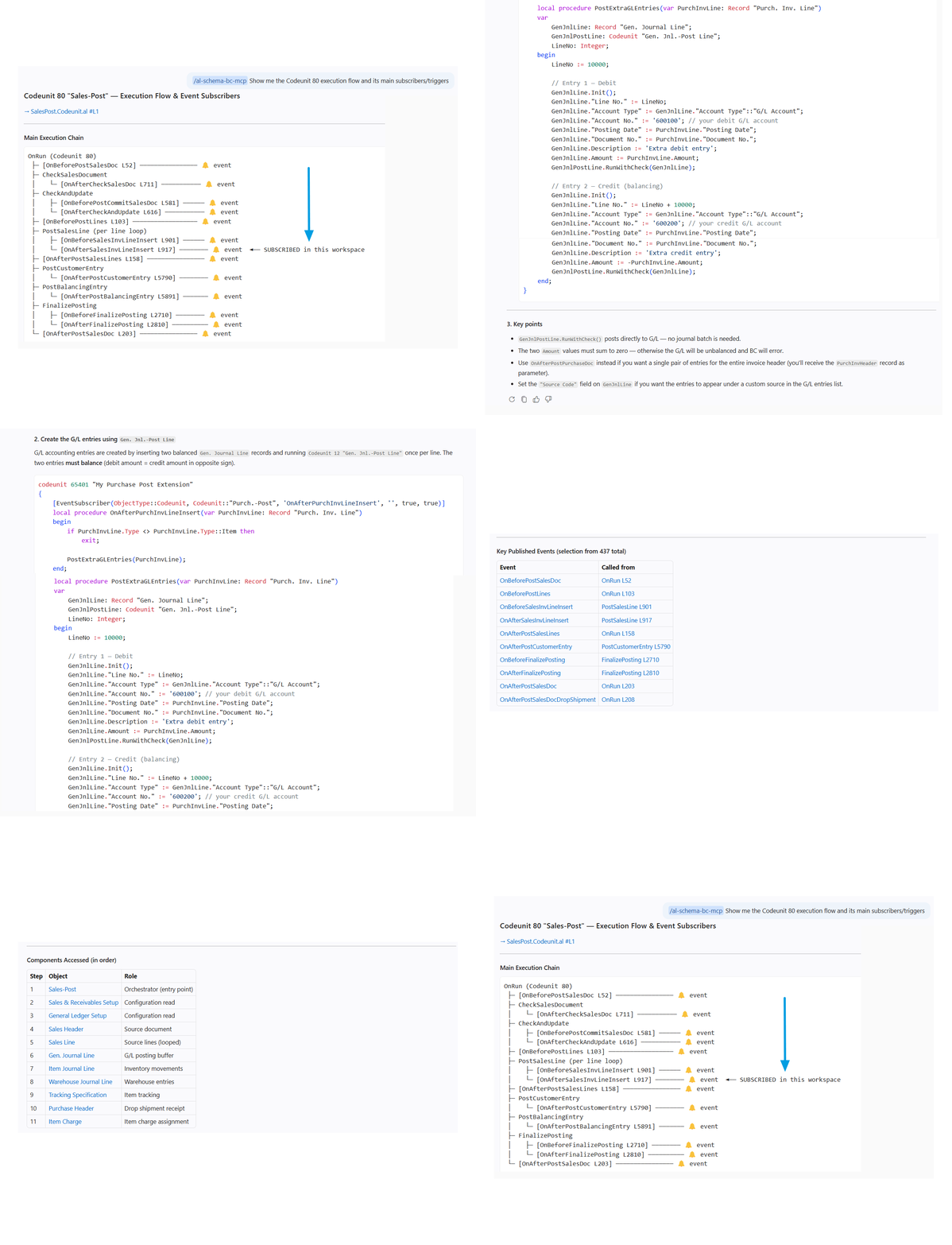
What it does
When you open a Business Central project, AL Language MCP automatically:
- Indexes your AL sources — every object, procedure, trigger, field, and event in your own code, across one or many extensions in the workspace
- Indexes your dependency packages — the
.app files downloaded via Download Symbols, giving the AI full visibility into what Base App and any other dependency exposes; packages shared by several extensions are de-duplicated automatically
- Starts a local MCP server — wires everything into your AI assistant as a set of semantic tools they can query in real time
The result: your AI assistant can reason about your specific codebase with deep, indexed context.
Telemetry and version validation
AL Language MCP contacts bc-schema-api.vercel.app periodically for two purposes:
Version validation (non-optional) — the MCP server checks whether its version is still supported. The data sent is a pseudonymous machine identifier (a one-way hash of your Windows MachineGuid — not reversible to any personal information), the server version, and your approximate region (country/city derived from your IP by Vercel; the raw IP is never stored).
Anonymous usage statistics (opt-out available) — the OS platform, OS version, and number of indexed AL objects. You can disable this in VS Code settings:
"alSchema.telemetry.enabled": false
Your code stays on your machine. Always.
Requirements
- VS Code 1.85+
- A workspace containing AL source files (
.al)
- .NET 8 Runtime (or use the self-contained build — no .NET required)
Getting Started
- Install the extension from the Marketplace
- Open your Business Central AL project folder in VS Code
- AL Language MCP indexes your code automatically — a progress notification appears during first-time indexing (typically 1–5 minutes depending on project size)
- Once ready, ask your AI assistant anything about your AL code
Example prompts:
- "What is currently indexed in this workspace? Include my extensions, object counts, and the exact versions of the Business Central symbol packages."
- "Which custom subscribers react when a sales invoice is posted, and where are they defined?"
- "Show me every place that reads or modifies Customer.Credit Limit, grouped by object."
- "Trace the execution flow from Sales-Post.PostSalesDoc and include the procedures it calls."
- "If I change the primary key or fields of MNB Bonus Header, which objects should I review first?"
Commands
| Command |
Description |
AL Language MCP: Reindex Project |
Forces a full reindex of the workspace |
AL Language MCP: Clear Index |
Stops the MCP server and removes all indexed data |
AL Language MCP: Create AL Language MCP Skill |
Creates .github/skills/al-schema-bc-mcp/SKILL.md — a reusable AI assistant skill for AL analysis |
Using the AL Language MCP Skill
After running AL Language MCP: Create AL Language MCP Skill, a skill file is placed at .github/skills/al-schema-bc-mcp/SKILL.md.
To activate it in a conversation, mention it by name in your AI assistant chat:
/al-schema-bc-mcp Where is the OnAfterPostSalesInvoice event subscribed?
The skill tells the AI exactly which MCP tools to use, how to format results (tables, source links, object IDs), and when to proactively query the graph. You only need to create it once per project; it lives alongside your source code and can be committed to your repository.
Extension Settings
| Setting |
Description |
alSchema.sourcePaths |
Folders containing .al source files. Auto-detected if empty. |
alSchema.symbolsPaths |
Folders containing .app dependency packages. Auto-detected if empty. |
alSchema.telemetry.enabled |
Send anonymous usage statistics (OS, object count). Default: true. |
alSchema.dev.verbose |
Show file paths and process details in the AL Schema output channel. Default: false. Enable for troubleshooting. |
If both sourcePaths and symbolsPaths are empty when the extension activates, AL Schema scans your workspace automatically.
AL Language MCP is built to make Business Central code easier to understand, safer to change, and more enjoyable to explore with an AI assistant. It keeps your source code local, indexes the details that matter, and gives your assistant enough context to answer with confidence instead of guessing.
If it saves you a few trips through object search, event subscribers, or dependency chains, it is doing its job.
AL Language MCP is actively evolving, and your feedback genuinely shapes what gets built next. Found a bug, have a feature request, or just want to share how you're using it? Reach out at rubenmagro80@gmail.com — all messages are read and appreciated.

