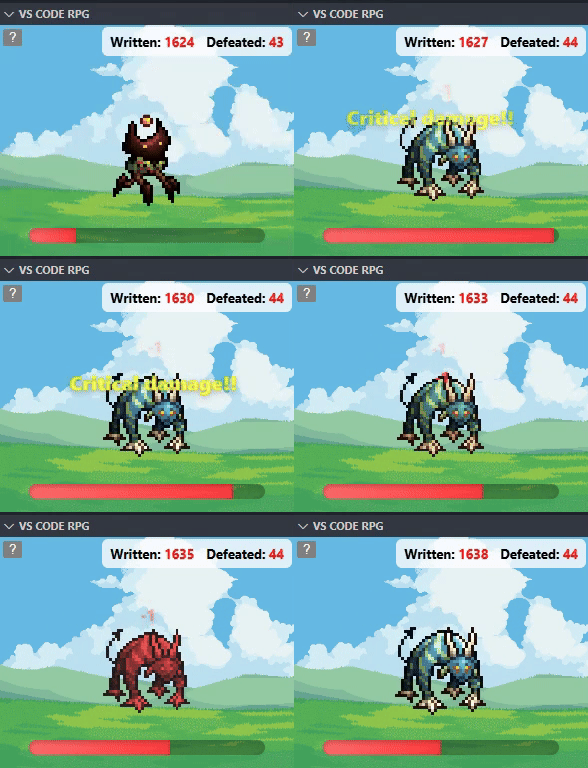
A small RPG panel inside Visual Studio Code that turns your typing into combat: deal damage to monsters as you write code, track the health bar and the scores (Written / Defeated). Ideal for light fun while practicing typing or for getting entertaining visual feedback during coding sessions.
Main features
Interactive panel with animated monsters (pulsing, critical-hit effect, floating damage).
Dynamic health bar that updates in real time as you type.
Score counters: tracks typed characters and defeated monsters.
Visual feedback for critical hits with animation and increased damage.
Responsive design: optimized for different Webview panel sizes.
How to use
Install the extension from the Visual Studio Marketplace or load it from a VSCODE.
Open the explorer panel (search for “VS CODE RPG” in the Webviews sidebar).
Start typing in any file in the editor; each text change deals damage to the monster in the panel.
Track the health bar and the score values in the upper corner.
PORTUGUESE VERSION
Um pequeno painel RPG dentro do Visual Studio Code que transforma sua digitação em combate: cause dano a monstros enquanto escreve código, acompanhe a barra de vida e os scores (Written / Defeated). Ideal para diversão leve enquanto você pratica digitação ou quer um feedback visual divertido durante sessões de codificação.
Principais recursos
Painel interativo com monstros animados (pulsação, efeito de crítico, float de dano).
Barra de vida dinâmica que atualiza em tempo real enquanto você digita.
Contadores de pontuação: registra caracteres digitados e monstros derrotados.
Feedback visual para hits críticos com animação e maior dano.
Responsivo: pensado para diferentes tamanhos de painel do Webview.
Como usar
Instale a extensão pela Visual Studio Marketplace ou pelo VSCODE.
Abra o painel da explorador (procure por "VS CODE RPG" na barra lateral de Webviews).
Comece a digitar em qualquer arquivo no editor; cada alteração de texto causa dano ao monstro no painel.
Acompanhe a barra de vida e os valores de score no canto superior.