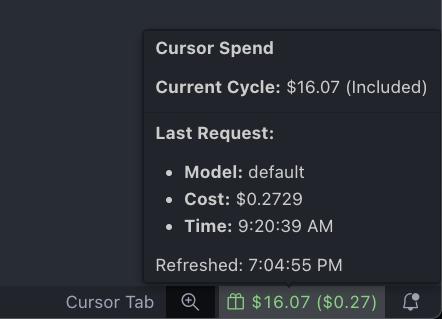
A simple Visual Studio Code status bar utility to track your Cursor AI usage and price in real-time.
Features
Real-time Spend Tracking: See your current cycle's total spend directly in the status bar.
Last Request Cost: Instantly know the price of your last AI interaction.
Included vs. On-demand: The status bar icon changes to indicate if you're using included credits or have gone into on-demand usage.
Auto-discovery: The extension attempts to automatically discover your Team ID.
Manual Refresh: Manually trigger a refresh at any time.
Setup
After installing the extension, you need to configure your session token.
Get Your Session Token:
Open your web browser and log in to your account at https://cursor.com/dashboard.
Open your browser's developer tools (usually with F12 or Cmd+Opt+I).
Go to the "Application" (in Chrome/Edge) or "Storage" (in Firefox) tab.
Find the "Cookies" section and select https://cursor.com.
Find the cookie named WorkosCursorSessionToken and copy its value.
Set the Token in VS Code:
Open the command palette (Cmd+Shift+P or Ctrl+Shift+P).
Run the command "Cursor Price: Set Session Token".
Paste your copied token and press Enter.
The tracker should now appear in your status bar.
Commands
The following commands are available via the VS Code command palette:
Cursor Price: Refresh: Manually forces a refresh of the usage data.
Cursor Price: Set Session Token: Prompts you to enter or update your session token.
Cursor Price: Set Team ID: Allows you to manually set your Cursor Team ID if auto-discovery fails or you need to specify a different team. Set to 0 to re-enable auto-discovery.
Cursor Price: Show Logs: Opens the output channel to view detailed logs and API responses for debugging.
Configuration
You can also configure the extension in your settings.json:
cursorUsageTracker.sessionToken: Your session token. It's recommended to use the Set Session Token command for this.
cursorUsageTracker.teamId: Your numerical Team ID. The extension will try to auto-discover this if left as 0.
cursorUsageTracker.refreshInterval: The interval for automatic background refreshes, in seconds. Defaults to 60.