RokRage Excel Viewer
Preview Excel .xlsx workbooks and .csv files directly in VS Code or VSCodium.
RokRage Excel Viewer is a local, read-only spreadsheet viewer. It does not upload your files or modify the source workbook.
Features
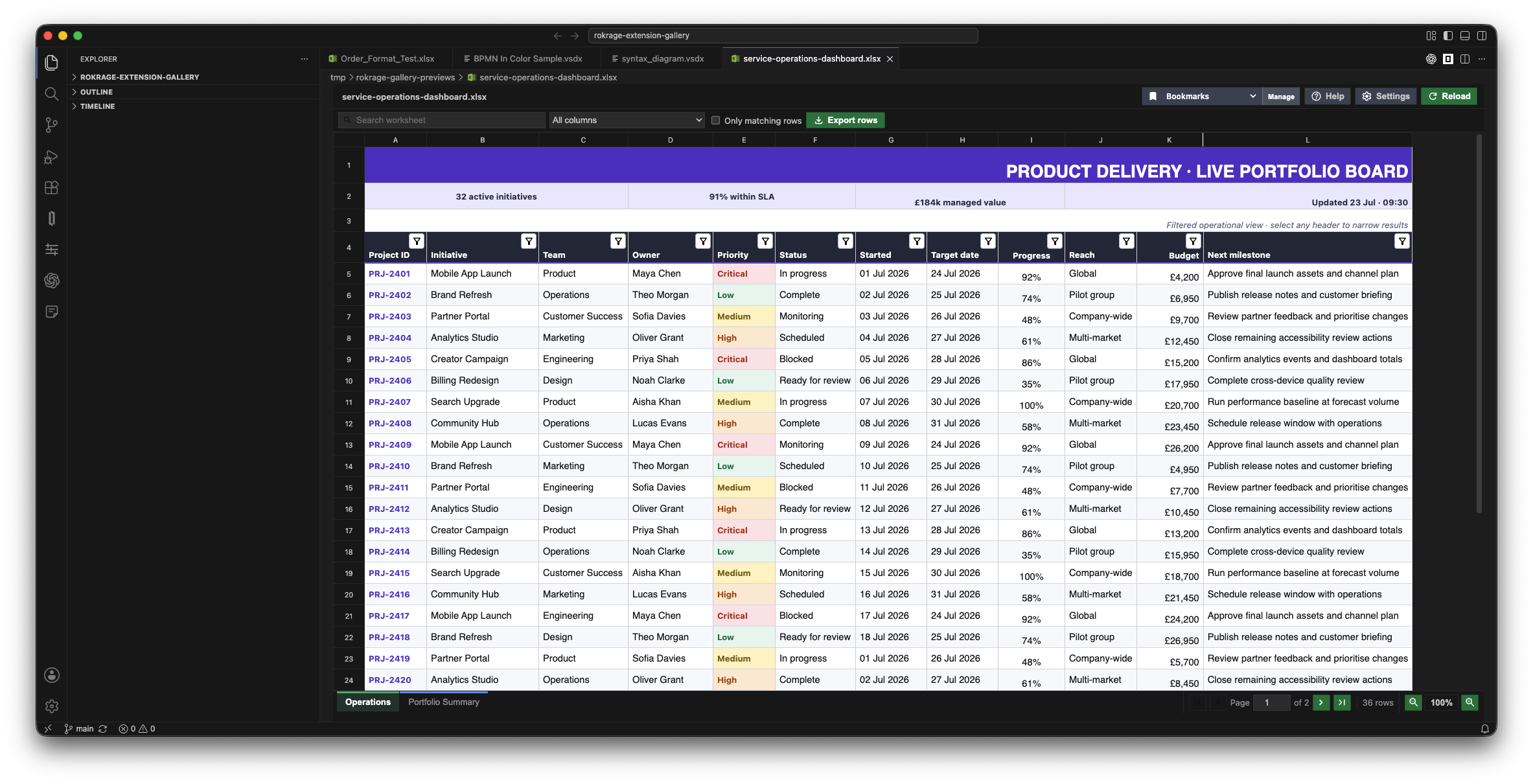
- Display formatted values, formulas, fonts, colours, fills, borders, alignment and wrapped text.
- Preserve merged cells, row heights, column widths, hidden rows and hidden columns.
- Resize visible columns by dragging the divider in the A/B/C heading row.
- Zoom worksheets from 50% to 200% using the footer controls or Ctrl/Cmd with plus, minus and 0.
- Keep frozen rows and columns visible while scrolling.
- Navigate worksheets with colour-accented Excel-style tabs.
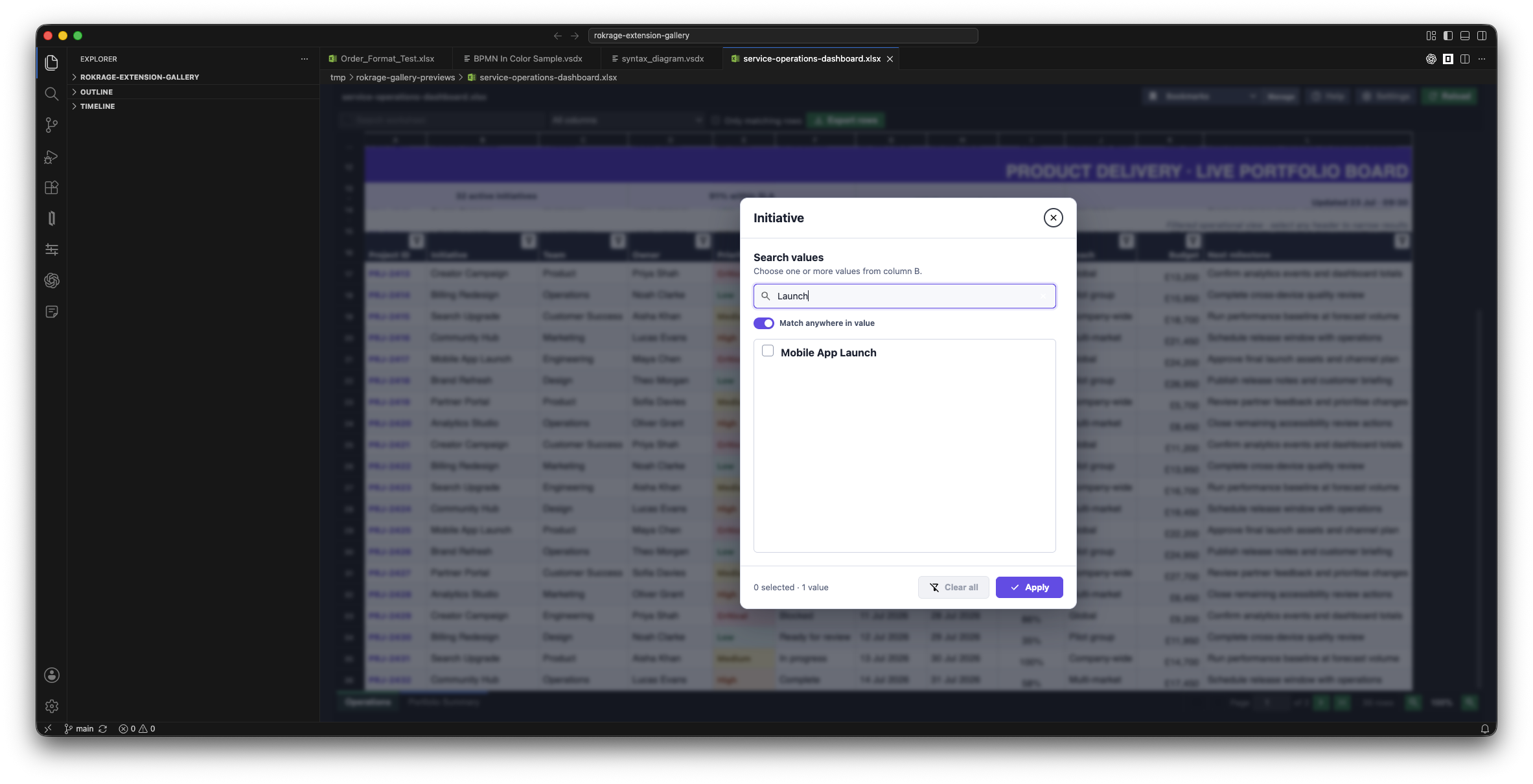
- Filter AutoFilter columns using searchable multi-select value pickers, switch between matching anywhere or from the start of each value, then right-click a filter button to clear that column.
- Save complete multi-column filter sets as selectable bookmarks that persist between VSCodium sessions.
- Search the whole sheet or a selected column, with match counts, highlighting and result navigation.
- Show only matching rows without changing the workbook.
- Page through large result sets with first, previous, next and last controls or direct page entry.
- Scroll large worksheets smoothly using virtualised row rendering.
- Display formula results, with the formula available on hover.
- Show hyperlinks and cell-note indicators.
- Reload automatically when the source file changes.
- Open CSV files with automatic comma, semicolon, tab and pipe delimiter detection.
- Decode UTF-8, Windows-1252 and UTF-16 CSV files, including quoted fields and embedded newlines.
- Export the current visible rows as CSV, JSON, Markdown table file or clipboard content, Microsoft SQL Server T-SQL INSERT or InterSystems Health Connect lookup XML.
- Open the toolbar Help guide for filter, bookmark, export and Health Connect lookup instructions without leaving the viewer.
Searchable filters
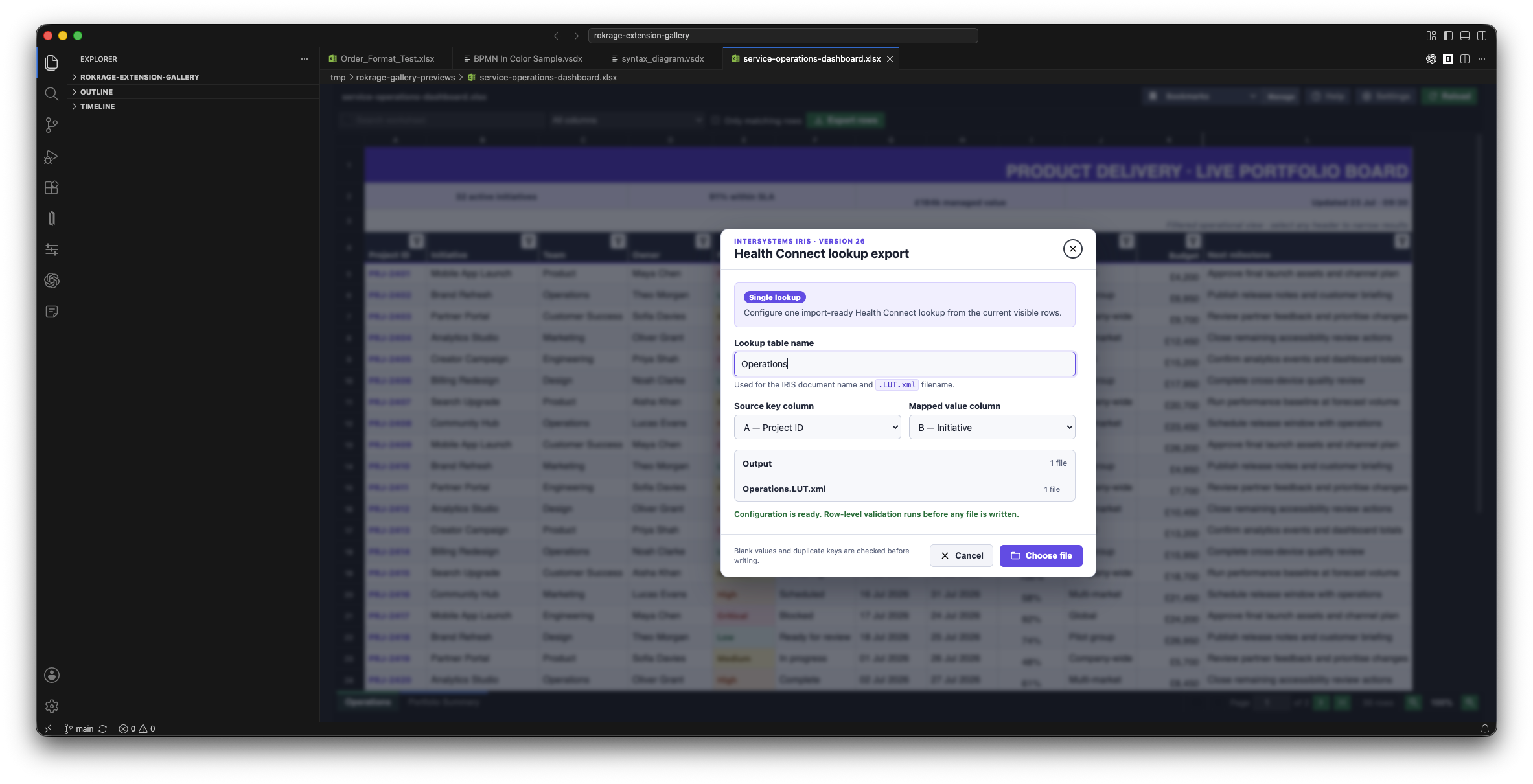
Health Connect export
Rows are loaded into the preview on demand, so large worksheets can be scrolled without creating hundreds of thousands of browser elements. Extremely wide worksheets are limited to 250 columns and display a notice when truncated.
Getting started
- Install RokRage Excel Viewer.
- Open an
.xlsx or .csv file from the Explorer.
- If another editor is selected, right-click the file and choose Open With..., then select RokRage Excel Viewer.
Privacy
Workbook and CSV parsing takes place locally. The extension does not upload file contents. It opens spreadsheets in a read-only editor and never writes changes back to the source file.
Exports create a separate file or clipboard copy only when you explicitly request one.
Exporting data
Export rows creates CSV, JSON, Markdown table, Microsoft SQL Server T-SQL INSERT or InterSystems Health Connect lookup XML from the current visible row set. CSV, JSON and Markdown exports include a multi-select column picker.
Markdown export opens a dedicated in-viewer modal matching the Health Connect and T-SQL workflows. Choose a saved .md file or direct clipboard copy, search and select columns, review the live pipe-formatted preview, then export. When an active column filter contains multiple selected values, the modal can split the result into one labelled table per value with the header repeated for every table. If several columns qualify, choose which filtered column defines the tables. Pipes, backslashes and embedded line breaks are escaped, and combined worksheet filters plus Only matching rows restrict the exported content.
Microsoft SQL Server export opens a dedicated modal for a table, schema.table or database.schema.table target and searchable multi-column selection. It generates a UTF-8 .tsql file using bracketed identifiers, N'…' Unicode displayed values, escaped apostrophes and NULL for blank cells. Multi-row INSERT statements are split into batches of no more than 1,000 rows. Combined worksheet filters and Only matching rows restrict the exported content.
Health Connect export opens a dedicated in-viewer modal matching the filter and settings dialogs. It previews single or grouped output filenames, collects the table/grouping, key and value columns, and validates the configuration before opening the final native file or folder picker. It then creates the IRIS version="26" .LUT import format. Blank keys, blank values, duplicate keys and invalid table names are rejected. Exports respect worksheet filters and the optional Only matching rows view.
When an active column filter contains multiple selected values, Health Connect export uses those values as arbitrary lookup groups. It asks for the shared key and value columns, then writes one independently validated <group>.LUT.xml file per selected value into a chosen folder. Other active filters continue to restrict the exported rows. If several columns have multi-select filters, the exporter asks which column defines the lookup groups. Values containing spaces or unsafe filename characters are converted to Health Connect-safe names and shown for confirmation before export.
Filter bookmarks
Use the Bookmarks selector in the viewer header to apply any saved filter set immediately. Choose Manage bookmarks… from that selector, or use the adjacent Manage action, to open the matching in-viewer modal for saving the current filters, replacing a named set, applying a saved set or confirming deletion. Bookmarks preserve multiple selected values across multiple columns, are scoped to the workbook and worksheet, and are stored locally in VSCodium so they remain available after restarting the editor. They do not modify the source workbook.
In-viewer help
Select Help in the main toolbar for a local usage guide covering worksheet navigation, column sizing, search, filters, filter bookmarks, CSV/JSON/Markdown/T-SQL export and the complete single or grouped Health Connect lookup workflow.
- Excel
.xlsx workbooks.
- Delimited-text
.csv files.
Limitations
The extension does not edit workbooks. Preview filters do not modify the source file. Filter searches display up to 1,000 distinct values per column, and worksheets are limited to 250 displayed columns.
Charts, embedded images, conditional formatting, macros, pivot tables and Excel theme colour transformations are not currently rendered. CSV values remain text so identifiers with leading zeroes are preserved.
When ExcelJS cannot read a valid workbook because its SpreadsheetML tags use explicit namespace prefixes, the viewer normalises a temporary in-memory copy. The original file is never changed.
Requirements
- VS Code or VSCodium 1.90.0 or later.

