Fine Art Code
Curated VS Code / Cursor snippets and color-theory themes inspired by classical pigments, engineered for modern development velocity.
Publisher: Rockosrevelation
Version: 0.0.16
Marketplace Identifier: Rockosrevelation.fine-art-code
Categories: Snippets · Themes
Build Status: 
🛠️ Engineering & Architecture
While inspired by classical aesthetics, Fine Art Code is architected as an engineering tool designed to solve real-world developer friction: reducing cognitive load during long sessions and eliminating repetitive layout boilerplate.
- AST-Driven Syntax Highlighting: Visual elements are mapped strictly against Abstract Syntax Tree (AST) token roles, ensuring predictable token colorization across disparate language compilers (e.g., matching Python data types with TypeScript interfaces seamlessly).
- Production-Grade Snippet Boilerplate: Instead of basic "hello world" shortcuts, the snippet engine injects production-ready, bulletproof structural scaffolds (including asynchronous error handling, responsive CSS layout math, and strict typing configurations).
- Fully Automated CI/CD Pipeline: Built and deployed using an enterprise software workflow. Code changes automatically package, verify, and ship live to the global Visual Studio Marketplace via authenticated Azure DevOps Personal Access Token (PAT) pipelines using the
vsce CLI toolchain.
🎨 Color-Theory Themes
Fine Art Code ships two themes derived from a strict split-complementary palette—one dark, one light—ensuring structural code legibility remains identical across changing ambient lighting environments.
Umber (Dark)
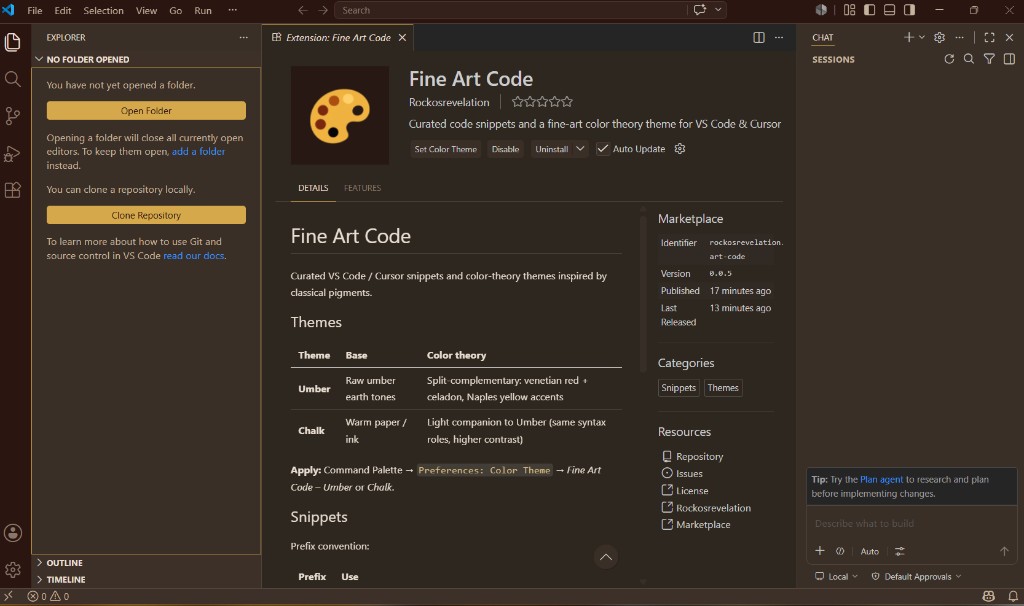
Grounded in raw umber earth tones to eliminate blue-shifted screen glare. Syntax relationships pair warm Venetian red and cool Celadon green against a high-visibility Naples yellow accent.
| Token Role |
Pigment Reference |
Hex |
Target Cognitive Impact |
| Background |
Burnt umber deep |
#1C1814 |
High-contrast, low eye-strain ground |
| Editor Canvas |
Raw umber |
#251F19 |
Soft midtone separator |
| Primary Text |
Titanium white |
#E8DDD0 |
High-readability neutral text |
| Keywords |
Venetian red |
#C0614A |
Immediate visual anchor for control flow |
| Strings |
Celadon |
#6FA58A |
Recessive, non-distracting data literal tint |
| Functions |
Naples yellow |
#D4A84B |
Sharp, identifiable structural targets |
| Types / Classes |
Cerulean |
#7AAFC4 |
Distinct separation for static definitions |
Chalk (Light)
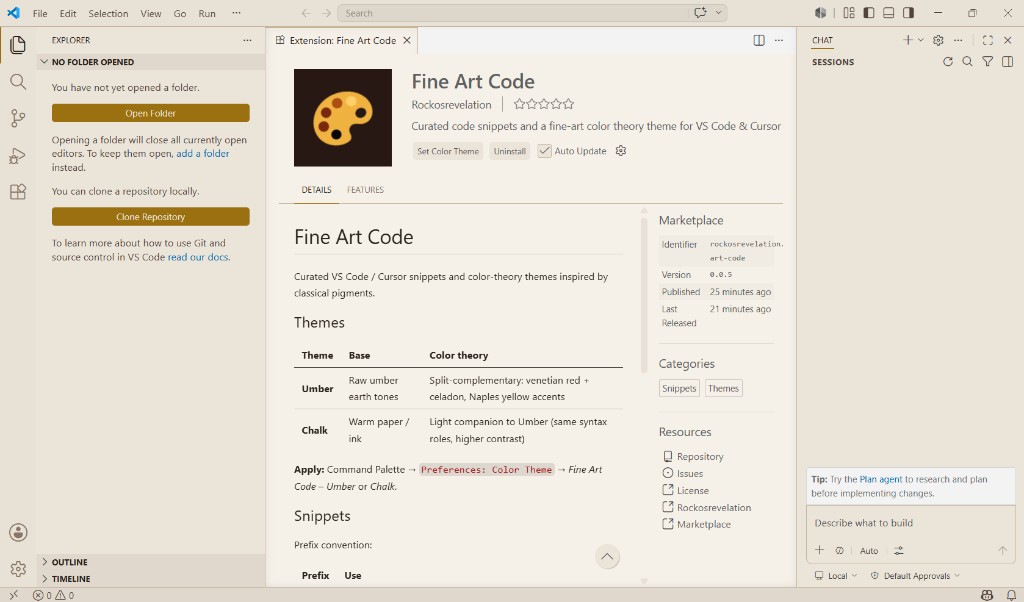
The light companion to Umber. Replaces the dark ground with warm, non-reflective paper and ink tones while preserving the exact same syntax role mappings. Switching backgrounds never breaks your visual memory of your codebase.
⚡ Production Boilerplate Snippets
All snippets utilize the unified fa- prefix ecosystem for predictable, high-speed autocomplete mapping.
Core JavaScript / TypeScript
fa-async: Generates fully localized async arrow functions wrapped in strict try/catch block handling.fa-fetch: Implements a guarded HTTP native fetch wrapper complete with explicit response status checks and automatic JSON parsing logic.fa-clone: Instantiates an optimized deep-clone sequence via the modern structuredClone API.
React / TSX Framework Patterns
fac-rfc: Generates a fully typed functional component paired with an explicit, extensible Props interface.fac-ctx: Scaffolds an entire boilerplate-heavy React Context architecture, including custom provider wrappers and a type-safe custom useContext consumer hook.fa-zod-form: Automates a schema-driven validation form wired completely to a Zod runtime layer.
Enterprise Python & Styling
fa-pydantic / fa-py-pydantic: Pydantic schemas — quick strict model or full enterprise contract (UUID, timestamps).fa-fastapi / fa-py-fastapi: FastAPI routes — response-model controller or GET-by-id with telemetry.fa-async: Async function with perf timing and structured logging.fa-grid / fa-css-grid: CSS Grid — inline properties or fluid wrapper class layout.fa-cssvar: Fine Art Code Umber design tokens (color, spacing, radius, motion).
🚀 Installation & Activation
1. Marketplace Fetch: Search for Fine Art Code directly inside the Extensions tab (Ctrl+Shift+X) in VS Code or Cursor, and click Install.
2. Activation Sequence: Trigger the Command Palette (Ctrl+Shift+P / Cmd+Shift+P) → select Preferences: Color Theme → choose Fine Art Code – Umber or Fine Art Code – Chalk.
3. Autocomplete Execution: Simply begin typing any file-appropriate fa- or fac- token inside your source file; the snippet engine will automatically inject the corresponding structural boilerplate on Tab or Enter.
📈 Roadmap
- [ ] Add strict Semantic Token configurations to map to language-specific LSP extensions (Go, Rust).
- [ ] Implement abstract configuration layer to allow developers to hot-swap pigment foundations.
- [ ] Expand the typography baseline to support font-ligature alignments out of the box.
🤝 Contributing & Issue Tracking
Bugs, feature requests, or structural snippet proposals can be submitted via GitHub Issues or the Marketplace Q & A tab.
Fine Art Code — Precision engineering meets classical color-theory analytics.

