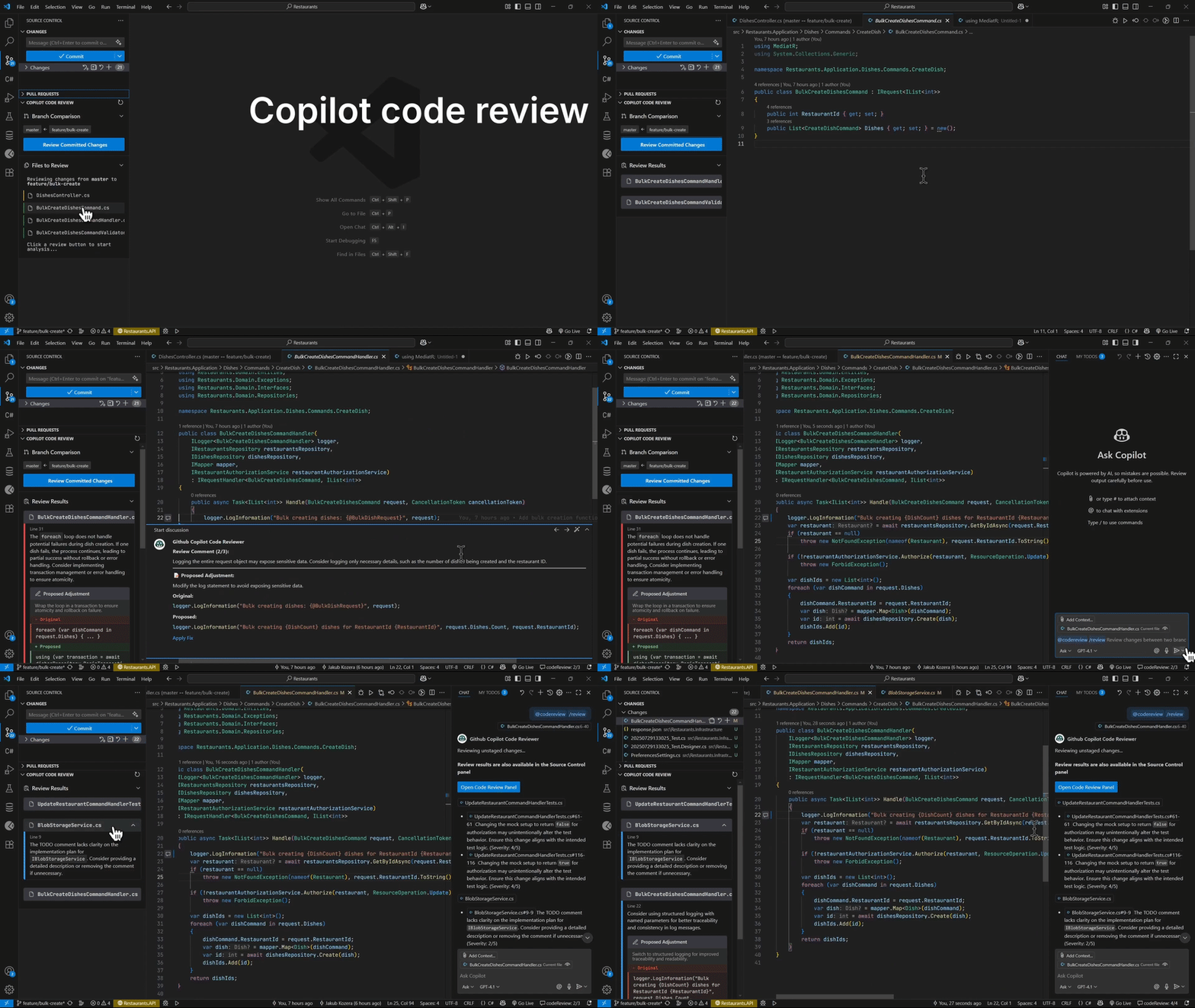
NextG Code Review




NextG Code Review is a Visual Studio Code extension that uses GitHub Copilot Chat to review source code changes in Git. It can help you catch bugs, areas for improvement, and other issues before merging.
Note: This project is forked from jakubkozera/vsc-copilot-code-review and includes additional customizations.
What's New in v0.23.0
- NextG branding applied in extension UI and documentation.
- Review history export now supports timestamped JSON files with scope-aware naming and configurable output path (
codeReview.reviewHistoryPath).
- Added saved review reloading from the Source Control review panel (Load Saved Review).
Fork Lineage
Key customizations in this fork include:
- NextG branding updates in the VS Code UI and documentation
- Enhanced prompt management with project-level context and language-specific prompt files
- Saved review export/reload workflow in the Source Control review panel
Getting Started
Open the Chat Sidebar
Switch to the Chat sidebar and ensure you are in Ask mode.
Start a Review
- Type
/review to review uncommitted changes or changes between two branches, commits, or tags.
- You can specify git refs explicitly, e.g.
/review develop main, or omit arguments to select refs interactively.
- Use
/branch to review changes between two branches.
- Use
/commit to review a single commit.
View Results
codeReview will respond with review comments grouped by file and sorted by severity. The enhanced Source Control integration automatically displays review results in a dedicated "NextG Code Review" tab within the Source Control panel, providing a structured view alongside your Git changes for seamless workflow integration.
Navigate Review Comments
- Results appear both in the chat and in the dedicated "NextG Code Review" tab in Source Control
- The Source Control tab organizes comments by file with direct navigation to code locations
- Click on any comment to jump directly to the relevant line in your code
- Navigate between comments using the arrow buttons in comment threads
- Use keyboard shortcuts:
Ctrl+Shift+N (next) and Ctrl+Shift+B (previous) when a comment thread is active
- Manage review comments alongside your Git workflow in a unified interface
Features
- Enhanced Source Control Integration: Review results appear in a dedicated "NextG Code Review" tab within the Source Control view, seamlessly integrating with your Git workflow for efficient code review management.
- Dual Display Mode: Comments are shown both in Chat and in the structured Source Control tab for maximum flexibility.
- Only Copilot Required: Uses Copilot Chat for reviewing changes.
- Model Selection: Choose any language model available to VS Code via the codeReview: Select Chat Model command available in the Command Palette (press
Cmd+Shift+P or Ctrl+Shift+P).
- Custom Instructions: Add custom instructions via the
codeReview: Custom Prompt setting (e.g., change the language of review comments by adding - In the final JSON output, use Spanish for the comment field.).
- Interactive Navigation: Navigate between review comments using keyboard shortcuts and inline buttons directly from the Source Control tab.
- Saved Review Reloading: Use the Load Saved Review action in the Code Review view title to reopen exported review
.json files in the sidebar.
- Agent Support: Adds tools to enable automatic reviews in agent mode:
#review: Reviews changes between two git references (branches, tags, or commits)#reviewStaged: Reviews only staged changes in your working directory#reviewUnstaged: Reviews only unstaged changes in your working directory- Example usage:
After your changes, run all tests and run #reviewUnstaged to check your work.
- Chat Integration: Review content remains in chat history for follow-up questions by omitting
@codeReview.
Project Prompt Files
You can provide repository-level review instructions and project context by adding files in your project:
- Prompt snippets:
.github/vsc-code-review/prompts/*.md
- Project context (first existing file is used):
.github/vsc-code-review/project-context.md.github/vsc-code-review/AGENT.mdAGENT.md (repository root)
These files are automatically added to the review prompt for better, project-aware feedback.
Built-in language guidance prompts are stored in:
media/prompts/lang/csharp.mdmedia/prompts/lang/react.md
Review export location is configurable via:
codeReview.reviewHistoryPath (relative to workspace root or absolute path)
Recommended layout
.github/
  vsc-code-review/
    project-context.md
    prompts/
      general.md
      ts.md
      security.md
AGENT.md
Example: .github/vsc-code-review/project-context.md
Review context for this repository:
- We prioritize backward compatibility for public APIs.
- Flag missing tests for bug fixes.
- Prefer explicit error handling over silent fallbacks.
Example: .github/vsc-code-review/prompts/ts.md
-----
langauge: .ts|.tsx
-----
For TypeScript changes:
- Check unsafe `any` usage and missing null checks.
- Prefer narrowing and explicit return types for public functions.
Prompt file selection rules
- Files in
.github/vsc-code-review/prompts/ are loaded in sorted order.
- Generic files (no language metadata block) apply to all reviews.
- Language-specific files are detected from a wrapped metadata block:
-----langauge: .ts|.tsx (also supports language:)-----
- Language-specific files are included when changed file extensions match, e.g.
.ts, .tsx, .cs.
Limitations
- This project is a work in progress; comment quality may vary.
- Large change sets may trigger chat model rate limits. Please wait before retrying.
- Some non-Copilot models require setting a system prompt which is not possible just yet.
Data Usage
Source code changes and commit messages selected for review are sent to the chat model configured in the extension settings (default: GitHub Copilot GPT-4o).
Contributing
Contributions are welcome! If you have ideas, bug reports, or want to help improve codeReview, please open an issue or submit a pull request on GitHub.
Packaging note
- Use
pnpm package (or pnpm build) to create the .vsix.
- Avoid running raw
vsce package directly in this repository; dependency checks may use npm behavior and report false "missing" transitive packages in a pnpm-managed workspace.

