

EPIC is an architecture and memory layer for coding agents that defines system architecture and enforces it through persistent context.
Architecture means your agent always knows what it's building: PRDs, user stories, data models, API specs, and system design that persist across sessions. Memory means your agent retains decisions, patterns, solutions, and learnings from past sessions so it never repeats mistakes or forgets what worked.
Unlike prompt-based workflows where context disappears, EPIC ensures your agent builds against the intended architecture, follows established constraints, and gets smarter the more you use it.
Your coding agent doesn't just write code.
It builds against a system it remembers.
Give Your Coding Agent Architecture It Remembers
AI coding agents write code well.
They struggle to remember why the system exists and how it is structured.
EPIC solves this with two layers:
System Architecture
- Product intent: What you're building and why
- System structure: How components fit together
- Technical constraints: Rules your code must follow
Persistent Memory for Coding Agents
- Decisions: Architecture and tech choices with rationale, so agents don't re-debate settled questions
- Patterns: Code conventions, file structures, and project standards your agent should follow
- Solutions: Problems encountered and how they were solved, preventing repeated debugging
- Learnings: Gotchas, edge cases, and important discoveries from past sessions
- Preferences: Your coding style and workflow preferences
- Context: Project goals, relationships, and domain knowledge
Memory is stored per-project and available to any coding agent via MCP - Cursor, Claude Code, Windsurf, and others can all read and write to the same memory bank.
See EPIC in Action
Generate Architecture from a Prompt
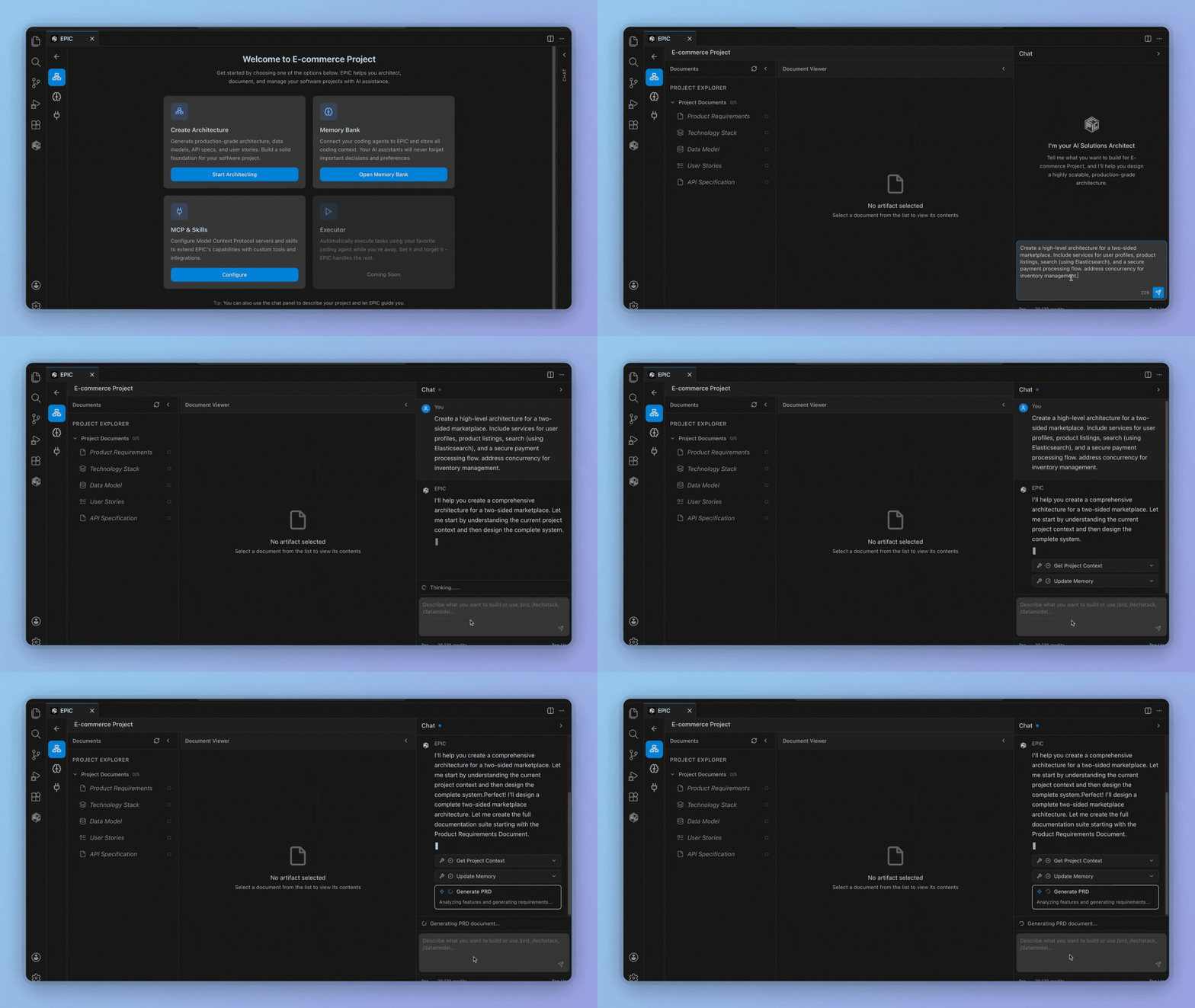
Production-Grade Documentation

EPIC does not replace your coding agent.
It gives your coding agent durable architecture, product context, and persistent memory.
How Memory Works
Coding agents connected via MCP can store and retrieve memories during their sessions.
Example flow:
- You debug a tricky async race condition with your agent
- The agent stores the solution as a memory with related files
- Next week, a different agent session hits a similar issue
- It searches memory, finds the previous solution, and applies it immediately
Memory is:
- Project-scoped: each project has its own memory bank
- Agent-agnostic: any MCP-connected agent can read and write
- Searchable: semantic search finds relevant memories even with different wording
- Versioned: memories evolve as understanding deepens
What EPIC Defines and Maintains
EPIC defines the full system blueprint before and during development:
| Document |
Purpose |
| PRDs |
Capture product intent and requirements |
| User Stories |
Guide implementation with acceptance criteria |
| APIs & Contracts |
Enforce boundaries between services |
| System Architecture |
Define service design and relationships |
| Database Schemas |
Model data and relationships |
| Infrastructure |
Document cloud and deployment assumptions |
All of this lives inside the editor, so your coding agent can reference it continuously while writing code.
How EPIC Works
EPIC follows a simple loop that mirrors how real systems are built.
Plan
Define the system before writing code.
- Create PRDs and user stories
- Design architecture and APIs
- Set technical and infrastructure constraints
Execute
Build with your coding agent.
- EPIC provides continuous system context
- Your agent generates code against defined specs
- Agents store decisions and learnings as they work
Manage
Keep everything aligned as the system evolves.
- Update architecture when requirements change
- Keep PRDs, APIs, and schemas in sync with code
- Memory accumulates, making your agent more effective over time
All three happen inside the editor, where coding agents operate.
Built to Work Alongside Coding Agents
EPIC works next to your coding agent, not above it.
- EPIC manages architecture, product definition, and persistent memory
- Your coding agent focuses on implementation, informed by everything EPIC knows
Together, they produce cleaner, more consistent systems with fewer rewrites.
Who EPIC Is For
- Developers using AI coding agents
- Vibe coders who want structure without friction
- Indie builders shipping fast
- Teams scaling from prototype to production
If your agent writes the code, EPIC makes sure it understands the system and remembers what it learned.
Editor Support
| Editor |
Status |
| Cursor |
Available |
| VS Code |
Available |
| Claude Code |
Coming soon |
| Windsurf |
Coming soon |
| Antigravity |
Coming soon |
EPIC is designed for agent-first editors.
Quick Start
- Install: Search "EPIC" in Extensions
- Sign In: Click the EPIC icon and authenticate
- Create a Project: Describe what you're building
- Generate: Let EPIC create your architecture
Summary
- Runs inside the editor
- Works alongside coding agents
- Defines PRDs, user stories, APIs, and architecture
- Persistent memory bank for decisions, patterns, solutions, and learnings
- Reduces context loss and architectural drift
- Helps ship production-grade systems faster
Website •
X (Twitter)
Built by Reload Tech Inc.


