View in Browser — Publish Leak Audit (HTML)
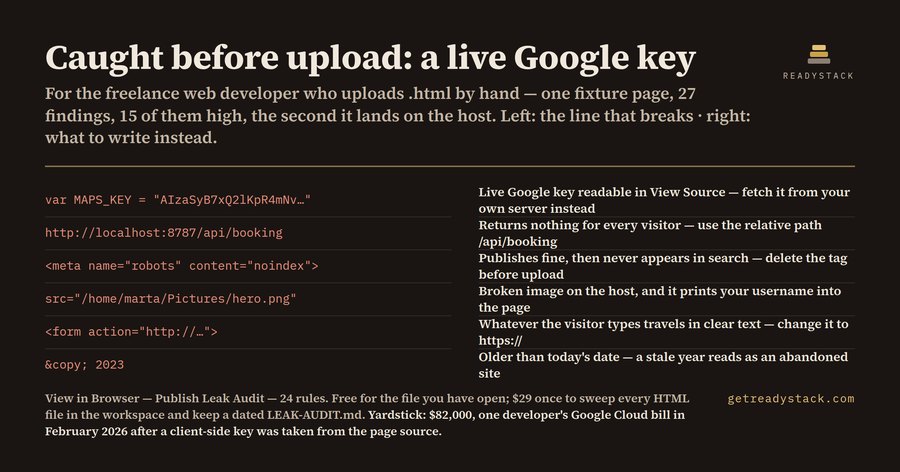
You open an .html file in the browser to see how it looks. It looks right. Then the same file
goes to Netlify, GitHub Pages, S3, a client's cPanel — and the things that only worked on your
machine stop working, while the things that should never have left your machine keep working
perfectly for everybody.
This extension reads the HTML file you are looking at and reports, line by line, everything in it
that behaves differently once the file has a public URL.
What it looks for
24 rules, in four groups:
- Credentials that ship to the visitor — Google API keys (
AIza…), AWS access key ids
(AKIA…), Stripe secret keys (sk_live_…), Slack tokens (xox…), Firebase-style apiKey:
literals, PEM private key blocks, generic api_key / client_secret / password assignments,
and user:password@ embedded in a URL. Also credentials parked inside HTML comments, which
ship to the browser exactly like the rest of the page.
- Paths that only resolve on your disk —
http://localhost:…, 127.0.0.1, private LAN
addresses (192.168.x, 10.x, 172.16–31.x), file:/// URLs, and absolute disk paths such as
/Users/…, /home/… or C:\… used as src/href (those also print your username into the page).
- Things the host or the browser will treat differently — plain
http:// resources on a page
served over https, a form whose action is http://, an external <script> with no integrity
hash, a CDN script pinned to @latest, a shipped sourceMappingURL, and a leftover
<meta name="robots" content="noindex"> — the one failure nobody notices for weeks, because the
page publishes fine and simply never appears in search.
- Development leftovers —
console.log / console.debug calls, a DEBUG = true flag still
switched on, YOUR_API_KEY / FIXME / TODO placeholders, target="_blank" without
rel="noopener", and a copyright year older than today (generated markup gets the year wrong
constantly; the extension compares against the real current date, not a hard-coded one).
How it runs
Open an HTML file and run View in Browser: Audit This Page from the Command Palette. Findings
appear with severity (high / medium / low), line number, and the fix — not just the name of the
problem. Nothing is uploaded; the check runs locally on the text in your editor.
The same engine file (engine.js) that runs inside the editor also runs in the free web page at
https://getreadystack.com/tools/view-in-browser-leak-audit — paste a page there and you get the
identical findings, with no install.
Free and paid
Free: audit the file you are about to open in the browser, with every finding and its line number.
That is a whole job — it ends.
Paid ($29 once): Audit Every HTML File in This Workspace — one command sweeps the whole folder
and writes a dated LEAK-AUDIT.md you keep, so a site with forty pages is one pass instead of
forty. The cut is scope, not capability: no watermark, no time limit, no locked answers.
Key check: https://getreadystack.com/api/buy/cl/polar_cl_CwvLDIxujtAKjVYNswBmnY71CVpJXNzshSaBQ2RDuKe
The yardstick
In February 2026 a developer reported an $82,000 Google Cloud bill after a key embedded in
client-side Google Maps code was lifted from the page source; their normal spend was $180 a month.
GitGuardian's State of Secrets Sprawl 2026, scanning 1.94 billion public commits, counted
28,649,024 new secrets pushed to public repositories during 2025 — the largest single-year
figure it has recorded — and found that more than 64% of credentials confirmed valid in 2022 were
still valid when retested in January 2026. A leaked key does not expire on its own.
Measured on the bundled fixtures
_fixtures/clean.html — a page that is safe to publish — returns 0 findings.
_fixtures/dirty.html — the same page before cleanup — returns 27 findings
(15 high, 8 medium, 4 low), and exercises all 24 rules.
Licence
MIT for the free tier. See LICENSE.txt.

