Skip to content
| Marketplace
Sign in
Visual Studio Code>Linters>SQL Server Express Downgrade CheckNew to Visual Studio Code? Get it now.
SQL Server Express Downgrade Check

SQL Server Express Downgrade Check

ReadyStack

|
2 installs
| (0) | Free
Moving off SQL Server Standard or Developer to free Express? Lists every T-SQL, ini and compose line Express cannot run (Agent jobs, Database Mail, backup compression, 10 GB cap) with the Express fix.
Installation
Launch VS Code Quick Open (Ctrl+P), paste the following command, and press enter.
Copied to clipboard
More Info

SQL Server Express Downgrade Check

SQL Server Express Downgrade Check

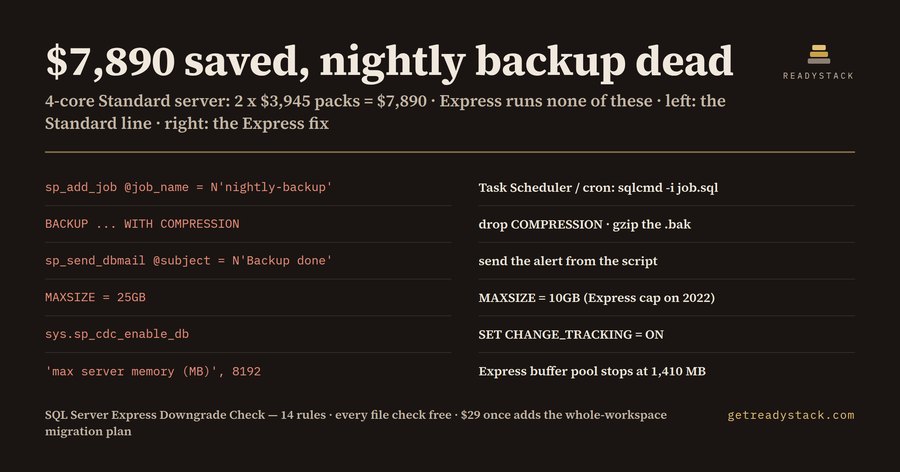
Finds every line SQL Server Express cannot run before you move off Standard or Developer. On the bundled sample maintenance script (clinic_app, written for Standard): 7 findings — a SQL Server Agent backup job that would never run, WITH COMPRESSION on a backup, Database Mail, change data capture, MAXSIZE = 25GB over the 10 GB Express cap, and max server memory at 8,192 MB when Express uses 1,410 MB. 14 rules.

Free web version (same engine, paste a file): https://getreadystack.com/tools/sql-server-express-downgrade-check

Yardstick: staying on SQL Server Standard costs $3,945 per 2-core pack (SQL Server 2022 list price, microsoft.com). A 4-core server is 2 x $3,945 = $7,890. Express is free, but it is a smaller product.

Why this exists

Moving a small database from Standard (or from a Developer container that quietly went to production) to the free Express edition is a common way to cut a licence bill. Microsoft's editions table lists what Express does not have, but it does not read your scripts. The failures are quiet: an Agent job is created and simply never runs, an alert e-mail is never sent, a backup that asks for compression is rejected, and a database that grows past the cap stops taking inserts. You find out the morning you need the backup.

What it checks (14 rules)

Rule What Express does Express fix
agent-job No SQL Server Agent: sp_add_job, sp_add_jobstep, sp_start_job ... never run Save the step as job.sql, schedule sqlcmd -i job.sql with Task Scheduler or cron
db-mail No Database Mail: sp_send_dbmail, sysmail_add_* Send the alert from the app or the scheduled script
backup-compression No backup compression Drop COMPRESSION, gzip / 7-Zip the .bak
db-size-cap 10 GB per database on SQL Server 2022, 50 GB on 2025 (data files) MAXSIZE = 10GB, archive, or keep that database on Standard
max-memory Buffer pool stops at 1,410 MB Size the box for the cap
tde No transparent data encryption Disk encryption or Always Encrypted
cdc No change data capture Change tracking (Express has it)
log-shipping No log shipping Scheduled log backup + restore
availability-group No availability groups, not even basic Backup + restore to a second server
resource-governor No Resource Governor Drop it; Express caps itself at 4 cores
ini-agent AGTSVC* lines in ConfigurationFile.ini Delete them
paid-edition MSSQL_PID=Standard/Enterprise/Developer... or a PID= product key MSSQL_PID=Express
default-developer mcr.microsoft.com/mssql/server with no MSSQL_PID runs Developer (non-production only) Add MSSQL_PID=Express
cores-over-cap Express uses the lesser of 1 socket or 4 cores cpus: "4"

Files: *.sql, ConfigurationFile*.ini, Dockerfile, docker-compose*.yml, compose*.yml, values*.yaml. The size cap follows the target version: add -- target: 2025 (or use a mssql/server:2025 image) to check against 50 GB; the default is SQL Server 2022 (10 GB).

How to use

Open a file and run SQL Server Express Downgrade Check: Check this file from the command palette. Findings show in the Problems panel with file, line and the replacement line. No account, no upload: the check runs inside VS Code.

Sources

  • Microsoft Learn, Editions and supported features of SQL Server 2022 and ... SQL Server 2025: Express = 10 GB / 50 GB database size, 1,410 MB buffer pool, lesser of 1 socket or 4 cores; SQL Server Agent, Database mail, Backup compression, Log shipping, TDE, Change data capture, Resource governor and Basic availability groups = No for Express.
  • Microsoft Learn, Configure SQL Server settings with environment variables on Linux: MSSQL_PID chooses the edition; Developer is for non-production use.
  • microsoft.com SQL Server 2022 pricing: Standard $3,945 per 2-core pack.

Re-checked against these pages on 2026-10-14. When Microsoft changes the table, the rules change with it.

Free and full version

Free, no key: the open file, every finding, every Express replacement line. Full version ($29 once, one licence key per person or team seat): the whole workspace in one Express migration plan, a dated edition report for the company (where a paid MSSQL_PID or product key is still set, and what Standard would cost at $3,945 per 2-core pack) and a CI gate that fails a build adding an Agent job or a paid MSSQL_PID. Team key $149.

  • Contact us
  • Jobs
  • Privacy
  • Manage cookies
  • Terms of use
  • Trademarks
  • Your Privacy Choices
  • Consumer Health Privacy
© 2026 Microsoft