Skip to content
| Marketplace
Sign in
Visual Studio Code>Linters>Rancher Desktop Migration: Docker Desktop linesNew to Visual Studio Code? Get it now.
Rancher Desktop Migration: Docker Desktop lines

Rancher Desktop Migration: Docker Desktop lines

ReadyStack

|
3 installs
| (0) | Free
Finds Docker Desktop-only lines (host-gateway, desktop-linux context, ~/.docker/run socket, Docker.app setup) in compose, Makefile, script and devcontainer files and prints the Rancher Desktop
Installation
Launch VS Code Quick Open (Ctrl+P), paste the following command, and press enter.
Copied to clipboard
More Info

Rancher Desktop Migration Check — Docker Desktop lines

Rancher Desktop Migration Check — Docker Desktop licence lines

Finds every line in your repo that only works on Docker Desktop and prints the exact Rancher Desktop line that replaces it. On the bundled sample dev-setup.sh it flags 9 lines from 10 rules.

Free web version (same engine, paste a file): https://getreadystack.com/tools/rancher-desktop-migration-check

Why this exists

Docker Desktop is free only for companies with fewer than 250 employees AND less than US $10,000,000 annual revenue (Docker pricing FAQ, section 4.2); government entities need a subscription. Teams past that line either buy seats or move to a free engine such as Rancher Desktop (Apache-2.0, by SUSE). The move is mostly painless, because Rancher Desktop with the dockerd (moby) engine keeps the docker CLI and docker compose working. What breaks is the small set of Docker Desktop names that setup scripts, Makefiles, compose files and devcontainers hard-code.

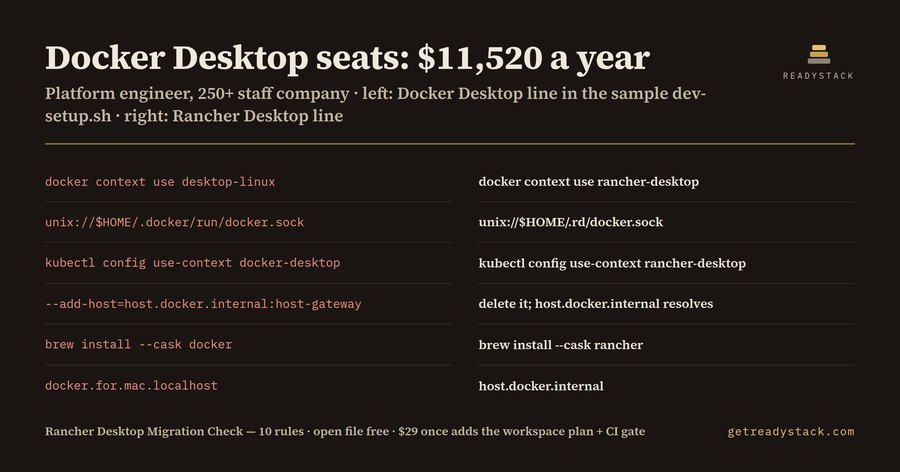
Yardstick: Docker Business list price is $24 per user per month (docker.com/pricing, checked 2026-10-12): 40 developers x $24 x 12 months = $11,520 a year.

What it flags (bundled sample, left = Docker Desktop line, right = Rancher Desktop line)

Docker Desktop line Rancher Desktop line
docker context use desktop-linux docker context use rancher-desktop
unix://$HOME/.docker/run/docker.sock unix://$HOME/.rd/docker.sock
kubectl config use-context docker-desktop kubectl config use-context rancher-desktop
--add-host=host.docker.internal:host-gateway (delete it) host.docker.internal resolves
brew install --cask docker brew install --cask rancher
docker.for.mac.localhost host.docker.internal

The 10 rules

  • host-gateway in --add-host or extra_hosts: Rancher Desktop FAQ: the special value host-gateway is specific to Docker Desktop and is not yet supported in Rancher Desktop. Delete the entry; host.docker.internal and host.rancher-desktop.internal resolve without it.
  • desktop-linux Docker context → rancher-desktop context.
  • docker-desktop Kubernetes context → rancher-desktop context.
  • ~/.docker/run/docker.sock → ~/.rd/docker.sock, or /var/run/docker.sock when Administrative Access is on.
  • kubernetes.docker.internal hard-coded API host → select the rancher-desktop context instead.
  • docker.for.mac.* / docker.for.win.* host names → host.docker.internal.
  • gateway.docker.internal → host.docker.internal or host.rancher-desktop.internal.
  • Docker Desktop install lines (brew install --cask docker, choco install docker-desktop, Docker.DockerDesktop) → brew install --cask rancher or the installer from the Rancher Desktop GitHub releases page.
  • open -a Docker → rdctl start.
  • Setup text that tells people to use Docker Desktop (info only).

Files checked: docker-compose*.yml, compose*.yaml, Makefile, *.mk, *.sh, devcontainer.json, README.md. Everything runs locally; nothing leaves your machine.

Free and full version

Free, no key: the open file, every flagged line with its line number and the replacement line, as Problems in the editor.

Full version ($29 once, one licence key per person or team seat): the whole workspace as one dated migration plan, the seat-cost exposure report, and a CI gate that fails a build adding a new Docker Desktop-only line. Get a licence key.

Sources

  • Docker pricing FAQ: https://www.docker.com/pricing/faq/
  • Rancher Desktop FAQ: https://docs.rancherdesktop.io/faq/
  • Rancher Desktop Administrative Access: https://docs.rancherdesktop.io/ui/preferences/application/general/
  • rdctl reference: https://docs.rancherdesktop.io/references/rdctl-command-reference/
  • Contact us
  • Jobs
  • Privacy
  • Manage cookies
  • Terms of use
  • Trademarks
  • Your Privacy Choices
  • Consumer Health Privacy
© 2026 Microsoft