Skip to content
| Marketplace
Sign in
Visual Studio Code>Linters>Podman Migration Check — Docker Desktop tiesNew to Visual Studio Code? Get it now.
Podman Migration Check — Docker Desktop ties

Podman Migration Check — Docker Desktop ties

ReadyStack

|
1 install
| (0) | Free
Podman migration check: flags Docker Desktop-only lines (docker.sock, host.docker.internal, credsStore desktop, desktop-linux context, docker scout, ports below 1024, short image names) in compose, Do
Installation
Launch VS Code Quick Open (Ctrl+P), paste the following command, and press enter.
Copied to clipboard
More Info

Podman Migration Check — Docker Desktop ties

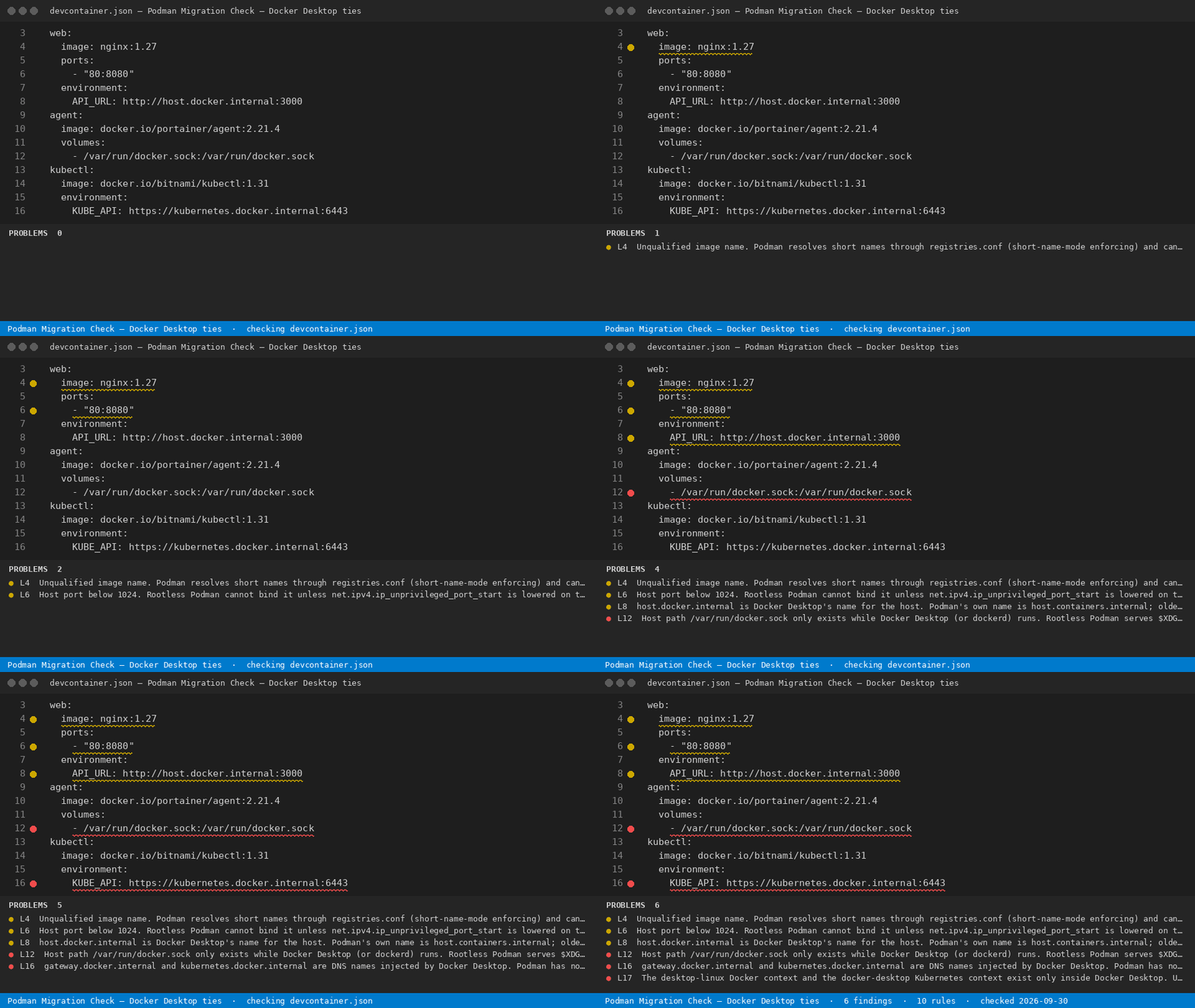
Podman Migration Check — Docker Desktop ties — finds the line

Podman Migration Check — Docker Desktop ties

Finds the lines in your compose.yaml, Dockerfile, devcontainer.json, CI workflows and shell scripts that only work while Docker Desktop is installed, and prints the Podman replacement next to each one.

Tool page: https://getreadystack.com/tools/podman-migration-check

Yardstick: Docker Desktop needs a paid subscription once an organisation has more than 250 employees or more than $10 million in annual revenue; Docker Business is $24 per user per month, billed annually ($288 per developer a year).

Why these lines matter

Teams that move from Docker Desktop to Podman usually keep their compose files, dev containers and CI scripts. Most of those files run unchanged. A few lines do not, because they depend on something Docker Desktop injects: the /var/run/docker.sock host socket, the host.docker.internal / kubernetes.docker.internal DNS names, the desktop-linux and docker-desktop contexts, the docker-credential-desktop helper, and CLI plugins such as docker scout. Rootless Podman also refuses host ports below 1024 and treats unqualified image names differently. These lines fail on the day Docker Desktop is uninstalled, usually in CI first.

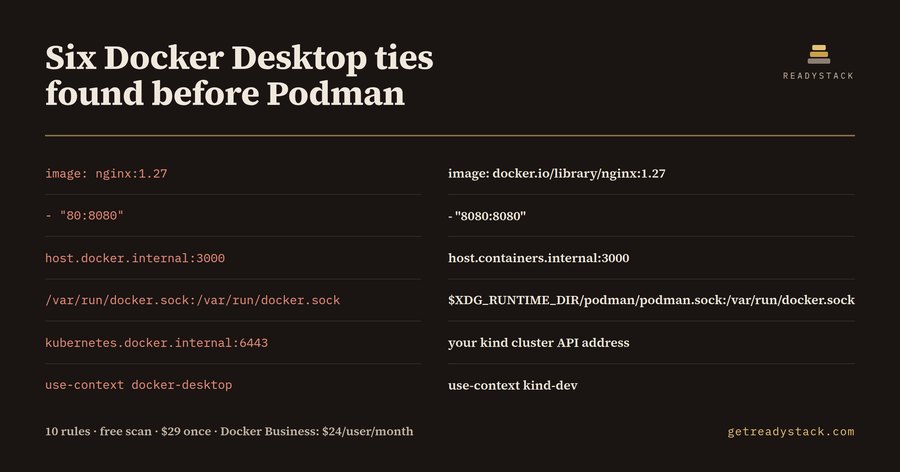
Six Docker Desktop ties found before Podman — the bundled example

The dirty example is a 17-line compose.yaml. The check returns 6 findings on 6 lines (3 errors, 3 warnings):

Line Docker Desktop line Podman fix
4 image: nginx:1.27 image: docker.io/library/nginx:1.27
6 - "80:8080" - "8080:8080"
8 http://host.docker.internal:3000 http://host.containers.internal:3000
12 /var/run/docker.sock:/var/run/docker.sock ${XDG_RUNTIME_DIR}/podman/podman.sock:/var/run/docker.sock
16 https://kubernetes.docker.internal:6443 your kind or minikube API address
17 use-context docker-desktop use-context kind-dev

The fixed file returns 0 findings.

The 10 rules

ID Check Severity
PM01 /var/run/docker.sock as a host path error
PM02 gateway.docker.internal, kubernetes.docker.internal error
PM03 host.docker.internal (use host.containers.internal) warning
PM04 "credsStore": "desktop" in config.json error
PM05 desktop-linux / docker-desktop contexts error
PM06 host port below 1024 (rootless Podman) warning
PM07 unqualified image name (short-name-mode) warning
PM08 docker scout, docker extension, docker desktop error
PM09 buildx bake, buildx create, buildx use warning
PM10 docker-in-docker dev container feature warning

Each finding carries the rule's source link in ext/rules.json.

Use

Open any compose, Dockerfile, Containerfile, devcontainer.json, workflow YAML, Makefile or .sh file. Findings appear in the Problems panel as you type. Run Podman Migration Check: Check current file from the command palette to re-run.

Free and full version

Free: the full check of the open file, every rule, with the fix text. Nothing is capped.

Full version ($29 once, one licence key per person or team seat): scan every repo in the workspace in one pass and export a Markdown migration report per repo for the licence decision — get a key.

Limits

The check reads text line by line. It does not start containers and does not know which Podman version you run; host.docker.internal is a warning because newer Podman releases may add the alias. Comment lines are skipped.

  • Contact us
  • Jobs
  • Privacy
  • Manage cookies
  • Terms of use
  • Trademarks
  • Your Privacy Choices
  • Consumer Health Privacy
© 2026 Microsoft