Skip to content
| Marketplace
Sign in
Visual Studio Code>Linters>Podman Desktop Laptop Check: Docker Desktop seatsNew to Visual Studio Code? Get it now.
Podman Desktop Laptop Check: Docker Desktop seats

Podman Desktop Laptop Check: Docker Desktop seats

ReadyStack

|
1 install
| (0) | Free
Finds every Docker Desktop install in Brewfiles, winget and choco manifests and laptop setup scripts (brew --cask docker, Docker.DockerDesktop, desktop.docker.com) with the Podman Desktop line for eac
Installation
Launch VS Code Quick Open (Ctrl+P), paste the following command, and press enter.
Copied to clipboard
More Info

Podman Desktop Laptop Check: Docker Desktop seats

Podman Desktop Laptop Check: Docker Desktop seats

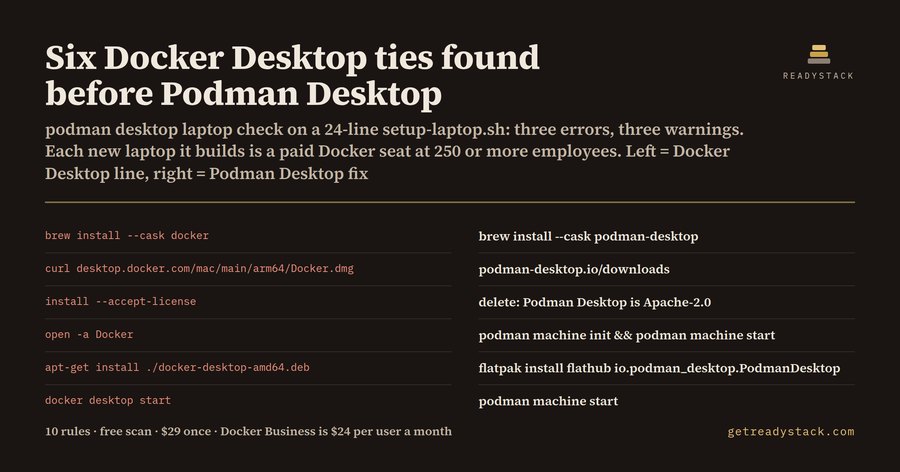
Finds every line in a laptop setup file that installs, downloads or starts Docker Desktop, and prints the Podman Desktop line that replaces it. On the sample 24-line setup-laptop.sh it finds 6 Docker Desktop ties: 3 errors and 3 warnings. 10 rules.

Free web version, same engine: https://getreadystack.com/tools/podman-desktop-laptop-check

Yardstick: Docker's pricing page lists Docker Business at $24 per user per month on the annual plan (Team $15, Pro $9), read 2026-10-10.

Why the laptop setup file

Docker's own licence page says Docker Desktop is free for small businesses with fewer than 250 employees and less than $10 million in annual revenue, for personal use, education and non-commercial open source. Professional use in larger organizations and government entities needs a paid Pro, Team or Business subscription. Docker Engine and the other Moby open-source projects keep their own licences.

So the question for an IT or platform team is not "do we use Docker" but "which machines get Docker Desktop". That answer lives in the files that build a new developer laptop: a Brewfile, a winget or Chocolatey manifest, a setup-laptop.sh or bootstrap.ps1. Every laptop those files build is one more seat.

What it flags

Rule Severity Docker Desktop line Replacement
brew-cask-docker error brew install --cask docker, cask "docker" (old token, now docker-desktop) brew install --cask podman-desktop
brew-cask-docker-desktop error cask "docker-desktop" cask "podman-desktop"
winget-docker-desktop error Docker.DockerDesktop winget install -e --id RedHat.Podman-Desktop
choco-docker-desktop error choco install docker-desktop, <package id="docker-desktop"> choco install podman-desktop -y
desktop-download-url error any desktop.docker.com/ download https://podman-desktop.io/downloads
linux-desktop-package error docker-desktop-amd64.deb / .rpm flatpak install -y flathub io.podman_desktop.PodmanDesktop
accept-license-flag warn install --accept-license delete it with the install line
launch-docker-app warn open -a Docker, Docker Desktop.exe podman machine init && podman machine start or colima start
docker-desktop-cli warn docker desktop start podman machine start
docker-desktop-bundle-id warn com.docker.docker settings or MDM profile ~/.config/containers/containers.conf

What it does not flag: brew install docker (the Homebrew formula, the Apache-2.0 Docker CLI), docker-compose, podman, colima. The cask and the formula share the word "docker"; only the cask is Docker Desktop. A plain text search for "docker" cannot tell them apart.

Comment lines are skipped. If the file already states a paid plan with a line such as # docker-subscription: business, the install errors turn into info lines: the seat is paid, and it still belongs in the seat count.

How to use

  1. Open a Brewfile, *.sh, *.ps1, *.dsc.yaml or packages.config.
  2. Run Podman Desktop Laptop Check: check this file from the command palette. Findings show in the Problems panel with the line number and the replacement line.
  3. Or paste the file into the free web page; it runs the same engine.js in the browser and sends nothing.

Free and paid

Free, no key: check the open file. You get every finding with its line number and its Podman Desktop replacement.

With a licence key: scan every setup file in the workspace in one pass and export a dated Docker Desktop seat report with each Podman Desktop line and the seat cost at Docker's list price. Get the workspace seat report

Limits

It reads text. It cannot tell how many employees a company has or whether it already holds a Docker subscription, unless the file says so with # docker-subscription: business. It does not follow a script that another script downloads. This is not legal advice: the terms on docker.com decide.

Sources

  • Docker Desktop licence: https://docs.docker.com/subscription/desktop-license/
  • Docker pricing: https://www.docker.com/pricing/
  • Homebrew cask docker-desktop (old token docker): https://formulae.brew.sh/cask/docker-desktop
  • Podman Desktop downloads: https://podman-desktop.io/downloads
  • Contact us
  • Jobs
  • Privacy
  • Manage cookies
  • Terms of use
  • Trademarks
  • Your Privacy Choices
  • Consumer Health Privacy
© 2026 Microsoft