npm publish package.json gate: engines & SPDX

Node 20 reached end of life on 2026-04-30. If your package.json still says "engines": { "node": ">=18" }, every npm install of your package tells users that two end-of-life Node lines are fine. This extension reads the package.json you are about to publish and lists every line that still pins an end-of-life Node line or blocks npm publish --provenance, with the exact replacement line next to it.
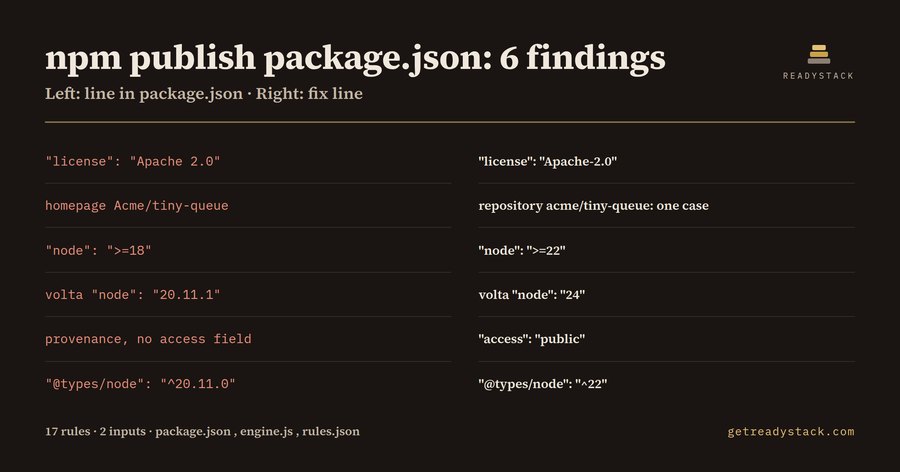
Worked example (the bundled dirty fixture, checked on 2026-09-30): 6 findings from 17 rules and 2 inputs (the package.json text and today's date):
| Line in package.json |
Fix line |
"license": "Apache 2.0" |
"license": "Apache-2.0" |
homepage Acme/tiny-queue vs repository acme/tiny-queue |
one letter case in every URL |
"node": ">=18" |
"node": ">=22" |
volta "node": "20.11.1" |
volta "node": "24" |
scoped name, provenance: true, no access |
"access": "public" |
"@types/node": "^20.11.0" |
"@types/node": "^22" |
The Node line map
The gate walks every place a package.json can pin a Node line, so you see the whole migration in one list:
engines.node — the lowest major the range admits is compared with the Node release schedule (Node 18 EOL 2025-04-30, Node 20 EOL 2026-04-30, Node 22 EOL 2027-04-30, Node 24 EOL 2028-04-30). A floor that is still supported but ends within 180 days is a warning.
volta.node — the version every contributor and CI job using Volta will run.
@types/node — types for an end-of-life line let the compiler accept APIs your floor should not promise.
packageManager — with provenance on, npm older than 9.5.0 cannot publish provenance (npm docs: "ensure you are on 9.5.0+").
The date input changes the answer: the same file checked on 2026-03-01 gives 4 findings, because Node 20 was still supported that day.
Licence and repository checks
license must be an SPDX identifier or SPDX expression such as (MIT OR Apache-2.0); Apache 2.0, GPLv3 and MIT License are not. Deprecated ids like GPL-3.0 get the -only / -or-later replacement. License objects and licenses arrays are flagged as deprecated metadata. UNLICENSED without "private": true is flagged.
repository must be a URL a VCS program can use (git+https://github.com/OWNER/REPO.git), not a /tree/ page or plain http://. Shorthand is flagged because npm rewrites it and warns during publish.
- npm provenance needs a public repository that matches, case-sensitive, where you publish from. The gate compares
repository.url with homepage and bugs.url and flags the same repo written in two letter cases.
- A scoped package publishing with provenance needs
"access": "public" for its first provenance publish.
Why a chatbot answer is not enough
A chatbot does not know today's date, guesses SPDX ids, and cannot see the letter case in your repository URL. This gate runs on your own file, offline, with the Node end-of-life dates written into the rules.
Use
Open a package.json and run Check package.json release gate from the Command Palette. Findings appear in the Problems panel with the fix line. The same engine runs on the web page: https://getreadystack.com/tools/package-json-release-gate
Free: every finding and every fix line, no key. Full version (licence key): a dated release report (Markdown) of every finding and its fix line, saved for the release ticket or audit file.
Sources: Node release schedule (github.com/nodejs/Release), npm docs "Generating provenance statements" and "package.json".