Skip to content
| Marketplace
Sign in
Visual Studio Code>Linters>Outlook Email HTML Lint - Classic vs NewNew to Visual Studio Code? Get it now.
Outlook Email HTML Lint - Classic vs New

Outlook Email HTML Lint - Classic vs New

ReadyStack

| (0) | Free
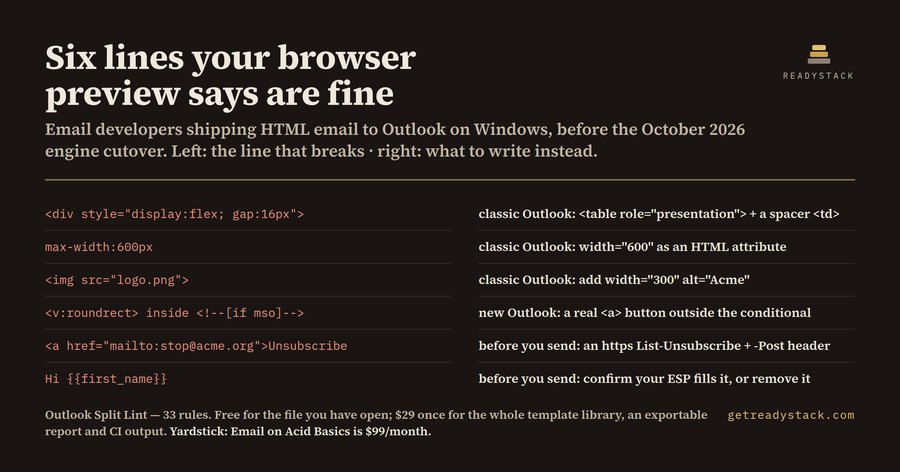
Classic Outlook renders with the Word engine, the new Outlook with WebView2. Lint one email file against both at once, line by line, before you send.
Installation
Launch VS Code Quick Open (Ctrl+P), paste the following command, and press enter.
Copied to clipboard
More Info

Outlook Split Lint

Outlook Email HTML Lint - Classic vs New

Classic Outlook renders with the Word engine, the new Outlook with WebView2. Lint one email file against both at once, line by line, before you send.

What it does for free

  • Check the open email file against both Outlook engines
  • Check only the lines you select
  • Reopen the last findings list
  • List every rule that ships inside

With a licence

  • Scan the whole template library — Walks every email file in the workspace in one pass instead of one open file.
  • Export a report you can hand over — Writes the findings to CSV, JSON or HTML so a client or a colleague can read them.
  • CI output — Machine-readable JSON so a build step can stop a broken template before it ships.

Email on Acid Basics is $99/month and Litmus Core starts at $500/month (checked 2026-09-07). This licence is $29, once.

Get a licence

Install

ext install outlook-email-html-lint
  • Contact us
  • Jobs
  • Privacy
  • Manage cookies
  • Terms of use
  • Trademarks
  • Your Privacy Choices
  • Consumer Health Privacy
© 2026 Microsoft