MV3 Manifest Preflight — Chrome Web Store
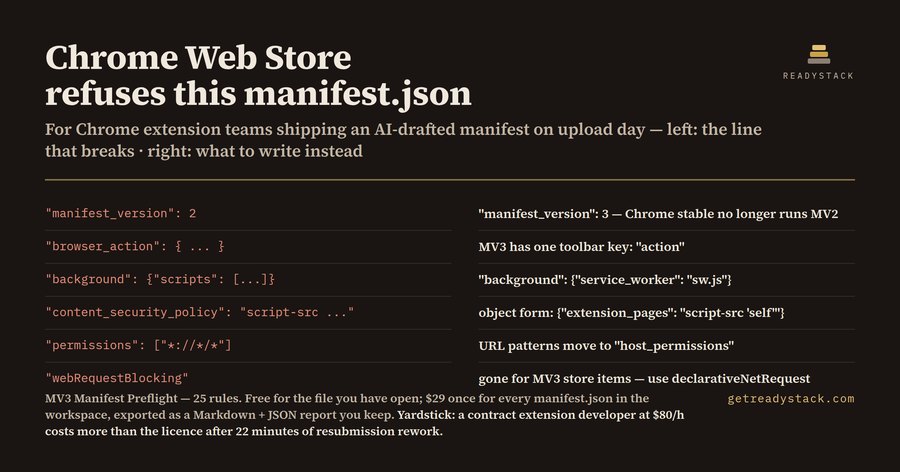
Open a manifest.json and this extension marks every line that Manifest V3 or the Chrome Web Store upload will refuse, with the replacement written next to it.
Why it exists: code assistants were trained on years of Manifest V2 examples, so the manifest they draft still says "manifest_version": 2, "browser_action", "background": {"scripts": [...]} and a content_security_policy string. Chrome stable no longer runs Manifest V2, and the Chrome Web Store has accepted only MV3 for new items since 17 January 2022. Each of those lines is a rejected upload and another wait in the review queue.
What it checks — 25 rules
MV2 leftovers
manifest_version other than 3browser_action / page_action instead of actionbackground.scripts, background.page, background.persistent instead of service_workercontent_security_policy written as a string instead of an objectweb_accessible_resources written as a flat path list instead of objects
Policy blockers
- host match patterns left in
permissions / optional_permissions instead of host_permissions / optional_host_permissions
webRequestBlocking in an MV3 store item- remotely hosted code: a content script or service worker pointing at a URL
unsafe-eval or a remote origin inside the CSPupdate_url left in the uploaded package
Upload and listing fields
version that is not one to four integers of 0–65535 (so 1.0.0-beta fails)name over 75 characters, short_name over 12, description missing or over 132- missing 128×128 icon
__MSG_ placeholders without default_locale- a
content_scripts entry with no matches
- an incomplete
declarative_net_request.rule_resources entry
- broad host access, a leftover
key, and a wildcard in externally_connectable (warnings, not blockers)
How to run it
Open any manifest.json in the editor — findings appear in the Problems panel as you type. The command palette entry MV3 Manifest Preflight: Check this file writes the same result as a report.
On the reference fixture shipped with the source (_fixtures/dirty.json, an MV2-style draft of a tab manager) the engine returns 19 findings: 16 errors that block the upload and 3 warnings. The matching _fixtures/clean.json returns 0.
Free and paid
Free: the open file. Every rule runs, every finding is named, nothing is hidden behind a key — one manifest, finished.
Paid ($29, one licence key per person or team seat): scan every manifest.json in the workspace in one run and export the pre-submission report as a file you keep — Markdown for the reviewer, JSON for CI.
Yardstick: at an $80/h contract rate, 22 minutes of resubmission rework costs more than the licence, and a rejected upload restarts the Chrome Web Store review queue.
The same engine runs in the browser, with no install and nothing uploaded: https://getreadystack.com/tools/mv3-manifest-preflight
Not affiliated with Google or Microsoft. Rules follow the published Chrome extension manifest reference and Chrome Web Store program policies; the manifest is checked, not the extension's behaviour.

