Skip to content
| Marketplace
Sign in
Visual Studio Code>Linters>Miniforge Migration Check: Anaconda in Docker, CINew to Visual Studio Code? Get it now.
Miniforge Migration Check: Anaconda in Docker, CI

Miniforge Migration Check: Anaconda in Docker, CI

ReadyStack

|
1 install
| (0) | Free
Finds continuumio/miniconda3 images, repo.anaconda.com installers, setup-miniconda without miniforge-version and conda tos accept in Dockerfiles and CI YAML, with the Miniforge line for each.
Installation
Launch VS Code Quick Open (Ctrl+P), paste the following command, and press enter.
Copied to clipboard
More Info

Miniforge Migration Check: Anaconda in Docker, CI

Miniforge Migration Check: Anaconda in Docker, CI

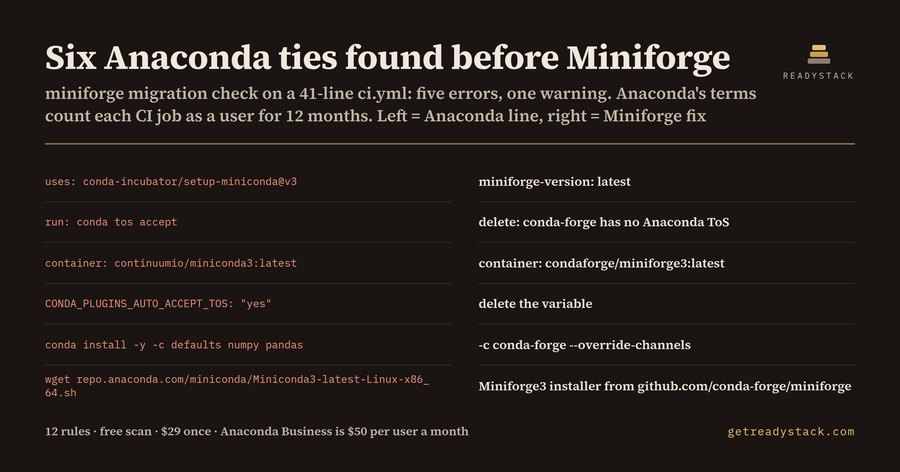
Finds every line in a Dockerfile or CI YAML that still pulls Miniconda, Anaconda images or Anaconda's terms, and prints the Miniforge line that replaces it. On the sample 41-line GitHub Actions ci.yml it finds six: five errors and one warning.

Hub page: https://getreadystack.com/tools/miniforge-migration-check

What it finds (12 rules)

Rule The Anaconda line The Miniforge line
anaconda-docker-image container: continuumio/miniconda3:latest, FROM continuumio/anaconda3 condaforge/miniforge3:latest or mambaorg/micromamba
miniconda-installer-url wget https://repo.anaconda.com/miniconda/Miniconda3-latest-Linux-x86_64.sh https://github.com/conda-forge/miniforge/releases/latest/download/Miniforge3-$(uname)-$(uname -m).sh
anaconda-installer-url repo.anaconda.com/archive/Anaconda3-… the same Miniforge3 installer
legacy-continuum-url repo.continuum.io/… the same Miniforge3 installer
setup-miniconda-default uses: conda-incubator/setup-miniconda@v3 with no miniforge-version add miniforge-version: latest under with:
setup-miniconda-miniconda-version miniconda-version: latest miniforge-version: latest
conda-tos-accept conda tos accept delete — conda-forge has no Anaconda ToS prompt
auto-accept-tos-env CONDA_PLUGINS_AUTO_ACCEPT_TOS: "yes" delete the variable
defaults-channel -c defaults, channels: conda-forge,defaults -c conda-forge --override-channels
anaconda-channel -c anaconda -c conda-forge --override-channels
pkgs-main-channel pkgs/main, pkgs/r, pkgs/msys2 conda-forge
package-manager-miniconda brew install --cask miniconda, choco install miniconda3, winget install Anaconda.Miniconda3 brew install --cask miniforge or the Miniforge3 installer

Comment lines (# …) are skipped, so a note like # was continuumio/miniconda3 does not count.

Why these lines matter

Anaconda's Terms of Service (anaconda.com/legal/terms/terms-of-service, read 2026-10-10) say a for-profit organization with more than 200 total employees or contractors, including all affiliates, must pay for a Business Plan to use the Platform. The same terms define a "User" as human or non-human, and name CI/CD jobs, service accounts, serverless processes and AI agents as non-human users. A User counts as active for 12 months after it accesses packages on repo.anaconda.com.

So a single container: continuumio/miniconda3 job, a Miniconda installer download, or a conda tos accept line in a pipeline is the company accepting those terms. Miniforge is the community installer from the conda-forge project. Its only channel is conda-forge, so none of these lines are needed.

Yardstick: anaconda.com/pricing lists the Business plan at $50 per user per month (read 2026-10-10).

How to use it

  1. Open a Dockerfile, .github/workflows/*.yml or .gitlab-ci.yml.
  2. Findings appear in the Problems panel with the line number. Each message ends with the replacement line after →.
  3. Run Miniforge Migration Check: Check this file from the Command Palette to re-check on demand.

The free web page runs the same engine: paste a file and read the same findings.

Free and paid

Free, no key: check the open file. You get every finding with its file line and its Miniforge replacement.

With a licence key: scan every Dockerfile and CI file in the workspace in one pass and export a dated Markdown migration plan that maps each Anaconda pull to its Miniforge line. Get the workspace migration plan

Limits

It reads text. It cannot tell how many employees your company has, and it cannot tell whether you already hold an Anaconda licence. It does not read environment.yml channel lists. It does not follow a script that another script downloads. This is not legal advice: the terms on anaconda.com decide.

  • Contact us
  • Jobs
  • Privacy
  • Manage cookies
  • Terms of use
  • Trademarks
  • Your Privacy Choices
  • Consumer Health Privacy
© 2026 Microsoft