MCP Config Lint - mcp.json and claude_desktop_config security audit
Your mcp.json is valid JSON. That is the whole of what a linter or a schema check can tell you about it.
For anyone wiring MCP servers into Claude, Cursor or VS Code: plaintext secrets and over-broad server permissions are found in the config file itself.
It cannot tell you that npx -y @scope/server with no version resolves whatever was published most recently, on every launch, with no lockfile behind it. It cannot tell you that the token sitting in env stays valid until somebody rotates it, and that the file it sits in is committed, screenshotted and pasted into issues. It cannot tell you that alwaysAllow removed the confirmation step for the tools named in it, or that a filesystem root of / put every SSH key, browser profile and .env on the machine inside the agent's reach for the length of the session.
These files are written fast, often by the assistant that is about to use them. Nothing between writing one and running it reads it as a permission grant.
What it does
Open an mcp.json — .vscode/mcp.json, .mcp.json, .cursor/mcp.json, claude_desktop_config.json — and run MCP: Audit this config. Every finding is a line number, the rule it broke, and the text that replaces it.
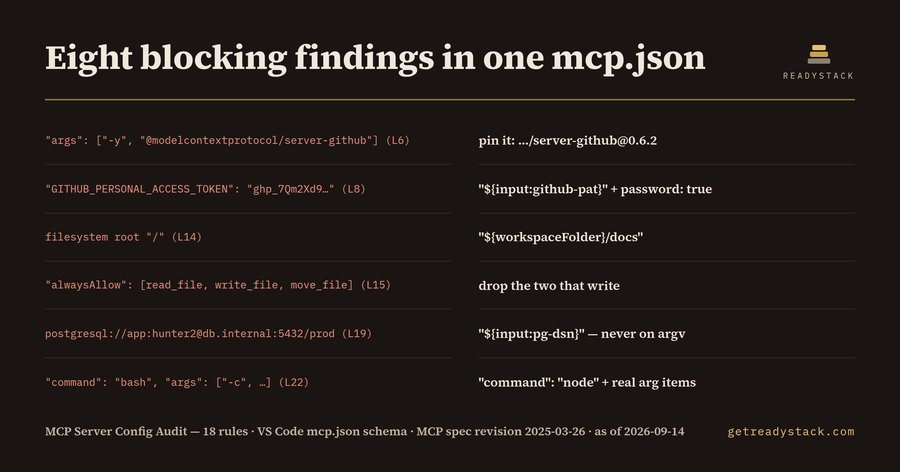
The config shipped with the extension at _fixtures/dirty.mcp.json is 33 lines and five servers. The audit returns 14 findings, 8 of them blocking:
| Line as written |
What replaces it |
"args": ["-y", "@modelcontextprotocol/server-github"] (L6) |
pin it: …/server-github@0.6.2 |
"GITHUB_PERSONAL_ACCESS_TOKEN": "ghp_7Qm2Xd9…" (L8) |
"${input:github-pat}", "password": true |
filesystem root "/" (L14) |
"${workspaceFolder}/docs" |
"alwaysAllow": ["read_file","write_file","move_file"] (L15) |
drop the two that write |
postgresql://app:hunter2@db.internal:5432/prod (L19) |
"${input:pg-dsn}" |
"command": "bash", "args": ["-c", …] (L22) |
"command": "node", real argument items |
"url": "http://analytics.internal.example/mcp" (L27) |
https:// |
"Authorization": "Bearer sk-live-9f2b…" (L29) |
"${input:analytics-token}" |
The corrected version of the same file, _fixtures/clean.mcp.json, returns zero findings from the same 18 rules.
The 18 rules
Credentials: a literal API key, bearer token or database password in env, headers or args; a promptString input for a secret without "password": true; a DSN carrying user:password@.
Supply chain: npx/bunx with no version, uvx with no version, a Docker image with no tag or :latest.
Transport: a non-loopback http:// endpoint, the HTTP+SSE transport that MCP spec revision 2025-03-26 replaced with Streamable HTTP, a server entry carrying both command and url or neither, a servers entry with no type.
Privilege: an alwaysAllow/autoApprove list, a bash -c or powershell -Command wrapper, a filesystem root of /, ~, $HOME or a drive letter, a database server with no read-only flag.
Correctness: mcpServers used where the VS Code schema reads servers, an absolute path under /Users/<name>, two servers sharing one name.
Each rule names what it comes from — the VS Code mcp.json schema, the MCP specification, npm and uv resolution, OCI image references, JSON object semantics, least privilege.
Free and paid
Free audits one config completely: all 18 rules, every line number, every replacement, in the editor or in the browser at https://getreadystack.com/tools/mcp-config-audit. Nothing is withheld, nothing is watermarked, nothing leaves the machine — the rules run locally.
Paid changes the scope, not the depth: every agent config in a repository plus the user-scope locations for VS Code, Cursor, Claude Desktop and Windsurf in one pass, a non-zero exit code so CI fails on a blocker, and a dated evidence report of file, rule and line.
$29 once · one licence key per person or team seat · Freelance application-security engineers commonly bill $100–$200 an hour.
Licence
Commercial, one key per person or team seat. See LICENSE.txt.

