Skip to content
| Marketplace
Sign in
Visual Studio Code>Linters>Lit Template Binding AuditNew to Visual Studio Code? Get it now.
Lit Template Binding Audit

Lit Template Binding Audit

ReadyStack

| (0) | Free
Finds the Lit / lit-html template bindings that auto-escaping does not cover - unsafeHTML, javascript: href, .innerHTML, srcdoc, unsafeStatic - and names the safe form.
Installation
Launch VS Code Quick Open (Ctrl+P), paste the following command, and press enter.
Copied to clipboard
More Info

Lit Template Binding Audit

Lit Template Binding Audit — finds the line

Lit Template Binding Audit

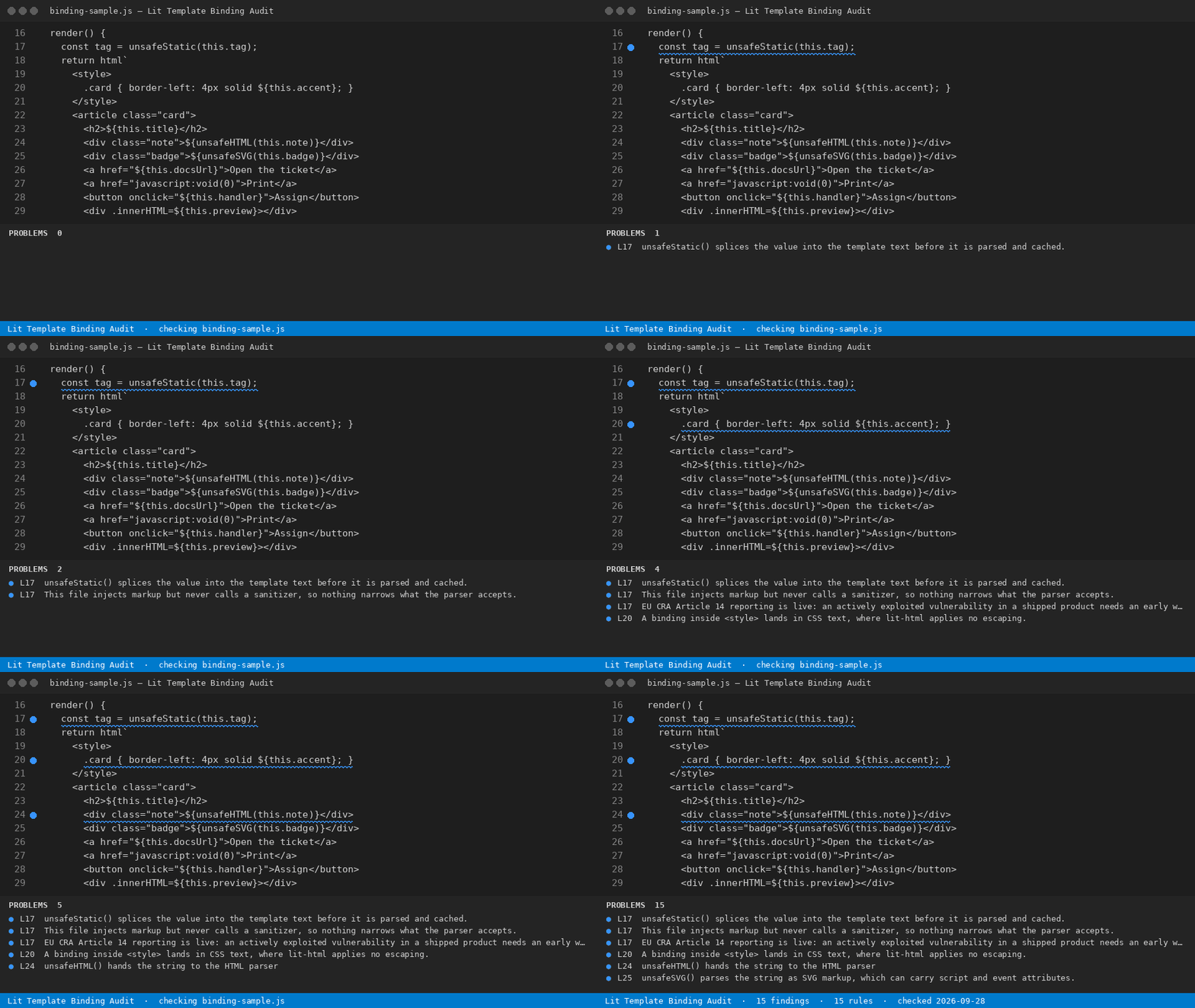
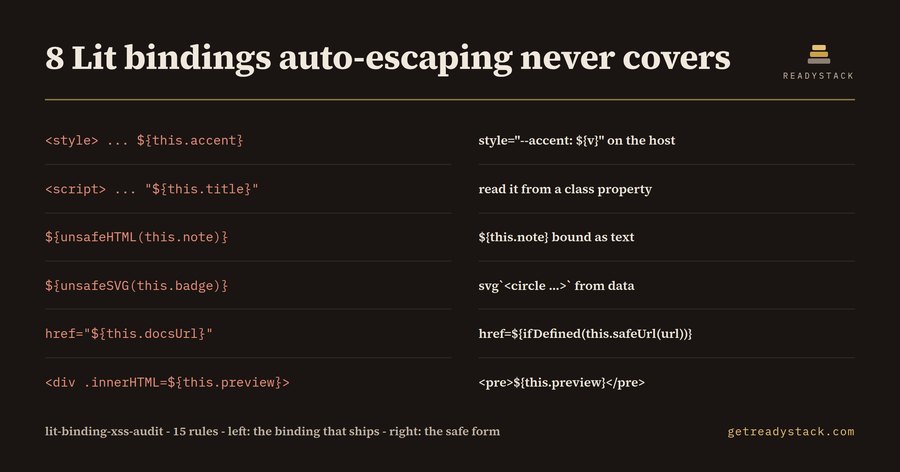
lit-html escapes the text you interpolate into a child position. It does not escape everything a template can hold, and the positions it skips are the ones that ship holes: unsafeHTML, unsafeSVG, unsafeStatic, a .innerHTML property binding, an srcdoc attribute, an on* attribute binding, a URL attribute bound straight from data, and any binding that lands inside a <style> or <script> block. This extension reads a Lit component file and lists those positions with line numbers.

Since 11 September 2026, EU Cyber Resilience Act Article 14 reporting is in force: a vulnerability in a product with digital elements that is actively exploited means an early warning within 24 hours, a notification within 72 hours and a final report within 14 days. A component that injects attacker-controlled markup is the kind of defect that starts that clock, so the audit exists to run before the component ships rather than after.

What it checks

15 rules, all of them line-addressed:

Rule What it catches
unsafe-html / unsafe-svg / unsafe-static directives that hand a runtime string to the parser
sanitizer-missing a file that injects markup and never calls a sanitizer
binding-in-style / binding-in-script a ${} inside a <style> or <script> block
innerhtml-binding / innerhtml-assign .innerHTML=${} in a template, or .innerHTML = in code
srcdoc-binding a binding used as an iframe document body
inline-event-attr onclick="${...}" instead of @click=${...}
javascript-url / url-attr-binding a javascript: URL, or a URL attribute bound with no scheme check
insert-adjacent-html / document-write markup inserted around the component
cra-report-window states the Article 14 24h / 72h / 14-day windows once a high finding exists

Each finding is { check, sev, msg, line, fix }. The bundled fixtures are the reference: the dirty component raises all 15, the clean rewrite of the same component raises none.

Use

Open a .js or .ts component file and run Lit Binding Audit: Check this file from the command palette. Findings appear with the line number and the safe form to write instead.

The same rule file and the same engine run in the browser page at https://getreadystack.com/tools/lit-binding-xss-audit — paste a component in and the findings are identical, because it is the same engine.check().

Free and licensed

The audit of the file you have open is free and complete: all 15 rules, every line number, every suggested fix, no watermark and no run limit. A licence key adds a different job — sweeping every component in the workspace in one command and writing a dated evidence report that lists each unsafe binding with its file and line.

Yardstick

An application-security contractor reviewing component code bills roughly 150 to 250 an hour.

Licence

See LICENSE.txt. The rule list in rules.json is readable and editable; if a rule does not fit your codebase, delete it and the count in the report follows.

  • Contact us
  • Jobs
  • Privacy
  • Manage cookies
  • Terms of use
  • Trademarks
  • Your Privacy Choices
  • Consumer Health Privacy
© 2026 Microsoft