Firestore Security Rules Lint - open rules and missing auth
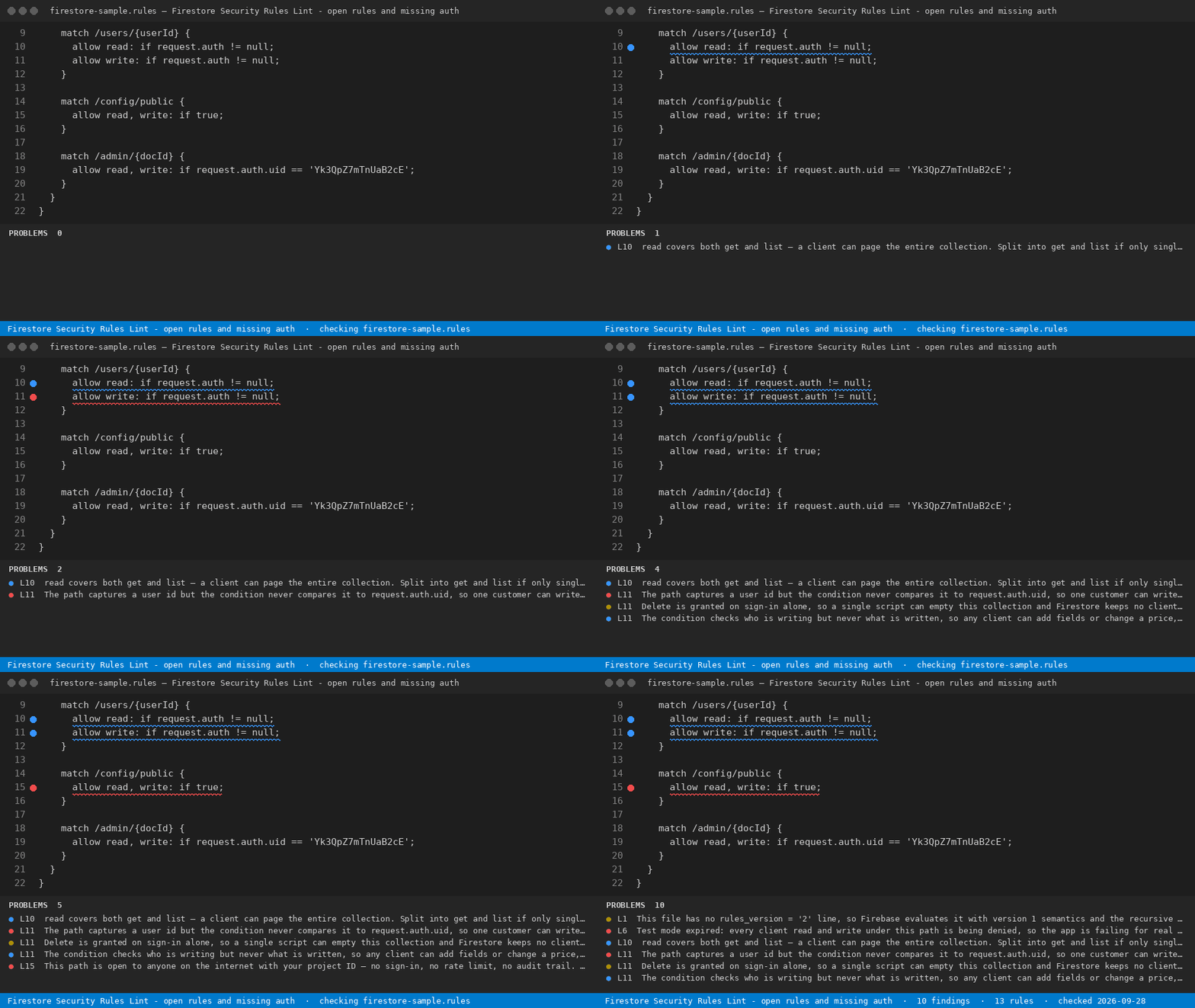
Firebase security rules are the only thing between a public API endpoint and your users' documents. They are also the file most often written by a coding assistant and never read again: firestore.rules and storage.rules are short, they look declarative, and a wrong line fails open instead of failing loudly. Nothing in the Firebase CLI stops firebase deploy --only firestore:rules from publishing a ruleset that lets anyone on the internet page your whole users collection.
For Firebase apps: an open rule is a public database, and this names the exact match block that leaves it open.
This extension reads the rules file open in your editor and reports every line that grants more access than it looks like it grants, with the line number and what the line actually permits at runtime.
Free, and complete on its own: the .rules file you have open, audited to the end, every finding with its line number. No key, no account, no upload — the audit runs locally.
What it checks — 13 rules
| Rule |
What it catches |
rules_version_missing |
No rules_version = '2';, so version 1 semantics apply and the recursive wildcard matches differently than the code reads |
public_access |
allow ... : if true — open to anyone who knows the project ID |
testmode_open |
request.time < timestamp.date(...) with the date still ahead: world readable and writable until then |
testmode_expired |
The same line after the date: every client read and write is denied and the app is failing for real users |
recursive_wildcard_write |
A write grant on /{document=**}, which covers collections that do not exist yet |
auth_any_user_wildcard |
request.auth != null on a wildcard subtree — anonymous auth counts as signed in |
owner_check_missing |
A {userId} segment never compared to request.auth.uid |
hardcoded_uid |
A literal uid pinned in the rules file |
delete_unrestricted |
Delete granted on sign-in alone |
list_exposure |
read where only get was meant — read also grants list |
write_no_validation |
A write condition that checks who but never what, so a client can set its own role or price field |
storage_size_unbounded |
A Storage write with no request.resource.size cap |
storage_content_type |
A Storage write with no request.resource.contentType check |
Why the date rules matter
Firebase's test-mode template is written to expire 30 days after you create the database. Before that date the ruleset is fully open; after it, the same line denies every client read and write, and the failure shows up as a broken app rather than as a warning in your terminal. The audit takes a date (today by default), so an expired ruleset and a ruleset that is about to open are two different findings, not one.
Example
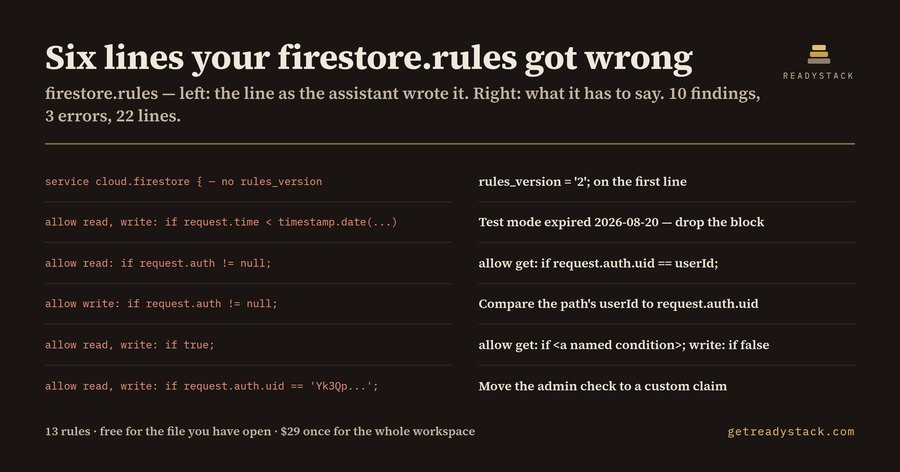
The sample ruleset in _fixtures/dirty.rules is 22 lines of ordinary assistant-written Firebase rules. The audit returns 10 findings on 6 of those lines, 3 of them errors. The matching _fixtures/clean.rules returns 0.
Free and full
Free covers one file: open firestore.rules, run Firestore Rules Guard: Audit This File, read the findings. The full version works on a different axis — scope and ownership: it audits every .rules file in the workspace in one pass and writes a dated Markdown evidence report you keep and can attach to a review or a customer security questionnaire. $29 once, one licence key per person or team seat.
A freelance Firebase developer is quoted at $120 an hour, and a manual pass over a project's rules takes about an hour.
Also on the web
The same engine, byte for byte, runs as a single page: https://getreadystack.com/tools/firestore-rules-guard
Licence
Free features may be used without a licence key. Paid features require a valid licence key.

