Skip to content
| Marketplace
Sign in
Visual Studio Code>Linters>Coverage Gate LintNew to Visual Studio Code? Get it now.
Coverage Gate Lint

Coverage Gate Lint

ReadyStack

| (0) | Free
Lints codecov.yml, .coveragerc, jest/vitest config and CI steps for coverage gates that report a number but can never fail the build.
Installation
Launch VS Code Quick Open (Ctrl+P), paste the following command, and press enter.
Copied to clipboard
More Info

Coverage Gate Lint

Coverage Gate Lint

Your CI prints a coverage percentage. A branch rule says the coverage check must pass. Both are true, and neither one can stop a pull request — because the gate itself is configured to always succeed.

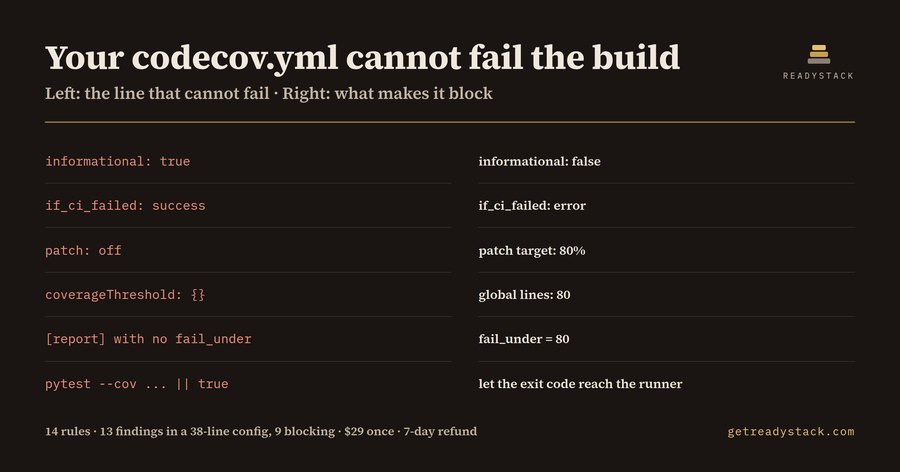
That is not a rare accident. It is what a generated config looks like. informational: true, if_ci_failed: success, patch: off, coverageThreshold: {}, a [tool.coverage.report] section with no fail_under, pytest --cov ... || true — every one of those is valid syntax, every one of them is accepted without a warning, and every one of them turns a quality gate into a status badge. A generated snippet is written to produce a green run, and a green run is exactly what these produce. Developers report trusting AI-written code roughly a third of the time, yet the config that is supposed to catch the other two thirds is usually the part nobody reads.

Coverage Gate Lint reads the coverage configuration you have open and names the lines where the gate stops being a gate.

What it checks — 14 rules

Codecov status (codecov.yml / .codecov.yml)

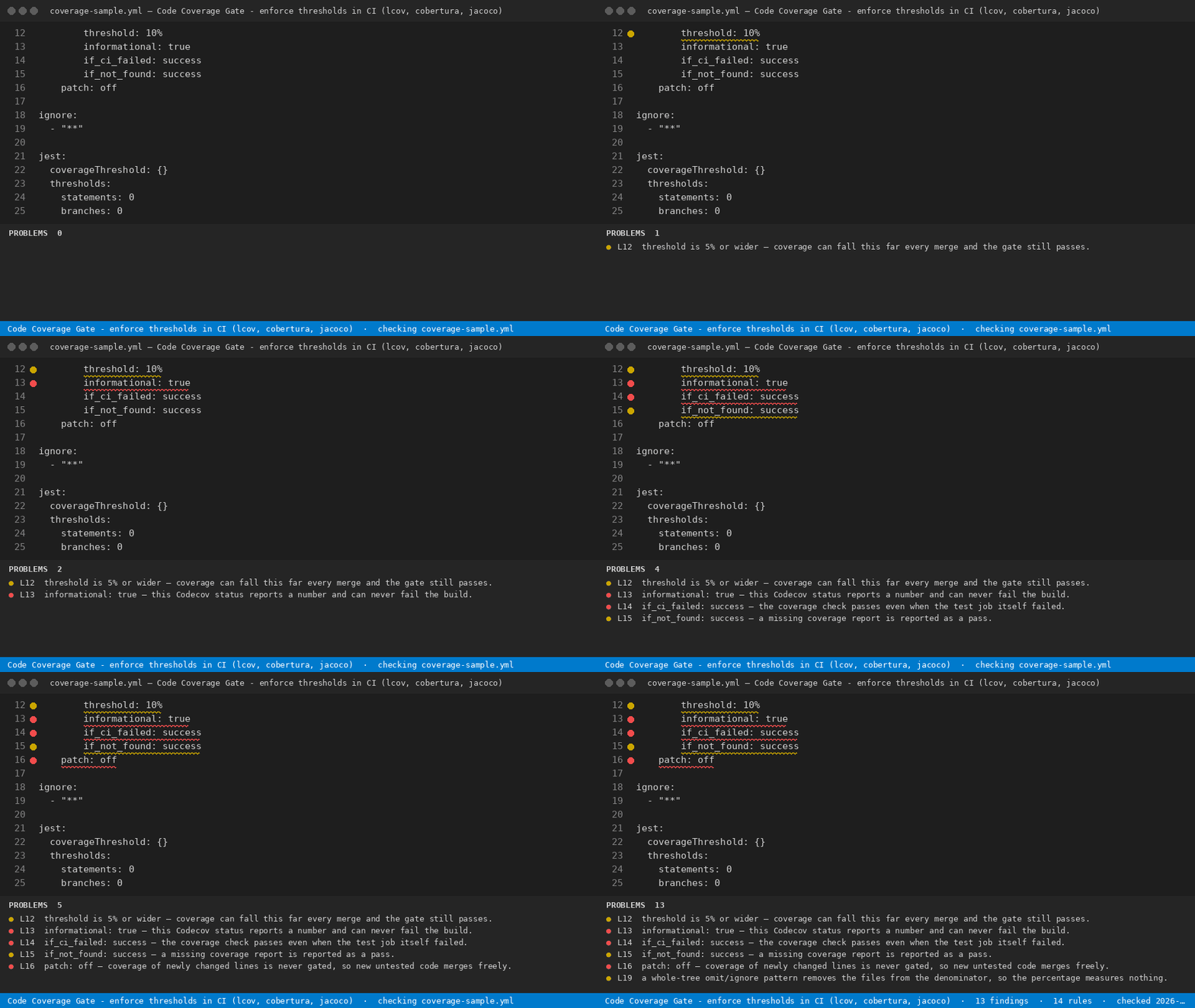
  • informational: true — the status reports a number and never fails
  • if_ci_failed: success — coverage passes even when the test job died
  • if_not_found: success — a missing report counts as a pass
  • patch: off — newly changed lines are never gated
  • threshold: of 5% or wider — coverage may drift down every merge
  • fail_ci_if_error: false — an upload that never arrives is still green
  • a coverage: block with no status: block — a comment, not a required check

coverage.py (.coveragerc, setup.cfg, pyproject.toml)

  • a report section with no fail_under — the run prints a percentage and exits 0
  • fail_under = 0
  • a whole-tree omit/ignore pattern — the files leave the denominator, so the percentage measures nothing

Jest / Vitest

  • coverageThreshold: {} — accepted, enforces nothing
  • a statements/branches/lines/functions threshold of 0

CI step (GitHub Actions and friends)

  • continue-on-error: true on the step that holds the gate
  • || true or ; exit 0 after a coverage command — the exit code never reaches the runner

Measured on the bundled fixtures

_fixtures/clean.yml — a gate that can fail — returns 0 findings. _fixtures/dirty.yml, 38 lines, returns 13 findings, 9 of them at error severity. Both files ship with the extension, so you can reproduce those two numbers before you trust anything else here.

Free and paid

Free, no key: open a coverage config, run Coverage Gate Lint: Check current file, and every one of the 14 rules runs against it. The file you have open is finished — nothing is held back, nothing is watermarked, there is no trial counter.

The paid tier is a different axis — scope. It sweeps every coverage config and CI workflow in the workspace in one pass and writes a dated report of which gates block and which do not, as a file you keep. That report is the artifact an auditor asks for when a CRA or NIS2 review wants evidence that testing gates were enforced, not merely present.

Yardstick: a contract CI/DevOps engineer bills about $150/hour, and reading every coverage config and workflow in a mid-sized monorepo by hand is most of an afternoon.

The paid tier is $29 once, one licence key per person or CI seat, with a 7-day full refund.

Full version — workspace sweep and dated report

More tools: https://getreadystack.com/tools/coverage-gate-lint

Settings

coverageGateLint.min_severity — info, warn or error. Findings below the level are not printed.

Licence

See LICENSE.txt. Findings are computed locally; no file contents leave your machine.

  • Contact us
  • Jobs
  • Privacy
  • Manage cookies
  • Terms of use
  • Trademarks
  • Your Privacy Choices
  • Consumer Health Privacy
© 2026 Microsoft