Skip to content
| Marketplace
Sign in
Visual Studio Code>Linters>Cert Lifetime Lint - TLS validity caps 200/100/47New to Visual Studio Code? Get it now.
Cert Lifetime Lint - TLS validity caps 200/100/47

Cert Lifetime Lint - TLS validity caps 200/100/47

ReadyStack

|
1 install
| (0) | Free
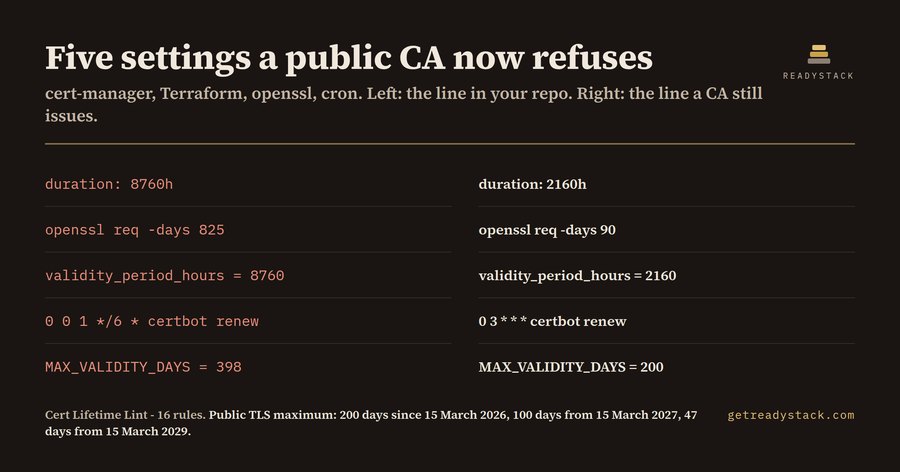
Finds the renewal settings in your repo that outlive the public TLS cap: 200 days since 15 March 2026, 100 days from 15 March 2027, 47 days from 15 March 2029.
Installation
Launch VS Code Quick Open (Ctrl+P), paste the following command, and press enter.
Copied to clipboard
More Info

Cert Lifetime Lint

Cert Lifetime Lint - TLS validity caps 200/100/47

Finds the renewal settings in your repo that outlive the public TLS cap: 200 days since 15 March 2026, 100 days from 15 March 2027, 47 days from 15 March 2029.

What it finds

# k8s/prod-cert.yaml
spec:
  duration: 8760h
# scripts/bootstrap.sh
openssl req -x509 -newkey rsa:2048 -days 825 -out edge.pem
# infra/tls.tf
validity_period_hours = 8760
# crontab
0 0 1 */6 * /usr/bin/certbot renew --quiet
# monitoring/expiry.py
MAX_VALIDITY_DAYS = 398

What it does for free

  • Check the open file against all 16 rules — no key, no limit
  • Check just the lines you selected
  • Re-open the last findings panel
  • Hide info-level findings with min_severity

With a licence

  • Scan every file in the repo — One command walks the whole workspace instead of the file you happen to have open.
  • Dated evidence report — Writes a CSV, JSON or HTML report you can hand to a change board or attach to a ticket.
  • CI output — JSON on stdout so a pipeline can fail the build before an over-cap certificate reaches production.

Get the full version — $29 - $29 once, one licence key per person or team seat.

Install

ext install cert-lifetime-lint
  • Contact us
  • Jobs
  • Privacy
  • Manage cookies
  • Terms of use
  • Trademarks
  • Your Privacy Choices
  • Consumer Health Privacy
© 2026 Microsoft