Skip to content
| Marketplace
Sign in
Visual Studio>Tools>DiffFinder for VS2026
DiffFinder for VS2026

DiffFinder for VS2026

Rami Abughazaleh

|
1 install
| (1) | Free
The extension allows you to compare files in two shelvesets or one shelveset with pending changes. Based on https://github.com/rajeevboobna/CompareShelvesets by Rajeev Boobna and https://github.com/ha
Download

Diff Finder for Visual Studio 2026

DiffFinder (from rajeevboobna / shelvesetcomparer) extends the existing hamidshahid / shelvesetcomparer Visual Studio extension.
ShelvesetComparer is a Visual Studio extension that allow users to compare contents of two shelvesets (from on or different users).

DiffFinder extends it to also

  • allow comparison of a shelveset with current workspace local pending changes
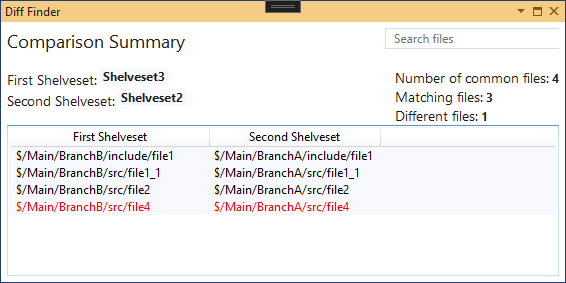
  • compare shelvesets targeting different branches, e.g. $/BranchA/path/to/file1 with $/BranchB/path/to/file1

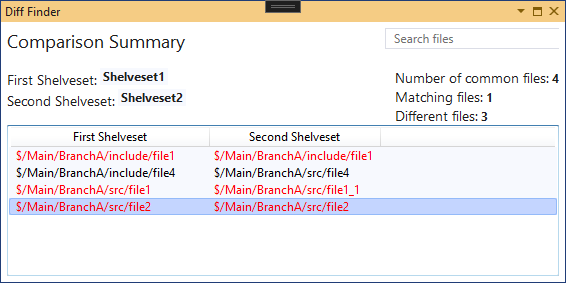
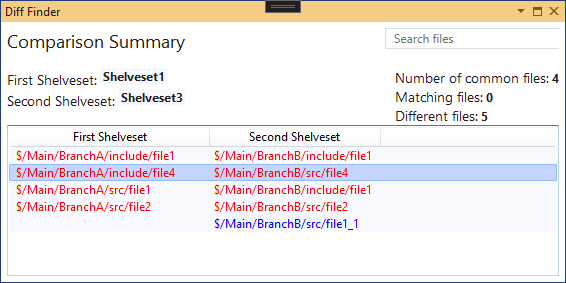
Color coding used in file comparison:

  • black: no difference / both files are identical
  • red: differences / both files differ
  • blue: file exists only in one of the compared containers (Shelveset or Pending Changes)

VisualStudio Marketplace

  • DiffFinder for VS2026 (icnocop)
    • Fork of dprZoft / shelvesetcomparer with additional improvements, including a fix for diff tool arguments containing spaces (dprZoft#17) and an automated GitHub Actions build.
  • DiffFinder for VS2026
    • New release required because, although Microsoft VS2026 tries to be backward compatible, extensions which depend on VS objects (like TeamExplorer) still need to be recompiled with matching references..
  • DiffFinder for VS2022
  • DiffFinder for VS2019
  • ShelvesetComparer:
    • ShelvesetComparer for VS2022 (see releases)
    • ShelvesetComparer for VS2019
  • Previous versions:
    • DiffFinder (VS2017)
    • ShelvesetComparer (VS2017)

Examples

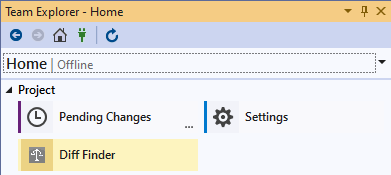
  1. Open Shelveset selection from TeamExplorer: PreviewImage.png

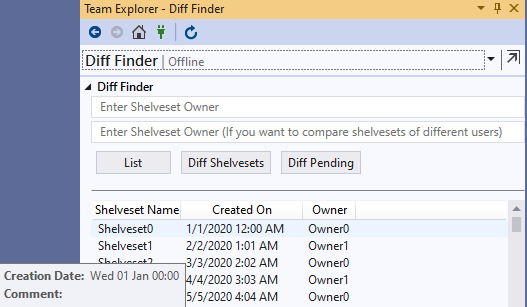
  2. Select two Shelvesets for comparison or one Shelvesets to compare with current Pending Changes: Example_SelectCompareShelvesets.png

  3. File comparison view comparing two Shelvesets:

    • Shelvesets with same file paths (same branch): Example_CompareSameBranch.png

    • Shelvesets with different paths (algorithm tries to find the best match (most common path parts)):

      • differerent branches but same relative path: Example_CompareDifferentBranches.png

      • different branches and different paths: Example_CompareDifferentBranchesAndFolders.png

  • Contact us
  • Jobs
  • Privacy
  • Manage cookies
  • Terms of use
  • Trademarks
  • Your Privacy Choices
  • Consumer Health Privacy
© 2026 Microsoft