Skip to content
| Marketplace
Sign in
Visual Studio>Tools>DiffFinder for VS2026
DiffFinder for VS2026

DiffFinder for VS2026

dprZoft

|
2 installs
| (0) | Free
The extension allows you to compare files in two shelvesets or one shelveset with pending changes. Based on https://github.com/rajeevboobna/CompareShelvesets by Rajeev Boobna and https://github.com/ha
Download

DiffFinder for VS2026

DiffFinder (from rajeevboobna / shelvesetcomparer) extends the existing hamidshahid / shelvesetcomparer Visual Studio extension. ShelvesetComparer is a Visual Studio extension that allow users to compare contents of two shelvesets (from on or different users).

DiffFinder extends it to also

  • allow comparison of a shelveset with current workspace local pending changes
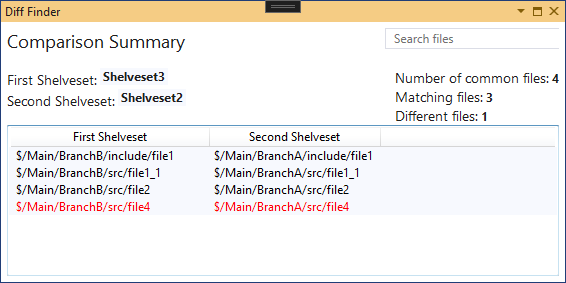
  • compare shelvesets targeting different branches, e.g. $/BranchA/path/to/file1 with $/BranchB/path/to/file1

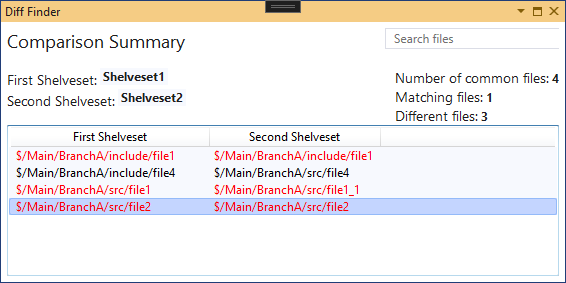
Color coding used in file comparison:

  • black: no difference / both files are identical
  • red: differences / both files differ
  • blue: file exists only in one of the compared containers (Shelveset or Pending Changes)

VisualStudio Marketplace

  • DiffFinder for VS2022
  • DiffFinder for VS2019
  • ShelvesetComparer:
    • ShelvesetComparer for VS2022 (see releases)
    • ShelvesetComparer for VS2019
  • Previous versions:
    • DiffFinder (VS2017)
    • ShelvesetComparer (VS2017)

Examples

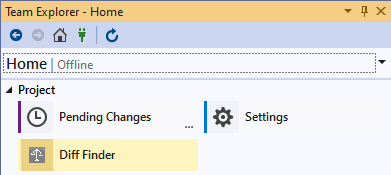
  1. Open Shelveset selection from TeamExplorer: TeamExplorer Diff Finder Button

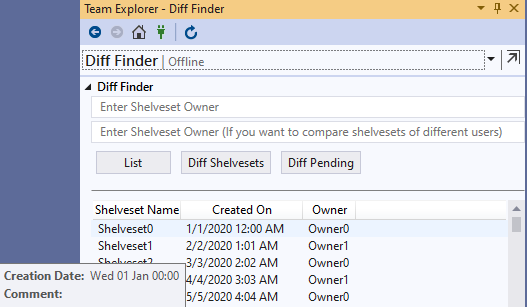
  2. Select two Shelvesets for comparison or one Shelvesets to compare with current Pending Changes: TeamExplorer Diff Finder Button

  3. File comparison view comparing two Shelvesets:

    • Shelvesets with same file paths (same branch): TeamExplorer Diff Finder Button

    • Shelvesets with different paths (algorithm tries to find the best match (most common path parts)):

      • differerent branches but same relative path: TeamExplorer Diff Finder Button

      • different branches and different paths: File comparison: different branches and folders -> tries to find best match

  • Contact us
  • Jobs
  • Privacy
  • Manage cookies
  • Terms of use
  • Trademarks
© 2026 Microsoft