RDTMD
RDTMD is a standalone, native technical markup language and VS Code extension built entirely from scratch without runtime dependencies or external libraries. It replaces the fragmented Markdown ecosystem by integrating mathematical formulas, interactive charts, structured diagrams, tabbed interfaces, metric dashboards, conversations, and modular files into a single, cohesive specification.
Table of Contents
- Overview and Philosophy
- Why RDTMD: Comparison with Markdown
- The Three Design Principles
- Syntax Reference
- Security and CSP Compliance
- AST Architecture
- VS Code Extension Settings and Commands
- Installation and Usage
Overview and Philosophy
Traditional Markdown was designed in 2004 as an email-friendly shorthand for simple HTML prose. Over the past two decades, technical writing and scientific documentation have evolved: researchers and engineers now require complex mathematical notation, interactive code snippets, architectural diagrams, metric tracking, and modular document structures.
To meet these requirements, the industry historically adopted a fragmented approach:
- Wrapping Markdown in non-standard dialects (CommonMark, GFM, MDX, Pandoc).
- Injecting third-party JavaScript runtimes (KaTeX, MathJax, Mermaid, Chart.js, Prism, Highlight.js).
- Concatenating unverified HTML strings that create security hazards and break strict Content Security Policies (CSP).
RDTMD redesigns technical documentation from the ground up:
- Zero runtime dependencies: The entire stack (tokenizer, AST parser, LaTeX math layout engine, SVG chart/diagram generators, syntax highlighter, and include resolver) contains zero third-party packages.
- Pure programmatic DOM/SVG generation: Never constructs HTML strings (
innerHTML). Every visual element is assembled via document.createElement, document.createElementNS, and element.textContent, guaranteeing compatibility with locked-down corporate and sandbox environments.
- Unified grammar: Charts, diagrams, mathematics, tabs, and metrics exist as first-class citizens within the grammar rather than ad-hoc script injections.
Why RDTMD: Comparison with Markdown
| Feature |
Standard Markdown (CommonMark / GFM) |
Markdown with Plugins (MDX / Mermaid / KaTeX) |
RDTMD |
| Mathematical Formulas |
Not supported natively. |
Requires KaTeX (~300 KB) or MathJax (~2 MB) injected into the DOM. |
Native recursive LaTeX engine built from scratch. Zero external assets. |
| Data Charts |
Not supported. Requires external image generation or static exports. |
Requires Chart.js, Vega, or Mermaid. Breaks offline and sandboxed views. |
Native SVG rendering (bar, line, pie) with automatic axis computation and unit labels. |
| Architectural Diagrams |
Not supported. |
Requires Mermaid.js runtime (~3 MB bundle), prone to CSP blocks. |
Native SVG layout algorithms for flow, sequence, mindmap, and timeline. |
| Tabbed Views |
Not supported. |
Requires HTML/JS wrappers or framework-specific MDX components. |
Native :::tabs block with instant client-side switching and keyboard accessibility. |
| Metric and KPI Cards |
Not supported. |
Hand-crafted HTML <div> blocks or external widgets. |
Native :::metrics grid with explicit polarity controls (good, bad, neutral). |
| Conversational Transcripts |
Not supported. Standard blockquotes lack role separation. |
Custom CSS hacks or proprietary chatbot extensions. |
Native :::chat block supporting user, assistant, system, and custom agents. |
| Collapsible Sections |
Dependent on raw <details> HTML tags. |
HTML tag pass-through with browser-dependent formatting. |
Native :::details block with animated SVG chevrons and default open states. |
| Code Syntax Highlighting |
Dependent on external highlighters (Prism, Shiki). |
Heavy grammars bundled with worker processes. |
Built-in tokenizer supporting 25+ languages, line highlights, titles, and copy buttons. |
| Modular Document Includes |
Not supported in standard specifications. |
Ad-hoc build scripts or static-site generator preprocessors. |
Native @include directive with cycle prevention and depth control. |
| Security Architecture |
Prone to XSS via raw HTML pass-through. |
High risk when executing arbitrary script tags. |
Strict CSP compliant: no innerHTML, no eval, no inline styles. |
The Three Design Principles
RDTMD adheres to three strict architectural rules to guarantee predictability for both human authors and LLM/AI code assistants:
1. Predictable Syntax and Nesting
Nested directives must never break the parser. RDTMD introduces variable-length colon fences (::::tabs, ::::details) and depth tracking. Fenced code blocks containing ::: or === within tabs or directives are safely ignored during directive boundary detection.
2. Legible Plain-Text Fallback
A technical document must remain readable in terminal environments, headless git viewers, and raw text editors without any graphical renderer. RDTMD syntax mirrors structured human notes:
- Tabs are demarcated by
=== Tab Title.
- Metrics are written as
Label: Value (Change).
- Conversations follow standard transcript formatting (
user: Hello).
The AST also includes a built-in plainText() serializer that converts any document into clean, human-readable prose.
3. Unambiguous Data Semantics
In machine learning and systems engineering, numerical variations are context-dependent:
- A +2.1% increase in inference throughput is an improvement.
- A +2.1% increase in latency or validation loss is a regression.
RDTMD avoids naive heuristic assumptions. In metric blocks, authors can explicitly declare directional semantics (
(+5 ms, bad), (-12%, good), (+1, neutral)) to prevent misleading colorations.
Syntax Reference
Headings and Typography
# Heading 1
## Heading 2
### Heading 3
#### Heading 4
##### Heading 5
###### Heading 6
Text can be formatted with **bold**, *italic*, ~~strikethrough~~, or `inline code`.
Automatic link parsing: https://example.org or formatted [Link Text](https://example.org "Optional Title").
Images: 
---
Lists and Checklists
RDTMD supports nested unordered lists, ordered lists with custom start offsets, and styled task checklists. Task boxes are rendered as scalable SVG vectors rather than OS-dependent form controls.
- Top level item
  - Indented nested item
  - Another nested item
- Regular list item

1. First sequential step
2. Second sequential step

- [x] Completed task item
- [ ] Pending task item
Tables
Tables support column alignment syntax (:--- for left, :---: for center, ---: for right), escaped pipe characters (\|), inline code, and math. Rendered tables feature rounded exterior borders, cell borders, and contrast headers.
| Model Name | Parameters | Context Length | Open Weights |
|:-----------|:----------:|---------------:|:------------:|
| Mistral-7B | 7B         | 32k            | Yes          |
| LLaMA-3-8B | 8B         | 8k             | Yes          |
| Gemini Pro | Unknown    | 1000k          | No           |
Callouts and Quotes
Standard blockquotes use >. In addition, RDTMD provides four semantic callout blocks (note, tip, warn, danger) styled with accent bars and header badges.
> Standard multi-line quote
> continuing on the second line.

:::note Important Consideration
Callouts support arbitrary nested blocks, including lists and formulas.
:::

:::tip Optimization Tip
Use INT8 quantization to cut memory consumption in half.
:::

:::warn Resource Limit
Running this model on GPU requires at least 16 GB of VRAM.
:::

:::danger Critical Alert
Do not deploy without setting authentication tokens.
:::
Custom LaTeX Mathematics
The mathematical engine parses LaTeX grammar directly into a specialized DOM tree without external JavaScript or web fonts. It handles baseline alignments, horizontal vinculums, dynamic parentheses scaling, and multi-line matrices.
Inline math uses $formula$. Display math blocks use $$:
Inline formula: $E = mc^2$ and $P(A \mid B) = \frac{P(B \mid A)P(A)}{P(B)}$.

$$
\sum_{i=1}^{n} i = \frac{n(n+1)}{2}
$$

$$
\int_0^{\infty} e^{-x^2}\,dx = \frac{\sqrt{\pi}}{2}
$$

Supported Mathematical Features
- Arithmetic and Algebra: Fractions (
\frac{a}{b}), square roots (\sqrt{x}), nth roots (\sqrt[n]{x}), superscripts (x^2), subscripts (x_i), dual indices (x_i^2).
- Calculus and Limits: Integrals (
\int, \oint), limits (\lim_{x \to 0}), products (\prod), sums (\sum).
- Matrices and Brackets:
$$
A = \begin{pmatrix} a & b \\ c & d \end{pmatrix}, \quad B = \begin{bmatrix} 1 & 0 \\ 0 & 1 \end{bmatrix}
$$
- Piecewise Functions (Cases):
$$
f(x) = \begin{cases} x & x > 0 \\ 0 & \text{otherwise} \end{cases}
$$
- Modern Machine Learning Operators: Built-in support for
\softmax, \sigmoid, \diag, \tr, \argmax, \argmin, \top ($W^\top x$), \mid ($P(A \mid B)$), and \to / \tos.
Native SVG Charts
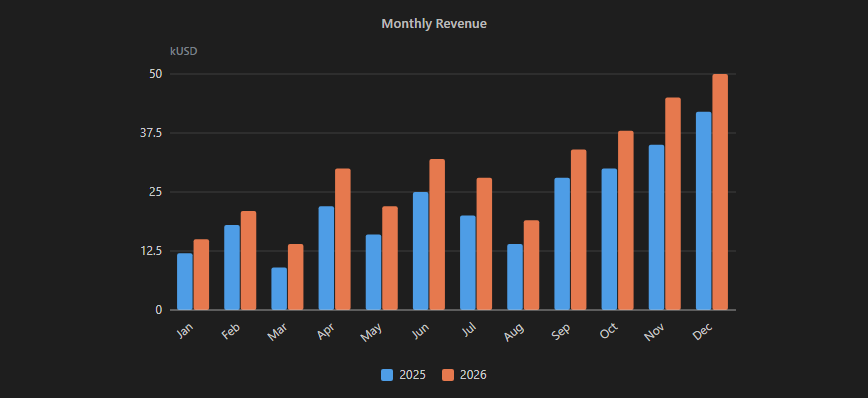
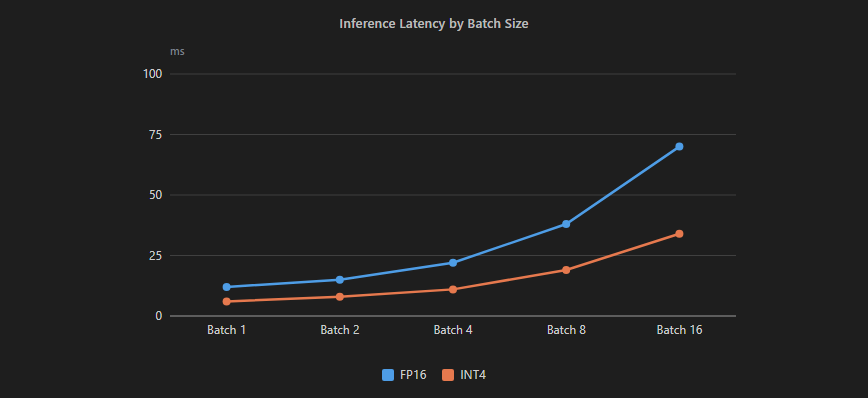
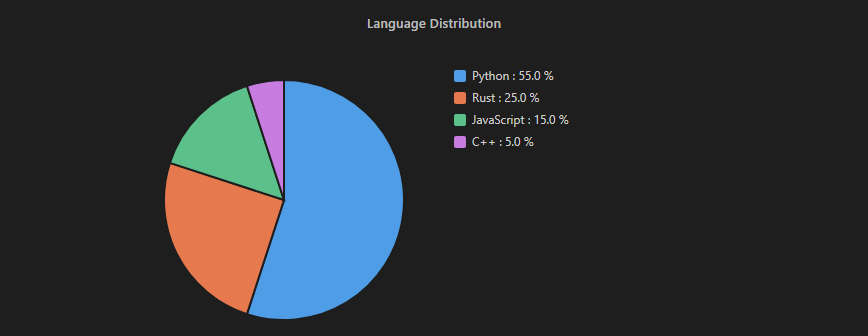
Charts are declared via :::chart <type> "Title". Types include bar, line, and pie. All charts are rendered as clean, scalable vector graphics with automatic coordinate mapping, gridlines, legends, dynamic Y-axis label spacing, and automatic X-axis label rotation when categories are dense.
Bar Chart
:::chart bar "Monthly Revenue"
@unit kUSD
x: Jan, Feb, Mar, Apr, May, Jun, Jul, Aug, Sep, Oct, Nov, Dec
2025: 12, 18, 9, 22, 16, 25, 20, 14, 28, 30, 35, 42
2026: 15, 21, 14, 30, 22, 32, 28, 19, 34, 38, 45, 50
:::
Line Chart
:::chart line "Inference Latency by Batch Size"
@unit ms
x: Batch 1, Batch 2, Batch 4, Batch 8, Batch 16
FP16: 12, 15, 22, 38, 70
INT4: 6, 8, 11, 19, 34
:::
Pie Chart
:::chart pie "Language Distribution"
Python: 55
Rust: 25
JavaScript: 15
C++: 5
:::
Native SVG Diagrams
RDTMD includes four built-in diagram generators with client-side layout algorithms.
1. Flowchart (flow)
Computes topological levels using a longest-path algorithm, handles internal cycles gracefully without infinite recursion, orders siblings via predecessor barycenters to minimize edge crossings, and draws curved connecting vectors with directional arrows.
:::diagram flow "Inference Pipeline"
@dir LR
Input -> Tokenizer
Tokenizer -> Embedding
Embedding -> Transformer
Transformer -> LMHead : Logits
LMHead -> Sampler
Sampler --> Output
:::

- Direction can be set to
@dir LR (left-to-right, default) or @dir TD (top-to-bottom).
- Solid arrows:
->. Dashed arrows: -->. Edge annotations: : label.
2. Sequence Diagram (sequence)
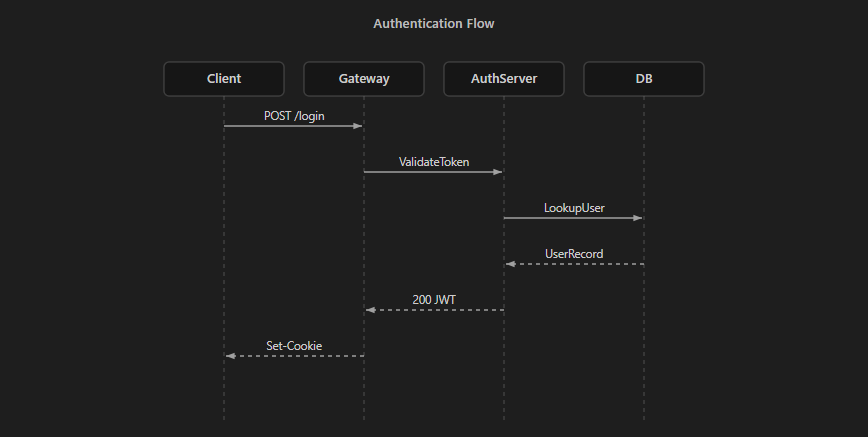
Generates vertical actor lifelines, sequence activation steps, synchronous calls, dashed return messages, and self-referential loops.
:::diagram sequence "Authentication Flow"
Client -> Gateway : POST /login
Gateway -> AuthServer : ValidateToken
AuthServer -> DB : LookupUser
DB --> AuthServer : UserRecord
AuthServer --> Gateway : 200 JWT
Gateway --> Client : Set-Cookie
:::
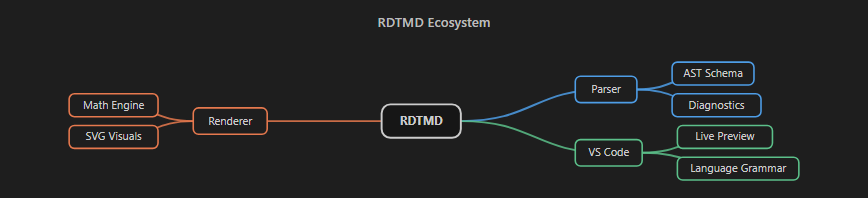
3. Mindmap (mindmap)
Parses indentation hierarchies (2 spaces per level) and generates a central-root tree structure. Child branches are distributed evenly across left and right sides with Bézier curves and distinct branch colors.
:::diagram mindmap "RDTMD Ecosystem"
RDTMD
  Parser
    AST Schema
    Diagnostics
  Renderer
    Math Engine
    SVG Visuals
  VS Code
    Live Preview
    Language Grammar
:::
4. Timeline (timeline)
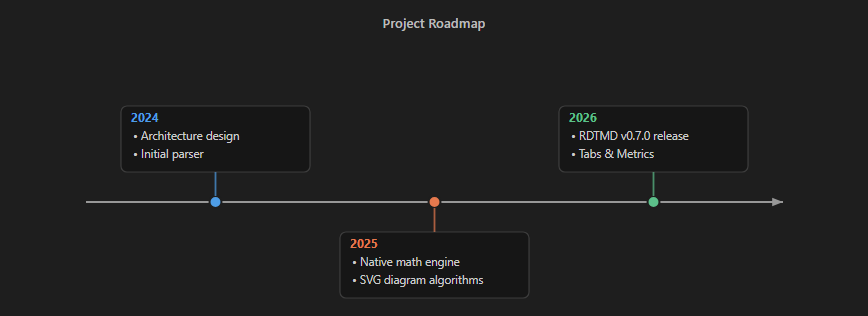
Constructs horizontal chronological project roadmaps. Milestone cards alternate above and below the central temporal axis, supporting multiple concurrent milestones separated by |.
:::diagram timeline "Project Roadmap"
2024: Architecture design | Initial parser
2025: Native math engine | SVG diagram algorithms
2026: RDTMD v0.7.0 release | Tabs & Metrics
:::
Interactive Tabs
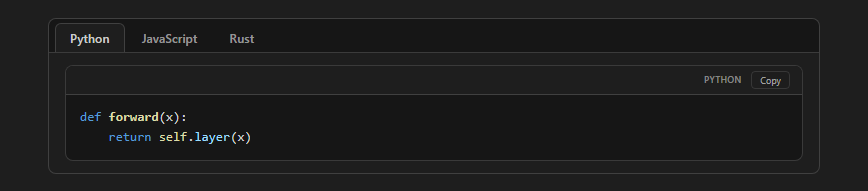
The :::tabs directive provides instant client-side tab switching without reloading or manipulating query parameters. Each tab begins with === Tab Name. Any valid RDTMD block (code blocks, tables, math, charts, callouts) can be placed inside a tab.
:::tabs
=== Python
```python
def forward(x):
    return self.layer(x)
=== JavaScript
function forward(x) {
    return this.layer.run(x);
}
=== Rust
fn forward(&self, x: &Tensor) -> Tensor {
    self.layer.forward(x)
}
:::
### Unambiguous Metric Cards
The `:::metrics` (or `:::kpi`) block creates responsive KPI grids. Variations can be enriched with explicit polarity qualifiers so improvements and regressions are categorized correctly:
```rdtmd
:::metrics "Benchmark Evaluation"
Validation Loss: 0.18 (-14%, good)
Latency: 42 ms (+6 ms, bad)
Accuracy: 98.4% (+1.2%, pos)
Parameters: 7B (+1B, neutral)
:::

- Positive / Improvement (
diff-pos, green badge): good, pos, amelioration (or prefix good: -14%).
- Negative / Regression (
diff-neg, red badge): bad, neg, regression (or prefix bad: +6 ms).
- Neutral (
diff-neutral, gray badge): neutral, neutre (or prefix neutral: +1B).
- Default: Without a qualifier, leading
+ defaults to positive, and - defaults to negative.
Conversational Dialogue
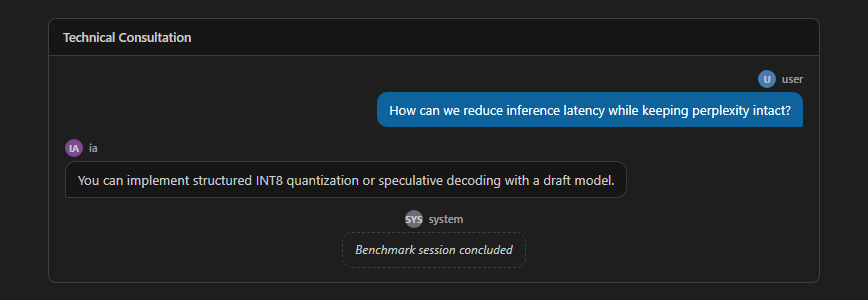
The :::chat (or :::dialog) block renders human-to-AI or multi-agent conversations with avatar badges, sender tags, and styled chat bubbles.
:::chat "Technical Consultation"
user: How can we reduce inference latency while keeping perplexity intact?
ia: You can implement structured INT8 quantization or speculative decoding with a draft model.
system: Benchmark session concluded
:::
Recognized roles:
user, utilisateur, human, me -> Right-aligned user bubble.ia, ai, assistant, model, bot -> Left-aligned assistant bubble.system, systeme -> Centered italicized system badge.- Any custom sender name is supported and labeled.
Collapsible Details
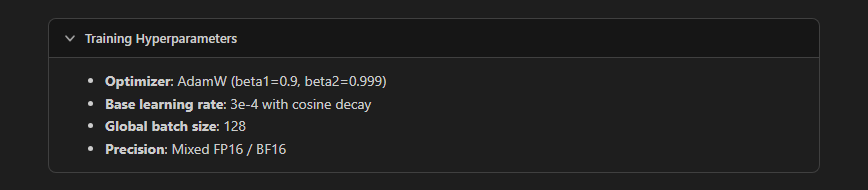
The :::details (or :::accordion) block provides collapsible disclosure sections with an animated rotating vector chevron.
:::details "Training Hyperparameters" @open
- **Optimizer**: AdamW (beta1=0.9, beta2=0.999)
- **Base learning rate**: 3e-4 with cosine decay
- **Global batch size**: 128
- **Precision**: Mixed FP16 / BF16
:::
- An optional
@open parameter renders the section expanded by default.
Fenced Code Blocks and Syntax Highlighting
Code blocks include enhanced headers displaying the language tag, file name, line numbering, line highlighting, and a one-click copy button:
```python title="train.py" lines hl="2,4-5"
import torch
import torch.nn as nn

class LinearModel(nn.Module):
    def __init__(self):
        super().__init__()
```
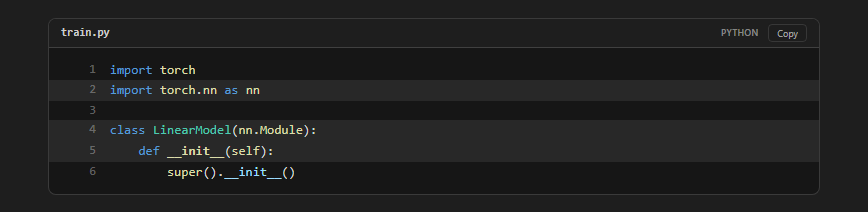
title="filename.ext": Displays the file name in the header bar.lines or num: Activates line numbers.hl="3,5-7": Surlines specified line numbers and ranges.- Language alias:
```py:train.py is also supported as a concise shorthand.
Custom Syntax Tokenizer
The built-in tokenizer recognizes 25+ programming languages, CLI utilities, and config formats:
- Languages: Python, JavaScript, TypeScript, Rust, C, C++, C#, Java, Go, PHP, Ruby, Kotlin, Swift, Lua, PowerShell, Batch, Shell, SQL, R, Perl, LaTeX.
- Config / Data: JSON, YAML, TOML, INI, HTML, XML, Nginx, GraphQL, Dockerfile, Makefile, Regex, Diff.
- Diff Enhancements: Multi-line diff blocks automatically compute outer boundary radiuses, keeping interior line seams square while rounding exterior corners.
```diff title="version_bump.diff"
@@ -1,4 +1,5 @@
-const version = "0.6.3";
+const version = "0.7.0";
+// Native tabs, metrics, chat, and details
```

Modular Document Includes
The @include directive embeds external .rdtmd documents cleanly:
@include chapters/introduction.rdtmd
@include architecture/diagrams.rdtmd
- Relative Path Resolution: Resolves target files relative to the current file on disk.
- Cycle Detection: Automatically flags and halts recursive loops.
- Depth Limiting: Clamps recursion to a maximum depth of 8 levels.
- Image Localization: Automatically remaps relative image paths within included documents to absolute system paths.
Security and CSP Compliance
Many VS Code markdown preview extensions encounter security warnings or rendering failures when strict Content Security Policies (CSP) are enforced in enterprise environments.
RDTMD is designed to adhere to the strictest CSP constraints:
- No
innerHTML: Code paths never assign raw string templates to element.innerHTML.
- No
eval() or dynamic scripts: Calculations and layouts execute through pure arithmetic routines.
- No inline style attribute assignments: Elements avoid
setAttribute('style', ...) in favor of direct property manipulation (element.style.width) or CSS utility classes.
- Safe URI validation: Links beginning with
javascript:, vbscript:, or malicious data: schemes are blocked at the inline parser stage.
AST Architecture
The RDTMD core exports two primary methods:
parse(text): Transforms a raw string into an Abstract Syntax Tree (AST) alongside an array of diagnostic warnings or errors.plainText(ast): Serializes the AST into plain text for fallback display, indexing, or search.
AST Node Example
{
  "type": "root",
  "children": [
    {
      "type": "heading",
      "level": 1,
      "inline": [{ "type": "text", "value": "Model Architecture" }],
      "line": 0
    },
    {
      "type": "metrics",
      "title": "Performance Summary",
      "items": [
        {
          "label": "Throughput",
          "value": "120 tokens/s",
          "diff": "+15 tokens/s",
          "diffType": "pos",
          "line": 3
        }
      ],
      "line": 2
    }
  ]
}
VS Code Extension Settings and Commands
Settings
rdtmd.preserveLineBreaks (boolean, default: true): Preserves source file line breaks in paragraphs and quotes within the preview.rdtmd.inlineIncludes (boolean, default: false): Embeds the content of @include files directly into the current preview. When disabled, displays a clickable navigation chip -> path.rdtmd that opens the target file in the editor.
Commands
- RDTMD: Open Preview (
rdtmd.preview): Opens the synchronized live preview in the side editor pane.
- RDTMD: Show AST (JSON) (
rdtmd.showAst): Opens a split view displaying the generated JSON Abstract Syntax Tree for debugging and introspection.
Installation and Usage
Installing the VSIX Extension Package
Run the following command in your terminal:
code --install-extension dist/rdtmd-1.0.2.vsix --force
Or search for RDTMD directly in the Visual Studio Code Extensions view (Ctrl+Shift+X).
After installation, reload your VS Code window:
- Press
Ctrl+Shift+P (or Cmd+Shift+P on macOS).
- Type
Developer: Reload Window and press Enter.
Creating Your First RDTMD Document
- Create a new file with the
.rdtmd extension (for example, report.rdtmd).
- Add your content:
# Project Report

:::metrics "System Health"
CPU Usage: 42% (-5%, good)
Memory: 8.2 GB (+0.4 GB, neutral)
:::

:::diagram flow "Pipeline"
Input -> Processor -> Storage
:::
- Click the preview button in the top-right corner of the editor tab, or press
Ctrl+Shift+P and choose RDTMD: Open Preview.
License
MIT License. Designed and maintained by Théo (RDTvlokip).


