SecretGuard 🔒
Visual-only secret masking for VS Code — Protect your credentials during screen sharing and live coding without modifying your files.



Screenshoot
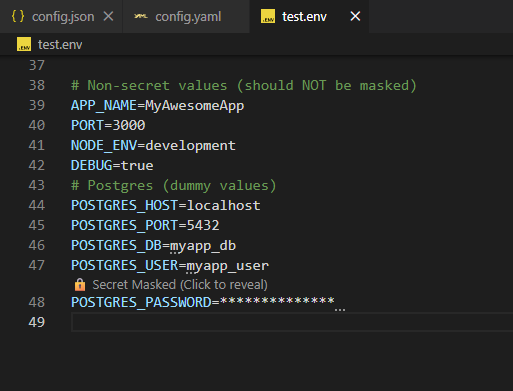
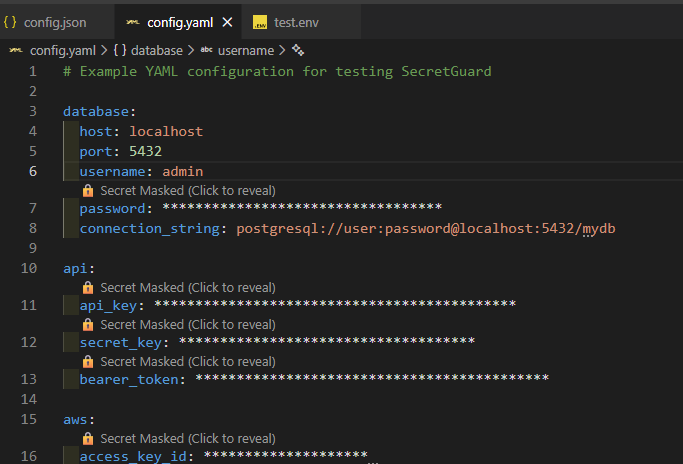
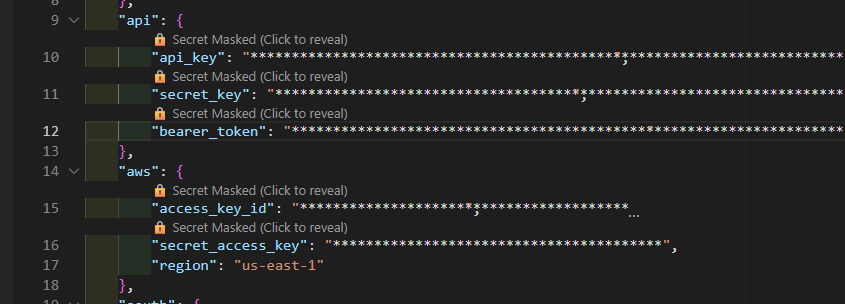
Features
✨ Visual-Only Masking — Secrets are masked in the editor view only. Your files remain unchanged (even inside VS Code diff views).
🔍 Smart Detection — Automatically detects secrets using:
- Keyword matching (API_KEY, SECRET, TOKEN, PASSWORD, etc.) even in indented YAML or single-quoted lines
- Regex patterns (JWT, AWS keys,
secret_access_key, connection strings, long tokens)
- Custom patterns you define
👁️ Reveal on Demand — Use inline CodeLens controls or commands to temporarily reveal secrets
⏱️ Auto Re-mask — Secrets automatically re-mask after timeout or when cursor moves
🎯 File Type Support — Works with .env, .json, .yaml, .js, .ts, .ini, .conf and more (including virtual Git diff documents)
🖼️ Screenshot Safe Mode — One-click mode forces every secret to stay masked and blocks reveal commands while presenting or sharing recordings
🏢 Workspace Policies — Teams can enforce strict masking rules (e.g., force strict mode, prevent disabling, mandate screenshot safe mode)
⚙️ Highly Configurable — Customize keywords, patterns, timeout, mask style, and more
⚡ Instant Status Toggle — Status bar button to enable/disable masking without leaving the editor
Installation
- Open VS Code
- Go to Extensions (Ctrl+Shift+X)
- Search for "SecretGuard"
- Click Install
Or install from VSIX:
code --install-extension secretguard-0.1.0.vsix
Usage
Automatic Masking
SecretGuard automatically masks secrets when you open supported files:
Before (actual file content):
API_KEY=sk_live_1234567890abcdefghijklmnop
DATABASE_PASSWORD=my_super_secret_password
JWT_TOKEN=eyJhbGciOiJIUzI1NiIsInR5cCI6IkpXVCJ9...
After (visual display in editor):
API_KEY=**********************************
DATABASE_PASSWORD=**************************
JWT_TOKEN=********************************************
CodeLens above each secret shows "🔒 Secret Masked (Click to reveal)" so you can toggle visibility without modifying the file.
Revealing Secrets
Method 1: Use inline CodeLens
- Click the CodeLens control (e.g., "🔒 Secret Masked (Click to reveal)") above the line
- Secret reveals for 10 seconds (configurable)
- Auto re-masks when timeout expires or when cursor moves
Method 2: Command Palette
Ctrl+Shift+P → "SecretGuard: Reveal Current Line"Ctrl+Shift+P → "SecretGuard: Mask All"Ctrl+Shift+P → "SecretGuard: Toggle Masking"
Status Bar Toggle
- Look for the status bar entry
$(eye-closed) Secrets: Hidden
- Click it to quickly enable/disable masking (
Secrets: Visible indicates masking is off)
- Useful when you momentarily need to reveal entire files without changing settings
Mask Styles
Full Mask (default):
API_KEY=********************************
Partial Mask:
API_KEY=sk**************************op
Change via settings: "secretGuard.maskStyle": "partial"
Configuration
Default Settings
{
  "secretGuard.enabled": true,
  "secretGuard.maskStyle": "full",
  "secretGuard.revealTimeout": 10000,
  "secretGuard.supportedExtensions": [
    ".env",
    ".json",
    ".yaml",
    ".yml",
    ".js",
    ".ts",
    ".ini",
    ".conf"
  ],
  "secretGuard.keywords": [
    "key",
    "secret",
    "token",
    "apikey",
    "api_key",
    "access_key",
    "private_key",
    "client_secret",
    "password",
    "pwd",
    "auth",
    "bearer"
  ],
  "secretGuard.customRegex": [],
  "secretGuard.maxFileSize": 1048576,
  "secretGuard.strictMode": false,
  "secretGuard.debounceDelay": 300
}
Customization Examples
Add custom keywords:
{
  "secretGuard.keywords": [
    "key",
    "secret",
    "token",
    "myCustomSecret"
  ]
}
Add custom regex patterns:
{
  "secretGuard.customRegex": [
    "ghp_[a-zA-Z0-9]{36}",
    "sk_test_[a-zA-Z0-9]{24}"
  ]
}
Enable strict mode (disable reveal):
{
  "secretGuard.strictMode": true
}
Increase reveal timeout to 30 seconds:
{
  "secretGuard.revealTimeout": 30000
}
Security Guarantees
✅ No File Modification — Files are NEVER modified. Masking is visual-only using VS Code's decoration API.
✅ No Logging — Secret values are never logged to console or output.
✅ No Persistence — Secrets are not saved to disk or sent anywhere.
✅ In-Memory Only — All masking happens in-memory during editor session.
✅ Strict Mode — Optionally disable reveal functionality entirely.
Supported File Types
.env - Environment variables.json - JSON configuration files.yaml, .yml - YAML configuration.js, .ts - JavaScript/TypeScript config files.ini - INI configuration.conf - Generic config files
Add more via secretGuard.supportedExtensions setting.
- Debounced Scanning - 300ms debounce to avoid UI blocking
- File Size Limit - Automatically skips files > 1MB (configurable)
- Visible Range Only - Scans only visible content for efficiency
- Non-Blocking - All operations are async and non-blocking
Troubleshooting
Secrets not being masked?
- Check if file extension is supported:
secretGuard.supportedExtensions
- Verify extension is enabled:
secretGuard.enabled
- Check if keyword matches:
secretGuard.keywords
- File might be too large:
secretGuard.maxFileSize
Reveal not working?
- Check if strict mode is enabled:
secretGuard.strictMode
- Verify screenshot safe mode or workspace policies aren't blocking reveal:
secretGuard.screenshotSafeMode, secretGuard.workspacePolicy.*
- Verify the line contains a detected secret
- Try using Command Palette: "SecretGuard: Reveal Current Line"
- Increase debounce delay:
secretGuard.debounceDelay
- Reduce max file size:
secretGuard.maxFileSize
- Disable for specific file types
Development
Building from Source
# Clone repository
git clone https://github.com/PutraAdiJaya/secretguard.git
cd secretguard

# Install dependencies
npm install

# Compile TypeScript
npm run compile

# Run in development mode
npm run watch
Testing
Press F5 in VS Code to launch Extension Development Host.
Create test files:
.env with API keys.json with secrets.yaml with credentials
Contributing
Contributions welcome! Please:
- Fork the repository
- Create a feature branch
- Make your changes
- Submit a pull request
License
MIT License - see LICENSE file for details
Support
Author
Maintained with ❤️ by PutraAdiJaya
Made with ❤️ for secure coding
Marketplace

