Password Generator Pro


Password Generator Pro is the ultimate tool for generating secure, customizable, and memorable passwords directly within VS Code. Whether you need a cryptographically strong random key or a memorable passphrase for your next project, we've got you covered.

📸 Screenshots
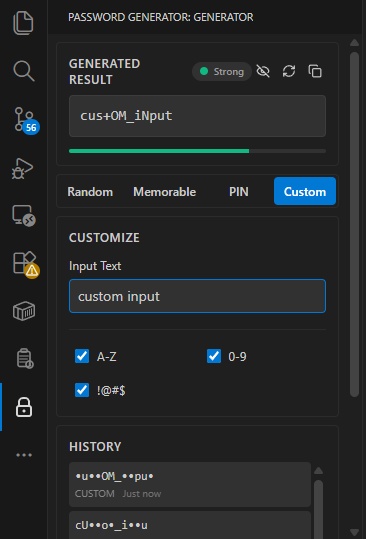
Main Interface
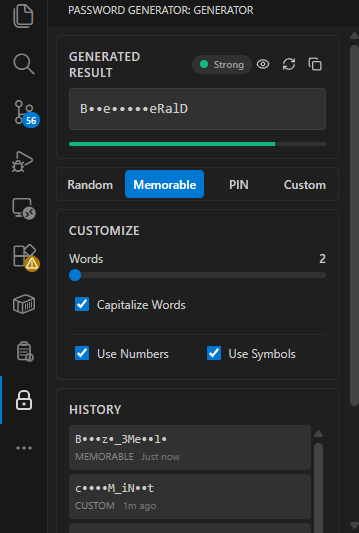
Password Generation Options
✨ Key Features
🔒 Cryptographically Secure
Powered by the Web Crypto API (crypto.getRandomValues), ensuring true randomness.
- Fisher-Yates Shuffling: Every character position is randomized to prevent pattern analysis.
- Guaranteed Inclusion: Ensures at least one character from every selected category (Uppercase, Symbols, etc.) is present.
🧠 Memorable Passphrases
Generate easy-to-remember passwords using a curated offline dictionary.
- Randomized Leetspeak: Advanced logic transforms words securely (e.g.,
apple → 4pp13 or Ap@lE) using secure probabilistic substitution.
- Custom Separators: Use dashes, underscores, or random symbols between words.
✍️ Custom Text Security
Turn your own phrases into secure passwords.
- Input Transformation: Type any text (e.g., "my secret project") and watch it transform into a secure, randomized Leetspeak version (e.g.,
My_53cr3t_Pr0j3c+).
🛡️ Secure History
- OS Keychain Storage: Your generated password history is stored securely using VS Code's
SecretStorage API, leveraging your operating system's professional-grade keychain (macOS Keychain, Windows Credential Manager, or Linux Secret Service).
- Zero-Static Keys: Unlike basic extensions, we don't use hardcoded encryption keys, ensuring your data remains private.
- Masking: Passwords in history are partially masked by default (showing only a snippet) to prevent shoulder surfing.
🛠️ Development & Quality
This extension is built with professional software engineering standards:
- Unit Tested: Core logic is verified by a comprehensive Jest test suite.
- Type Safe: Written entirely in TypeScript for reliability.
- Modern Stack: Built with React 19 and Tailwind CSS for a smooth, responsive UI.
🚀 Usage
- Open the Command Palette (
Ctrl+Shift+P / Cmd+Shift+P).
- Type
Password Generator: Generate Password.
- Select your preferred type:
- Random: Standard high-entropy strings.
- Memorable: Word-based phrases.
- PIN: Numeric codes.
- Custom: Your own text, secured.
⚙️ Configuration
Customize your experience via the UI panel:
- Length: Slider control (6-128 chars).
- Character Sets: Toggle A-Z, 0-9, Symbols, etc.
- Readability: Option to avoid ambiguous characters (
l, 1, O, 0) or use "Easy to Read" sets.
🔒 Privacy & Security
Password Generator Pro works 100% offline.
- No internet connection required.
- No telemetry or data collection.
- Passwords are generated locally on your machine.
Enjoying Password Generator Pro?
Please leave a rating and review on the Marketplace! ❤️
License
MIT © PutraAdiJaya

