Live API Mock Pro
A zero-setup mock REST & GraphQL server that lives inside VS Code.
Spin up realistic endpoints in seconds, fill them with Faker data, break them on purpose with error simulation, and test everything in a built-in API playground — no Docker, no backend, no internet connection required.
Features
- Zero setup — start a local Express server on
http://localhost:3777 with one click. It works offline.
- Collections → instant CRUD — every collection becomes a full REST resource with list, get, create, update, patch, delete and bulk endpoints. You also get pagination, sorting and filtering.
- 47 ready-made templates — in 7 categories (e-commerce, social media, travel, education, finance, health, general), e.g. products, orders, users, posts, flights, invoices, patients and tasks.
- Realistic fake data — generate up to 1,000 documents at a time with Faker, in any Faker locale.
- GraphQL — query your collections at
/api/graphql alongside REST.
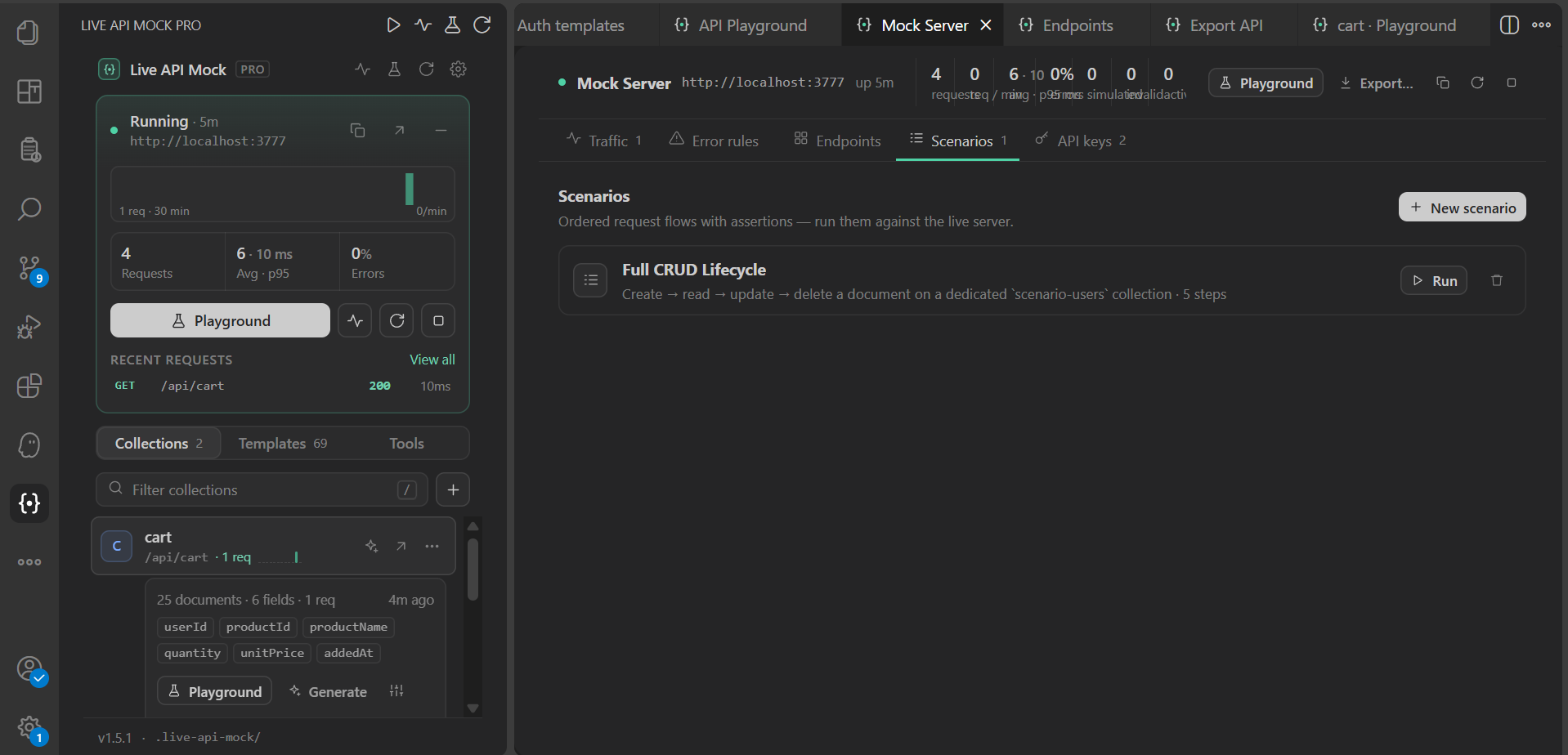
- Mock Server panel — a live log of the last 500 requests with status filters, search, a request/response inspector, one-click Replay in Playground and Copy cURL. It also shows req/min, avg and p95 latency, error rate, per-endpoint hits, scenarios and API keys.
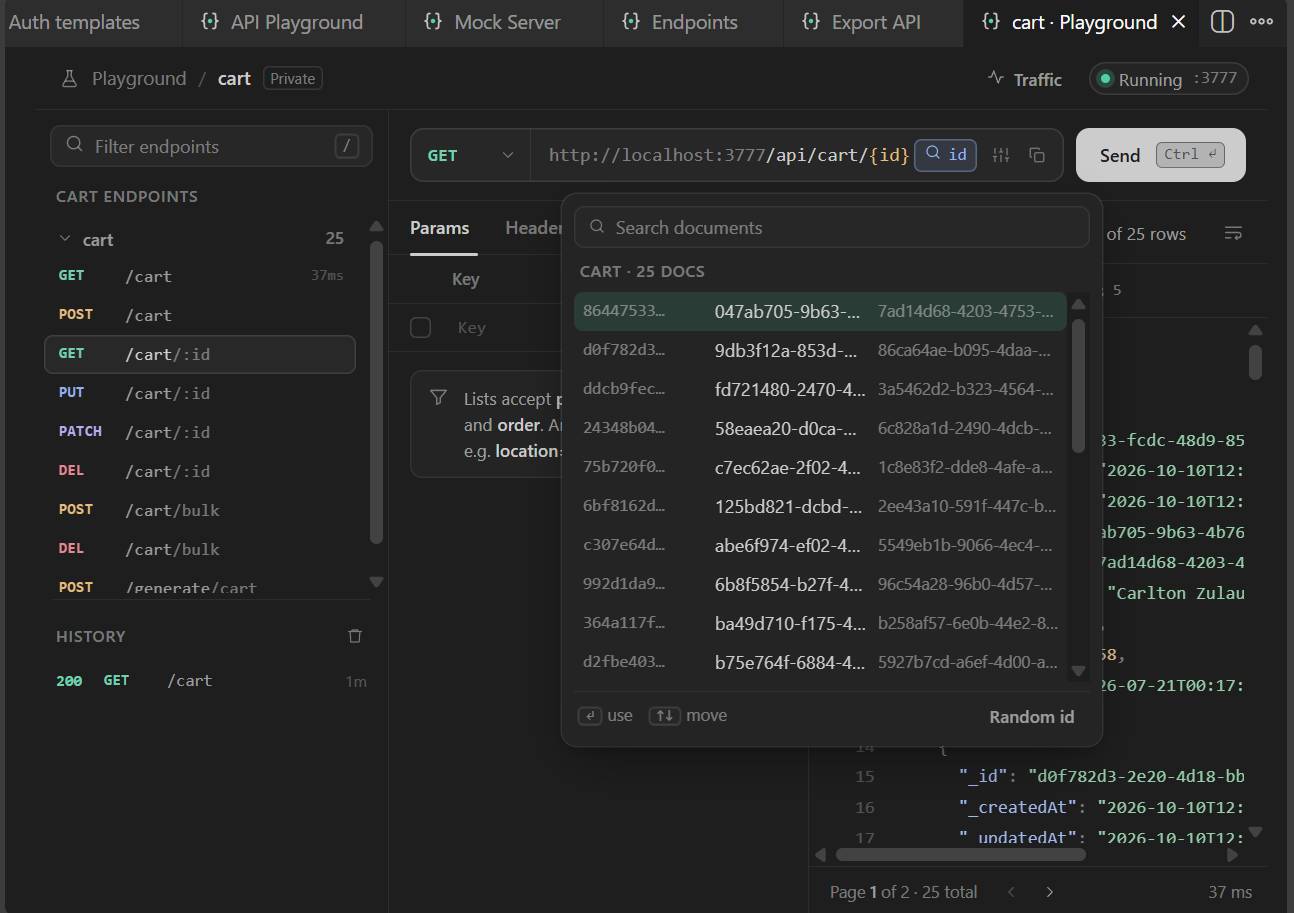
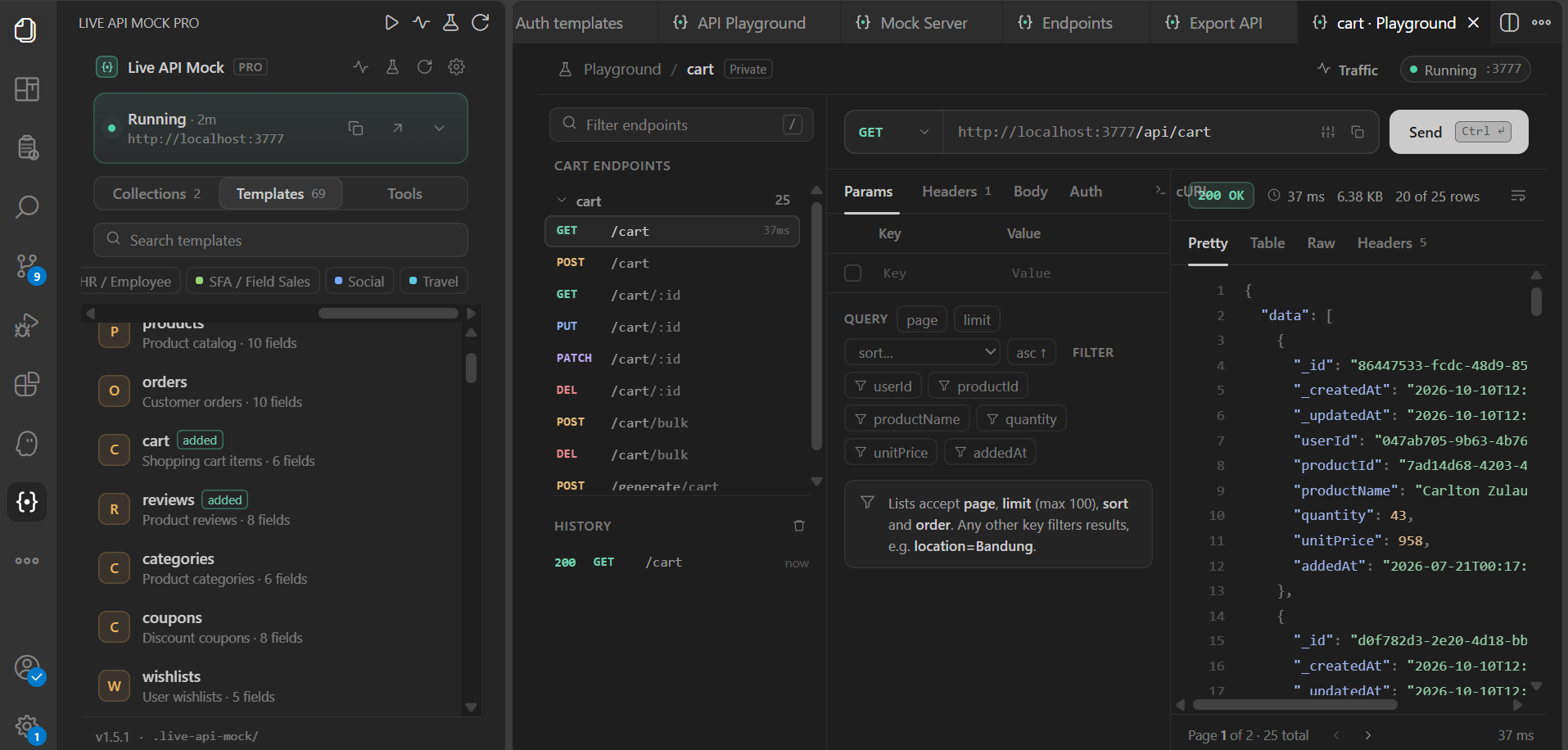
- Built-in API Playground — browse endpoints, edit params, headers, body and auth, and send requests (Esc cancels). An id picker fills
{id} from real documents, query chips add page/limit/sort/order/filters, POST/PUT bodies are pre-filled with Faker samples (never over text you typed), and GraphQL has ready-made examples. Big JSON renders in chunks; the table view has search, sorting, paging and tells you when columns are hidden. History is shared by all playground tabs.
- Error rules — inject HTTP errors (e.g.
503), timeouts, invalid JSON or random failures per endpoint and method. Choose exact-path or path + sub-paths matching (:id / {id} segments are wildcards), set a chance from 0–100 %, toggle rules on and off, pause all at once, start from presets and watch the hit counters. Rules are saved to .live-api-mock/rules.json and never touch the extension's own /api/health, /api/collections and /api/error-simulation routes.
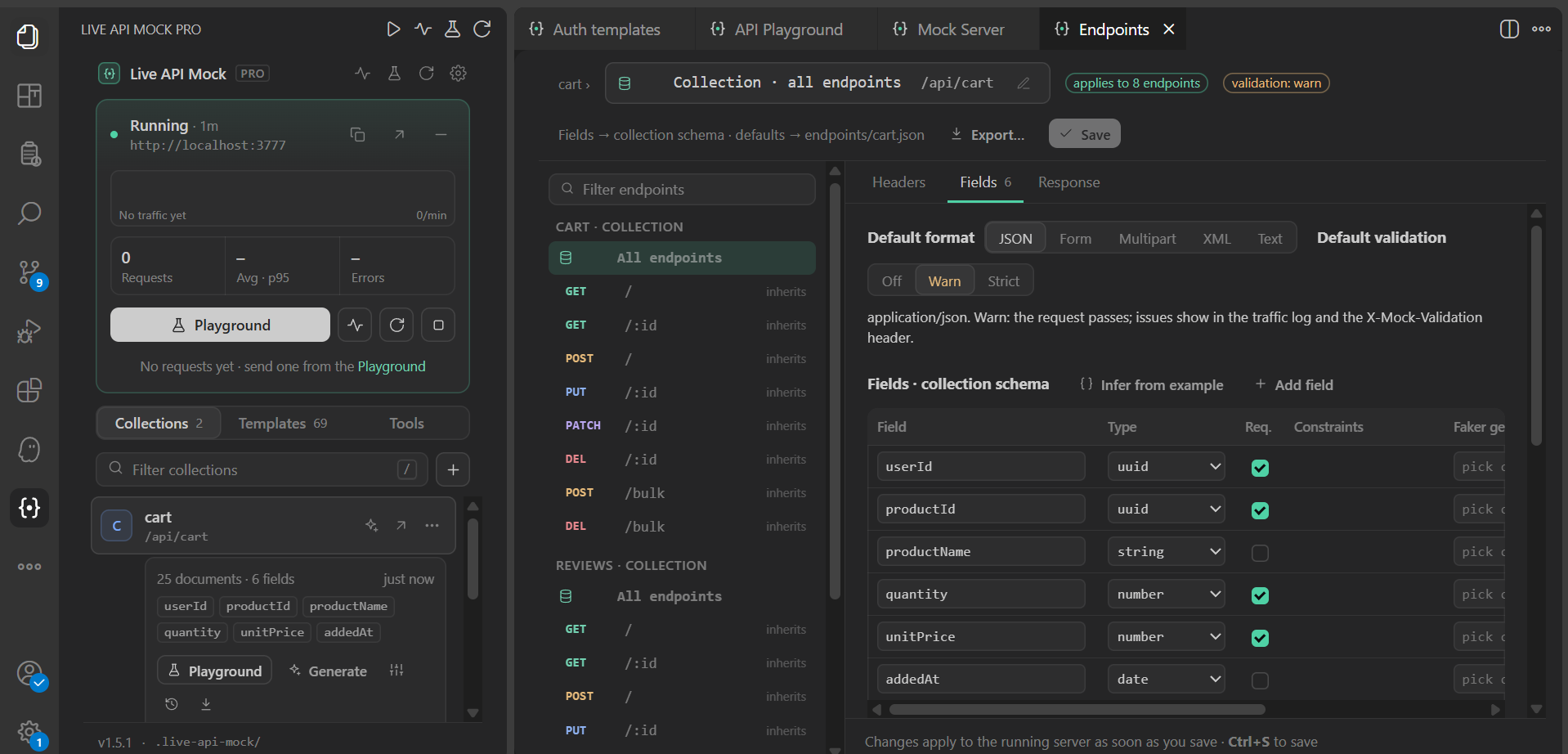
- Collection-level field attributes (1.3) — edit a collection's fields once and every endpoint uses them: name, type (incl. integer and enum), required, constraints (range, length, pattern, values, date format), Faker generator, example, custom error message, and how the field appears in responses (rename, format, hide). The same screen sets collection-wide required headers, validation modes, the default body format and response defaults. Saving updates the collection's real schema, so data generation, CRUD validation and GraphQL use it; renaming a field asks whether to migrate stored documents, and type changes that could invalidate data ask for confirmation. Per method: POST/PUT require the required fields, PATCH makes all fields optional, GET/DELETE ignore the body.
- Endpoint overrides — every endpoint inherits the collection settings. Inherited values are shown greyed out; change any field attribute, header or setting to override it on that endpoint only (marked override), with Reset to collection per item or for the whole endpoint. Endpoint files store only the differences. Endpoint files from 1.2.x are converted automatically on first start (a
*.v1.json.bak backup is kept): a body schema that is identical on POST, PUT and PATCH moves to the collection, real differences stay as overrides.
- Endpoint configuration — per route, declare query/path params (type, required, default, enum, pattern, range), required request headers (exact, one of, pattern; choose the 400/401/403/415 status), the request body format (JSON, form, multipart with file uploads, XML, text) and its field schema (types, nested objects, arrays, constraints, Faker generators, examples, custom messages). Validation mode per endpoint: Off, Warn (request passes; issues appear in the traffic log and an
X-Mock-Validation header) or Strict (rejects with 400 / 415 / 422 and a JSON error listing every issue). Shape responses too: status, delay ± jitter, extra headers, hide/rename/format returned fields, { data: … } envelopes, XML or text output, and conditional responses (e.g. when body.email ends with @blocked.test → 409). Works for collection CRUD routes and for custom endpoints such as POST /auth/login with templated bodies ({{body.username}}, {{uuid}}, {{faker.person.fullName}}). Collection defaults and endpoint overrides live in .live-api-mock/endpoints/<collection>.json (custom endpoints in custom.json) and apply instantly. Existing collections start in Warn mode, so nothing breaks after an update. Open the editor from a collection's menu in the sidebar (opens the collection level), the Endpoints tab of the Mock Server panel, the playground's URL bar or a request in the traffic log.
- OpenAPI import — turn an OpenAPI 3 JSON document into endpoint configs (params, header and bearer requirements, request-body schemas with
$ref/allOf, example responses). Postman and OpenAPI exports now include your endpoint configs and custom endpoints.
- API key authentication — optionally protect every endpoint with an
X-API-Key header.
- Scenarios & version history — script request sequences, snapshot collection schemas and roll back when needed.
- Import / export — share single collections, back up everything to one file, or turn a collection into a reusable custom template.
- Native look — the UI follows your VS Code theme (dark, light and high contrast). A status bar item shows the server state and request count; click it to start or stop the server.
Renaming paths
Every path can be changed after it was created — click the pencil next to the path in the endpoint editor, use Rename path… in the sidebar collection menu, or the pencil in Mock Server → Endpoints:
- Collection base path (
/api/users → /api/members): CRUD routes, overrides, error rules and playground history follow. Choose whether the GraphQL name stays or the collection is renamed too, and whether the old path is removed (default), kept as an alias or redirected (308).
- Custom endpoints: change the method and path, including
:params.
- CRUD route alias: an extra path for a single route, e.g.
GET /me/:id.
A live preview lists every affected route and blocks invalid, reserved or duplicate paths. Changes apply without restarting the server.
Exporting the API
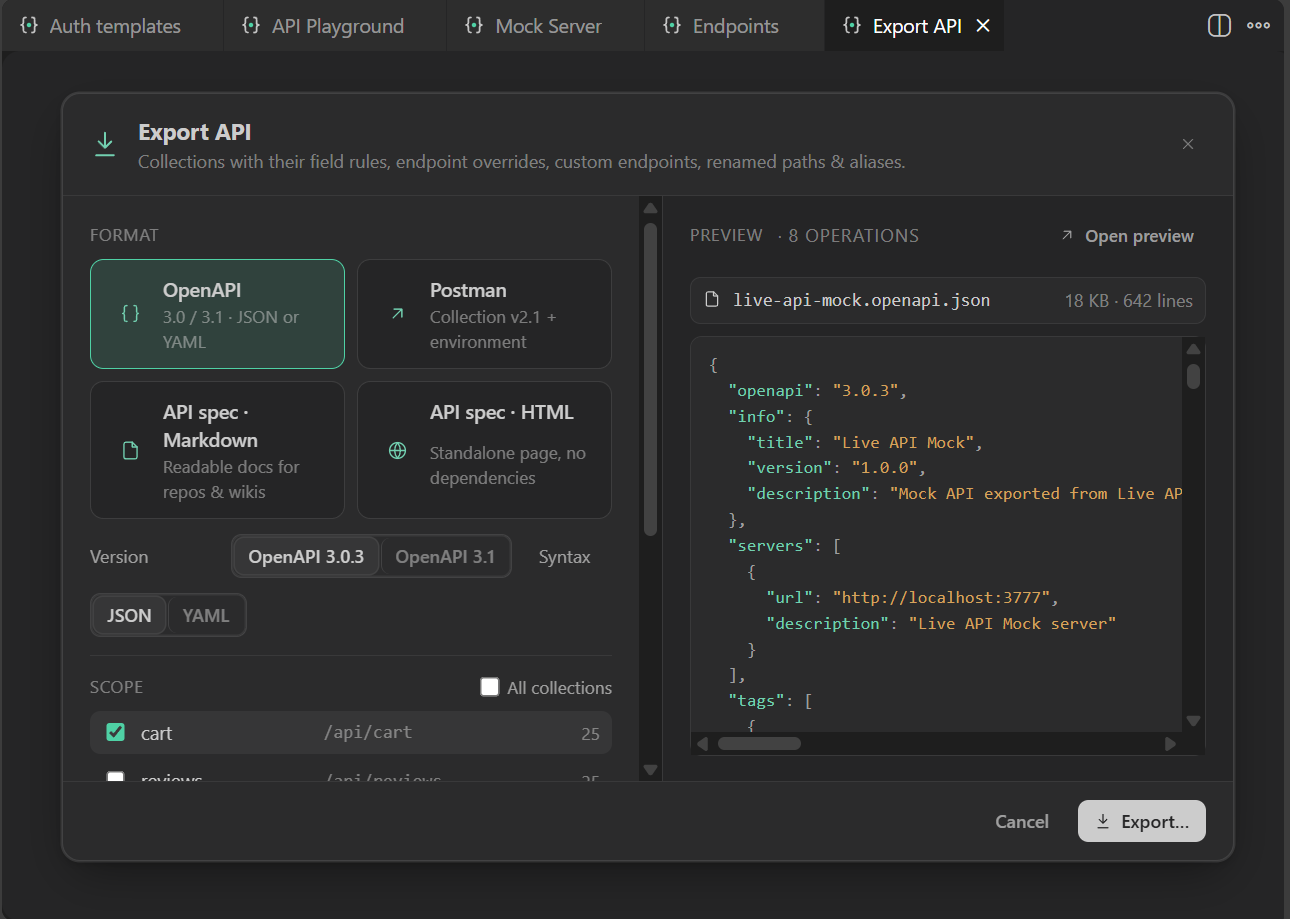
Live API Mock: Export… (also in the sidebar collection menu, the Mock Server panel header and per collection in its Endpoints tab, and the endpoint editor header) opens a small dialog: pick one, several or all collections plus custom endpoints, the server URL and title, whether to include examples and error rules — with a live preview of the output. Formats:
- OpenAPI 3.0.3 or 3.1 as JSON or YAML (YAML is written by a built-in serializer).
- Postman Collection v2.1 — a folder per collection, example bodies (field examples / Faker / stored documents), saved example responses, API-key auth, plus a
*.postman_environment.json with baseUrl and apiKey.
- API spec — a readable Markdown document or a standalone HTML page (filterable, light/dark) with endpoints, parameters, headers, body schema tables, validation rules, examples and error shapes.
Exports use the collection's field attributes plus endpoint overrides, custom endpoints, renamed base paths, old-path aliases and route aliases, required headers, auth, conditional responses (as named examples) and a GraphQL note. Files are saved through the normal save dialog, then Open / Reveal (and Open in Browser for HTML).
Quick Start
- Click the Live API Mock icon (
{•}) in the Activity Bar.
- Press Start (or click
Mock :3777 · off in the status bar).
- Open the Templates tab and add one, e.g. users. Or create your own collection with +.
- Click Open Playground and send
GET /api/users. Or call it from your app:
curl "http://localhost:3777/api/users?page=1&limit=10&sort=fullName&order=asc"
Your mock data is stored as JSON in .live-api-mock/ inside your workspace, so you can commit it and share it with your team.
REST endpoints
Every collection gets a full set of REST routes out of the box:
| Method |
Path |
Description |
GET |
/api/:collection |
List documents. Query params: page, limit (max 100), sort, order; any other param filters by field |
GET |
/api/:collection/:id |
Get one document |
POST |
/api/:collection |
Create a document |
PUT / PATCH |
/api/:collection/:id |
Replace / partially update a document |
DELETE |
/api/:collection/:id |
Delete a document |
POST / DELETE |
/api/:collection/bulk |
Bulk create / bulk delete |
POST |
/api/generate/:collection |
Generate fake documents ({ "count": 25 }) |
GET / POST |
/api/graphql |
GraphQL endpoint |
List responses include X-Total-Count, X-Page and X-Limit headers for easy pagination.
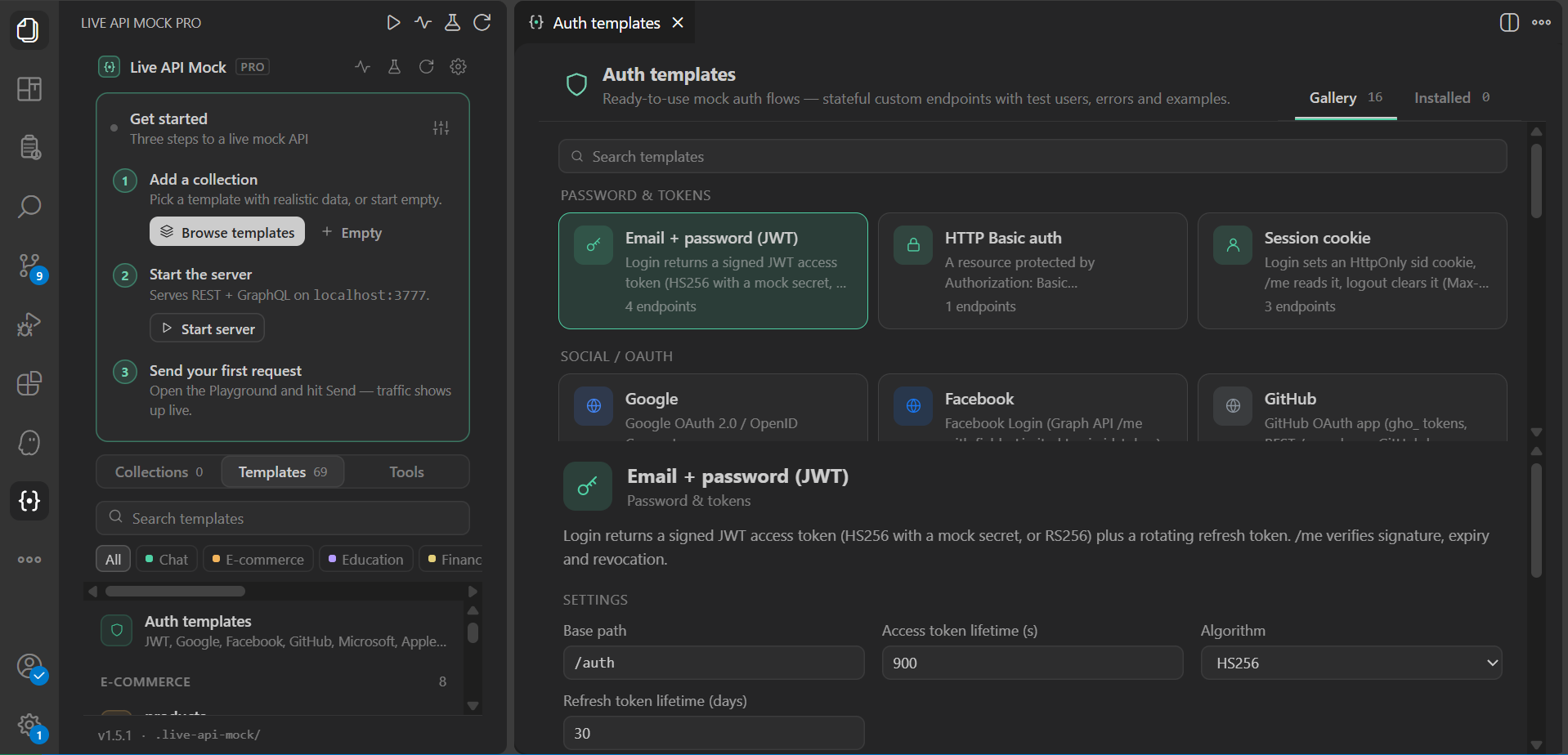
Auth templates (1.5.0)
Run Live API Mock: Auth Templates… (or Auth templates in the sidebar Templates tab / Mock Server → Endpoints) to add ready-made mock auth flows as custom endpoints:
| Template |
Endpoints (default base) |
| Email + password (JWT) |
POST /auth/login, /refresh, /logout, GET /auth/me |
| Google · Facebook · GitHub · Microsoft · Apple · generic OIDC |
/oauth/<provider>/authorize, /token, userinfo, /.well-known/openid-configuration, /jwks, /revoke |
| SAML 2.0 SSO |
/saml/metadata, /sso, /acs, /slo |
| LDAP (REST facade — not an LDAP protocol server) |
POST /ldap/bind, GET /ldap/search?filter= |
| OTP / 2FA |
/auth/2fa/otp/send, /otp/verify, /totp/setup, /totp/verify, /backup-codes, /backup-codes/verify |
| Magic link · API key · Basic · Session cookie · Password reset · Register + verify |
see the gallery preview |
Flows are stateful (codes, refresh tokens, sessions, OTP attempts) and use the auth_users collection (test users: alice@example.com / bob@example.com / locked@example.com / unverified@example.com, password Passw0rd!). One-time codes and links are returned in X-Mock-* response headers (visible in the traffic log) and listed in the gallery. Toggle failure scenarios per flow, or send X-Mock-Auth-Fail: invalid_credentials|locked|expired_token|wrong_otp on a request.
Commands
All commands are available from the Command Palette (Ctrl+Shift+P / Cmd+Shift+P) under Live API Mock.
| Command |
What it does |
| Start / Stop / Restart Mock Server |
Control the local server |
| Toggle Mock Server (Start/Stop) |
Same action as clicking the status bar item |
| Open API Playground |
Open the request playground |
| Open Mock Server Panel |
Live traffic, inspector, error rules, endpoints, scenarios and API keys |
| Create / Delete Collection |
Manage collections |
| Import Template |
Add one of the 47 built-in templates (choose document count and realism) |
| Generate Fake Data |
Fill a collection with Faker data |
| Export… |
OpenAPI 3.0/3.1 (JSON/YAML), Postman v2.1 + environment, or a Markdown/HTML API spec |
| Auth Templates… |
Gallery of stateful mock auth flows: JWT, Google/Facebook/GitHub/Microsoft/Apple/OIDC, SAML, LDAP (REST), OTP/2FA, magic link, API key, Basic, session cookie, reset, register |
| Export / Import Collection |
Share a single collection as JSON |
| Export / Import All Collections |
Back up or restore everything |
| Export Collection as Template / Import Custom Template |
Reuse your own schemas |
| Generate API Key |
Create a key for X-API-Key authentication |
| Configure Endpoints |
Edit a collection's field attributes and defaults once, and override them per endpoint |
| Rename Path… |
Rename a collection's base path, edit a custom endpoint's method/path, or add a CRUD route alias |
| Import OpenAPI (JSON) as Endpoint Configs |
Create endpoint configs and custom endpoints from an OpenAPI 3 JSON file |
| Configure Error Simulation |
Open the error-rules editor in the Mock Server panel |
| Create / Run / Delete Scenario |
Manage request scenarios |
| View Version History / Rollback to Version |
Inspect and restore schema versions |
| Refresh Collections |
Reload the sidebar |
Settings
| Setting |
Default |
Description |
liveApiMock.port |
3777 |
Port of the local mock server |
liveApiMock.autoStart |
false |
Start the server automatically when VS Code opens |
liveApiMock.corsOrigins |
* |
Allowed CORS origins (comma-separated) |
liveApiMock.authEnabled |
false |
Require an X-API-Key header on every request |
liveApiMock.dataDir |
.live-api-mock |
Data folder, relative to the workspace |
liveApiMock.fakerLocale |
en |
Faker locale used for generated data (e.g. de, fr, id_ID, ja) |
Requirements
- VS Code 1.85 or newer
- An open folder or workspace (mock data is stored inside it)
Privacy
Everything runs locally. The mock server only listens on your machine, and the extension sends no telemetry.
Feedback
Found a bug or have an idea? Please open an issue.
License
MIT © Putra Adi Jaya
| |

