Gigagrid CSV Pro
Fast CSV/TSV viewer and editor for VS Code, built for very large files.
Open multi-GB CSV files without freezing the editor. Gigagrid CSV Pro indexes the file lazily in a background worker and renders only the rows on screen, so you can scroll, search, sort, filter and edit millions of rows in a clean, spreadsheet-style grid.
Features
Built for big files
- Lazy indexing in a worker thread: the first rows show immediately while the rest is indexed (with progress and a Cancel button).
- Virtual scrolling of millions of rows with an edge-to-edge grid and frozen header.
- Delimiter and encoding detection (UTF-8, UTF-16 LE/BE, Latin-1, BOM-aware). Encoding, delimiter and line endings are preserved on save.
Spreadsheet-style interface
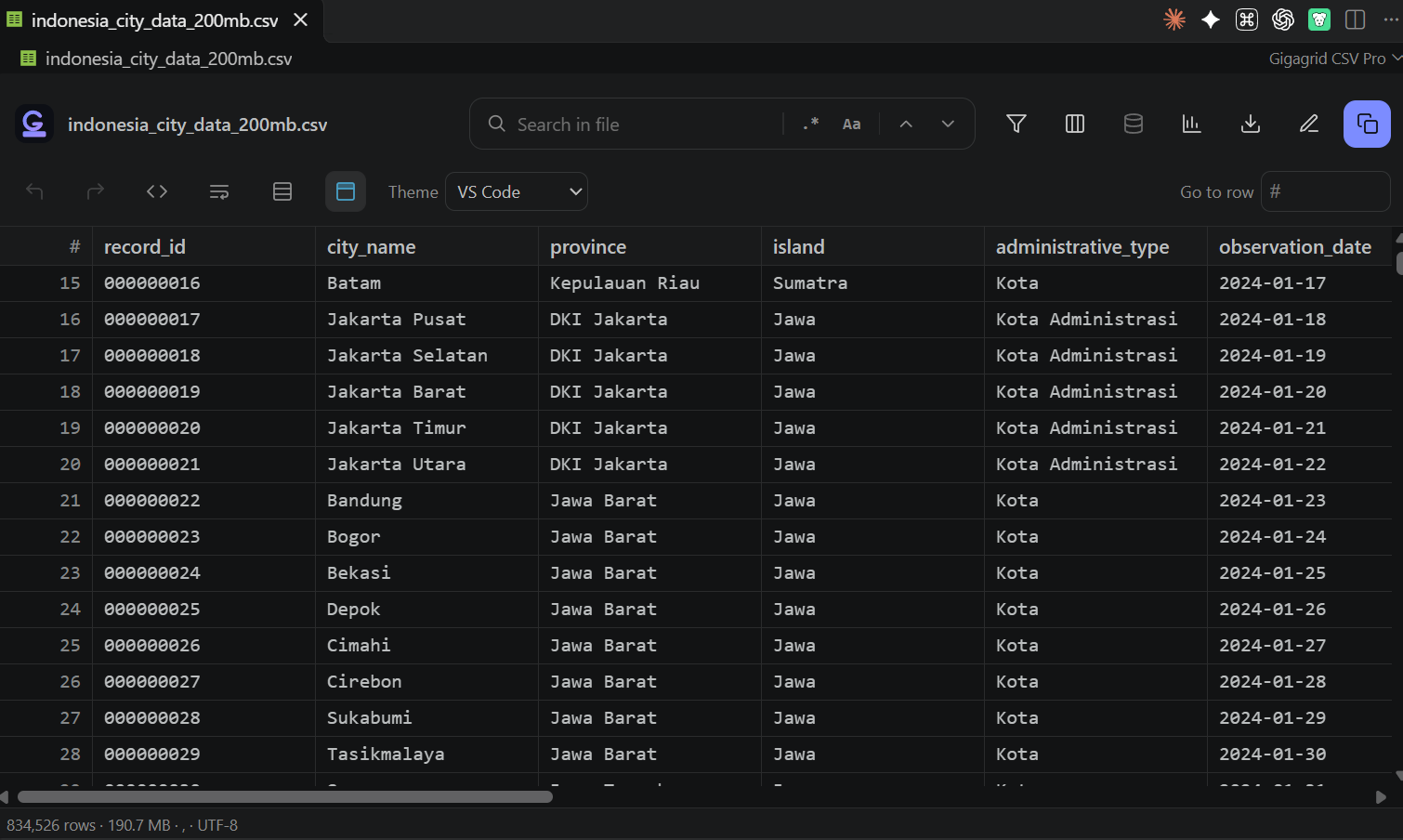
- Header with file name, row count, size and encoding.
- Icon toolbar: undo, redo, open as raw text, wrap text, zebra rows, first-row-is-header, theme, go to row.
- Cell bar showing the selected cell address (e.g.
C3 or B2:D5) and its full value.
- Sheet-style column and row headers, resizable / reorderable / hideable columns (layout saved per file).
- Slim status bar with rows, size, delimiter, encoding and edit state.
Themes
Choose Auto (follows VS Code), Excel, Gigagrid Dark, Light or High Contrast from the toolbar or with the gigagrid.theme setting.
Search, sort and filter
- Search the whole file, with regex and match-case options; jump between hits.
- Click a column header to sort (asc / desc); sorting runs in a background worker with a loading indicator.
- Stackable filters: contains, equals, range, is empty, is not empty.
- Column inspector: value preview and column profile (type, empty count, distinct values, histogram).
Editing
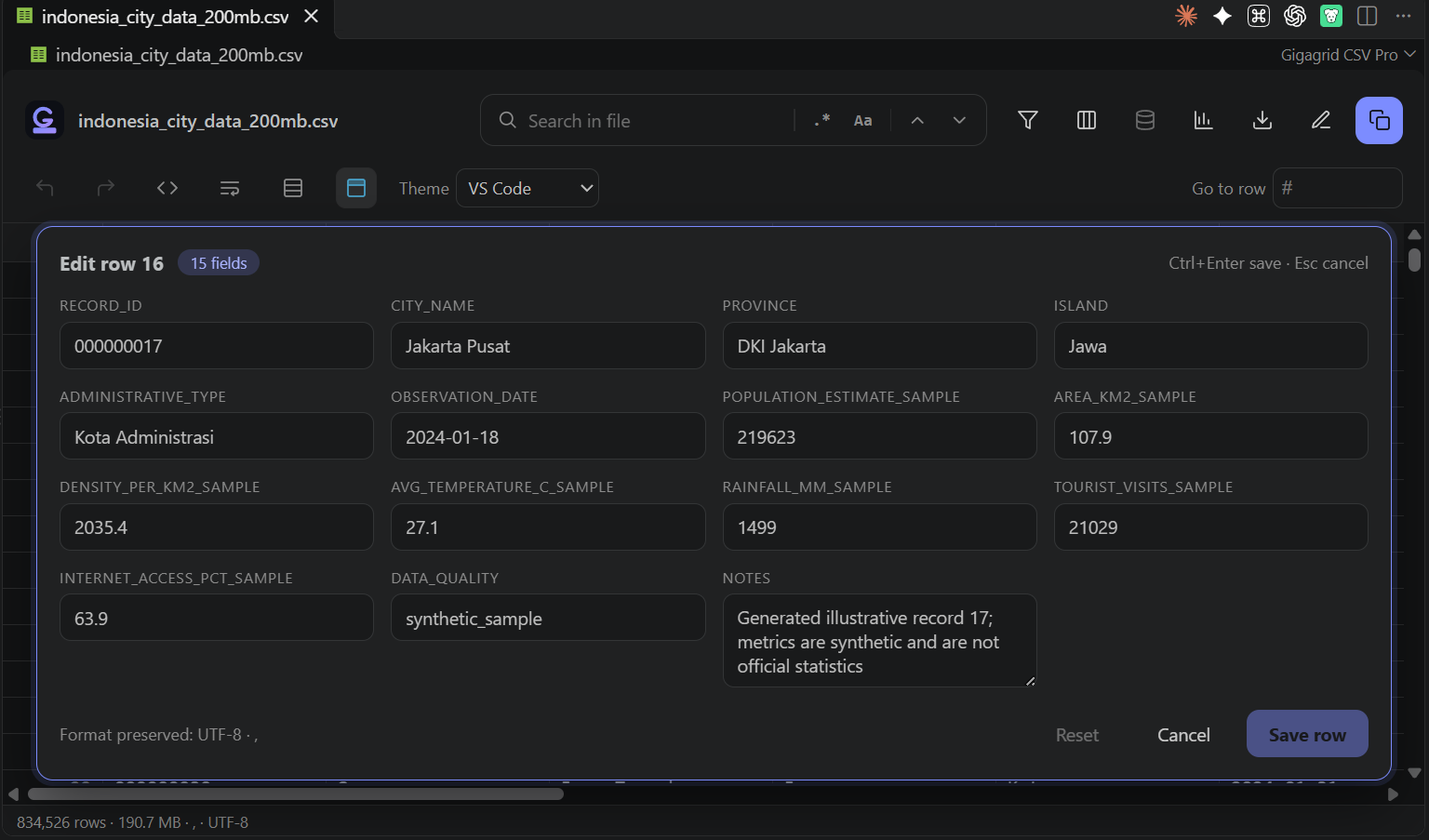
- Double-click a cell to edit inline, or open the row edit form (Shift+Enter or the row hover button) to edit all fields at once.
- Row hover actions: copy, edit, delete. Deleted rows stay visible (struck through) until you save, and can be restored.
- Undo / redo, integrated with VS Code (Ctrl+Z / Ctrl+Y), and normal VS Code save.
Copy and export
- Copy a cell, a range or whole rows as TSV, CSV, Markdown or JSON (optionally with header).
- Export the current (filtered/sorted) view to CSV or JSON.
Keyboard shortcuts
| Key |
Action |
| Ctrl+F |
Focus search |
| F3 / Shift+F3 (Ctrl+G) |
Next / previous match |
| Arrow keys, Shift+Arrows |
Move / extend selection |
| Enter or double-click |
Edit cell |
| Shift+Enter |
Edit row as form |
| Ctrl+Enter |
Save row form |
| Esc |
Cancel edit / close form |
| Ctrl+C |
Copy selection |
| Ctrl+Z / Ctrl+Y |
Undo / redo |
| Ctrl+S |
Save |
Supported files
.csv, .tsv, .tab, .psv open with Gigagrid CSV Pro by default. For a file already open as text, use the table icon in the editor title bar or Open with Gigagrid CSV Pro in the Explorer context menu.
Settings
| Setting |
Default |
Description |
gigagrid.theme |
auto |
Grid theme: auto, excel, gigagrid-dark, light, high-contrast. |
gigagrid.indexStride |
1000 |
Store one byte offset per N rows. Lower is faster to seek but uses more memory. |
Requirements
VS Code 1.85.0 or newer. Works locally, over Remote SSH and in WSL.
License
Proprietary. Copyright (c) 2026 PutraAdiJaya. All rights reserved. See LICENSE.txt included with the extension.
| |

