File & Folder Splitter Pro ✂️



Split and join large files and folders with ease!
Perfect for sharing large files, managing storage, and working with size-limited platforms.
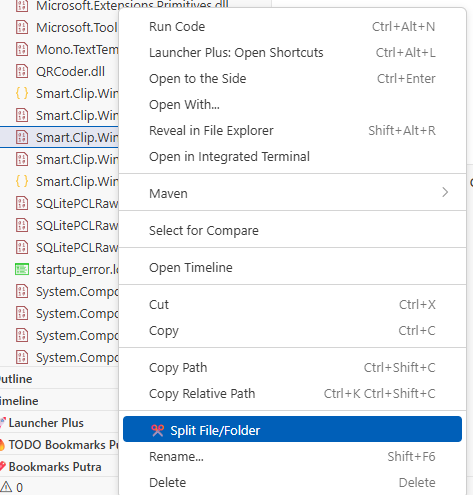
📸 Screenshots
Split File/Folder
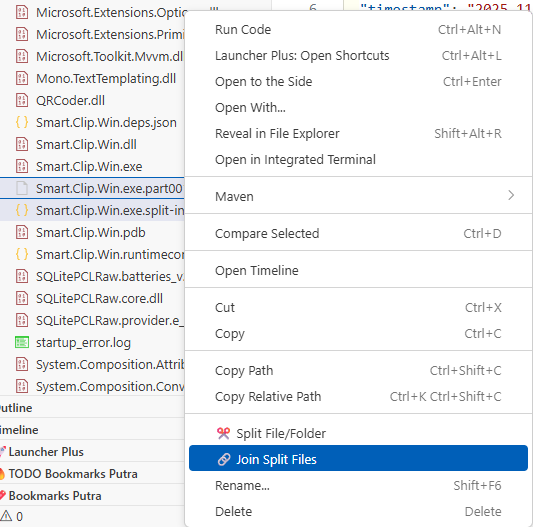
Join Split Files
✨ Features
- ✂️ Split Files - Break large files into configurable-size parts for easier distribution
- 📁 Split Folders - Automatically compress and split entire folders
- 🔗 Join Files - Seamlessly rejoin split files with integrity verification
- 📦 Auto Extract - Automatically extract compressed folders after joining
- 🔒 Checksum Verification - SHA-256 hashing ensures file integrity
- 🗑️ Auto Cleanup - Optional automatic deletion of parts after successful join
- 📊 Progress Tracking - Real-time progress indicators for all operations
- ⚙️ Configurable - Customize part size, compression level, and auto-delete settings
🚀 Quick Start
Installation
- Open VS Code
- Press
Ctrl+Shift+X (Windows/Linux) or Cmd+Shift+X (Mac)
- Search for "File & Folder Splitter Pro"
- Click Install
Usage
Split a File or Folder
- Right-click on any file or folder in the Explorer
- Select "✂️ Split File/Folder"
- Enter the desired part size in MB
- Done! You'll get:
- Multiple
.part001, .part002, etc. files
- A
.split-info.json metadata file
Join Split Files
- Right-click on any
.part001 file
- Select "🔗 Join Split Files"
- The extension automatically:
- Finds all parts
- Validates checksums
- Reconstructs the original file
- Extracts folders (if compressed)
- Cleans up parts (if enabled)
⚙️ Configuration
Access settings via File > Preferences > Settings and search for "File Splitter":
| Setting |
Default |
Description |
fileSplitter.partSize |
100 |
Default part size in MB (1-10000) |
fileSplitter.autoDeleteOnJoin |
false |
Auto-delete parts after successful join |
fileSplitter.compressionLevel |
6 |
Compression level for folders (0-9) |
🔧 Requirements
- VS Code 1.80.0 or higher
- Node.js runtime (included with VS Code)
💡 Use Cases
- 📧 Email Attachments - Split large files to fit email size limits
- ☁️ Cloud Storage - Upload large files to services with size restrictions
- 💾 Backup - Split backups across multiple drives or media
- 🌐 File Sharing - Share large files on platforms with upload limits
- 📱 Mobile Transfer - Transfer large files in smaller chunks
- Streaming I/O - Memory-efficient processing for files larger than RAM
- SHA-256 Hashing - Ensures complete file integrity
- Safe Cleanup - Only deletes verified parts after successful join
- Error Handling - Automatic rollback on verification failure
🐛 Troubleshooting
"Missing part" error
- Ensure all
.part### files are in the same directory
- Don't rename or move part files
- Check the
.split-info.json file for the expected number of parts
"Checksum mismatch" error
- One or more parts may be corrupted
- Re-download or copy the parts from source
- Delete the corrupted file and retry splitting
Join fails silently
- Check VS Code Output panel for error messages
- Verify write permissions in the target directory
- Ensure sufficient disk space is available
The .split-info.json file contains:
{
  "originalName": "document.pdf",
  "totalParts": 5,
  "partSize": 100,
  "checksum": "sha256_hash_of_original_file",
  "timestamp": "2025-11-23T10:30:00Z",
  "autoDeleteEnabled": true,
  "createdBy": "vscode-file-splitter"
}
⚠️ Limitations
- Maximum part size: 10,000 MB
- Minimum part size: 1 MB
- Parts must remain in the same directory
- Works within a single workspace
📄 License
MIT License - see LICENSE file for details
🤝 Contributing
Contributions are welcome! Please feel free to submit issues and pull requests.
📚 Release Notes
See CHANGELOG.md for version history and updates.

