Skip to content
| Marketplace
Sign in
Visual Studio Code>Other>HandoffBar for Claude CodeNew to Visual Studio Code? Get it now.
HandoffBar for Claude Code

HandoffBar for Claude Code

Proxylang

|
1 install
| (0) | Free
Copy a Claude Code chat's handoff with one click from the chat tab, and see how long its prompt cache has left.
Installation
Launch VS Code Quick Open (Ctrl+P), paste the following command, and press enter.
Copied to clipboard
More Info

HandoffBar for Claude Code

When a Claude Code chat sits idle too long, its prompt cache expires and your next message re-sends the whole chat at full price. A short handoff in a new chat is cheaper.

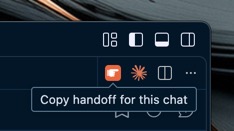
This extension adds a hand icon to the title bar of every Claude Code chat tab and to the Claude sidebar. Click it and the chat's handoff is on your clipboard. Paste it into a new chat and keep going.

The orange hand icon at the top right of a Claude chat tab, with the tip "Copy handoff for this chat"

  • One click, nothing sent. The icon copies the handoff. It does not type into the chat, so the old chat is never re-sent.
  • Cache countdown. The status bar shows how long the open chat's cache has left, and turns yellow once it expires.
  • Same handoff as the app. It writes ~/.claude/handoffs/<chat id>.md, the same file the HandoffBar Mac and Windows apps write.

What it reads and writes

It reads the chat files Claude Code already saves in ~/.claude/projects. It writes one Markdown file per chat in ~/.claude/handoffs. It makes no network requests and has no dependencies.

MIT licensed. Source: github.com/Proxylang/handoff-bar. Not affiliated with Anthropic.

  • Contact us
  • Jobs
  • Privacy
  • Manage cookies
  • Terms of use
  • Trademarks
  • Your Privacy Choices
  • Consumer Health Privacy
© 2026 Microsoft