Stacked Pull Requests for Azure DevOps
Review big changes in small, honest pieces. See every stack of dependent pull requests as one tree, and review each
layer on its own, without re-reading the code underneath it.
Get it on the Visual Studio Marketplace ·
Source on GitHub ·
User guide
The problem
Stacking is how teams ship large work safely: branch b from a, then c from b, and open a pull request for each
so every review stays small. Azure DevOps has no idea that these pull requests belong together:
main ← A ← B ← C

   What you want to review        What Azure DevOps shows for C
   ───────────────────────        ─────────────────────────────
   C                              A + B + C   (and A and B again)
So reviewers read the same code over and over, or wait for the parent to merge before the child is reviewable. Stacking
stops being worth the trouble.
What this extension does
It makes the stack visible, and makes each layer reviewable.
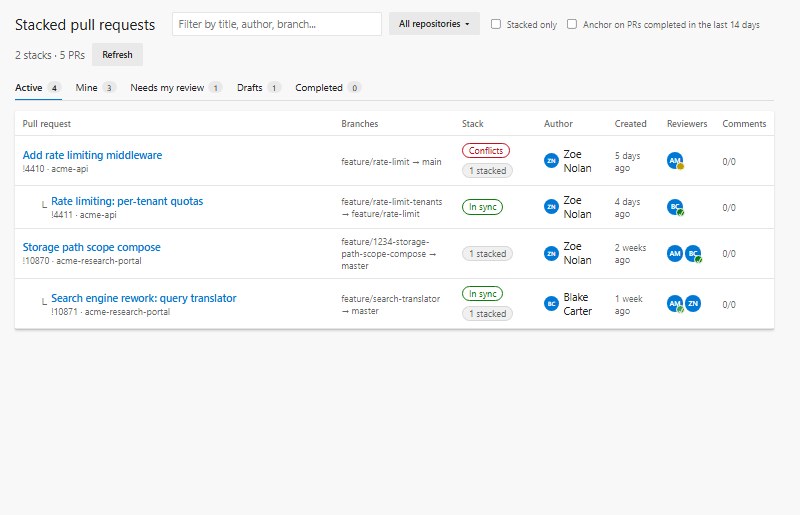
- A tree, not a flat list. Every active PR in your project, across all repositories, arranged into its stack.
Chains, branching stacks and parents that already merged are all handled.
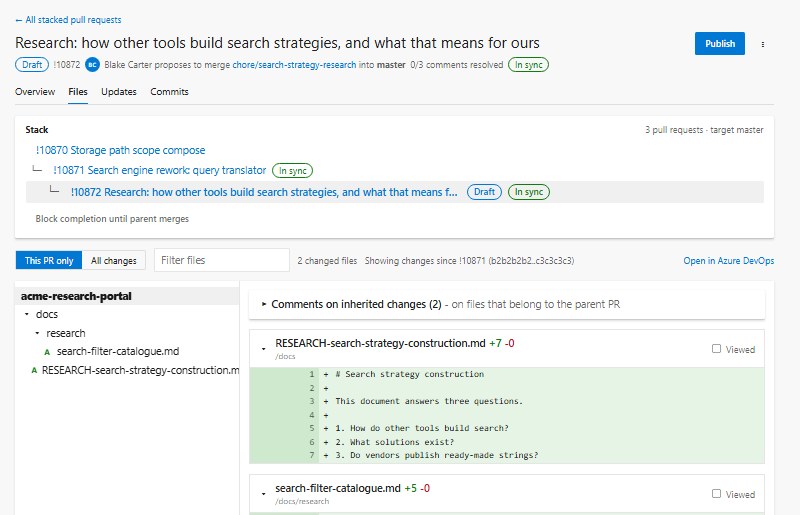
- Review only what this PR adds. One switch flips between This PR only and All changes. The layer diff is
taken against the merge base with the parent, so it stays correct when the parent moves on or was squash-merged.
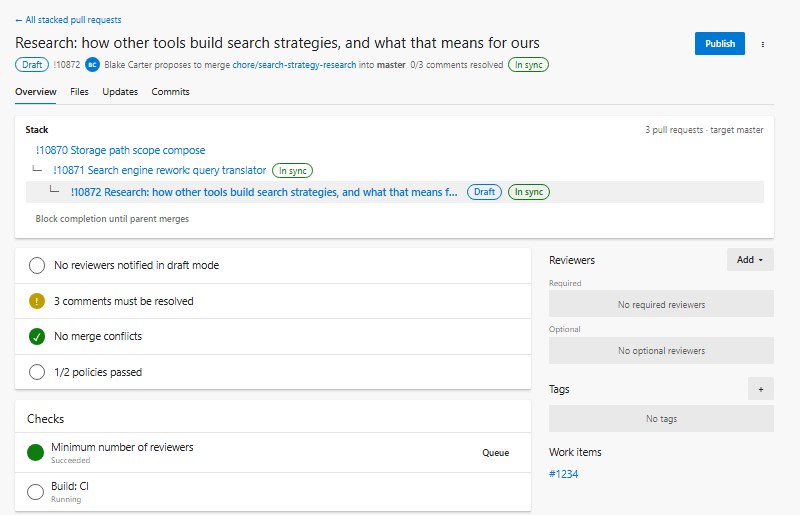
- Nothing is lost. Comments, votes, reviewers, policies and builds are the real Azure DevOps ones. Anything you do
here shows up on the built-in PR page, and the other way round.
A complete review experience
You never have to leave to finish a review. Everything the built-in page does for a pull request is here:
|
|
| Inline comments |
Add, reply, edit, delete, like and resolve, with all thread states. Comments on the parent's files are grouped separately. |
| Votes that stay put |
Approving B never approves A. Every vote lands on the PR you are looking at, and nowhere else. |
| Reviewers and checks |
Reviewers, tags, work items, policy evaluations and statuses, with build re-queue. |
| Finish the job |
Complete, auto-complete, abandon, mark as draft and publish. Updates and Commits tabs for the history. |
| Viewed marks |
Tick files off as you go and collapse what you have read. |
| Fast on big PRs |
Pages stream in as they arrive and long lists scroll infinitely, so a huge stack opens quickly instead of timing out. |
| Light and dark |
Follows your Azure DevOps theme. |
Keeps the stack healthy
Stacks rot when a parent changes underneath them. The extension tells you before that bites:
- Parent ahead: the parent has new commits, so the child needs a rebase.
- Parent merged: the parent completed. One click retargets the child to the trunk.
- Conflicts are flagged right in the list.
- Merge order: add an optional status check that a branch policy can require, so B cannot be completed before A.
- Pin a parent by hand from the PR menu when automatic detection is not what you want. It is stored on the PR, so
the whole team sees it.
It lives where you already work
- A Pull Requests (Stacked) page under Repos.
- A Stack tab on every pull request.
- An Open stacked review item in the PR "..." menu.
How stacks are found
No special branch naming, no CLI, no setup. The extension reads your pull requests and works it out, highest priority
first:
- Manual: a parent you pinned.
- Explicit:
B targets the branch that A is built from.
- Contained:
A and B share a target, and A's commits are inside B. This is the common "everything targets
main" setup.
When several pull requests qualify, the closest one wins, so A ⊂ A2 ⊂ B becomes A ← A2 ← B.
Install
- Open the extension on the
Visual Studio Marketplace.
- Choose Get it free and pick your Azure DevOps organization.
- Open Repos → Pull Requests (Stacked).
It works with Azure DevOps Services (cloud) and Azure DevOps Server 2022 or later (on-prem). There is no
backend: the extension talks only to your own organization or collection, using the permissions it asks for (vso.code_write, vso.code_status, vso.build, vso.work,
vso.identity, vso.graph, vso.extension.data_write).
Azure DevOps Server
- Connected servers: install from the Marketplace through Collection Settings → Extensions → Browse Marketplace.
- Offline servers: download the
.vsix from the Marketplace page (or build it with npm run package), then go to
Collection Settings → Extensions → Browse local extensions → Manage extensions → Upload extension and install it
into the collection.
The extension finds the collection URL from the host and adapts to the REST API version the server supports.
Prefer to build it yourself? See Development.
Good to know
Azure DevOps extensions run in a sandbox, which shapes a few things:
- Everything can be switched off per user or for the whole organization under Preview features
(Stacked Pull Requests, on by default).
- The built-in PR page cannot be replaced, so this adds its own full review page and links to it from the native one.
- A comment on a deleted line of a layer diff is attached to the nearest remaining line and quotes the removed text.
- Merge order is enforced through a branch policy on the optional status. Nothing runs in the background.
Roadmap
Side-by-side diffs, whitespace-insensitive diffs, syntax highlighting, a stack-wide review dashboard and guided restack
are on the list. See docs/IMPROVEMENTS.md for the researched backlog, and
open an issue to tell us what would help your team.
Contributing
Contributions are welcome. Start with CONTRIBUTING.md and docs/DEVELOPMENT.md.
You can run the whole UI against mock data, with no Azure DevOps organization needed:
npm install
npx webpack --mode development --env harness
node scripts/serve.js        # then open http://localhost:5173/harness.html
More: User guide · Architecture · Changelog
Acknowledgements
Inspired by Active Pull Requests, which shows pull requests
from all repositories in one list, and by GitHub's native stacked pull requests.
License
MIT

