Class Spy
Stop guessing what your CSS classes do — hover and see everything instantly.


What does it do?
Class Spy turns your class and className attributes into interactive CSS explorers. Hover over any class string in your code and instantly see:
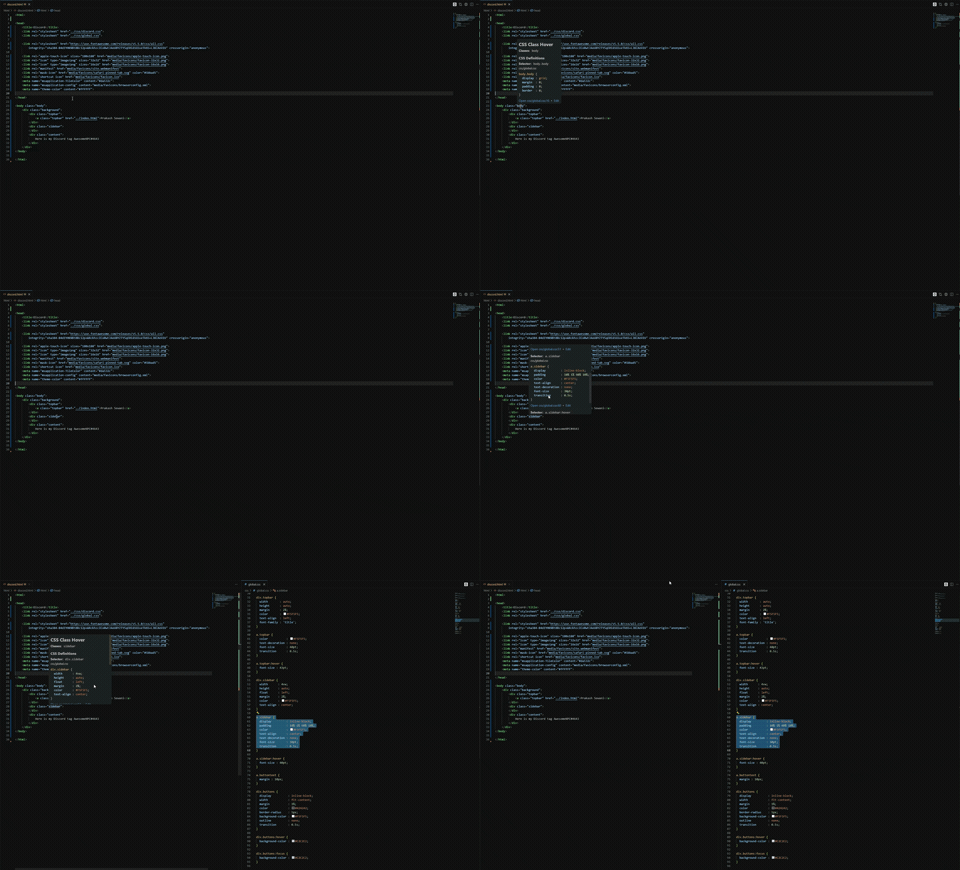
- Where the CSS is defined — each custom class gets its own section with file name and full rule
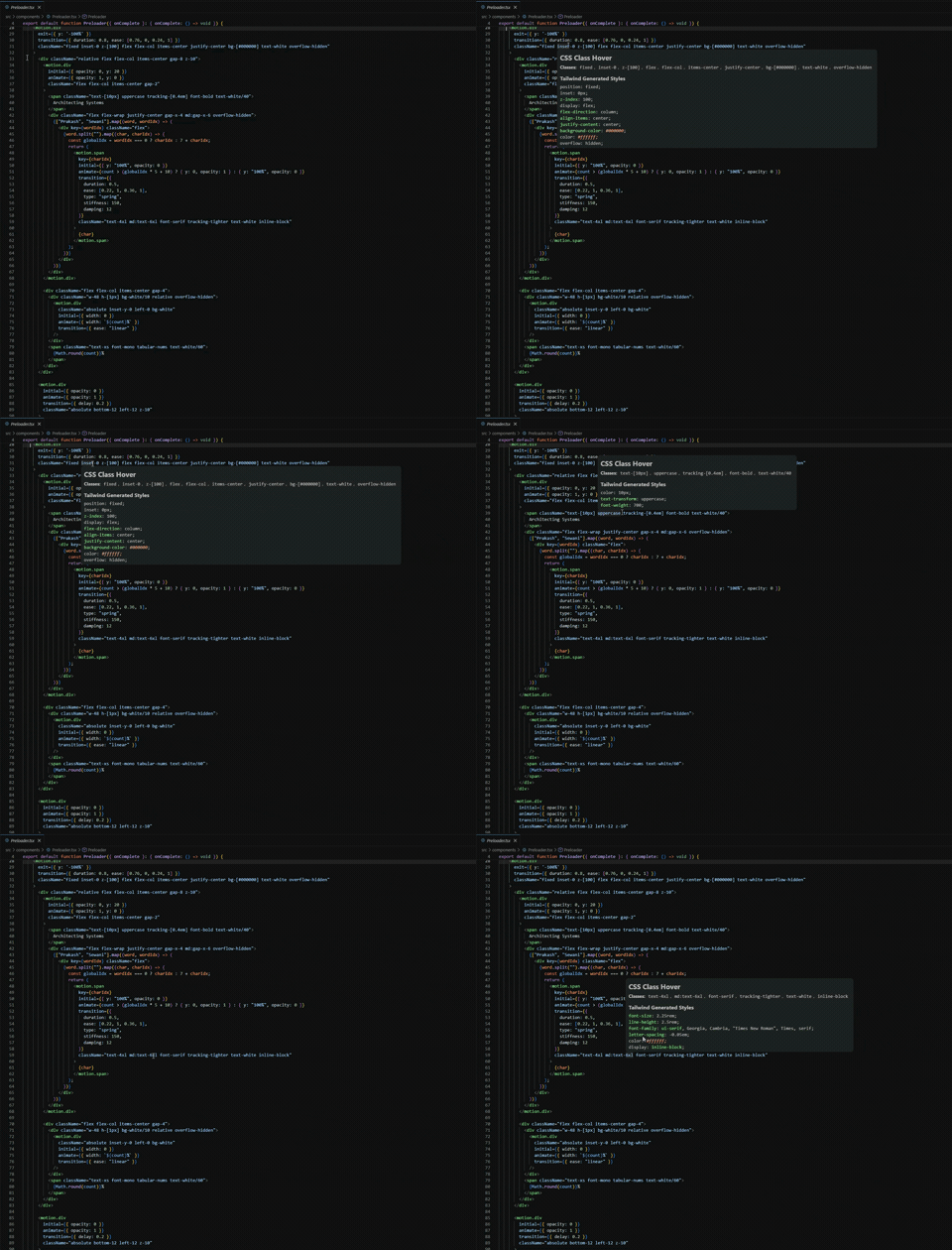
- What Tailwind generates — all Tailwind utilities combined into one decoded CSS block
- SCSS
& nesting resolved — BEM suffixes (&__title), modifiers (&.active), and pseudo-classes (&:hover) are expanded to their real class names
- Unknown classes flagged — classes with no CSS definition and no Tailwind match are highlighted as unused
- Create missing definitions — click a hover link or use the lightbulb Quick Fix to add a new rule to a stylesheet already imported in the file
- One-click navigation — jump directly to the source file to edit
No more switching between files, no more "where did I define this style?", no more memorizing Tailwind scales.
Quick Demo
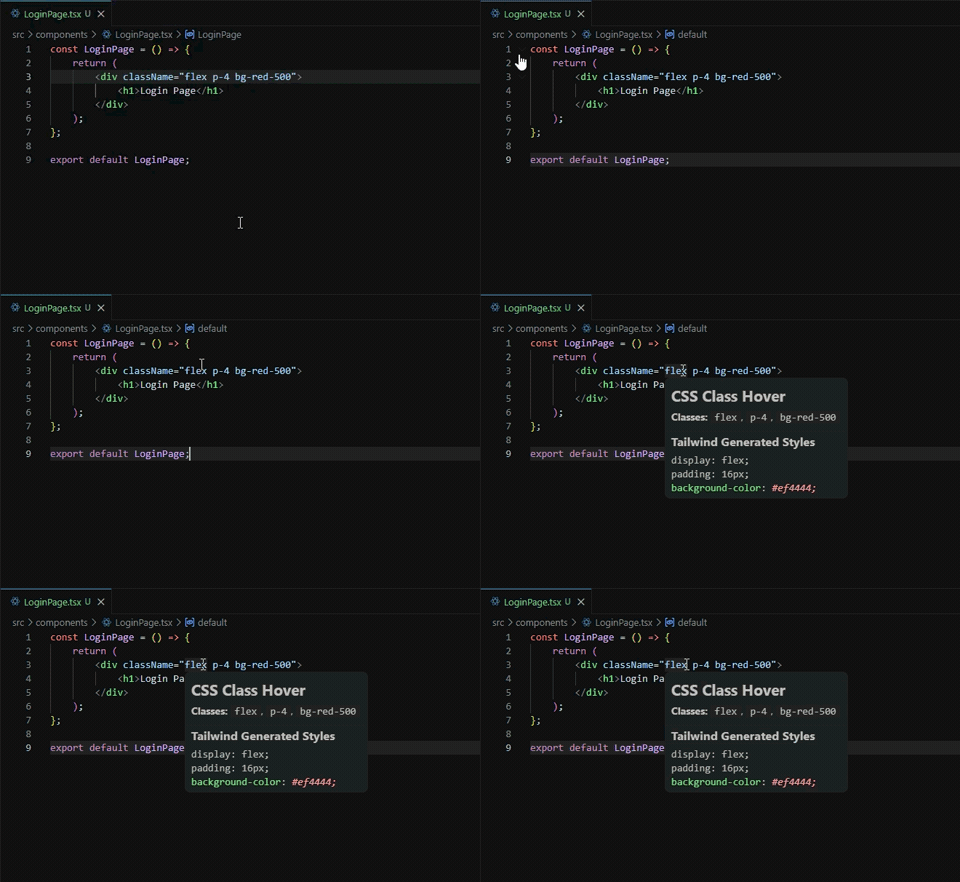
Hover to reveal CSS definitions
See decoded Tailwind utilities
Click to jump to the definition
Features
| Feature |
Description |
| Hover Reveal |
Hover over any className="...", class="...", :class, [ngClass], or cn() / clsx() call to instantly see all matching CSS definitions. |
| Tailwind Decoder |
Automatically decodes Tailwind utility classes (bg-red-500, p-4, flex) into their generated CSS equivalents, combined into a single block. |
| Unknown Class Detection |
Classes with no CSS definition in the workspace and no Tailwind match are flagged with a ❓ No CSS found section. |
| Grouped Output |
Custom CSS classes each get their own section. All Tailwind classes are combined into one ⚡ Tailwind block for clean, scannable output. |
| Workspace-wide Indexing |
Scans your entire workspace for .css, .scss, .sass, .less, and inline <style> blocks in .vue, .svelte, .astro, .html, .jsx, .tsx. |
| Clickable References |
Every found definition includes a clickable link to its file and line number, opening in a new tab for quick navigation. |
| Edit in Place |
Click Edit next to any CSS rule to open the source file with the rule auto-selected — modify and save directly. |
| Live Updates |
File watchers keep the CSS index updated automatically as you add, modify, or delete styles. |
| Reverse Lookup |
Hover over a class selector in CSS/SCSS/SASS/LESS files to see all template files where that class is used. |
SCSS & Resolution |
Nested selectors using & are expanded so &__title, &.active, &:hover, and descendant nesting resolve to their final class names. |
| Create Missing Definitions |
Undefined classes show a hover link; use Ctrl+. (Quick Fix) to insert a rule into an imported stylesheet. |
| Go to Definition |
Press F12 on a class to jump to its CSS/SCSS definition(s). Prefers imported stylesheets when multiple matches exist. |
| Configurable |
Customize utility function names and exclude patterns via VS Code settings. |
Installation
From VS Code Marketplace
Search for "Class Spy" in the Extensions panel (Ctrl+Shift+X / Cmd+Shift+X) and click Install.
From VSIX
Download the latest .vsix from the Releases page, then run:
code --install-extension class-spy-1.0.0.vsix
Usage
1. Hover over a class attribute
// React / TSX
<div className="flex p-4 bg-red-500 text-white">
Hover anywhere inside "flex p-4 bg-red-500 text-white" and you will see:
**Class Spy**
`flex`  `p-4`  `bg-red-500`  `text-white`

---

#### ⚡ Tailwind

```css
display: flex;
padding: 16px;
background-color: #ef4444;
color: #ffffff;
If you have custom CSS classes mixed in, each gets its own `📐` section:

```html
<div class="container flex p-4">
**Class Spy**
`container`  `flex`  `p-4`

---

#### 📐 `container`
*styles.css* | [Open] [Edit]

```css
.container {
  max-width: 1200px;
  margin: 0 auto;
}
⚡ Tailwind
display: flex;
padding: 16px;
2. Unknown classes are flagged
If a class has no CSS definition and is not a Tailwind utility, it appears in a ❓ No CSS found section:
<div class="container typo-class flex">
**Class Spy**
`container`  `typo-class`  `flex`

---

#### 📐 `container`
...

---

#### ⚡ Tailwind
display: flex;

---

#### ❓ No CSS found
`typo-class`

*These classes have no CSS definitions in the workspace and are not Tailwind utilities.*
3. Open a definition
Click Open styles.css:12 to jump to the rule in a new editor tab.
4. Edit a rule
Click Edit next to any definition. The source file opens in a split tab with the exact rule highlighted. Modify it and save with Ctrl+S.
5. Template literal & dynamic class support
Works inside JSX/TSX template literals and interpolations:
// Template literals with dynamic prefixes
<div className={`${base}-btn flex p-4`}>

// Ternary expressions — still decodes quoted strings
<div className={`${isActive ? 'bg-red-500' : 'bg-blue-500'} flex`}>
Static classes are always shown. Quoted string literals inside ${…} blocks are extracted as a best-effort, so you still see CSS definitions and Tailwind decoding for conditional classes.
6. Utility function support
Works inside cn(), clsx(), and classNames() calls (configurable — see Settings):
// shadcn/ui, Radix, etc.
<div className={cn("flex p-4", isActive && "bg-blue-600")}>
7. SCSS nesting with &
Class Spy expands nested SCSS/SASS/LESS selectors so hovering over the final class name finds the right rule, even when the same bare name exists in other files.
// styles.scss
.card {
  &__title { font-size: 1.2rem; }
  &.active { opacity: 1; }
  &:hover { box-shadow: 0 2px 4px rgba(0,0,0,0.1); }
}
// Component.tsx
<div className="card__title">Title</div>
Hovering card__title shows the &__title rule, and hovering active shows the &.active rule — no collisions with unrelated .title or .active classes elsewhere.
8. Create missing class definitions
If a class has no CSS definition, Class Spy offers two ways to add it:
- Hover link — in the
❓ No CSS found section, click Define .my-class.
- Quick Fix — place the cursor on the class and press
Ctrl+. / Cmd+. to choose Define .my-class in imported stylesheet.
The extension scans the current file for relative import './...scss', import styles from './...module.css', or import('./...css') statements, lets you pick one, and appends the rule with the cursor ready inside the new block.
// Button.tsx
import './button.scss';

export function Button() {
  return <button className="btn-primary">Click</button>;
}
Hovering btn-primary and choosing Define appends to button.scss:
.btn-primary {

}
9. Go to Definition
Place the cursor on a class name and press F12 (or right-click → Go to Definition). Class Spy opens the matching CSS/SCSS rule. When multiple definitions exist, results from the current file and imported stylesheets appear first.
Supported Languages & Frameworks
- HTML (
.html, .htm)
- React (
.jsx, .tsx)
- Vue (
.vue)
- Svelte (
.svelte)
- Astro (
.astro)
- Angular templates (
[ngClass], [class], ng-class)
Supported CSS Languages
.css.scss.sass.less- Inline
<style> blocks inside templates
Settings
Class Spy can be configured via VS Code settings (Ctrl+, → search "Class Spy"):
| Setting |
Type |
Default |
Description |
classSpy.utilityFunctionNames |
string[] |
["cn", "clsx", "classNames"] |
Utility function names to detect class strings in. Add your own (e.g. "tv", "tw") if you use a custom class merging function. |
classSpy.excludePatterns |
string[] |
["**/node_modules/**", "**/dist/**", "**/build/**", "**/.next/**", "**/out/**", "**/.turbo/**", "**/coverage/**"] |
Glob patterns to exclude from CSS indexing. |
Test Suite
Class Spy includes a comprehensive test suite covering all core modules.
Run tests locally
npm install
npm run compile
npm test
Test Coverage
| Module |
Tests |
Coverage |
| Tailwind Decoder |
50+ utility classes decoded, arbitrary value syntax ([...]), invalid class handling |
>90% |
| CSS Indexer |
Selector parsing (simple, compound, nested & expansion), inline <style> extraction, deduplication, file watcher updates, findUsages caching |
>85% |
| Hover Provider |
class / className / cn() extraction, grouped output (custom sections + combined Tailwind), unknown class detection, create-definition links, edge cases |
>80% |
| Import Resolver |
ES import parsing for CSS/SCSS/SASS/LESS, relative path resolution, deduplication |
>90% |
| CSS Usage Hover Provider |
Reverse lookup in CSS files, file grouping, line deduplication, truncation |
>75% |
| Extension |
Command registration, integration smoke tests |
>75% |
Development
Build
npm install
npm run compile
Watch
npm run watch
Lint
npm run lint
Package
npx vsce package
Publish
npx vsce publish
Contributing
Contributions are welcome! Please open an issue or pull request on GitHub.
- Fork the repository
- Create a feature branch (
git checkout -b feature/amazing-feature)
- Commit your changes (
git commit -m 'Add amazing feature')
- Push to the branch (
git push origin feature/amazing-feature)
- Open a Pull Request
Support
If Class Spy saves you time and you want to keep it growing, consider supporting the project:

Your support helps fund new features, better Tailwind coverage, and more framework support.
License
MIT © Class Spy Contributors
Changelog
See CHANGELOG.md for release history.

