Drupal 7 Migration Inventory
Point VS Code at a Drupal 7 codebase and get back what is actually in it that
forces a migration decision — in the Problems panel, on the line it sits on.
Drupal 7 reached end of life in January 2025. The hard part of moving off it is
rarely the code itself; it is finding out what the code contains before anyone
can plan. This reads the codebase and tells you.
How to use it
1. Open the Drupal 7 site as a folder in VS Code (File → Open Folder, at
the site root — the level with sites/ and includes/ in it).
2. Start a scan. Any one of these:
- It offers. If the folder contains Drupal 7 modules or themes, a
notification appears: "Drupal 7 site detected. Scan it for migration
decisions?" Click Scan. It never scans on its own, and Don't ask again
for this folder is remembered for that folder only.
- Command Palette. Ctrl+Shift+P
(Cmd+Shift+P on macOS), then type
Drupal 7 and pick Drupal 7 Migration: Scan workspace for migration
decisions.
- Right-click a folder in the Explorer → Drupal 7 Migration: Scan this
folder. That scans just that folder, which is what you want when only one
module matters.
3. Read the results in two places.
- The Problems panel — Ctrl+Shift+M
(Cmd+Shift+M), or View → Problems. One entry
per occurrence, on the exact line and column. Click one to jump to the code.
Each entry's code is a link to the section of the free checklist that
explains how to settle that decision. Filter the panel by typing
d7-scan.
- The Output panel — View → Output, then choose Drupal 7 Migration
Inventory in the dropdown. This is the full report: totals per decision,
the contributed-module table with each project's real Drupal 10/11 status,
and examples. It opens by itself when a scan finishes.
4. The other two commands, both in the Command Palette under
Drupal 7 Migration:
- Open the inventory as Markdown — the same report as a document you can
paste into a ticket or a wiki. Scans first if you have not already.
- Clear the findings — empties the Problems panel and the report.
5. Two settings (File → Preferences → Settings, search d7Scan):
d7Scan.severity and d7Scan.maxProblemsPerFinding, both described in
Settings below.
Nothing here needs an account, a network connection, or write access to your
code.
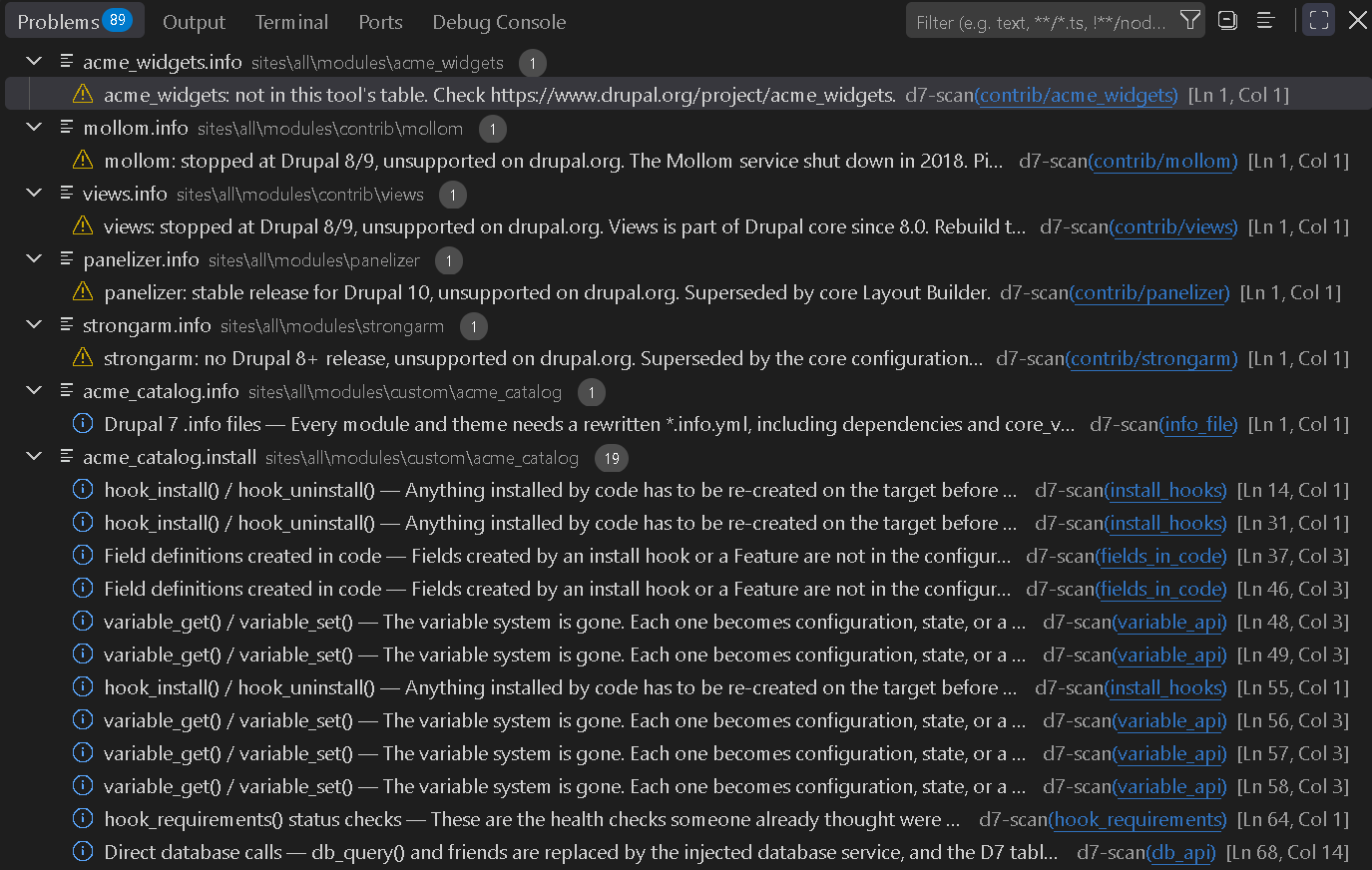
A real scan of the sample Drupal 7 site in this project's test suite: 89 findings, each on the file and line it applies to.
What it does
You get two things from a scan:
- Problems entries, one per occurrence, pointing at the file, line, and
column. Each one names the decision it belongs to and links to the free
checklist section that explains how to settle it.
- A readable report in the Output panel, with totals, the contributed-module
table, and examples per finding. Open the inventory as Markdown turns the
same report into a document you can paste into a ticket.
What it looks for
| Decision |
Signals |
| Inventory of custom code |
variable_get/set, direct db_* calls, hook_menu, block hooks, theme functions and preprocessors, .tpl.php files, drupal_add_js/css, removed procedural helpers, global $user, hook_init/boot, stored PHP, CTools plugins |
| Route per content type |
content types in code, custom entity types, Views exported to code, custom Views integration, Page Manager pages |
| Fields |
custom field types, widgets and formatters, fields created in code or by Features, entity_metadata_wrapper |
| Contributed modules |
every contributed project, with its real Drupal 10/11 release status |
| URLs |
URL alter hooks, alias and redirect calls, menu alters |
| Files and media |
File API calls, public:///private:// paths, image styles, hook_file_download |
| Users and permissions |
custom permissions, user_access checks, user lifecycle hooks, node access rules |
| Rehearsals |
hook_update_N, install and schema hooks, cron and batch jobs |
| Acceptance |
SimpleTest cases, hook_requirements |
Contributed modules get a measured verdict, not a guess: the release status
comes from drupal.org's own release-history feed, the same one a Drupal site's
update checker reads, with the collection date printed in the report. A module
whose job was taken over by core says so — strongarm reads "superseded by the
core configuration system", not "dead end".
What it deliberately does not do
- It does not parse PHP. It is a line-by-line pattern match with
Drupal-shaped patterns. It will miss code written in unusual ways and will
occasionally match a comment or a string. Read it as "here is where to look",
not "here is the complete list". The report says so every time it runs.
- It does not read the database. Every number is about code. How many nodes
exist and how long an import takes are not visible to it.
- It does not open credentials.
settings.php, *.local.php, .env,
*.key and *.pem are skipped by name and listed as skipped.
- It does not scan core or contributed code. Those get replaced wholesale by
their Drupal 10 versions, so a
variable_get() inside Views is not a decision
anyone has to make. Only your own code is matched.
- It never writes, and never connects to the network. Not to drupal.org, not
to telemetry, not to us. The release data is baked into the extension at build
time. It has no dependencies.
Settings
| Setting |
Default |
What it does |
d7Scan.severity |
Information |
How code signals appear in Problems. They are decisions, not errors. Contributed modules with no Drupal 10/11 release are reported one level higher. |
d7Scan.maxProblemsPerFinding |
200 |
Caps Problems entries per kind of finding so one repetitive pattern cannot bury the rest. The counts in the report are always the real totals. |
The same scanner without VS Code
The engine here is one dependency-free Node file, and it is a free download that
works as a CLI:
node d7-scan.mjs /path/to/drupal7
node d7-scan.mjs /path/to/drupal7 --markdown > inventory.md
https://practicalmodules.com/tools/drupal-7-migration-inventory-scanner/
Where the ten decisions come from
Every finding is filed under one of ten decisions that stall Drupal 7
migrations. They are written up in full, free and with no signup, in the
Drupal 7 migration kickoff checklist.
If you want that structure as a working spreadsheet you can run a real migration
from, that is the Drupal 7 → 11 Migration Workbook,
which is what pays for this being free.
Licence
MIT. Original work; no code, data, or text is copied from any Drupal module.
| |

