
Azure DevOps Pull Requests
Browse, review, and manage Azure DevOps Pull Requests — without leaving VS Code.
Features •
Installation •
Getting Started •
Usage •
Architecture •
Contributing •
License




✨ Overview
ADO Pull Requests is a Visual Studio Code extension that brings your Azure DevOps pull request workflow directly into your editor. Select a project and repository, browse active PRs in a dedicated sidebar, inspect file-level diffs with a single click, and even send entire PRs to GitHub Copilot Chat for an AI-powered code review — all without opening a browser.
🚀 Features
| Feature |
Description |
| 🔐 Microsoft SSO |
Sign in with your Microsoft / Azure AD account using VS Code's built-in authentication — no PAT tokens required. |
| 📂 Repository Picker |
Browse your organization's projects and repositories via interactive quick-pick menus. |
| 🌳 PR Tree View |
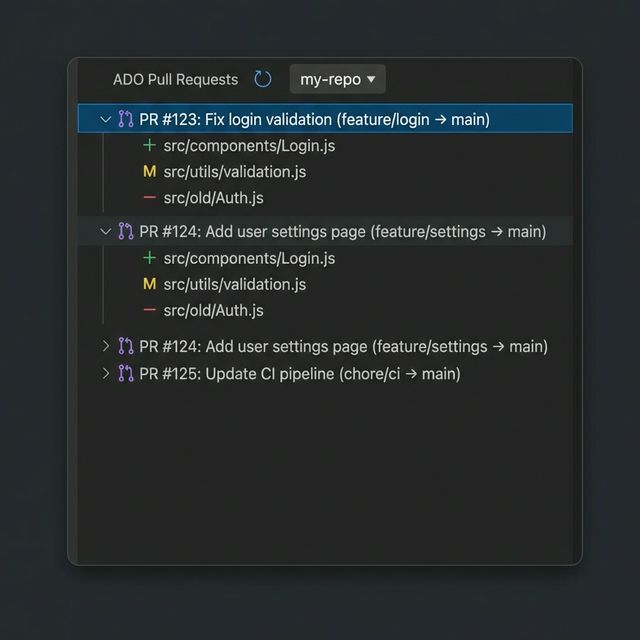
A dedicated Activity Bar panel lists all active pull requests, expandable to reveal every changed file. |
| 🎯 Target Branch Filter |
Filter your active pull requests dynamically by selecting a specific target branch from a quick-pick menu in the panel header. |
| 🔀 Inline Diff Viewer |
Click any changed file to open a side-by-side diff powered by VS Code's native diff editor. |
| 🤖 Copilot Specialized Reviews |
Deep integration with the GitHub Copilot background agent (vscode.lm). Features general code review alongside dedicated DB Performance and UX Message reviews. Analyzes the full PR diff quietly in the background, parses structured JSON findings, and opens an interactive webview to select and post comments directly to ADO. |
| 🌐 Open PR in Browser |
Quickly jump to the PR on Azure DevOps from the tree view. |
| 🔄 Refresh on Demand |
Instantly refresh the PR list from the sidebar toolbar. |
| 🏷️ Clean Branch Tracking |
Expand any PR to instantly view a dedicated nested node detailing the source → target branch mapping, alongside author and description details in the tooltip. |
📦 Installation
From source (development)
# Clone the repository
git clone https://github.com/porya1ras/ado-pull-requests-1.git
cd ado-pull-requests

# Install dependencies
npm install

# Compile the extension
npm run compile
Running in VS Code
- Open the project folder in VS Code.
- Press F5 (or Run → Start Debugging) to launch the Extension Development Host.
- The extension will be active in the new VS Code window.
🏁 Getting Started
1. Sign In
Run the command ADO: Sign In from the Command Palette (Ctrl+Shift+P / Cmd+Shift+P).
You'll be prompted to authenticate with your Microsoft account via VS Code's built-in auth flow.
2. Select a Repository
Run ADO: Select Repository:
- Organization URL — Enter your Azure DevOps org URL (e.g.
https://dev.azure.com/myorg). This is saved and reused automatically.
- Project — Pick a project from the list.
- Repository — Pick a repository to browse its pull requests.
3. Browse Pull Requests
Open the ADO Pull Requests panel from the Activity Bar (look for the git-pull-request icon).
All active PRs for the selected repository are shown in a tree view.
📖 Usage
Viewing Changed Files
Expand any pull request node to see the list of changed files. Each file displays:
- Change type icon — Added (
+), Modified (M), Deleted (−), or Renamed (R)
- File name and full path
Click a file to open the side-by-side diff viewer.
AI Code Review & Automated Feedback
Right-click any PR (or use the inline icons) to run a seamless background review powered by GitHub Copilot (vscode.lm Agent API):
- 💬 ADO: Send PR to AI Review - General bug, logic, and security review
- 🗄️ ADO: DB Performance Review - Specialized analysis for EF Core projections and N+1 query traps
- 📝 ADO: UX Message Review - Enforces UK spelling, plain English clarity, and actionable help text
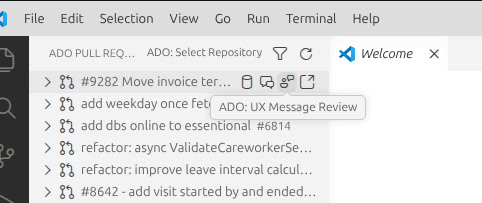
(Place your screenshot of the context menu in assets/review-buttons.png)
The extension builds a highly structured prompt including PR metadata and all changed file contents (up to 200 lines per file).
Once the AI generates its review:
- An Interactive Webview opens with the PR's overall Risk, Confidence scores, and a summary.
- All inline comments (bugs, style, performance) are shown in a checklist with severity icons (🔴 Blocker, 🟠 High, 🟡 Medium, 🔵 Low, ⚪ Nit).
- Select/Deselect comments as you see fit.
- Click Post Selected Comments to automatically publish them as specific threaded comments on the Azure DevOps pull request!
Note: This requires the GitHub Copilot extension to be installed and signed in. If the agent request fails, the raw prompt is placed safely on your clipboard.
Open PR in Browser
Click the 🔗 icon next to a PR to open it directly in your default browser on Azure DevOps.
🏗️ Architecture
src/
├── extension.ts          # Extension entry point — registers all commands & providers
├── auth.ts               # Microsoft SSO authentication via VS Code Authentication API
├── adoClient.ts          # Azure DevOps REST API client (projects, repos, PRs, file content)
├── prTreeDataProvider.ts # TreeDataProvider for the PR explorer sidebar
├── diffViewer.ts         # Virtual document content provider & diff command
├── copilotReview.ts      # Sends PR diffs to the background Copilot agent for General Review
├── dbPerformanceReview.ts# Sends PR diffs for specialized EF Core/SQL optimization review
├── uxMessageReview.ts    # Sends PR diffs for UK English user-facing error message review
├── postReviewComments.ts # JSON parser & helper functions to translate AI payload to ADO threads
└── reviewWebview.ts      # Interactive UI to review, select, and post the generated comments
Key Technologies
- VS Code Extension API — Tree views, commands, authentication, diff editor
- azure-devops-node-api — Official Node.js client for Azure DevOps REST APIs
- Webpack — Bundles the extension for fast activation
- TypeScript — Full type safety across the codebase
⚙️ Available Commands
| Command |
ID |
Description |
| ADO: Sign In |
adoPr.signIn |
Authenticate with Microsoft / Azure AD |
| ADO: Select Repository |
adoPr.selectRepo |
Pick org → project → repo |
| Refresh Pull Requests |
adoPr.refresh |
Reload the PR list |
| Filter by Target Branch |
adoPr.filterTargetBranch |
Filter pull requests by their target branch |
| View Diff |
adoPr.viewFileDiff |
Open side-by-side diff for a changed file |
| Open PR in Browser |
adoPr.openPr |
Open the PR page on Azure DevOps |
| Send PR to Copilot Review |
adoPr.copilotReview |
Send PR changes to GitHub Copilot for general review |
| ADO: DB Performance Review |
adoPr.dbPerformanceReview |
Send PR changes to Copilot for DB and EF Core queries |
| ADO: UX Message Review |
adoPr.uxMessageReview |
Send PR changes to Copilot for UX language/grammar |
🛠️ Development
Prerequisites
- Node.js 18+ and npm
- VS Code 1.80+
Scripts
npm run compile       # Build with webpack (development)
npm run watch         # Watch mode — rebuilds on file changes
npm run package       # Production build with source maps
npm run lint          # Run ESLint on src/
npm run test          # Run tests
Debugging
The project includes a .vscode/launch.json configuration. Press F5 to:
- Compile the extension
- Launch a new VS Code window (Extension Development Host)
- Attach the debugger for breakpoints and step-through debugging
🤝 Contributing
Contributions are welcome! Here's how to get started:
- Fork the repository
- Create a branch for your feature or fix:
git checkout -b feature/awesome-thing
- Commit your changes with clear messages
- Push to your fork and open a Pull Request
Guidelines
- Follow the existing code style (TypeScript strict mode, ESLint rules)
- Add relevant tests for new features
- Keep PRs focused — one feature or fix per PR
📝 License
This project is licensed under the MIT License — see the LICENSE file for details.
Made with ❤️ for developers who live in VS Code

