
StarCraft 2 Map LauncherLaunch StarCraft II maps directly from VS Code Installation Launch VS Code Quick Open ( Ctrl+P), paste the following command, and press enter.Copied to clipboard |

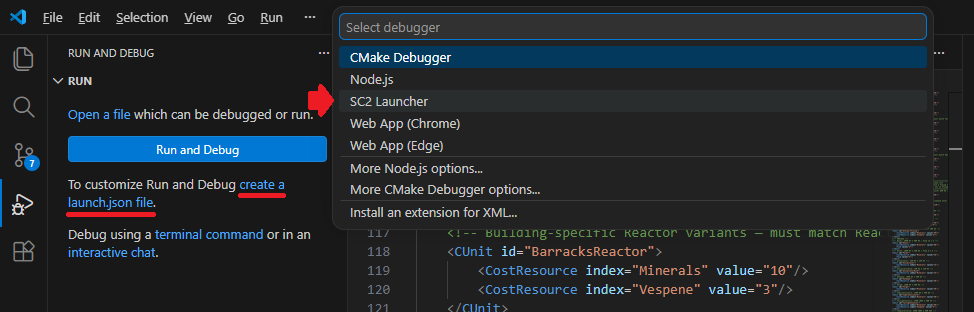
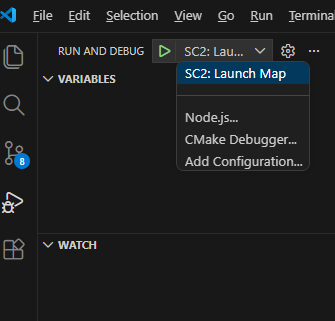
StarCraft 2 Map LauncherLaunch your StarCraft II map directly from VS Code — no alt-tabbing required. FeaturesStatus bar launch buttonA Run & Debug integrationThe extension registers itself as a debug configuration provider. Open the Run and Debug panel and
Press F5 or click the green play button to launch.
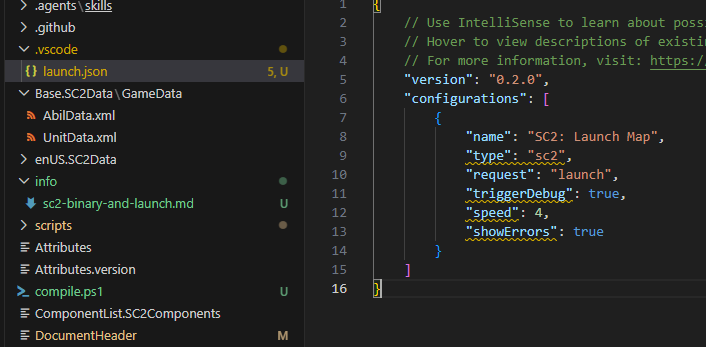
Advanced launch options via
|
| Option | Type | Description |
|---|---|---|
triggerDebug |
boolean | Open the in-game trigger debugger window on launch |
showErrors |
boolean | Stream SC2 output to the SC2 Output Channel in VS Code |
preload |
boolean | Preload map assets before launching |
noUserCheats |
boolean | Disable in-game cheat commands |
reloadCheck |
boolean | Enable reload checking (-reloadcheck) |
meleeMod |
string | Game mode/mod override (e.g. "Void") |
difficulty |
number | AI difficulty: 0=VeryEasy, 1=Easy, 2=Medium, 3=Hard |
speed |
number | Game speed: 0=Slower, 1=Slow, 2=Normal, 3=Fast, 4=Faster |
map |
string | Override the map path for this configuration. Absolute or relative path. Leave empty to use sc2.mapPath or auto-detection |
testMod |
string | Path to the .SC2Mod / component folder to load via -testmod |
testConfig |
string | Path to a .SC2TestConfig file passed as -testconfig; accepts an absolute path or a path relative to the workspace root |
Running SC2 behavior
If StarCraft II is already running when you trigger a launch, the extension kills the existing process and relaunches the map.
By default, sc2.warnIfRunning is enabled, so the extension shows a confirmation dialog before killing a running SC2 instance. Disable this setting if you want launches to skip the prompt and relaunch immediately.
Error and warning detection
Every time you launch, the extension watches the SC2 GameLogs folder for new files written by this specific launch. Previous files from older launches are snapshotted and ignored.
Script compile errors (ScriptError.txt)
If your Galaxy scripts fail to compile, SC2 writes a YYYY-MM-DD HH.MM.SS ScriptError.txt file to GameLogs.
The extension parses it and posts structured diagnostics to the Problems panel. When the error includes a file and line number, VS Code jumps to that exact location in your .galaxy file and highlights the line. The diagnostic message also includes the offending code snippet when SC2 reports it:
Error parsing function line, possibly invalid variable name/function call or missing } at end of function.
  Code: Spawn_Init();dsa
If no file/line is available (e.g. Script load failed: Function not found), the raw message is posted against the map path.
Runtime data warnings (Alerts.txt)
After a successful compile, SC2 may write a YYYY-MM-DD HH.MM.SS Alerts.txt to GameLogs with runtime data warnings, such as:
Too many CAbilStop abilities for 'LurkerMPBurrowed'.
Too many CAbilAttack abilities for 'Cyclone'.
These are posted as warnings (yellow) in the Problems panel. The extension extracts the entity name from each message and searches your workspace files to find where that entity is defined, then points the diagnostic at that location. XML files take priority over other file types — if Cyclone appears in an .xml data file, the warning points there rather than to a .txt list. If no workspace file contains the entity name, the warning falls back to the map path.
Clearing errors on edit
Diagnostics are cleared automatically when you start editing the line they point to — fixing the offending line removes its squiggle and Problems entry immediately without needing to relaunch. All diagnostics are also cleared at the start of every new launch.
SC2 output channel
The SC2 output channel (View → Output → SC2) is opened on every launch and logs watcher activity:
[SC2 Watcher] Watching: C:\Users\…\GameLogs (5 pre-existing files ignored)
[SC2 Watcher] New file detected: 2026-04-11 14.37.09 Alerts.txt
[SC2 Watcher] Searching 312 workspace files for 15 entity names...
[SC2 Watcher] Located 12/15 entities in workspace files.
[SC2 Watcher] Found 80 alerts.
Auto-detects map path
The extension scans your workspace for the first folder ending in .SC2Map and uses it as the map path. No configuration needed for standard project layouts.
Setup
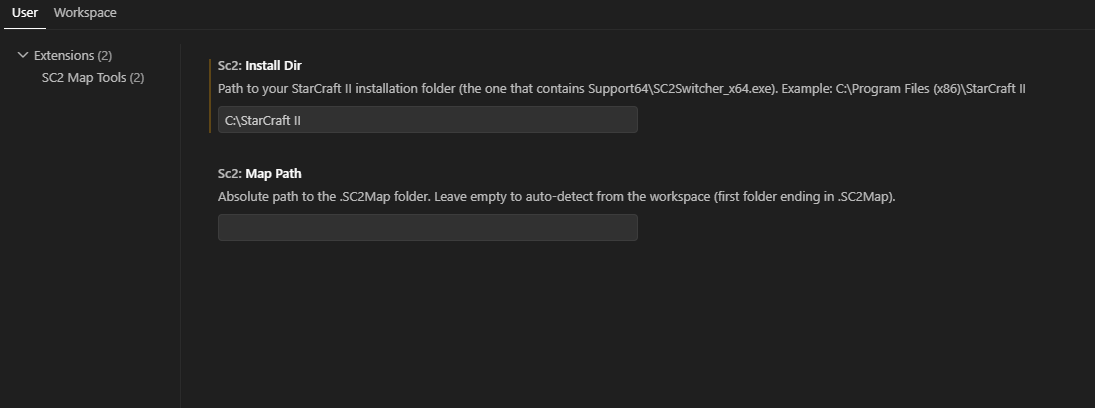
- Open Settings (
Ctrl+,) and search for SC2. - Set SC2: Install Dir to your StarCraft II root folder.
| Setting | Description |
|---|---|
sc2.installDir |
Required. Path to your StarCraft II root folder (e.g. C:\StarCraft II). |
sc2.mapPath |
Absolute path to the .SC2Map folder. Leave empty to auto-detect from the workspace. |
sc2.warnIfRunning |
Show a confirmation dialog before killing a running SC2 instance and relaunching the map. Default: true. Disable it to skip the prompt and relaunch immediately. |
sc2.gameLogsPath |
Path to the StarCraft II GameLogs folder used for error and warning detection. Default: ~/Documents/StarCraft II/GameLogs. Change this if your Documents folder is redirected to another drive, or if you run SC2 from a non-standard user profile. The folder must be the one that SC2 writes ScriptError.txt and Alerts.txt into — not the install directory. |
Requirements
- Windows
- StarCraft II installed
- VS Code >= 1.80