Shadow Monarch (Solo Leveling Theme)
"Arise."
I designed this theme family for developers who want a clean, focused coding environment themed around Sung Jin-woo and the system interface in Solo Leveling. The main goal was to capture that iconic shadow magic aesthetic—void darkness, glowing electric violets, radiant red flames, and glacial system window cyans—without causing eye strain during long sessions.
The extension bundles eight distinct variants (five dark, three light) to fit different lighting conditions, personal setups, and color preferences.
The Variants
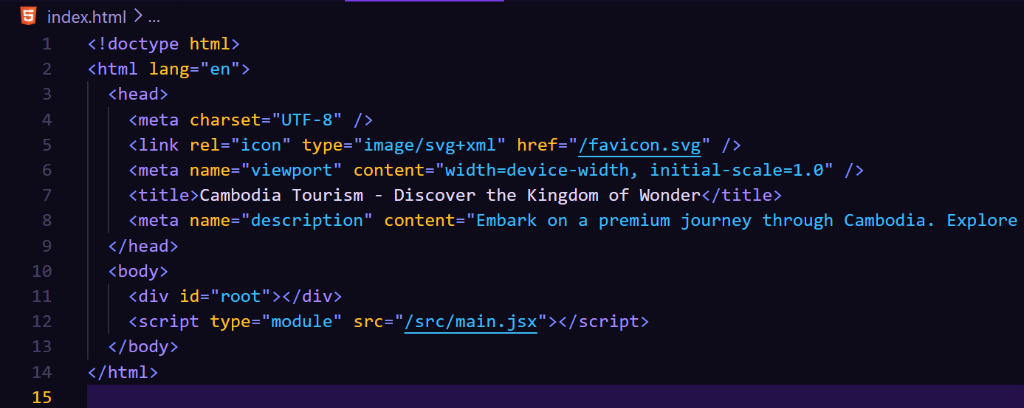
Shadow Monarch (Void)
This is the default dark theme. It features a deep purple black canvas that is much softer on the eyes than pure black. Syntax highlighting maps electric purple to keywords, radiant gold to functions, and status window cyan to strings.
- Editor Background:
#0D0A1A
- Best for: Daily coding in standard workspace lighting.
Shadow Monarch Abyss
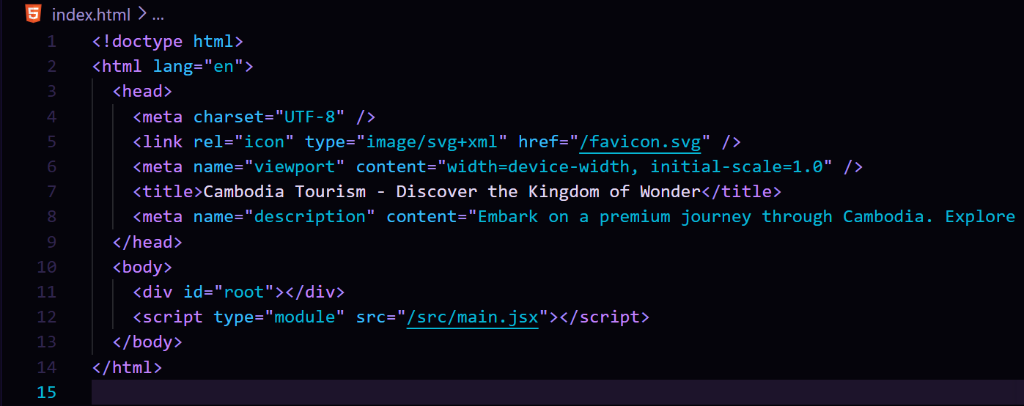
For night sessions or high contrast preferences. Abyss darkens the canvas to absolute pitch black, making electric purple keywords and neon cyan strings pop like active shadow extraction magic.
- Editor Background:
#05040B
- Best for: Pitch dark rooms or pure black display preferences.
Shadow Monarch Ember
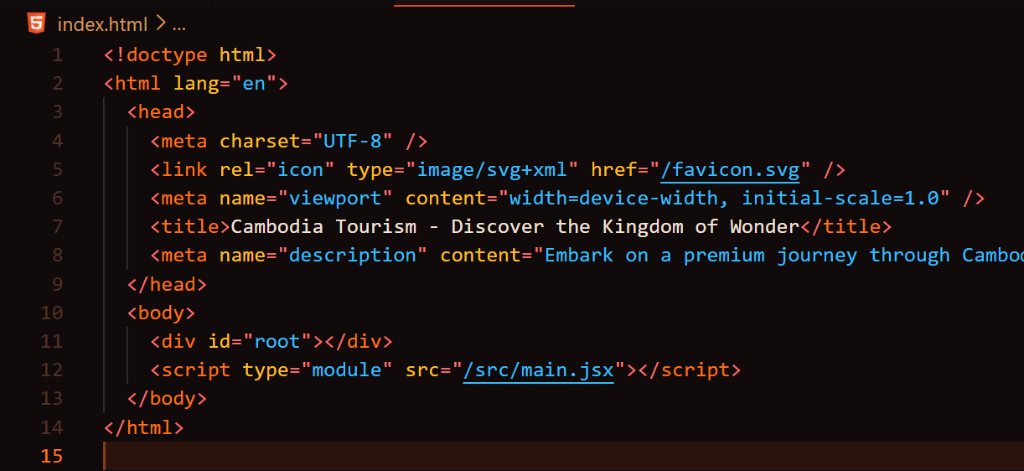
A dark theme with its accent shifted from violet toward deep red orange ember tones. Keywords burn in bright orange and types smolder in warm amber.
- Editor Background:
#100A0A
- Best for: Developers who love dark themes with warm firelight tones.
Shadow Monarch Igris
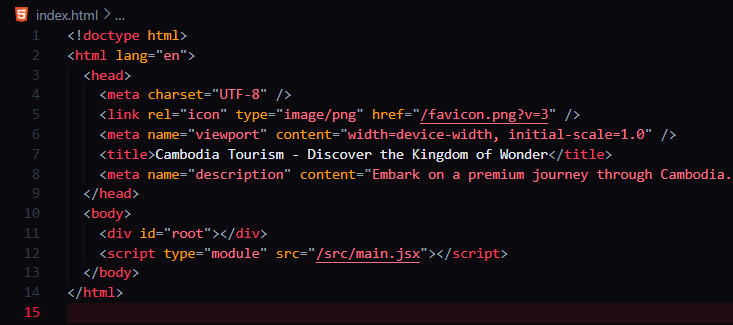
Inspired by the loyal Red Knight Commander Igris. Built on a metallic dark steel canvas (#0A090D) with vivid blood red and crimson flame accents, molten gold function declarations, and silver knight armor text.
- Editor Background:
#0A090D
- Best for: High contrast dark coding with sharp crimson knight accents.
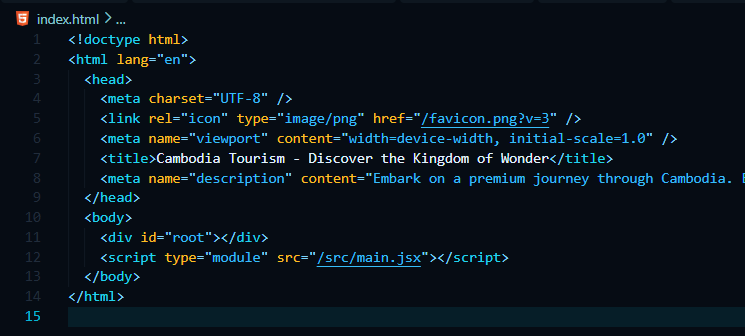
Shadow Monarch Frost
Inspired by the Frost Monarch. Built on a glacial deep ice black background (#060C14) with vibrant electric cyan and frost blue accents, crystal blue strings, and frosted silver text.
- Editor Background:
#060C14
- Best for: Developers who love cool, icy cyan and blue neon dark themes.
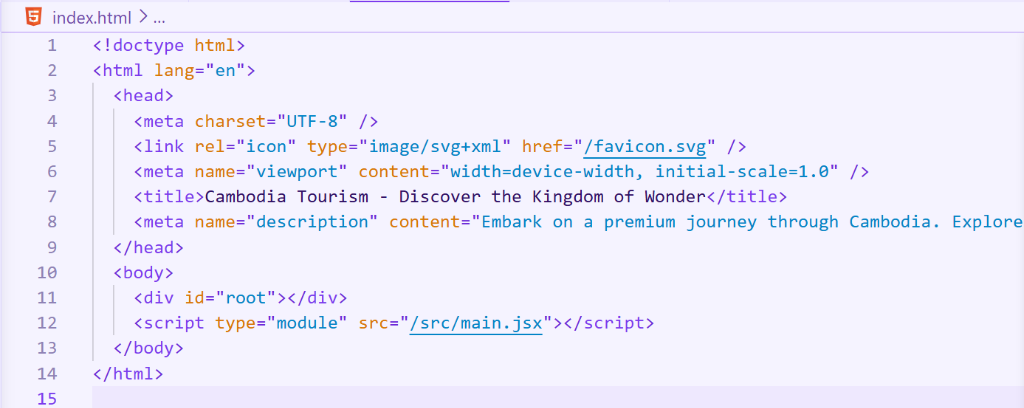
Shadow Monarch Light
A light mode counterpart styled in the lavender family. Provides a soft pastel lavender white workspace with high contrast indigo, deep violet, warm gold, and emerald syntax colors.
- Editor Background:
#F5F3FF
- Best for: Working in bright rooms or outdoors.
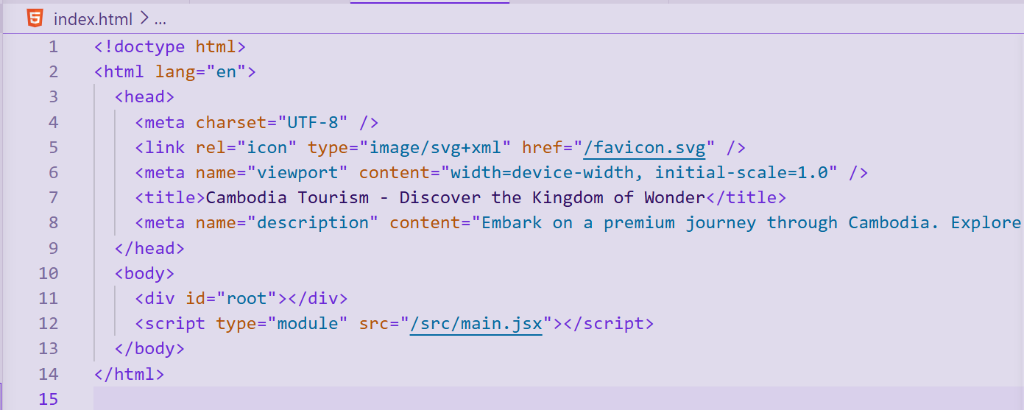
Shadow Monarch Twilight
A softer, dusty lavender gray light theme that drops contrast slightly to reduce glare under harsh lighting.
- Editor Background:
#E0DBEC
- Best for: Extended daytime coding under fluorescent lights.
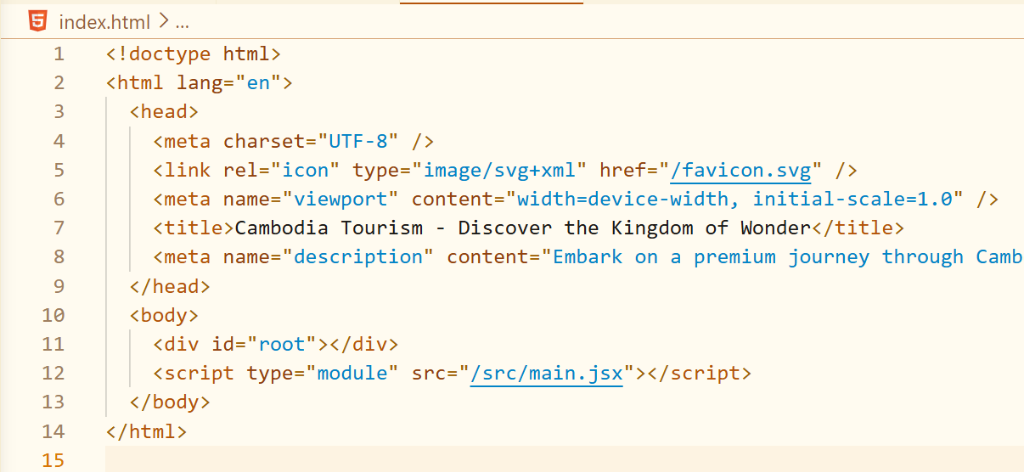
Shadow Monarch Dawn
A light theme styled in warm cream and gold. Keywords glow in deep amber and functions darken to burnt orange on a soft parchment canvas.
- Editor Background:
#FFFBF0
- Best for: Developers who prefer light themes with warm, earthy tones.
Expanded Multi-Language Syntax Support
Shadow Monarch includes tailored syntax highlighting rules for a wide variety of modern languages:
- JavaScript / TypeScript & React (JSX/TSX): Full hook, component, decorator, and prop styling.
- Python: Specific colors for
@decorators, self/cls, type hints (Optional[str]), and docstrings.
- Rust: Dedicated styling for lifetimes (
'a), macros (println!, vec!), attributes (#[derive]), and traits.
- Go: Channels, goroutines, struct tags, and interface definitions.
- Vue & Svelte: Single File Component tags (
<script>, <style>, <template>) and template directives (v-if, bind:).
- Tailwind CSS: Custom class string scope highlighting.
- SQL, Docker, YAML, & Shell: DML/DDL keywords, Docker instructions (
FROM, RUN), YAML keys, and shell environment variables.
What's New in v0.4.1
Version 0.4.1 introduces S-Tier Visual Polish & Atmosphere, calibrating syntax luminance hierarchy, taming inactive indent guide noise, refining comment subtlety, and ensuring full LSP semantic token parity alongside the 59 rules and 4-tier depth architecture.
Dedicated Frontend Variety (59 Rules per Theme)
- React & JSX / TSX: Custom components (
<Button />, <Card />), JSX props (className, style), and event handlers (onClick, onChange, onSubmit).
- CSS / SCSS / LESS: Property names vs property values, CSS units (
px, rem, em, %), class selectors (.btn), ID selectors (#app), pseudo-classes (:hover, :focus), and CSS custom variables (var(--primary)).
- Tailwind CSS: Utility class names vs variant modifiers (
hover:, focus:, dark:, md:).
- Vue & Svelte: Single File Component tags (
<template>, <script>), Vue directives (v-if, v-for, @click), and Svelte directives (on:click, bind:value, $:) receive distinct accent styling.
Enhanced Color Variety
Each theme now features dedicated, lore-aligned hues for:
- Control Flow Statements:
if, for, return, try, await stand out from standard storage keywords.
- Function Call Sites vs Declarations vs Built-ins: Function calls (
fetch(), console.log()) and declarations (function foo()) receive distinct visual treatment.
- Types, Interfaces, Enums & Structs: Interfaces (
italic), classes (bold), enums (bold), and structs are clearly differentiated.
- Regular Expressions (
string.regexp): Dedicated regex literal highlighting.
- Parameters & Constants: Dedicated colors for function parameters (
variable.parameter) and readonly constants.
4-Tier Depth Architecture (275 Workbench Keys)
Every theme features a unified 4-tier elevation system (Crust, Mantle, Base, and floating Surface panels) with 275 UI keys per theme, ensuring complete coverage across modern VS Code features (Command Palette glassmorphism, Minimap, Inlay Hints, Diagnostics, Peek View, Git indicators, Code Lens, Notifications, Debug Toolbar, and Notebook Cells).
S-Tier Visual Polish & Atmosphere
- 70/30 Neutral Hierarchy: Delimiters and punctuation (
() {} [] , ; :) are calibrated to calm secondary tones so that identifiers, functions, and keywords command primary focus.
- Atmospheric Line Aura: Softened line highlight to an elegant ethereal wash (8-10% opacity) that never distracts your eyes.
- Calm Indent Guides: Vertical guides provide clean, subtle indentation scaffolding without overwhelming your code with rainbow noise.
- Refined Comment Elegance: Muted, sophisticated tones (smoldering ash in Ember, glacial mist in Frost, shadow sage in Void/Abyss) that keep documentation easy on the eyes.
- LSP Semantic Parity: Synchronized 18 semantic token rules with TextMate grammars to eliminate any token color flickering when language servers (TypeScript, Pylance, Rust-Analyzer) spin up.
Installation
Manual Install
Copy the extension directory into your VS Code extensions folder:
- Windows:
%USERPROFILE%\.vscode\extensions\shadow-monarch
- macOS / Linux:
~/.vscode/extensions/shadow-monarch
After copying the files, reload VS Code (Ctrl+Shift+P -> Developer: Reload Window) and select Shadow Monarch from the color theme picker (Ctrl+K Ctrl+T).
| |

