🚀 DynamicsCrm.DevKit
DynamicsCrm.DevKit is an integrated development toolkit for Microsoft Dataverse, Dynamics 365, and Power Platform engineering. It combines a Visual Studio extension, project and item templates, one-click deployment workflows, a .NET global CLI, an MCP server for AI-assisted Dataverse operations, and Roslyn analyzers for production-grade server-side code.






📌 Current Release
- Version:
4.12.34.56
- Build:
30.06.2026 23:59:59
✨ Highlights
- Visual Studio extension for Dataverse projects, with 13 project templates and 16 item templates.
- One-click deployment from Visual Studio for server assemblies, plugin packages, web resources, TypeScript web resources, and reports.
devkit CLI for repeatable deployment, code generation, solution packaging, report operations, web resource operations, and MCP hosting.- MCP server with 33 active Dataverse tools across
basic, standard, and advanced tiers for AI-assisted inspection, CRUD, metadata, forms, views, ribbon, apps, security, audit, plugins, workflows, and Web API scenarios.
- Roslyn analyzer package with 21 diagnostics,
DEVKIT1001 through DEVKIT1021, focused on Dataverse plugin, workflow, data provider, and integration safety.
- TypeScript and JavaScript client scaffolding for form scripts, Web API modules, dialog scripts, generated typings, and deployable web resources.
📦 Install
| Component |
Install |
| Visual Studio extension |
Download from Visual Studio Marketplace |
| Visual Studio 2019 report upload VSIX |
Download from GitHub Releases and install manually |
| CLI global tool |
dotnet tool install -g DynamicsCrm.DevKit.Cli |
| Companion global tool |
dotnet tool install -g DynamicsCrm.DevKit.Tool |
| Roslyn analyzers |
<PackageReference Include="DynamicsCrm.DevKit.Analyzers" Version="*" PrivateAssets="all" /> |
📚 Component README
🧩 What Is Included
| Area |
Current capability |
| Visual Studio extension |
Project templates, item templates, wizards, context-menu commands, and editor commands for Dataverse development. |
| Visual Studio 2019 report VSIX |
LightweightDynamicsCrm.DevKit.2019 extension for uploading SSRS reports from Visual Studio 2019. |
| CLI |
generator, server, webresource, modelbuilder, solution, downloadreport, uploadreport, downloadwebresource, datasource, mcp, and compatibility commands for older task names. |
| MCP server |
Stdio MCP host with tool-category loading, setup guide output, tool listing, and dry-run mode for read-first workflows. |
| Code generation |
JavaScript form, TypeScript form, JavaScript Web API, TypeScript Web API, C# late-bound classes, and PAC modelbuilder-backed early-bound classes. |
| Deployment |
Server assemblies, plugin packages, managed identity metadata, web resources, compiled TypeScript web resources, reports, and solution pack/unpack automation. |
| Analyzers |
Compile-time diagnostics for filtering attributes, plugin images, stateless plugins, parallel execution, HTTP calls, tracing, file IO, data providers, and common Dataverse runtime risks. |
🖥️ Visual Studio Workflows
🚀 Deploy server projects
Deploy plugins, workflows, custom actions, custom APIs, and data providers from Visual Studio.
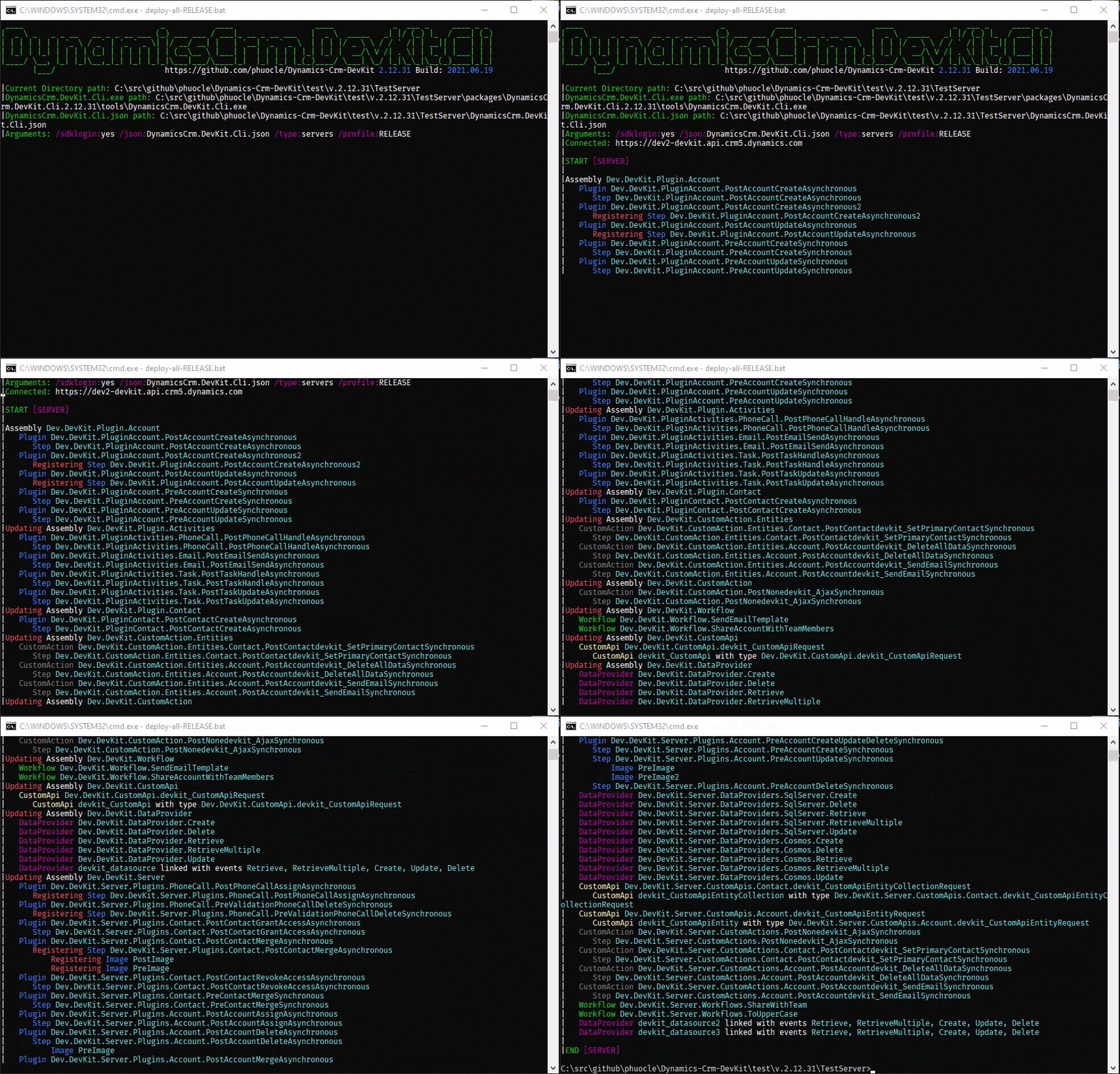
The animated GIF above shows the older deployment experience. The screenshots below show the current, up-to-date devkit server CLI log.
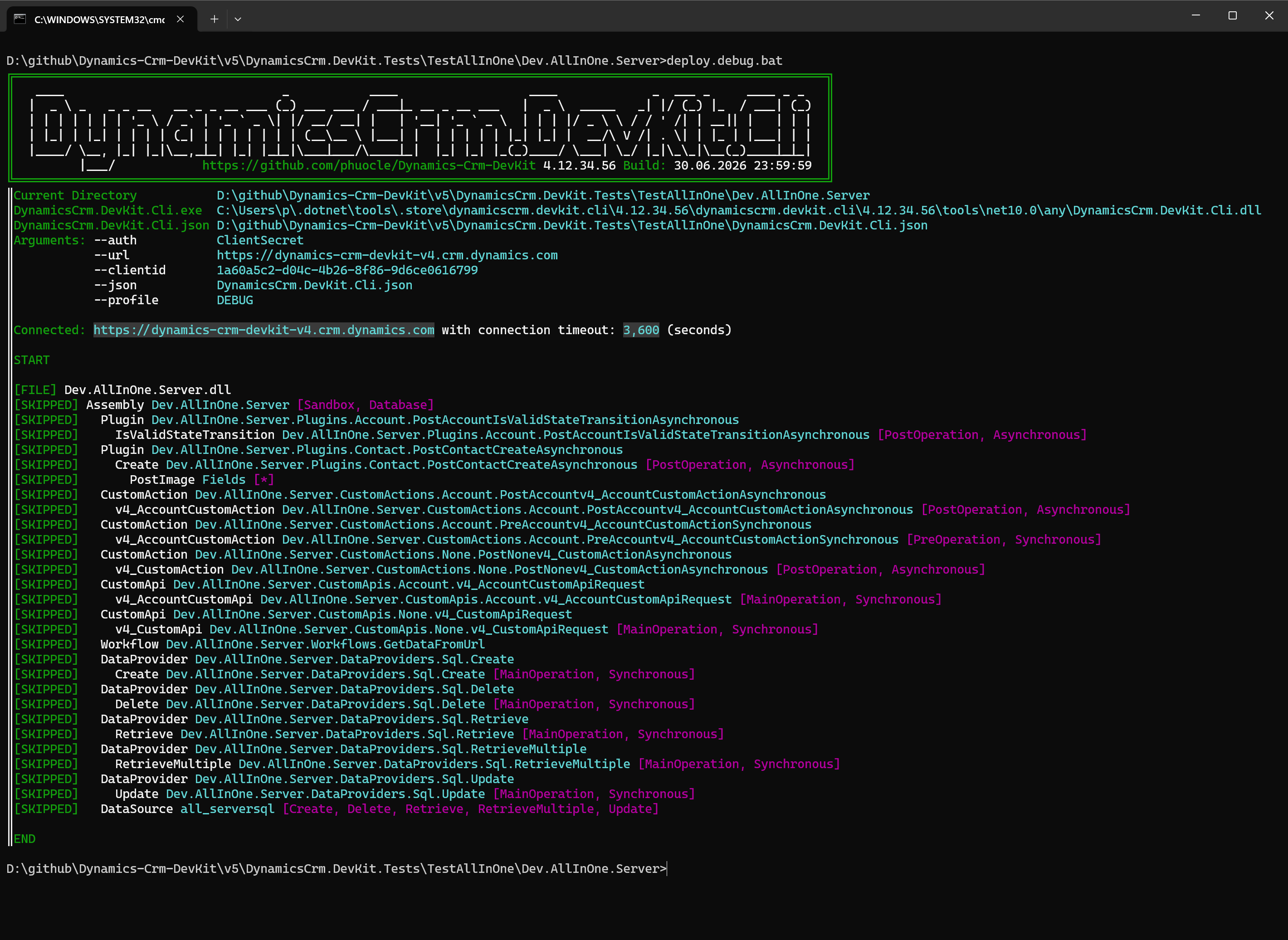
When there are no server-side changes to deploy, DevKit completes the deployment without reporting unnecessary updates.
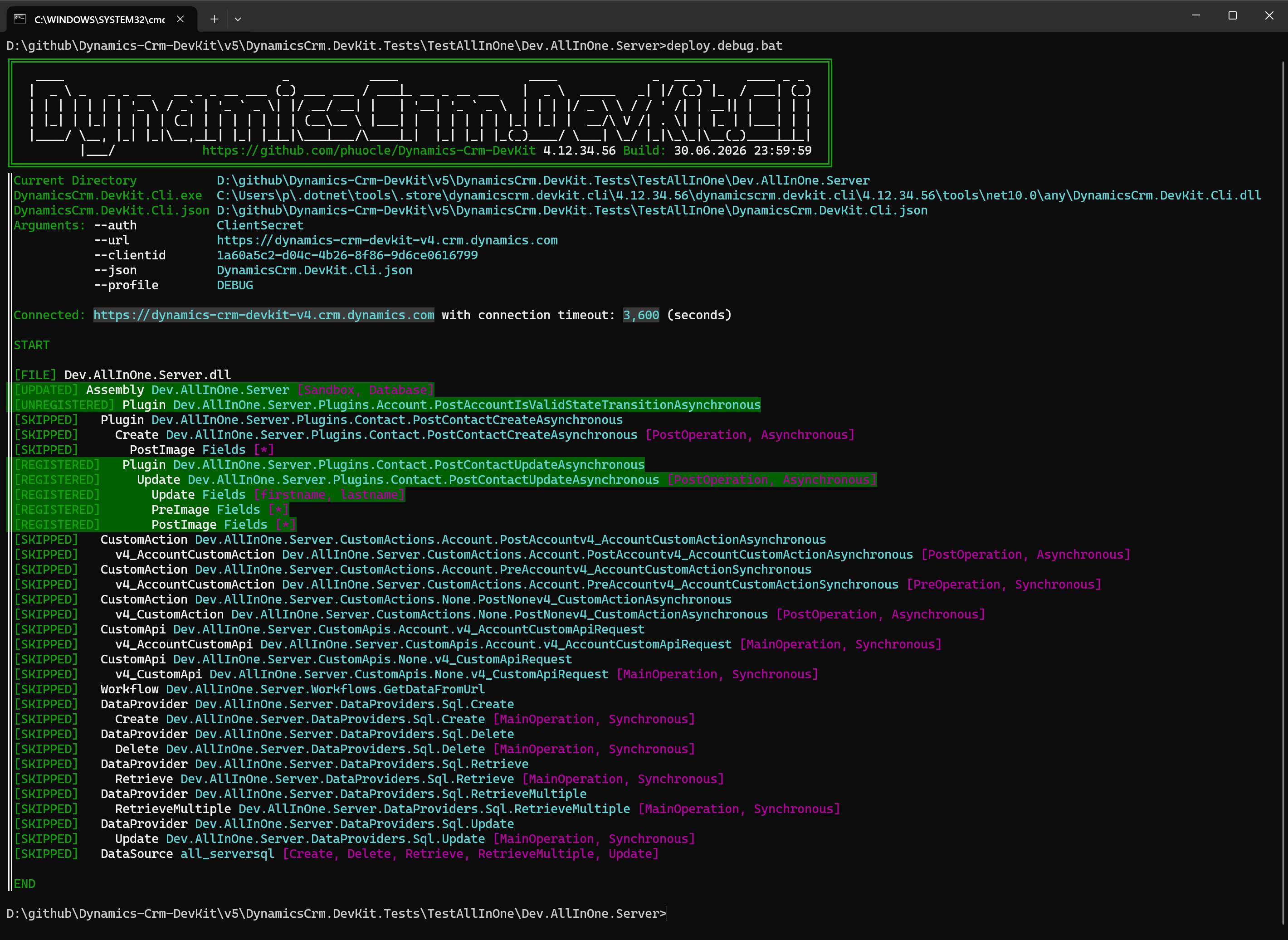
When any plugin changes are detected, the CLI log clearly shows what changed during deployment. This change-aware output is one of DevKit's practical advantages over many other Dataverse deployment tools: you can see exactly whether a plugin was unchanged or updated, instead of treating every deploy as an opaque publish step.
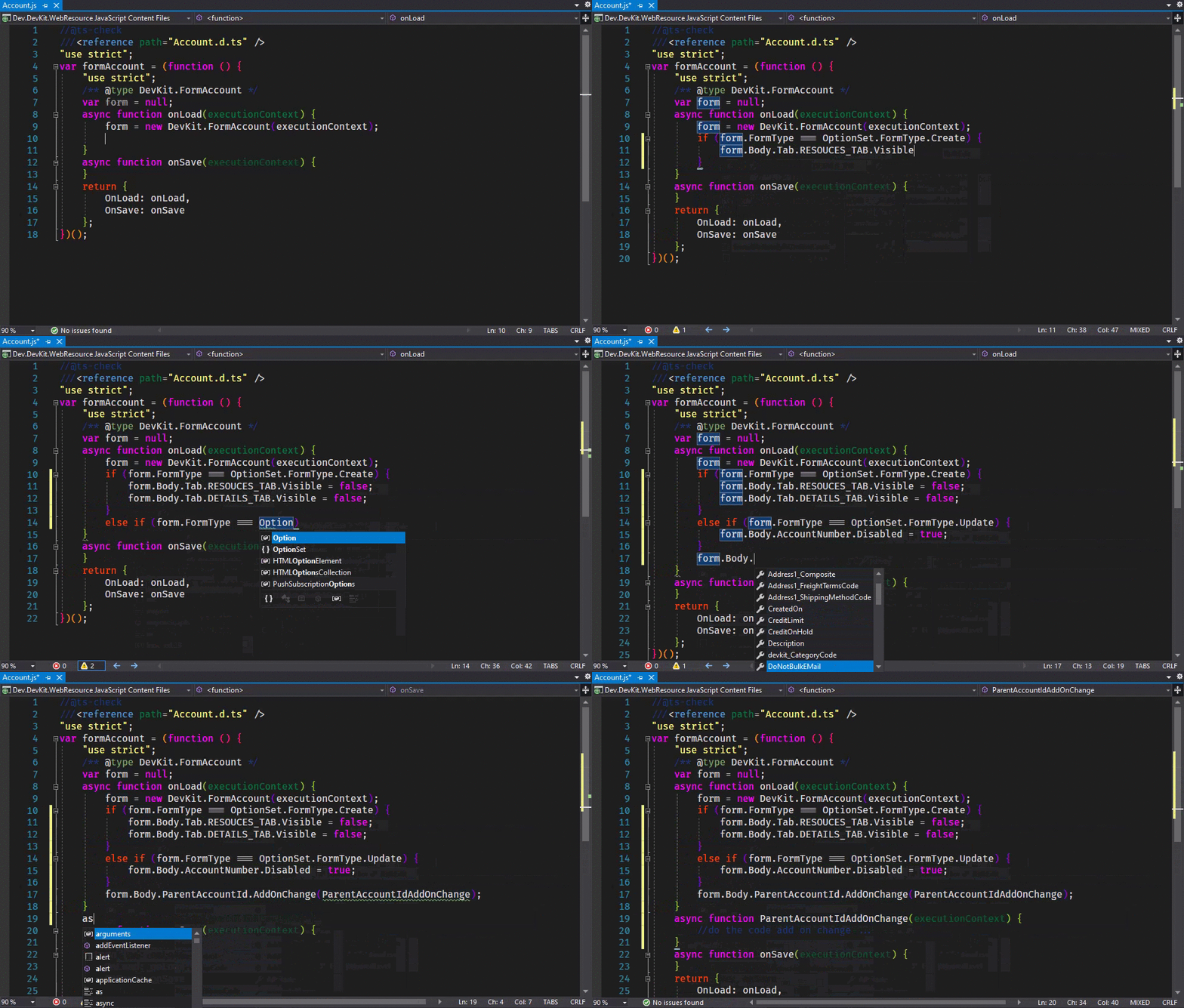
Generate client-side form helpers and work with typed form APIs directly in the editor.
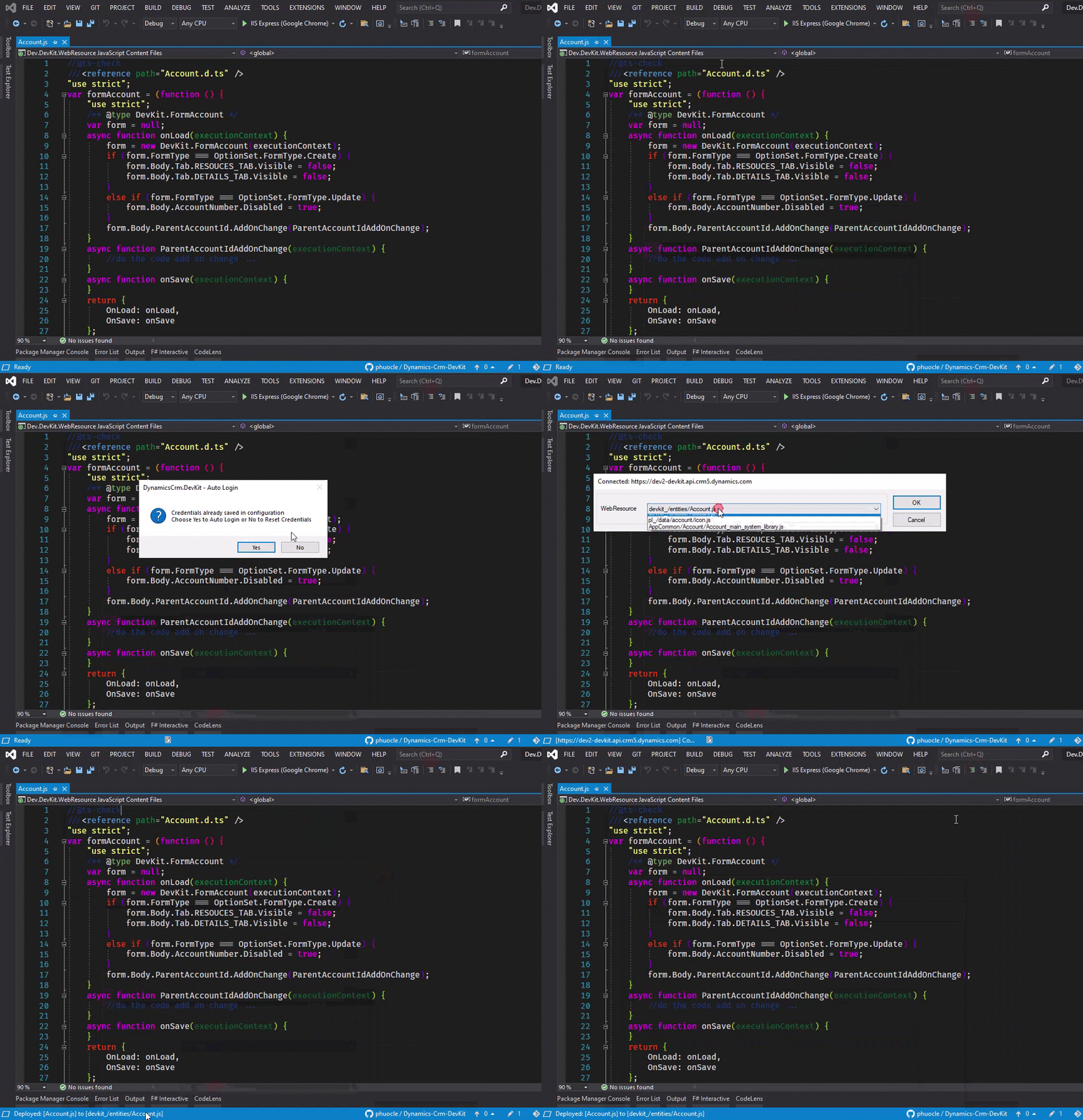
🌐 Deploy web resources
Deploy JavaScript, TypeScript output, HTML, CSS, images, XML, RESX, SVG, and related Dataverse web resource files.
📊 Deploy reports
Upload and download Dataverse SSRS report definitions from the development project.
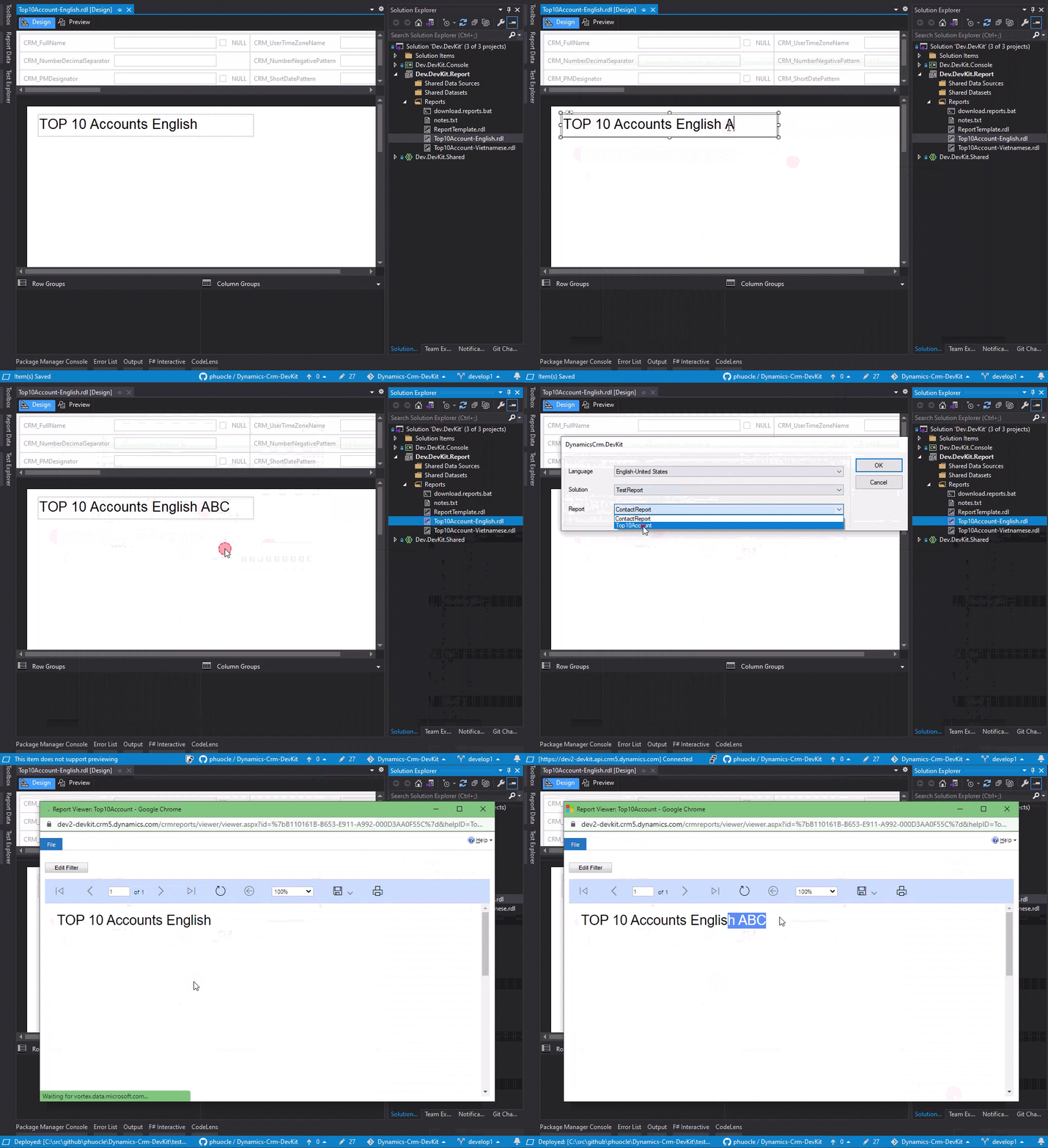
For SSRS report design, the Dynamics 365 Report Authoring Extension is still tied to Visual Studio 2019-era tooling. DevKit includes a small DynamicsCrm.DevKit.2019 VSIX for this workflow: design the report in Visual Studio 2019, then upload the .rdl directly from Visual Studio with the same kind of quick context-menu experience used for web resource upload in the Visual Studio 2026 extension.
This Visual Studio 2019 VSIX is not planned for Visual Studio Marketplace publishing. Download it from GitHub Releases and install it manually when you need report upload support in Visual Studio 2019.
🧱 Project Templates
The template names below match the display names shown by Visual Studio.
| Visual Studio display name |
Purpose |
Wiki |
| 01. Shared Project |
Shared Dataverse code, generated entity helpers, and reusable project items. |
Shared Project Template |
| 02. Console Project |
.NET Framework console utility project for Dataverse operations. |
Console Project Template |
| 03. Console Core Project |
.NET console utility project usingMicrosoft.PowerPlatform.Dataverse.Client. |
Console Core Project Template |
| 04. Server Project |
Plugins, workflows, custom actions, custom APIs, and data providers. |
Server Project Template |
| 05. Package Project |
Dataverse plugin package project with NuGet dependency support. |
Package Project Template |
| 06. WebResource Project |
JavaScript, HTML, CSS, image, resource, and helper web resources. |
WebResource Project Template |
| 07. Shared Test Project |
Shared test support project with Dataverse test helpers. |
Shared Test Project Template |
| 08. ProxyTypes Project |
Early-bound proxy type generation project. |
ProxyTypes Project Template |
| 09. Test Project |
Unit test project for Dataverse server-side code. |
Test Project Template |
| 10. Ui Test Project |
UI automation project using Dataverse UI test patterns. |
Ui Test Project Template |
| 11. Solution Packager Project |
Dataverse solution extract/pack automation. |
Solution Packager Project Template |
| 12. Report Project |
Dataverse SSRS report project. |
Report Project Template |
| 13. WebResource TypeScript Project |
TypeScript web resource project with generated typings and build output. |
WebResource TypeScript Project Template |
Project template catalog: Projects Template
🧩 Item Templates
The item template names below match the display names shown by Visual Studio.
| Visual Studio display name |
Purpose |
Wiki |
| 01. C# Late Bound Class |
Late-bound Dataverse entity class scaffold. |
CSharp Late Bound Class Item Template |
| 02. Javascript Form |
JavaScript form script, typings, and form helper file. |
JavaScript Form Item Template |
| 03. Javascript WebApi |
JavaScript Web API script, typings, and Web API helper file. |
JavaScript WebApi Item Template |
| 04. C# Plugin Class |
DataverseIPlugin class scaffold. |
CSharp Plugin Item Template |
| 05. C# Custom Action Class |
Custom action handler scaffold. |
CSharp Custom Action Item Template |
| 06. C# Custom Api Class |
Custom API handler scaffold. |
CSharp Custom Api Item Template |
| 07. C# Workflow Class |
Custom workflow activity scaffold. |
CSharp Workflow Item Template |
| 08. C# Data Provider Class |
Virtual table data provider operations: retrieve, retrieve multiple, create, update, delete. |
CSharp Data Provider Item Template |
| 09. C# Test Class |
Server-side unit test scaffold. |
CSharp Test Item Template |
| 10. C# Ui Test Class |
UI automation test scaffold. |
CSharp Ui Test Item Template |
| 11. Resource String |
Dataverse localization resource file. |
Resource String Item Template |
| 12. DevKit files |
DevKit support files, batch files, helpers, and managed identity setup files. |
DevKit File Item Template |
| 13. TypeScript Form |
TypeScript form script with generated form typings. |
TypeScript Form Item Template |
| 14. TypeScript WebApi |
TypeScript Web API script with typed interfaces. |
TypeScript WebApi Item Template |
| 15. TypeScript Dialog |
TypeScript dialog script with typed dialog interfaces. |
TypeScript Dialog Item Template |
| 16. JavaScript Dialog |
JavaScript dialog script with typed dialog interfaces. |
JavaScript Dialog Item Template |
Item template catalog: Items Template
⚙️ CLI
DynamicsCrm.DevKit.Cli is distributed as the devkit .NET global tool. It accepts modern --option arguments and keeps compatibility with older /option:value style arguments.
devkit server --conn "AuthType=OAuth;..." --json "DynamicsCrm.DevKit.Cli.json" --profile default
devkit webresource --conn "AuthType=OAuth;..." --file ".\js\account.js" --webresource "new_/js/account.js"
devkit generator --conn "AuthType=OAuth;..." --json "DynamicsCrm.DevKit.Cli.json" --profile default
devkit solution --conn "AuthType=OAuth;..." --json "DynamicsCrm.DevKit.Cli.json" --profile default
devkit mcp --conn "AuthType=OAuth;..." --category standard
Authentication can be supplied through --conn, explicit --auth options, PAC profile, client secret credentials, or DEVKIT_* environment variables.
🤖 MCP Server
The CLI includes an MCP server for Dataverse-aware AI agents.
| Category |
Tool count |
Typical use |
basic |
9 |
WhoAmI, table discovery, choices, records, FetchXML, search, demo data, URL parsing. |
standard |
26 |
Forms, views, roles, workflows, flows, BPFs, business rules, custom APIs, audit, plugins, trace logs, system jobs, web resources. |
advanced |
33 |
Model-driven apps, table and column metadata, relationships, raw Web API, modern command bar, and classic ribbon operations. |
Useful entry points:
The server-start commands require authentication through --conn, explicit --auth options, or DEVKIT_* environment variables.
devkit mcp --setup-guide
devkit mcp --tools
devkit mcp --category basic --dry-run
devkit mcp "DevKit Dataverse" --category advanced
Copy/paste prompts to try with the MCP server:
Inspect the Account classic ribbon, list every form, main grid, and subgrid button, then tell me which buttons are custom and which ones are out-of-box.Add a classic ribbon button named "Validate Customer" on the Account form that calls my JavaScript web resource. Resolve the web resource by display name, create a backup, publish, and wait for the publish system job before reading back.Hide the out-of-box Deactivate button on Contact only after you inspect the current ribbon and confirm the exact button id. Keep a rollback path.Create a split button on the Opportunity main grid with "Approve", "Reject", and "Request Info" actions, each using its own JavaScript function and enable rule.Show me all plugin steps registered on Account Update, include images, then compare them with the latest plugin trace logs and explain which step is failing.For this record URL, parse the table and record id, load the record, then show me the recent audit history for only fields that changed in the last 24 hours.Find every component in my unmanaged solution, group them by type, and point out missing dependencies I should check before export.Create a new Dataverse table with the correct publisher prefix from my solution, add required columns, choices with colors, and a relationship to Account.Update the main Account form: add a new tab, place fields into sections, add a subgrid, wire the JavaScript onload/onchange handlers, then publish the form.Inspect a model-driven app navigation structure, add a new area/group/subarea for my custom table, then publish only the affected app and sitemap changes.
🛡️ Code Quality
DynamicsCrm.DevKit.Analyzers adds Dataverse-specific Roslyn diagnostics to C# projects. The rule set covers high-impact issues such as missing filtering attributes, unsafe ColumnSet(true), invalid plugin images, stateful plugin instances, parallel execution, HTTP timeout configuration, invalid exception patterns, file IO in sandboxed code, data provider setup, and tracing gaps.
🔗 Project Links
📄 License
This project is licensed under the terms specified in LICENSE.
| |

