EJS + AngularJS Navigator
Tracks variables and functions between EJS templates and AngularJS 1.x (ES5) controllers —
go-to-definition from {{ expression }} straight to $scope, find-usages back from a controller
to every template that reads it, rename across both, and dead-code detection.
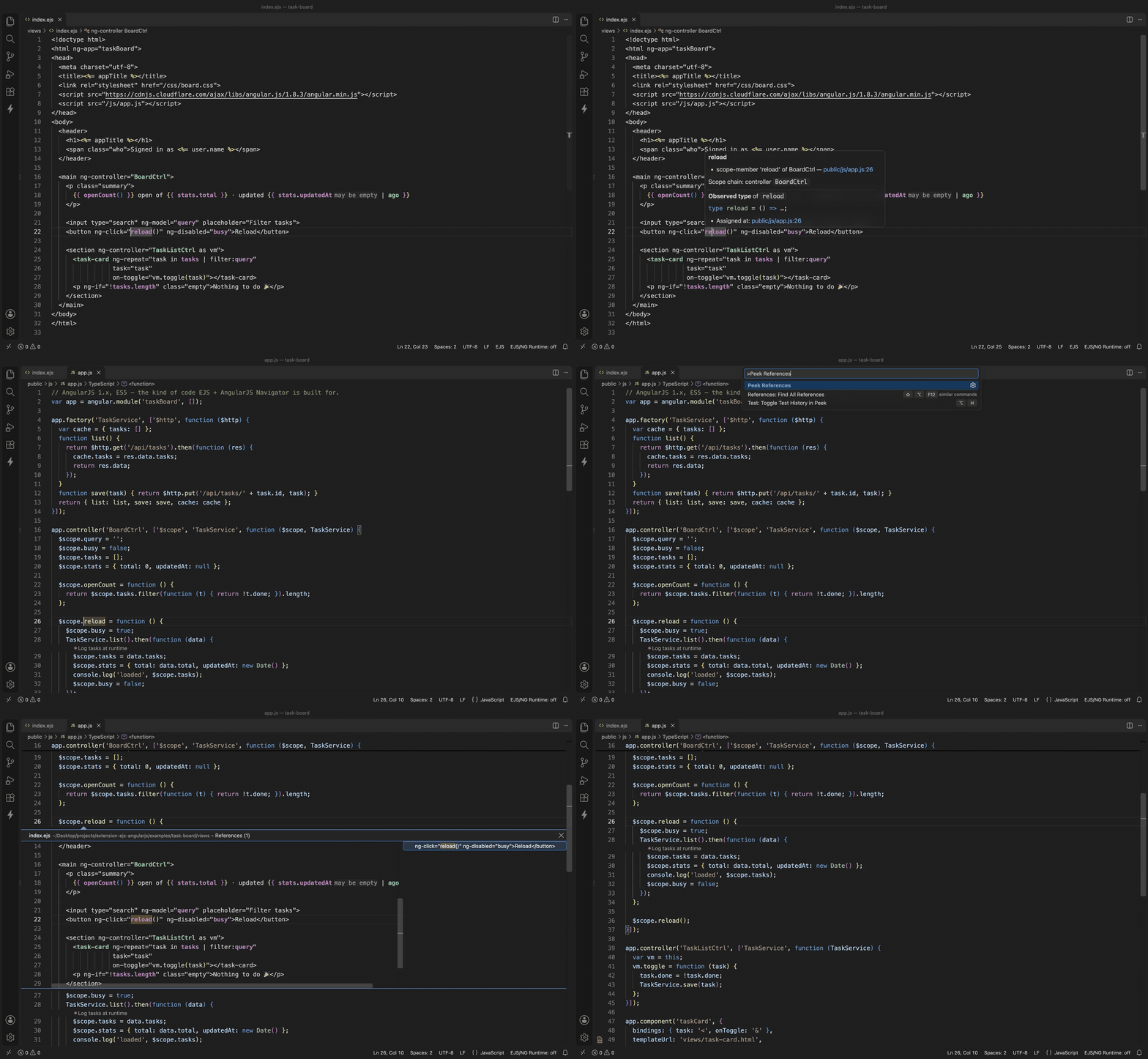
▶️ Watch the full demo video · Try it on the
example app
Demo
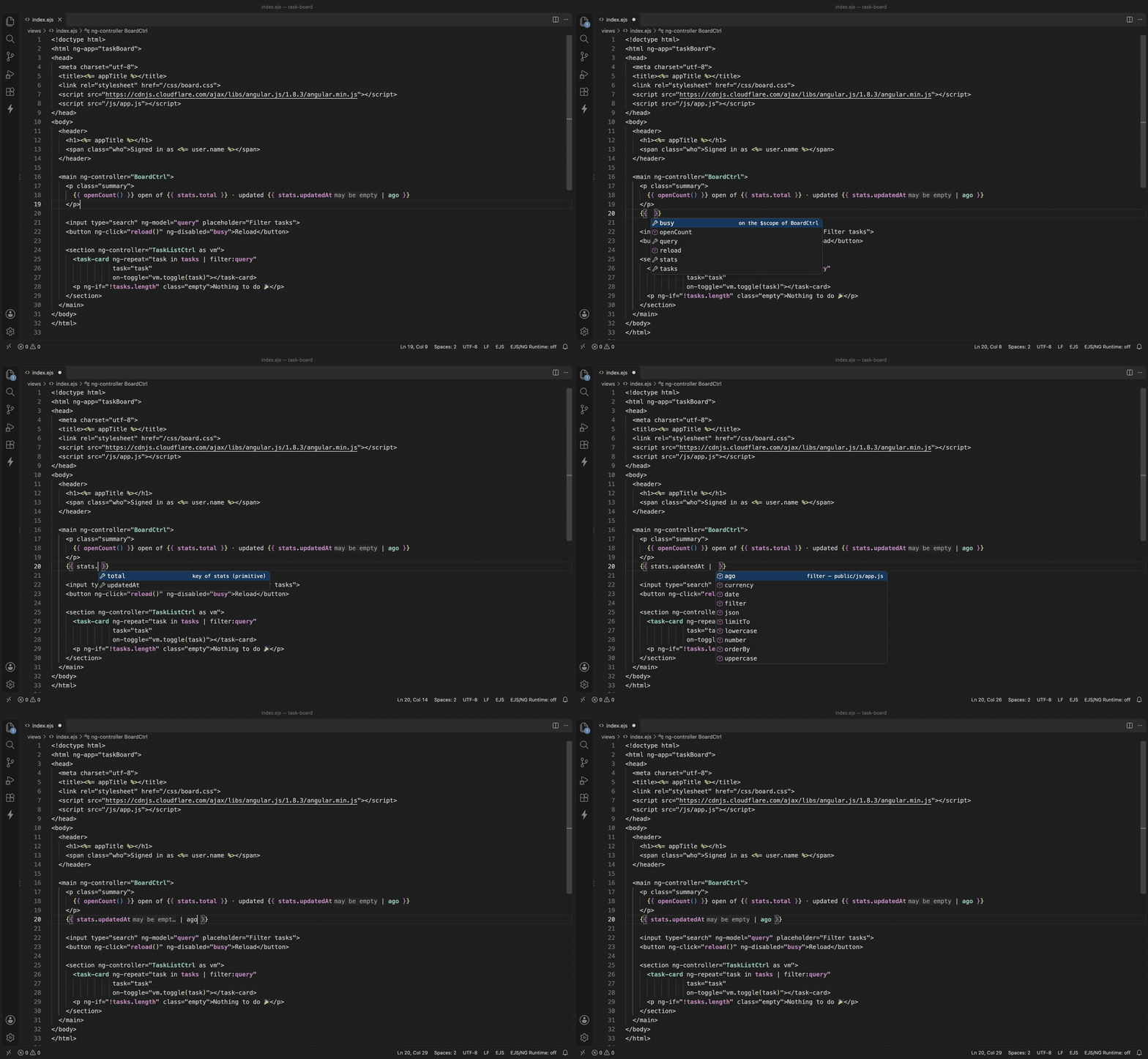
AngularJS-aware completion — scope members, the keys of an object, filters after |:
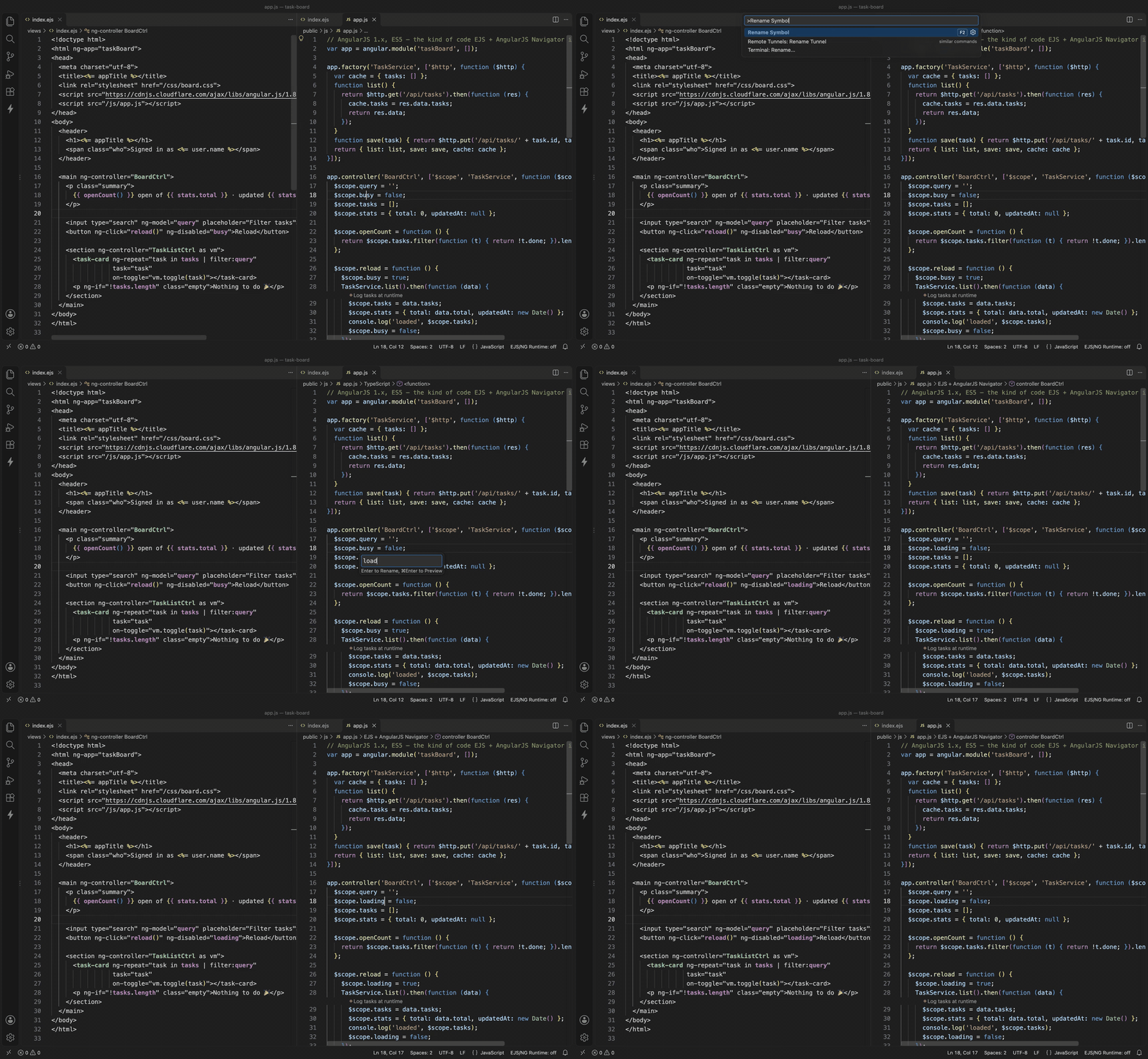
Rename a scope variable once — the controller and every template follow:
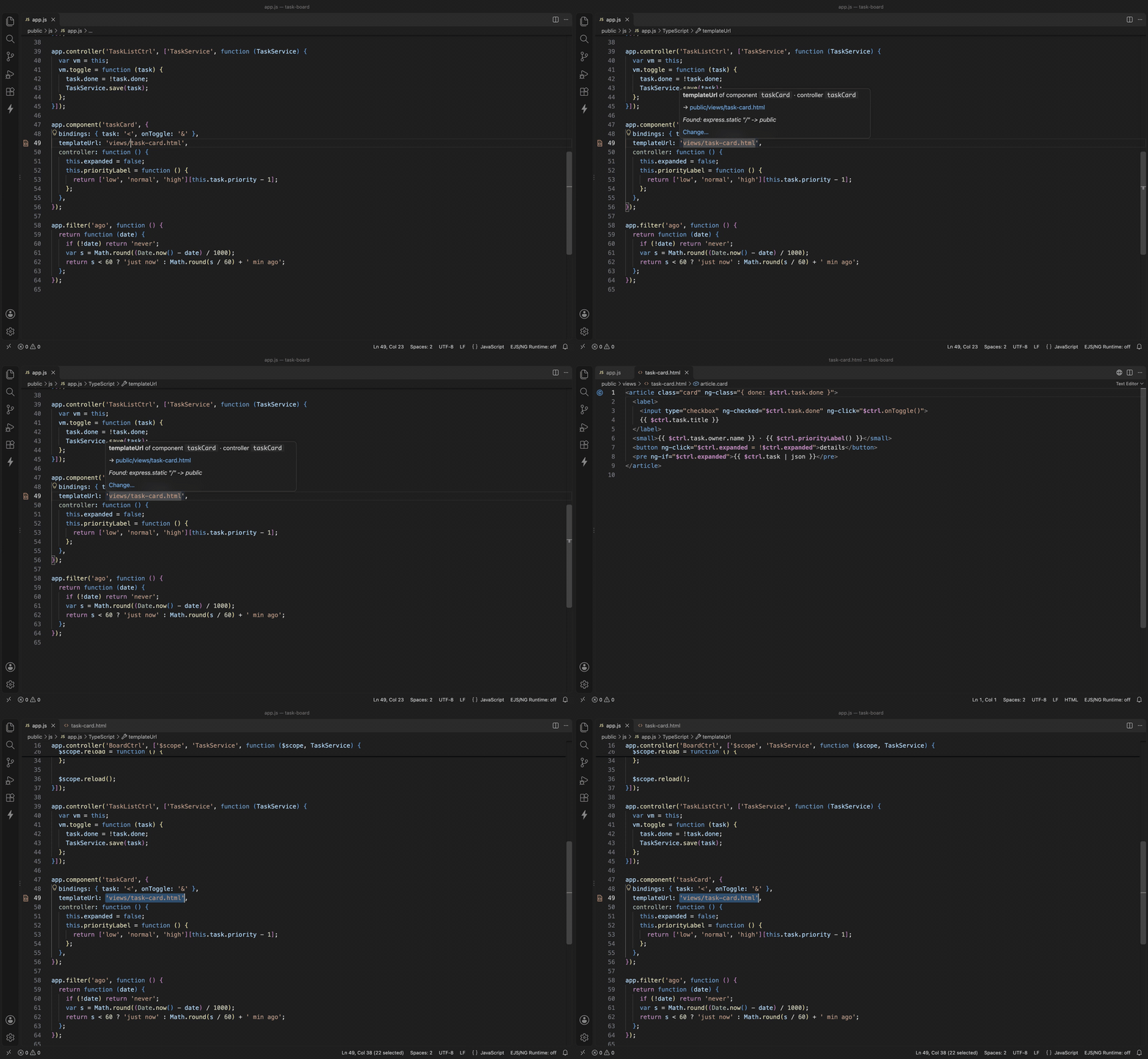
templateUrl — see which file it loads and how it was found; Go to Related jumps between them:
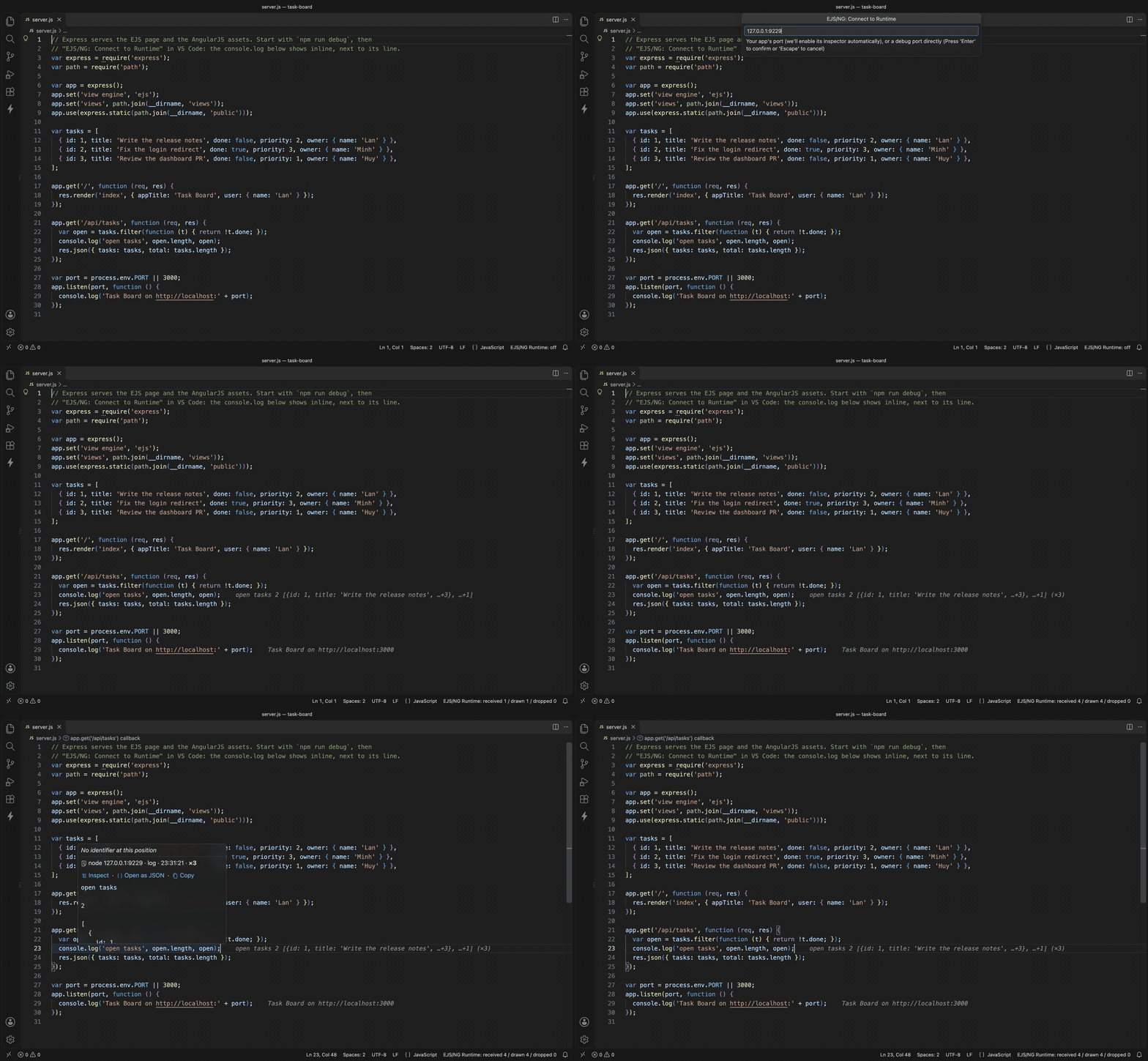
Inline runtime log — console.log from a running Node process, drawn next to the line:
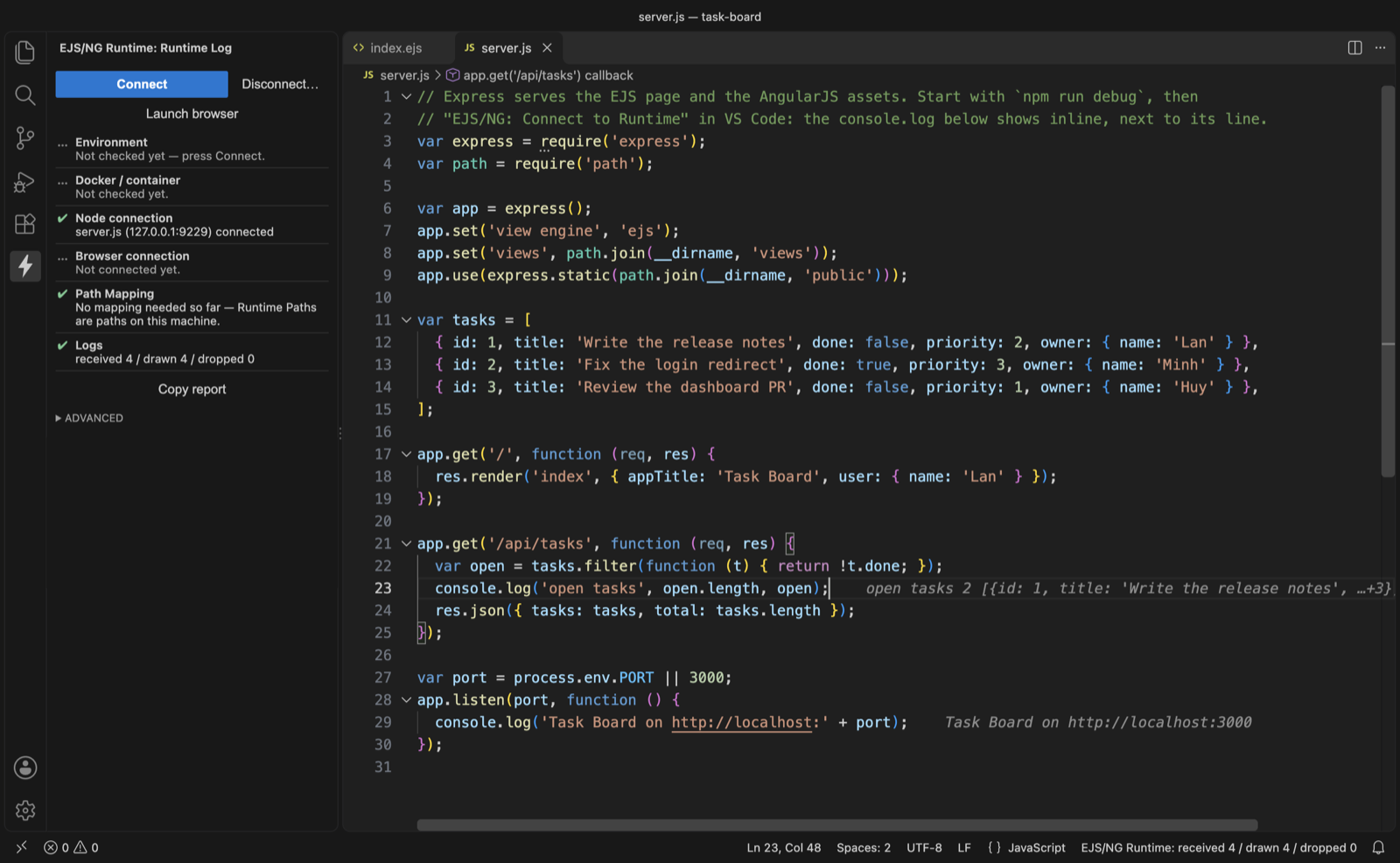
Runtime Log panel — one Connect button and a checklist of what works:
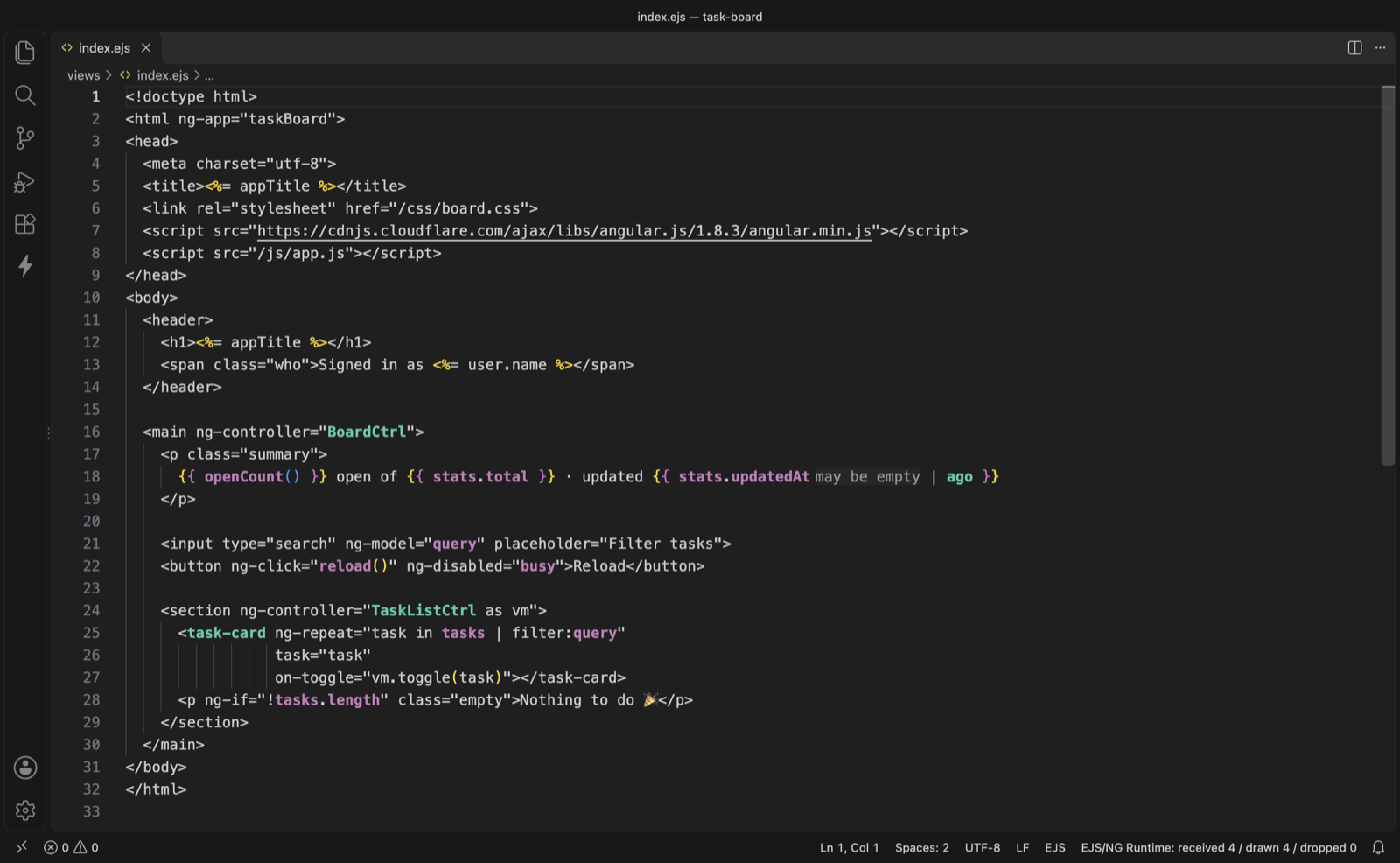
JS-backed names stand out in .ejs/.html:
Features
|
Example |
| Template → JS |
data-ng-click="selectSection(section)" → $scope.selectSection |
Property of an ng-repeat variable |
section.icon → the icon: key in the object literal of $scope.sections |
ng-controller → declaration |
works with hyphenated names too |
| JS → Template |
$scope.busy → every usage in every template |
| Custom directive / isolate binding |
pick-file="onPick($file)" → .directive('pickFile', …) |
| Filter |
{{ x \| money }} → .filter('money', …) |
| Rename |
$scope.busy → renames every read/write across JS and templates; refuses with a reason on conflict |
| AngularJS-aware completion |
busy. → the keys actually assigned on that object; parent-controller scopes, vm./$ctrl. with component bindings, filters after \|, component/directive tags and attributes; in .js, $scope./vm./this. and injected services (UserService.) |
| Dead code |
controller / directive / filter / property nobody uses |
| Live sync |
files changed outside the editor (git pull, checkout, another tool) re-index automatically |
| Inline runtime log |
console.log/warn/error from a running Node process or browser tab, shown inline next to the line that logged it — color-coded by severity; drawn like IntelliJ's inline debugger values (muted italic after the code); a line hit many times shows its count (42 (×3)); hover the line to see which container or tab it came from, when, the full value, and the last few values before it |
| Inline logpoints |
VS Code logpoints (right-click the gutter → Add Logpoint…, e.g. user = {user.name}) show inline while connected — no code change, no restart, no debug session, and the app never pauses |
templateUrl hover |
Says which template a templateUrl loads and how it was found (Express static mount, views directory, .html served from .ejs…) — or what was tried, with Link to a template… to pick it by hand (saved in ejsng.templateUrlMap) |
templateUrl ↔ template |
IntelliJ-style gutter icons: an HTML icon beside each templateUrl that maps to a file, a controller icon on the template's first line (hover it for who loads it). Go to Related (Ctrl+Cmd+↑ / Ctrl+Alt+Home) jumps between them. A correct Angular URL — relative to the page, like 'views/list.html' from public/js/app.js — is found without any templateRoots |
| JS-backed names colored |
In .ejs/.html, every name a .js file defines is drawn in its own color and bold — scope variables and their properties in one color, controllers/directives/components/filters in another — so what is wired to JavaScript stands out. ejsng.templateHighlight.enabled turns it off; the colors are ejsng.linkedScope.foreground and ejsng.linkedDeclaration.foreground |
| Runtime Values panel |
Laid out like IntelliJ's Variables view: name = {Type} value, round kind icons, Darcula / IntelliJ Light token colors |
| Runtime Log panel |
One Connect button finds your Node container through Docker, maps container paths from its mounts, and shows a step-by-step checklist of what works and why not — with fixes right on the failing step |
Requirements
No separate install step — the language server ships bundled inside the extension.
Extension Settings
| Setting |
Default |
Notes |
ejsng.include / ejsng.exclude |
common EJS/JS/HTML globs |
Which files to index |
ejsng.moduleAliases |
["myApp", "app", "appModule"] |
Variables holding the Angular module when declared in another file |
ejsng.ejsDelimiter |
"%" |
Set to "?" for <? ?> delimiters |
ejsng.customDirectives |
{} |
e.g. {"myOn": "statement"} for your own custom directives |
ejsng.templateUrlMap |
{} |
templateUrl → template links set by hand, e.g. {"/legacy/list": "old/tpl/list-v2.ejs"}; filled from the hover's Link to a template… |
ejsng.diagnostics.enabled |
false |
Off by default to avoid false warnings on legacy code |
ejsng.runtimeLog.pathMappings |
[] |
Container path → local path. Usually inferred from Docker mounts; declare one to override. ${workspaceFolder} allowed. Under Remote-WSL use Linux paths (a pasted \\wsl.localhost\… path is converted); the most specific remote always applies first |
ejsng.runtimeLog.skipFrames |
[] |
Extra stack-frame globs never used as a log's anchor (e.g. your own log wrapper) |
ejsng.runtimeLog.logpoints |
true |
Show VS Code logpoints inline while connected. Turn off if you also debug the same app with VS Code's debugger and see each logpoint twice in the Debug Console |
ejsng.runtimeLog.chromeExecutablePath |
"" |
Browser for Launch browser. Empty = Chrome, then Edge, then Brave |
ejsng.runtimeLog.chromeDebugPort |
9222 |
Debug port the launched browser opens |
Commands
- EJS/NG: Go to Related Template / Controller —
Ctrl+Cmd+↑ (macOS) / Ctrl+Alt+Home, as in IntelliJ
- EJS/NG: Reindex Workspace
- EJS/NG: Show Index Stats
- EJS/NG: Connect to Runtime — finds a Node container with
--inspect through Docker (an
inspector port that isn't published is tried at the container's own IP, which works when Docker
Engine runs on the same Linux/WSL host), or asks
for a host:port (an app port works too), and shows its console.log output inline. Multiple
connections can be open at once.
- EJS/NG: Disconnect Runtime — pick one of the currently open runtime connections to close.
- EJS/NG: Launch Browser and Connect — opens your app in Chrome/Edge/Brave on your machine
(on Windows when using Remote-WSL) with a dedicated, persistent debug profile, and connects to the
app's tab once it loads.
The EJS/NG Runtime view in the Activity Bar does all of the above from one place, plus a
Copy report button (markdown on the clipboard, home directory shown as ~, nothing sent anywhere).
Known limitations
This is an early release: dynamic templateUrl expressions, and JS built through a bundler step,
are reported as "unresolved" rather than followed. Runtime log: browser logs need the browser's
debug port reachable from where the extension runs — under Remote-WSL that means WSL
networkingMode=mirrored; Remote-SSH and Dev Containers support Node logs only for now. Minified or
obfuscated files without source maps are skipped rather than drawn on "line 1". Logpoints: .js
files only (not .ejs templates, which compile without source maps), no hit count condition, and on
Node older than 20.16 their output also goes to the app's own stdout.
Release Notes
0.4.2
- A line hit many times shows its count inline (
» 42 (×3)), and its hover lists the last values
before the latest — each with the container or tab it came from and when.
- Reconnecting to an app (after a restart) clears what that app logged before; other runtimes'
values on the same lines stay. Editing a file keeps each line's values on its code as lines are
added or removed.
0.4.1
- Hovering a line with an inline log shows where the value came from — the container name
(
cityos-app), node <host:port>, or browser: <tab title> — with its severity, the time it
arrived, and the full value. With two containers running the same code, this is how you tell
which one hit the line last.
0.4.0
- Inline logpoints: VS Code logpoints (right-click the gutter → Add Logpoint…) show inline
on a connected runtime — no code change, no restart, no debug session; the app never pauses. They
also work where your logger writes only to a file. Setting:
ejsng.runtimeLog.logpoints.
- Unpublished inspector ports: a container running
--inspect=0.0.0.0:9229 without publishing
that port is connected to at its own IP when that's routable (Docker Engine inside WSL / Linux).
- Remote-WSL path mappings: a
\\wsl.localhost\… path pasted into
ejsng.runtimeLog.pathMappings is read as its Linux path, and the most specific mapping always
applies first — logs under nested mounts no longer vanish as "file not readable". The checklist
flags both.
- The panel names the path it looked for when a file isn't readable, skips Node built-ins such as
node:events, and folds a stack that repeats (a framework logging every message) into one
counted entry, so it can't push your own log out of view.
0.3.0
Runtime log that finds its own way in remote and Docker setups:
- Connect discovers Node containers through Docker (by container name and app port, including
remapped inspector ports) and infers path mappings from the container's mounts — nested mounts
resolve to the repo actually running.
- Logs anchor to your code, not your logger:
node_modules, common logger directories and your own
skipFrames are skipped, as are minified/obfuscated files; ANSI colors are stripped.
- A log is drawn only when the file on disk is what the runtime is running — otherwise the panel
says Stale File (restart the app) or Shadowed File (and names the copy that runs).
- Browser URLs are matched to workspace files by their path tail (never drawn when ambiguous);
files outside the workspace are drawn when a path mapping covers them.
- The Runtime Log panel is now a checklist — environment, Docker, Node, browser, path mapping,
received / drawn / dropped by reason — with fixes in place and Copy report.
- Launch browser opens the app on your side (Windows Chrome under Remote-WSL) and connects to
its tab by itself.
- The status bar shows received / drawn / dropped instead of a connection count, and a connection
is shown as connected only once its socket really opens.
0.2.1
EJS/NG: Connect to Runtime now takes host:port directly and can open multiple simultaneous
connections (e.g. several Node processes at once); EJS/NG: Disconnect Runtime closes one.
0.2.0
Inline runtime log: EJS/NG: Connect to Runtime shows console.log/warn/error output from a
running Node process inline in the editor.
0.1.0
Initial release: go-to-definition, find references, rename, completion, and dead-code detection
between EJS templates and AngularJS 1.x controllers.
| |

