Fixed-Width Inspector
English · 繁體中文
Color every field of fixed-width (fixed-length) text files from your record layout, and validate them automatically — ACH, payroll, NACHA, Zengin, tax and health-insurance filings. Big5 / MS950 files whose field lengths are counted in bytes are supported.
依你定義的欄位規格,把固定長度文字檔(台灣稱「媒體檔」)的每個欄位上色,並自動檢核資料是否異常。支援以位元組計算長度的 Big5 / MS950 媒體檔。
Website 官網:fixed-width-inspector.pylabs.app · Schema guide 設定說明:English / 中文
English
Features
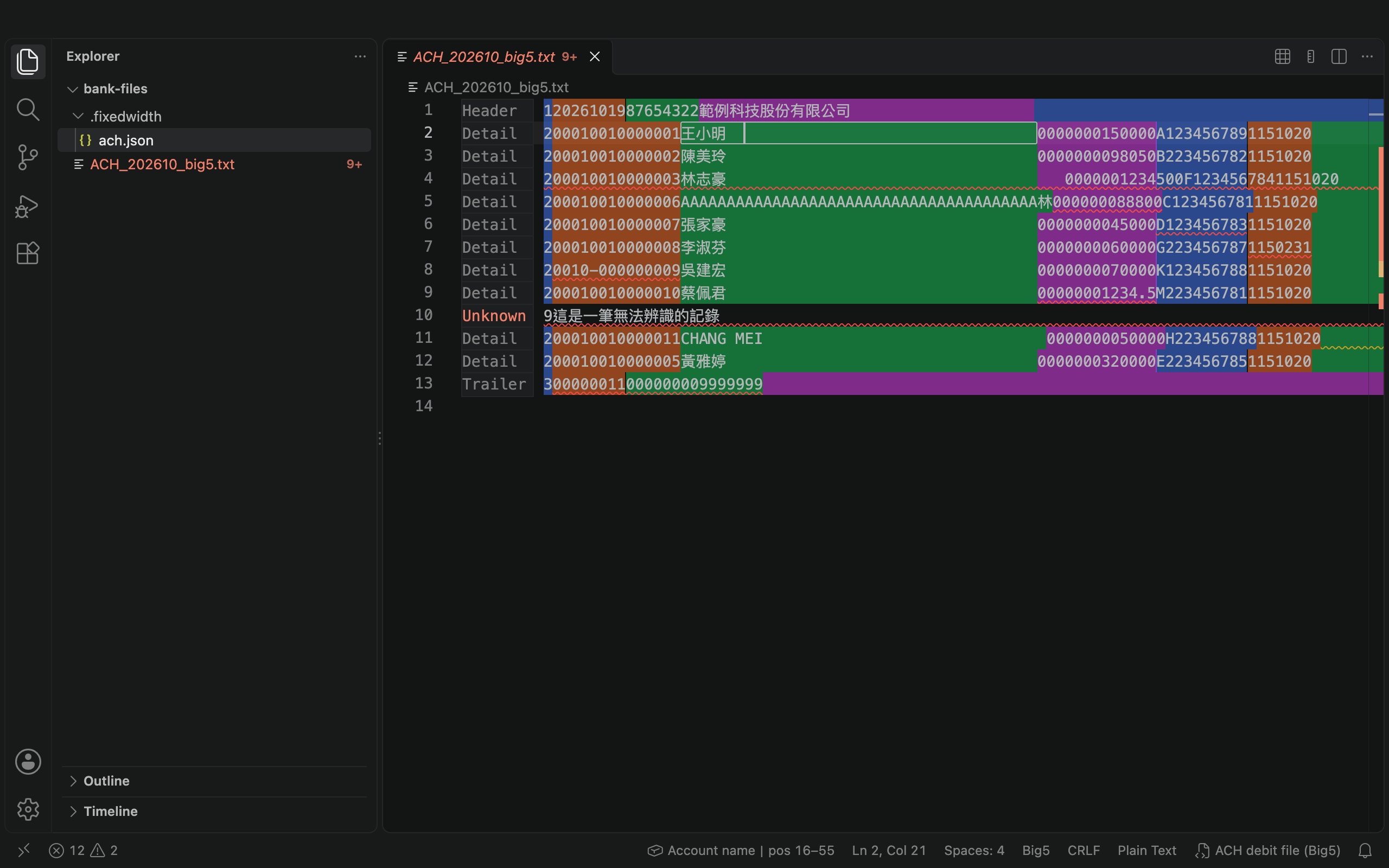
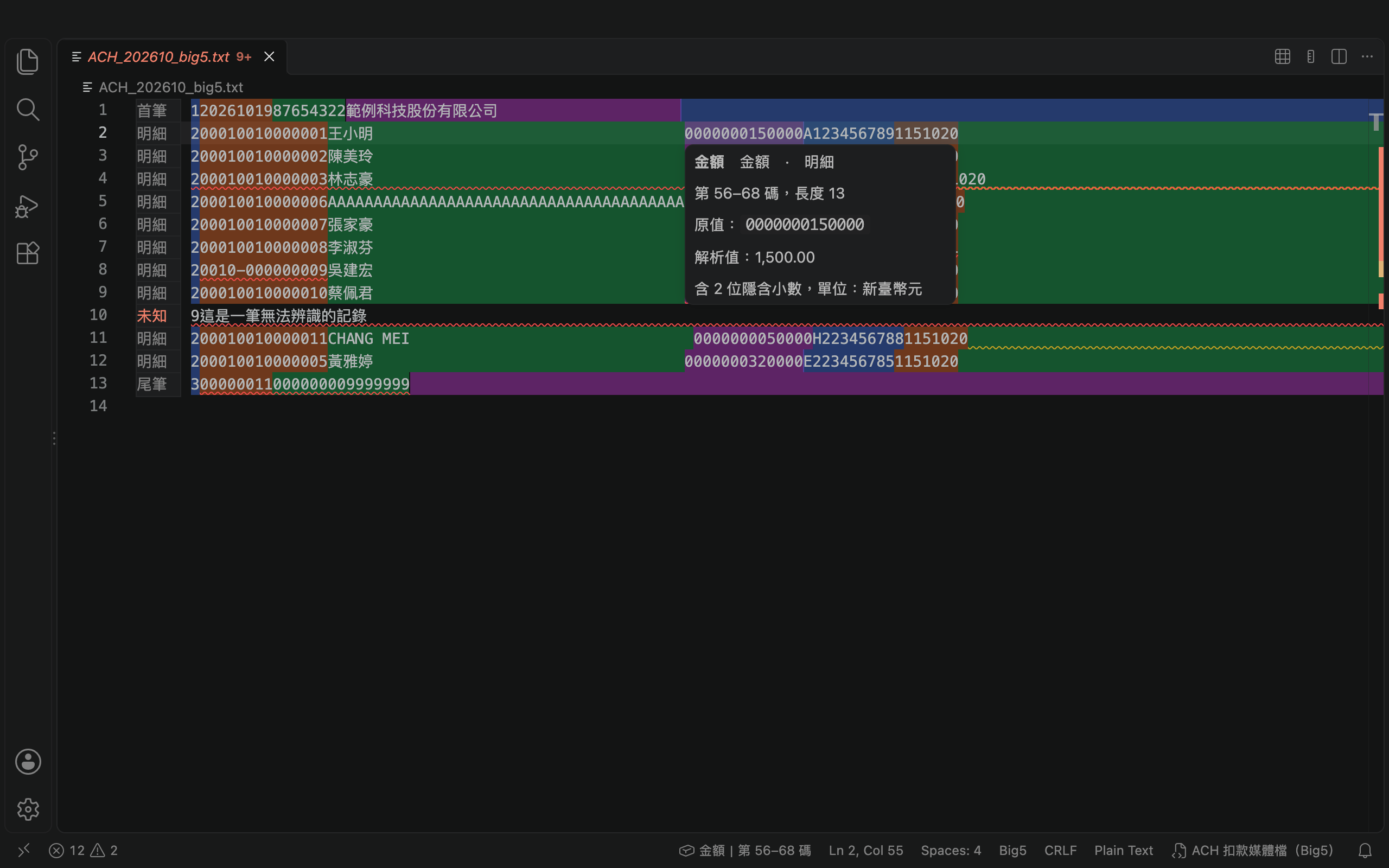
- See every field: neighboring fields get alternating colors (blue, orange, green, purple) that work in light and dark themes.
- Errors marked for you: problems get a red squiggle and are listed in the Problems panel.
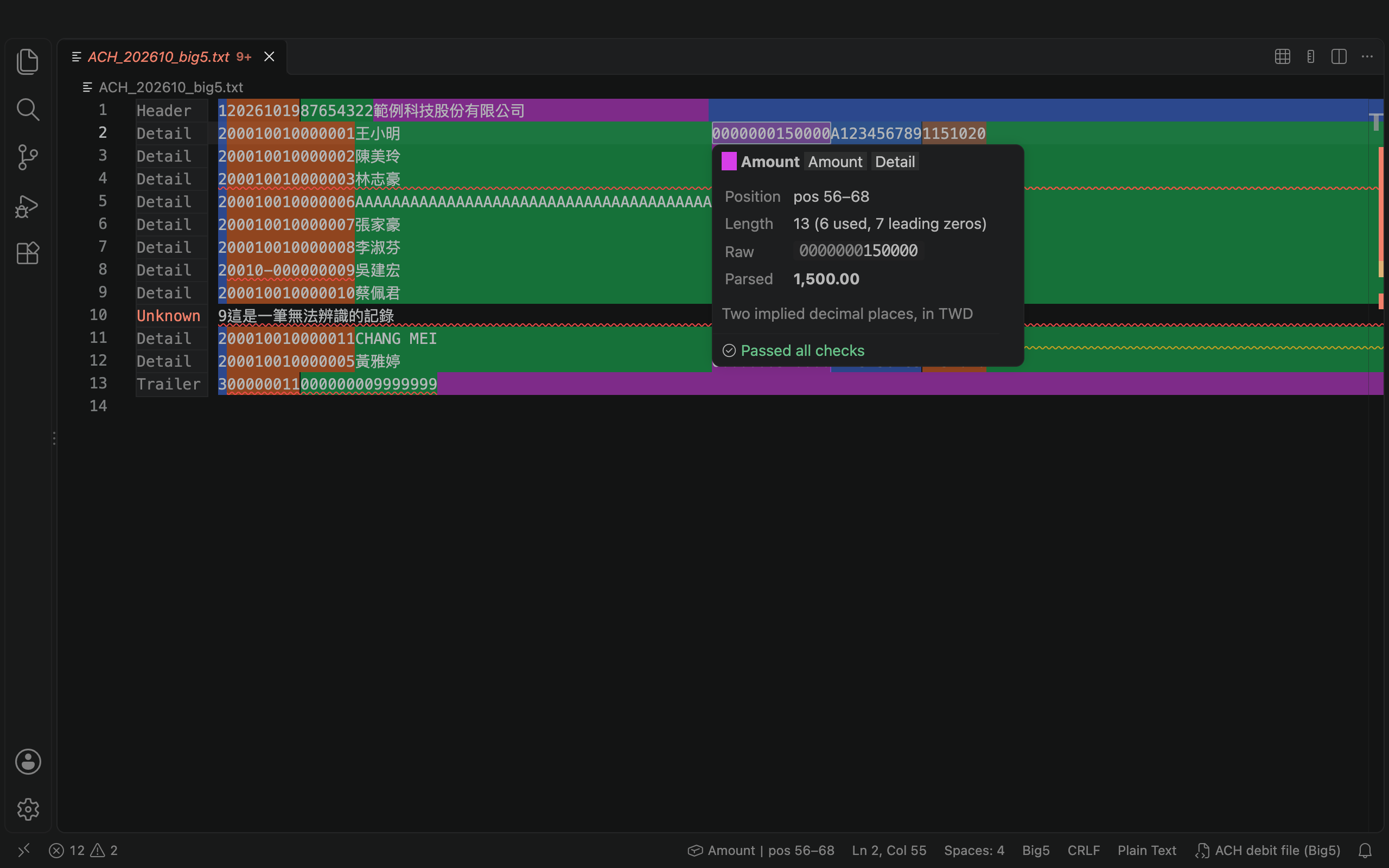
- Field details at the cursor: hover a field to see its name, position, length, raw value, parsed value and any error. Padding spaces and zeros are shown faintly with how many positions are used, and the result is colored green (passed) or red (errors). The field under the cursor is outlined, and the status bar shows it, such as
Account number|pos 2–15.
- Byte lengths for Chinese: in Big5 / MS950 files a Chinese character takes 2 positions, and you are warned when a field boundary splits one.
- Record labels: each line starts with Header / Detail / Trailer, or a red "Unknown" for lines that match no record. Customize the text with
label.
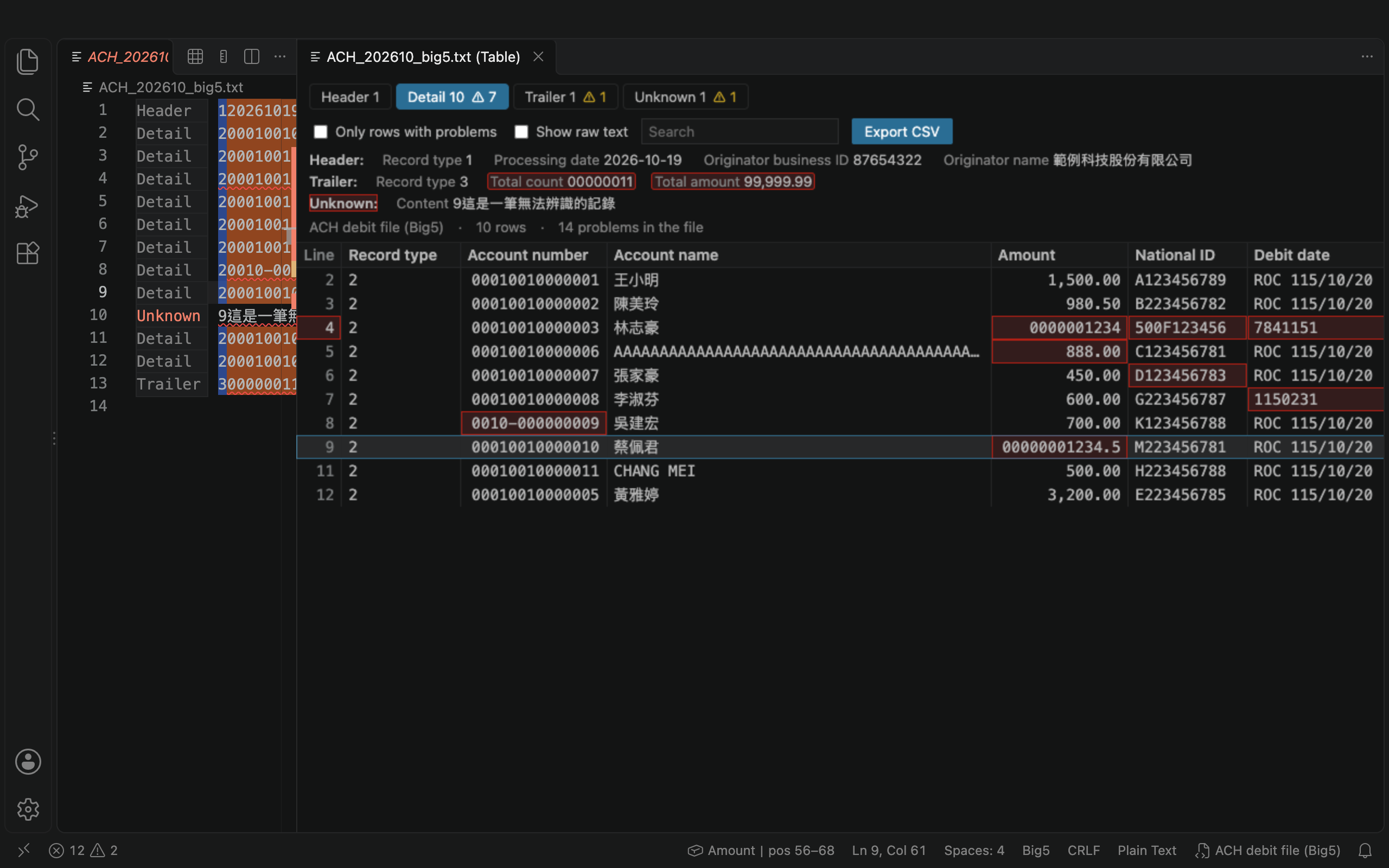
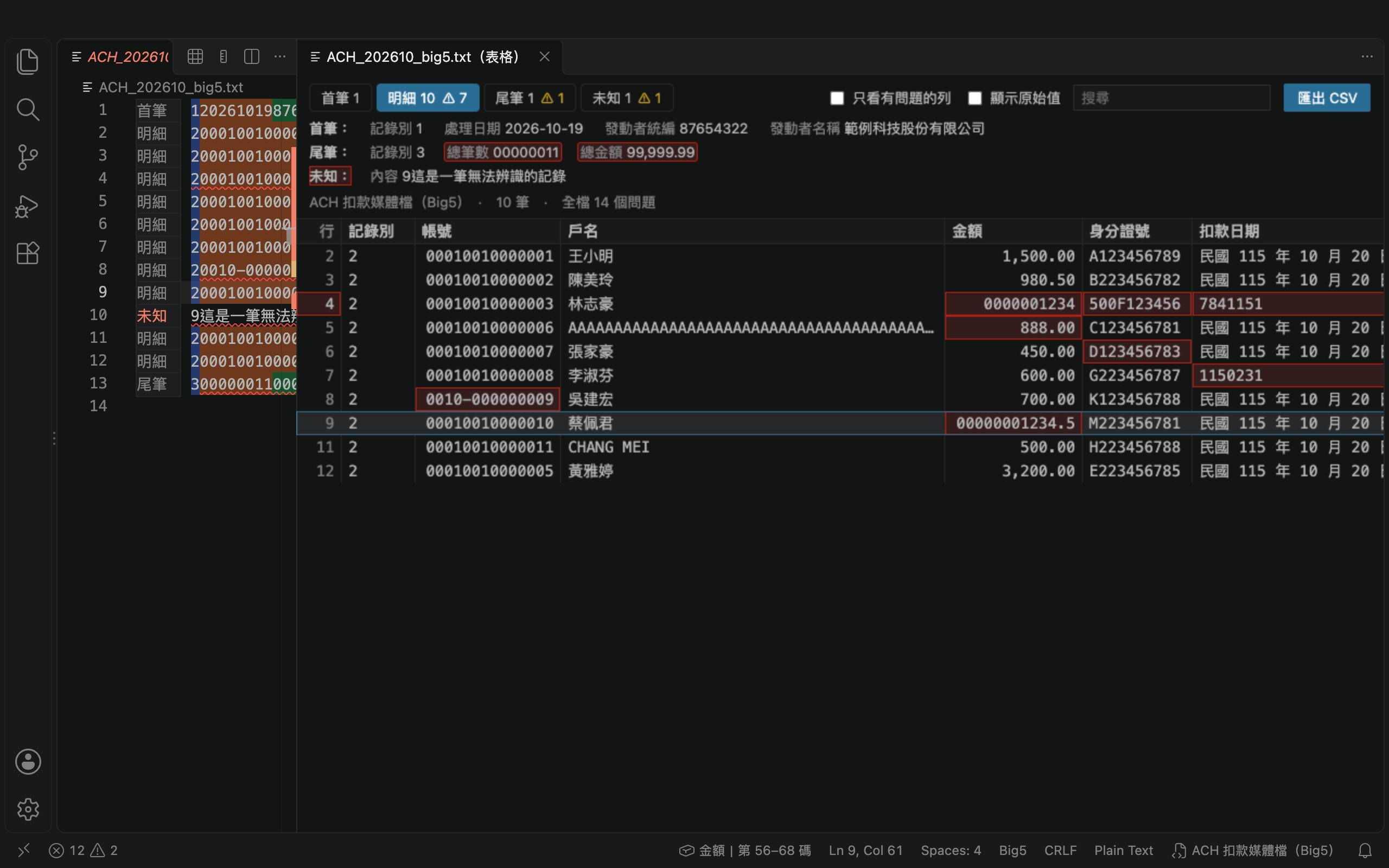
- Table view: one tab per record type and one column per field, with errors highlighted. Click a cell to jump to it in the file; the table updates as you edit.
- Export as CSV: open the result straight in Excel, with Chinese intact and leading zeros kept.
- Wrong encoding detection: when a Big5 file is opened as UTF-8, you are told and can reopen it with the right encoding in one click.
- English and Traditional Chinese, following the VS Code display language.
What gets checked
| Level |
Checks |
| Field |
text (left-aligned, pattern), numeric (digits only, zero-padded), amount (implied decimals, optional sign), date (YYYYMMDD / YYMMDD / Taiwan ROC ROC_YYYMMDD), enum, twid (Taiwan national ID check digit), twbiz (Taiwan business ID check digit), filler |
| Line |
line length, no matching record, line endings, header / trailer position, undecodable characters (U+FFFD) |
| File |
trailer count = number of detail records, trailer total = sum of detail amounts |
Getting started
- Create a
.fixedwidth/ folder next to your data file and put a schema (*.json) in it. Or run Fixed-Width Inspector: Create Schema from Template, which creates a sample next to the current file and applies it right away.
- Open a file whose name matches the schema's
filePattern; the schema is applied automatically.
- Or click the ruler icon at the top right of the editor (or "No schema" in the status bar) and choose Choose a schema file… to use a schema from anywhere. The choice is remembered.
- You get autocomplete and validation while writing a schema.
Schemas are looked up in this order: the schema you picked for this file; then .fixedwidth/ in the file's folder and each parent folder up to the workspace root (nearest first); then the folders in fixedWidthInspector.schemaPaths.
Schema example
{
  "name": "ACH debit file",
  "filePattern": "**/ACH*.txt",
  "encoding": "big5",
  "lengthUnit": "byte",
  "lineLength": 250,
  "lineEnding": "CRLF",
  "records": [
    {
      "type": "detail",
      "when": { "start": 1, "length": 1, "equals": "2" },
      "fields": [
        { "name": "Account number", "start": 2, "length": 14, "type": "numeric" },
        { "name": "Account name", "start": 16, "length": 40, "type": "text" },
        { "name": "Amount", "start": 56, "length": 13, "type": "amount", "decimals": 2 },
        { "name": "National ID", "start": 69, "length": 10, "type": "twid" }
      ]
    }
  ]
}
start counts from 1, in the unit set by lengthUnit (byte or char). When omitted, big5 / ms950 use byte and utf-8 uses char.- With a single record format,
records has one entry and when can be left out.
- Header, detail and trailer can be combined in any of 7 ways; list only the records your file has.
required sets whether a record must appear in every file.
- Every field also accepts
required (must not be blank), description (shown on hover) and severity (error / warning / info).
The schema guide covers every option, with copy-ready examples and a template builder.
Commands
| Command |
What it does |
| Fixed-Width Inspector: Select Schema |
Pick a schema for the current file, or choose one from a file (also a button at the top right of the editor) |
| Fixed-Width Inspector: Validate File |
Validate the whole file and open the Problems panel |
| Fixed-Width Inspector: Toggle Highlighting |
Turn field colors on or off |
| Fixed-Width Inspector: Create Schema from Template |
Create a sample schema in .fixedwidth/ next to the current file |
| Fixed-Width Inspector: Show as Table |
Show the current file as a table (also a button at the top right of the editor when a schema applies) |
| Fixed-Width Inspector: Export as CSV |
Export one record type as CSV, with parsed or raw values |
| Fixed-Width Inspector: Reopen with Schema Encoding |
Reopen the file with the schema's encoding |
Settings
| Setting |
Default |
Description |
fixedWidthInspector.enabled |
true |
Turn the extension on or off |
fixedWidthInspector.schemaPaths |
[".fixedwidth"] |
Extra schema folders (relative to the workspace, or absolute). .fixedwidth/ next to the file is always searched |
fixedWidthInspector.fieldColors |
4 translucent colors |
Colors used for alternating fields |
fixedWidthInspector.showRecordLabels |
true |
Show the record label at the start of each line |
fixedWidthInspector.highlightCurrentField |
true |
Outline the field under the cursor |
fixedWidthInspector.maxDiagnostics |
1000 |
Maximum number of problems listed; the status bar tells you when there are more |
fixedWidthInspector.debounceMs |
300 |
Delay before re-validating after an edit (milliseconds) |
fixedWidthInspector.language |
auto |
Interface language: auto follows VS Code, en English, zh-tw Traditional Chinese |
Feedback
Questions or suggestions: fixed-width-inspector@pylabs.app
繁體中文
功能
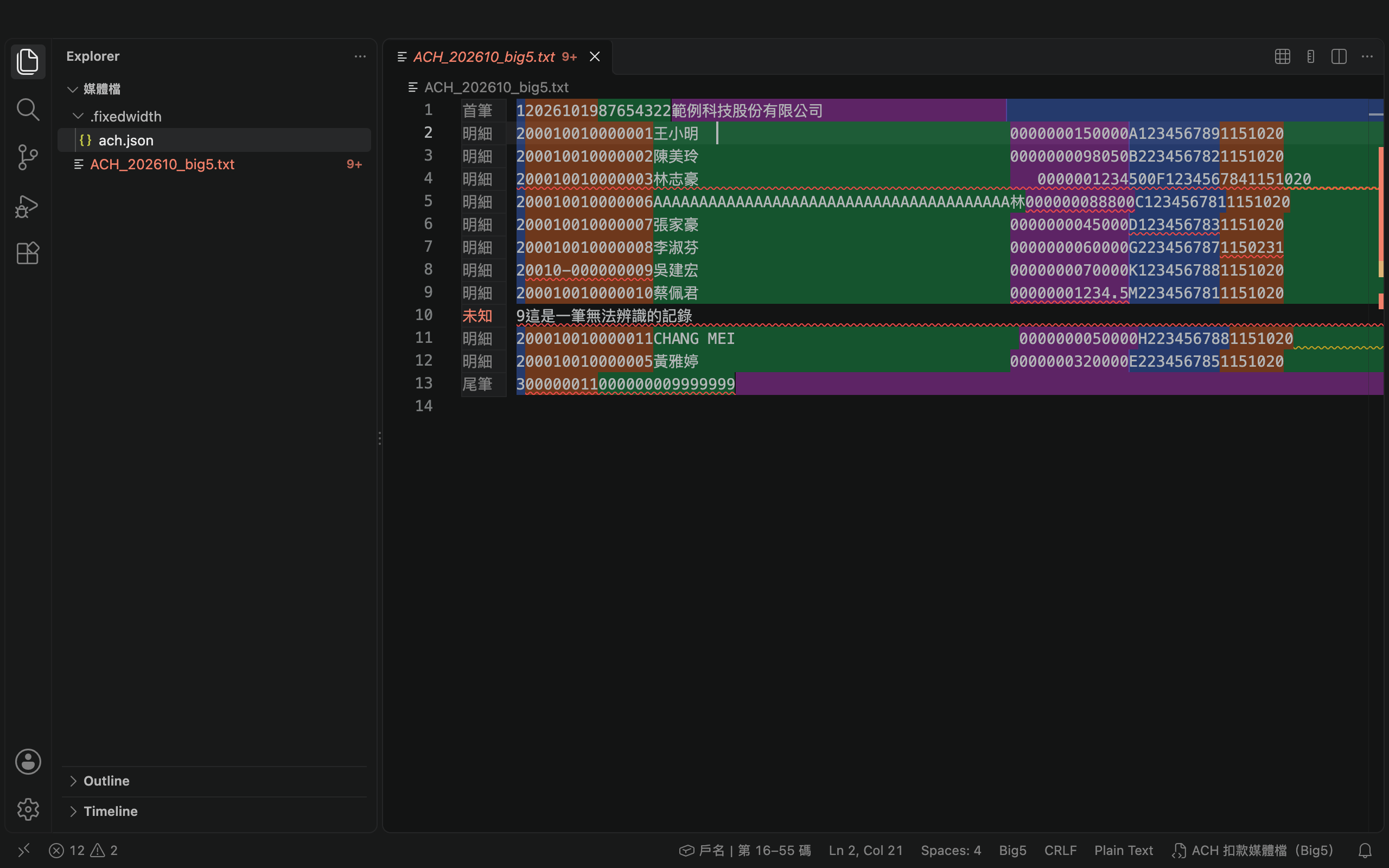
- 欄位看得見:相鄰欄位以藍、橘、綠、紫交替上色,亮色、暗色主題都適用
- 異常自動標出:錯誤以紅色波浪底線標示,並列入「問題」面板
- 游標所在欄位即時說明:Hover 顯示欄位名稱、起訖位置、長度、原值、解析值與錯誤原因;補的空白和 0 以淡色顯示並寫出已用幾碼,檢核結果以綠色(通過)或紅色(錯誤)標示。游標所在的欄位會加上外框,狀態列顯示「帳號|第 2–15 碼」
- 中文以位元組計:Big5 / MS950 媒體檔中文佔 2 碼,欄位邊界切到中文字時會提示
- 記錄別標籤:每行最前面顯示「首筆/明細/尾筆」,認不出的行顯示紅色「未知」;可用 schema 的
label 自訂文字
- 表格檢視:每種記錄一個分頁、每個欄位一欄,有錯的格子標紅;點格子跳到原檔位置,修改檔案時表格即時更新
- 匯出 CSV:Excel 可直接開啟,中文不亂碼、帳號前面的 0 不會消失
- 編碼開錯偵測:Big5 檔被當成 UTF-8 開啟時,提示並可一鍵以正確編碼重新開啟
- 中英文介面:跟隨 VS Code 顯示語言
檢核項目
| 層級 |
檢核 |
| 欄位 |
text(靠左、pattern)、numeric(只能 0–9、左補 0)、amount(隱含小數、正負號)、date(YYYYMMDD / YYMMDD / 民國 ROC_YYYMMDD)、enum、twid(身分證字號檢查碼)、twbiz(統一編號檢查碼)、filler(保留欄位) |
| 行 |
整行長度、無法對應任何記錄格式、換行符號、首筆 / 尾筆位置、無法解碼的字元(U+FFFD) |
| 跨行 |
尾筆總筆數 = 明細筆數、尾筆總金額 = 明細金額加總 |
開始使用
- 在媒體檔的同一層建立
.fixedwidth/ 資料夾,放入 schema(*.json)。也可以執行 Fixed-Width Inspector: Create Schema from Template,會在目前檔案旁邊建立範例並立即套用。
- 開啟檔名符合 schema
filePattern 的檔案,就會自動套用。
- 或點編輯器右上角的尺規圖示、狀態列的「未套用 schema」,選 從檔案選擇 schema… 指定任何位置的 schema 檔;這個選擇會被記住。
- 撰寫 schema 時有自動完成與格式驗證。
schema 的尋找順序:先看手動指定給這個檔案的 schema;再找檔案同一層的 .fixedwidth/,找不到再往上一層,直到工作區根目錄(最近的優先);最後是設定 fixedWidthInspector.schemaPaths 列出的目錄。
Schema 範例
{
  "name": "ACH 扣款媒體檔",
  "filePattern": "**/ACH*.txt",
  "encoding": "big5",
  "lengthUnit": "byte",
  "lineLength": 250,
  "lineEnding": "CRLF",
  "records": [
    {
      "type": "detail",
      "when": { "start": 1, "length": 1, "equals": "2" },
      "fields": [
        { "name": "帳號", "start": 2, "length": 14, "type": "numeric" },
        { "name": "戶名", "start": 16, "length": 40, "type": "text" },
        { "name": "金額", "start": 56, "length": 13, "type": "amount", "decimals": 2 },
        { "name": "身分證號", "start": 69, "length": 10, "type": "twid" }
      ]
    }
  ]
}
start 從 1 開始算,單位依 lengthUnit(byte 或 char)。省略時,big5 / ms950 預設 byte,utf-8 預設 char。- 只有單一記錄格式時,
records 放一筆且可省略 when。
- 首筆、明細、尾筆可任意組合(共 7 種),
records 只列出檔案有的記錄;required 設定該記錄是否每個檔案都必須出現。
- 所有欄位都可加
required(不可全空白)、description(顯示在 Hover)、severity(error / warning / info)。
每個參數的說明、可直接複製的範例與範本產生器,請看設定說明。
指令
| 指令 |
說明 |
| Fixed-Width Inspector: Select Schema |
為目前檔案選擇 schema,或從檔案指定(編輯器右上角也有按鈕) |
| Fixed-Width Inspector: Validate File |
對全檔執行完整檢核並開啟「問題」面板 |
| Fixed-Width Inspector: Toggle Highlighting |
開關欄位上色 |
| Fixed-Width Inspector: Create Schema from Template |
在目前檔案旁的 .fixedwidth/ 建立範例 schema |
| Fixed-Width Inspector: Show as Table |
以表格檢視目前檔案(有套用 schema 時,編輯器右上角也有按鈕) |
| Fixed-Width Inspector: Export as CSV |
把某一種記錄匯出成 CSV,可選「解析值」或「原始值」 |
| Fixed-Width Inspector: Reopen with Schema Encoding |
以 schema 指定的編碼重新開啟 |
設定
| 設定 |
預設 |
說明 |
fixedWidthInspector.enabled |
true |
啟用套件 |
fixedWidthInspector.schemaPaths |
[".fixedwidth"] |
額外的 schema 目錄(相對於工作區或絕對路徑);檔案旁邊的 .fixedwidth/ 一律會自動尋找 |
fixedWidthInspector.fieldColors |
4 個半透明色 |
欄位交替上色的顏色 |
fixedWidthInspector.showRecordLabels |
true |
在每行最前面顯示記錄別標籤 |
fixedWidthInspector.highlightCurrentField |
true |
游標所在的欄位加上外框 |
fixedWidthInspector.maxDiagnostics |
1000 |
「問題」面板最多列出的筆數,超過時狀態列會提示 |
fixedWidthInspector.debounceMs |
300 |
編輯後延遲多久重新檢核(毫秒) |
fixedWidthInspector.language |
auto |
介面語言:auto 跟隨 VS Code、en 英文、zh-tw 繁體中文 |
意見回饋
問題或建議請寄:fixed-width-inspector@pylabs.app
Development 開發
No third-party runtime packages; development needs only TypeScript and type definitions.
本套件不含任何第三方執行期套件;開發只需 TypeScript 與型別定義。
npm install
npm run compile          # compile to out/
npm run lint             # strict TypeScript checks
npm test                 # unit tests (node:test) with an 80% coverage gate
npm run test:integration # integration tests in a local VS Code with a temporary profile
npm run samples          # regenerate the sample files in examples/
npm run package          # build the .vsix
License 授權
MIT

