
LinuxCNC — HAL, INI & G-codeSmart editing for LinuxCNC HAL, INI & G-code: live error-checking, autocomplete, hover docs, and go-to-definition. Fully offline. Installation Launch VS Code Quick Open ( Ctrl+P), paste the following command, and press enter.Copied to clipboard |

LinuxCNC for VS CodeSmart editing and live error-checking for LinuxCNC Works fully offline, with no LinuxCNC install required, on Windows, macOS, or Linux. (Why offline?)
Cross-file checks catch bad references as you type, before the machine refuses to start. Quick start
There's nothing to configure for a single-machine workspace. (Got one FeaturesHAL (
|
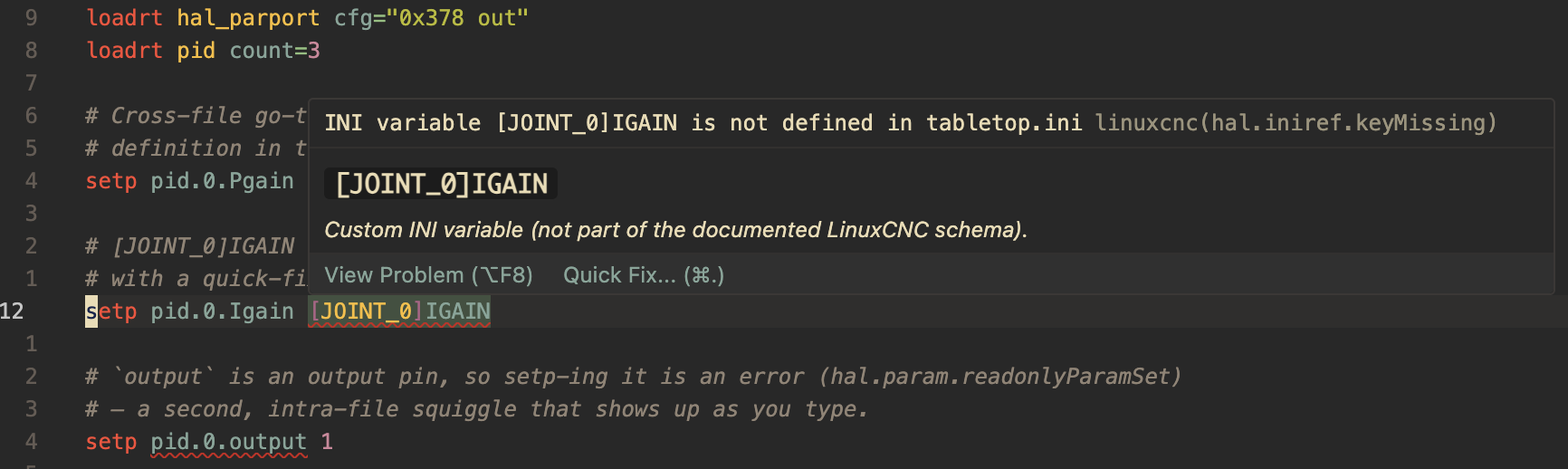
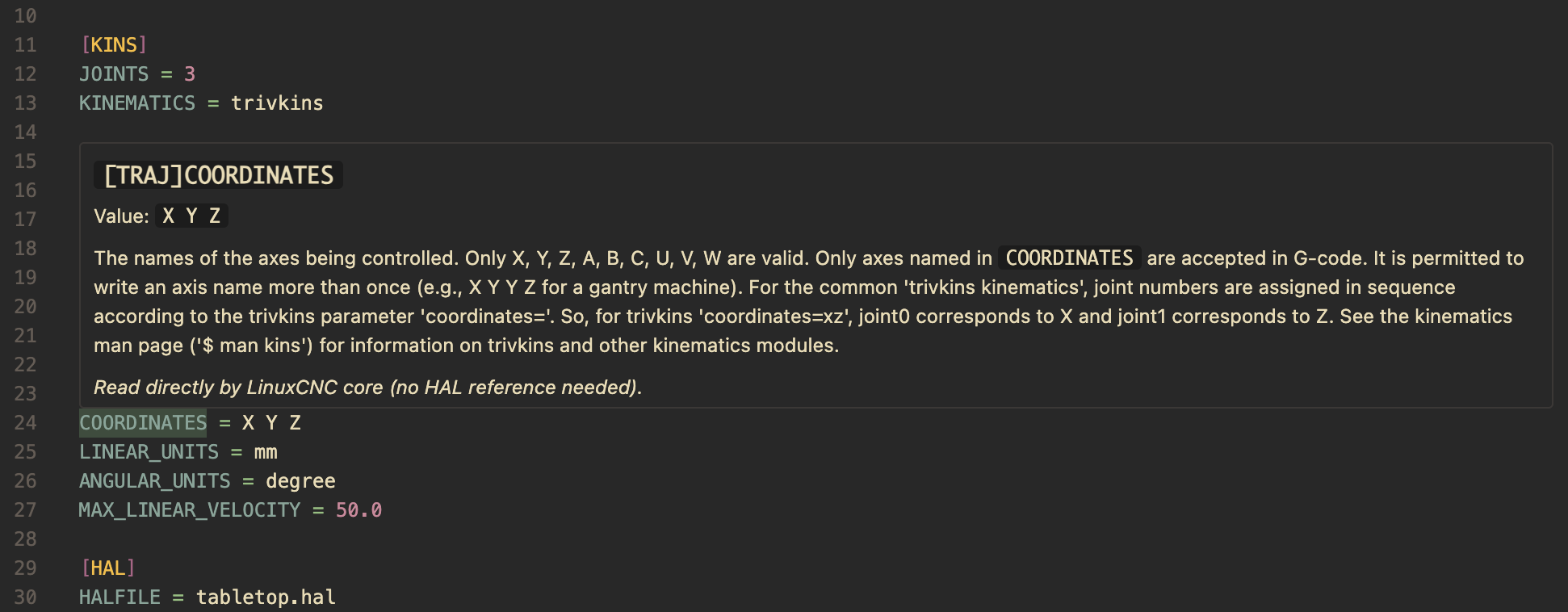
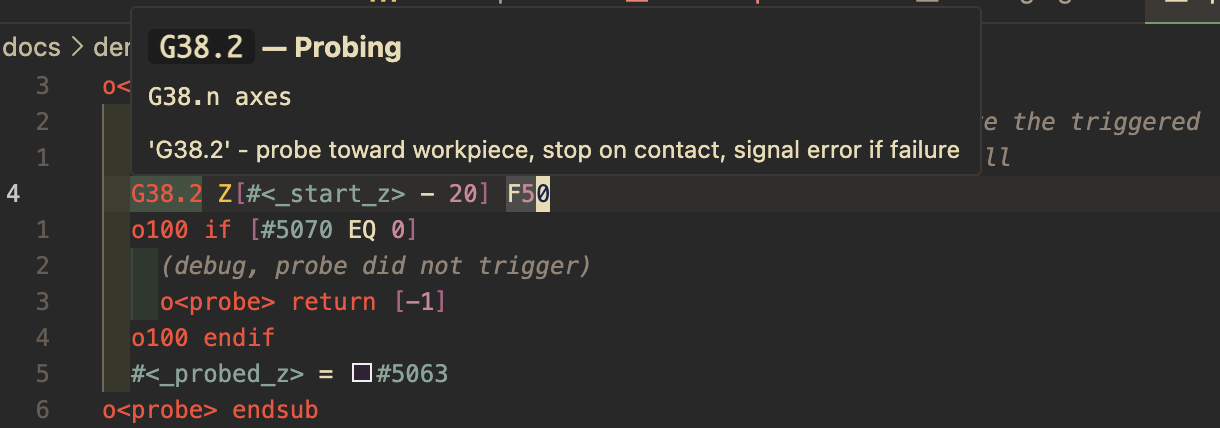
| You… | This extension |
|---|---|
edit LinuxCNC .hal / .ini by hand |
✅ its core purpose: validation, hover, navigation |
write LinuxCNC .ngc subroutines |
✅ outline, cross-file nav, formatter, structural checks |
| run Mesa hostmot2 or many machine configs | ✅ config= completion, custom .comp, active-machine pinning |
| want a 3D toolpath backplot or preview | ❌ not provided; use Axis, CAMotics, or your CAM |
| write Grbl / Fanuc / Marlin G-code | ⚠️ highlighting works; LinuxCNC-specific checks won't apply |
Settings
| Setting | What it does |
|---|---|
linuxcnc.iniDetection |
How .ini files are recognized as LinuxCNC configs: auto (by content, default), extension (every .ini), or off. |
linuxcnc.activeMachine |
Pin which machine provides context for a .hal shared by several INIs. See below. |
linuxcnc.libDir |
Path to the system HAL library so LIB: HALFILE references resolve. Leave empty if LinuxCNC isn't installed locally. |
linuxcnc.metadata.path |
Use a metadata DB you regenerated from a specific LinuxCNC version (default: the bundled DB). |
linuxcnc.diagnostics.enable |
Turn all diagnostics on/off. |
linuxcnc.diagnostics.rules |
Per-rule severity overrides, e.g. { "hal.signal.noReader": "off" }. See Diagnostics reference. |
linuxcnc.trace.server |
Trace the client↔server protocol (off/messages/verbose) for bug reports. |
Limitations
This is static analysis: it reads your files, it does not run LinuxCNC. So:
- It can't see runtime-loaded code. Pins/signals created by Tcl or userspace
components are invisible to the model, which can produce advisory "signal has no
writer" hints. When a workspace contains Tcl/
LIB:files, the signal-graph checks are deliberately relaxed to avoid false errors. Setlinuxcnc.libDirto resolveLIB:HALFILE references. - Metadata is pinned to one LinuxCNC version (currently 2.10.0~pre1; see
metadata-source.json). Components/pins/docs reflect that version. On a very different version, regenerate the DB and pointlinuxcnc.metadata.pathat it. - No 3D backplot or toolpath preview and no machine-limit checks (such as feed rate vs. axis max velocity). Use Axis/CAMotics for visualization.
- G-code is LinuxCNC RS274NGC only (see the G-code note above).
- G-code expressions aren't evaluated.
#10 = [#1 + [#2](https://github.com/PeterStolz/linuxcnc-lsp/issues/2)]is parsed for structure, not checked for undefined parameters or math errors. - A
.halshared by multiple machines uses the first machine found unless you pin one (see the next section).
Found a false positive or a miss? Please open an issue with the snippet; that's exactly what improves it.
Privacy and offline
- No LinuxCNC required, any OS. All component/pin/INI/G-code knowledge is
extracted at build time from a pinned LinuxCNC source tree into a bundled
database, so everything works with no LinuxCNC, no
halcmd, and no network. - No telemetry, no network calls. The extension collects nothing and phones nowhere; documentation is bundled. (Some hovers include a link to the online LinuxCNC manual, which only opens in your browser if you click it.)
- It won't hijack your
.inifiles. A.iniis treated as a LinuxCNC machine config only when its content has machine sections ([EMC],[HAL],[KINS], …); setlinuxcnc.iniDetectiontoextensionoroffto change that. - Open source, GPL-2.0-or-later, on GitHub; also on Open VSX.
Troubleshooting
- My
.inihas no highlighting or checks. It's recognized by content; if it lacks machine sections (or they're past the first ~20 KB), it stays plain text. Setlinuxcnc.iniDetectiontoextension, or pick LinuxCNC INI from the language menu (bottom-right of the status bar). - A
[SECTION]KEYis flagged "missing" but it exists. The.halis probably shared by several machines and the wrong one was picked. See Multiple machines. - "Unknown component" for something real. It may be newer than the bundled
2.10.0~pre1 DB, or a custom
.comp/Tcl component. Workspace.compfiles are picked up automatically; otherwise regenerate the DB and setlinuxcnc.metadata.path, or silence the rule (below). - Too noisy? Lower or disable a rule via
linuxcnc.diagnostics.rules, or add a comment# linuxcnc-lsp-disable-line <ruleId>(also-next-line, or a file-wide# linuxcnc-lsp-disable <ruleId>).
Diagnostics reference
Every check has a stable rule id you can re-target with
linuxcnc.diagnostics.rules (values: error, warning, information, hint,
off), e.g. { "hal.signal.noReader": "off", "gcode.call.unknownSub": "warning" }.
- HAL:
hal.syntax.*,hal.comp.unknownComponent,hal.param.readonlyParamSet,hal.signal.multipleWriters,hal.signal.noWriter,hal.signal.noReader,hal.signal.typeConflict,hal.iniref.sectionMissing,hal.iniref.keyMissing - INI:
ini.syntax.*,ini.key.unreferenced,ini.value.typeMismatch,ini.value.enumMismatch - G-code:
gcode.oword.unmatchedClose,gcode.oword.unclosed,gcode.oword.labelMismatch,gcode.oword.nestedSub,gcode.oword.duplicateSub,gcode.oword.duplicateElse,gcode.oword.returnOutsideSub,gcode.oword.controlOutsideLoop,gcode.oword.missingKeyword,gcode.call.unknownSub
Multiple machines in one workspace
Cross-file features (the [SECTION]KEY check, hover, go-to-definition, completion)
need to know which machine a .hal file belongs to. A machine is one .ini
plus all the .hal files it pulls in via [HAL]HALFILE. Usually that mapping is
unambiguous: one .ini, its own .hal files, and you can skip this section.
It gets ambiguous when the same .hal is pulled in by two or more .ini files,
which is very common in the LinuxCNC sample configs. In configs/sim/axis, for
instance, core_sim.hal is shared by axis.ini, axis_mm.ini (metric) and
historical_lathe.ini. Open core_sim.hal and the extension has three candidate
machines; with no pin it just uses the first one it finds.
How you'll notice
There's no popup; the symptom is wrong cross-file results in a shared .hal:
- a
[SECTION]KEYreference flagged as missing even though it exists, because the value lives in the other machine's INI, not the one that was picked; - hover or go-to-definition on an INI reference jumping to the wrong machine's value (e.g. inch vs. mm).
If a shared .hal looks wrong, that's the cue to pin the machine you actually mean.
Pinning the active machine
Run LinuxCNC: Select Active Machine from the Command Palette
(Ctrl/Cmd+Shift+P):
- it scans the workspace for machine
.inifiles and lists them; - pick the one whose context you want (or None to clear the pin);
- it writes
linuxcnc.activeMachineto your workspace.vscode/settings.json.
The server re-resolves immediately, with no reload needed. You can also write the setting by hand:
// flexicam/.vscode/settings.json
{
  // The folder holds Flexicam.ini and Flexicam_qtdragon.ini, which share the
  // same .hal files. Pin the qtdragon variant as the active machine.
  "linuxcnc.activeMachine": "Flexicam_qtdragon.ini"
}
The value is matched by path suffix, so use the shortest form that's unambiguous in your workspace:
- a bare file name,
"Flexicam_qtdragon.ini" - a workspace-relative path,
"configs/sim/Flexicam.ini" - an absolute path,
"/home/cnc/linuxcnc/configs/flexicam/Flexicam.ini"
Leave it empty ("") to go back to "first machine found".
What the pin does (and doesn't) do
- It's one pin per workspace, not per file. Whenever a
.halis shared, the pinned machine wins, as long as that machine actually pulls in this.hal. If the pinned machine doesn't own a given shared file, that file falls back to its first owner, so the pin never makes things worse. .halfiles owned by exactly one machine are unaffected; pinning only matters for shared files.- Working across machine families that don't share files? Re-run the command to switch the pin as you move between them.
Heads-up: don't use a
${workspaceFolder}/…value here. VS Code only expands${workspaceFolder}for a few built-in settings, not third-party ones, so it would be passed through literally and match nothing. Use a plain relative path.
Credits
This is an unofficial, community extension and is not affiliated with or endorsed by the LinuxCNC project. The icon is based on the LinuxCNC application icon (linuxcnc/linuxcnc, GPL-2.0), with an added "LSP" badge.