
GUI for Grok Build & Muse CodeGUI for Grok Build (incl. Grok 4.7) and Muse Code — and for Codex and Claude Code in the same window. Remote Control from your phone, voice control, multiple sessions, images and videos, Mermaid diagrams, and LaTeX. Works with SuperGrok, X Premium+, and xAI API key. Fair Source (FSL-1.1-MIT). Not af Installation Launch VS Code Quick Open ( Ctrl+P), paste the following command, and press enter.Copied to clipboard |

GUI for Grok Build & Muse Code
The GUI for Grok Build CLI (incl. Grok 4.7) and Meta's Muse Code, right in your editor. It drives OpenAI's Codex and Anthropic's Claude Code too: one window, one model picker, and every conversation keeps the agent it started with. And it comes with Remote Control: pair AFK Pilot once and watch, approve, and steer your agent from your phone or any browser while away from your desk. Drop open files in as No manual setup: the extension walks you through installing the
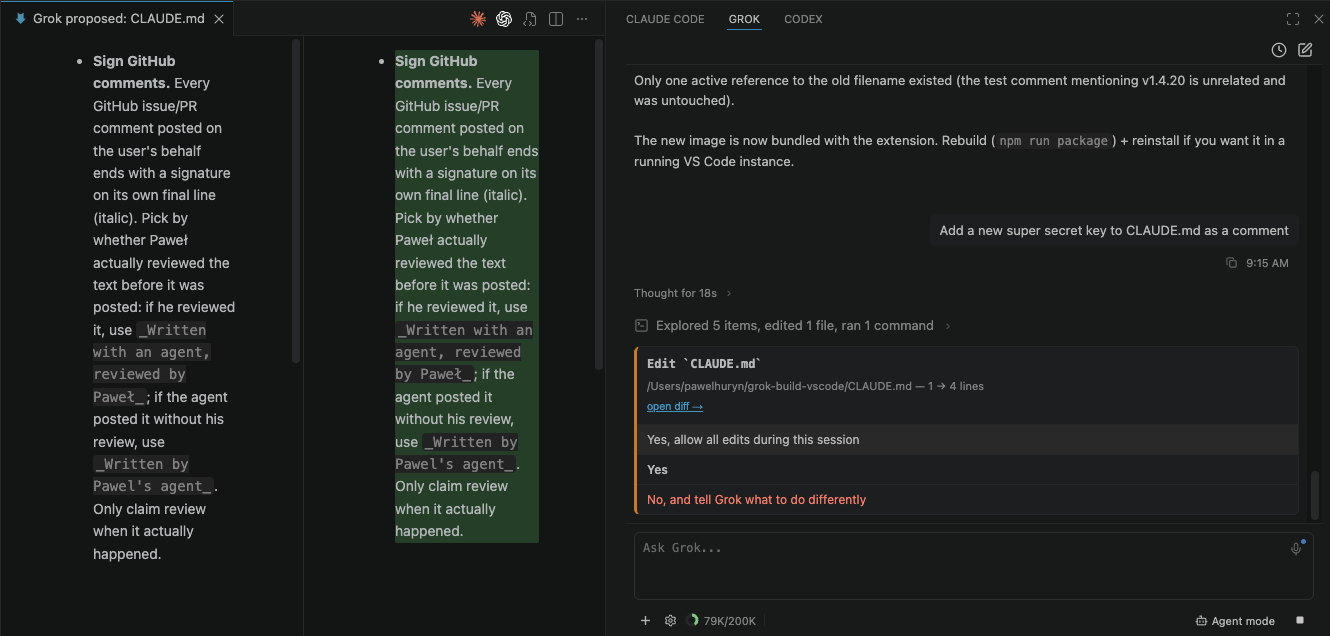
Why use this?If you live in your editor, this puts Grok Build right next to your code — a graphical workflow on top of the CLI: the native diff editor on every proposed edit, your open files and selection as context, parallel sessions with status dots, resumable history, inline images & video, and voice dictation. The CLI does the heavy lifting; this is the GUI for when you'd rather not be in a terminal. Features & capabilitiesClick any feature to expand. Permission cards with diff preview — see every edit in VS Code's native diff before you approveWhen Grok proposes an edit, hit open diff → to review the whole file in VS Code's native diff editor, focused on the first changed line, then Allow once / always or Reject. The file is written only after you approve. For Grok, Codex and Claude, a card for a command offers a third answer: Yes, and allow
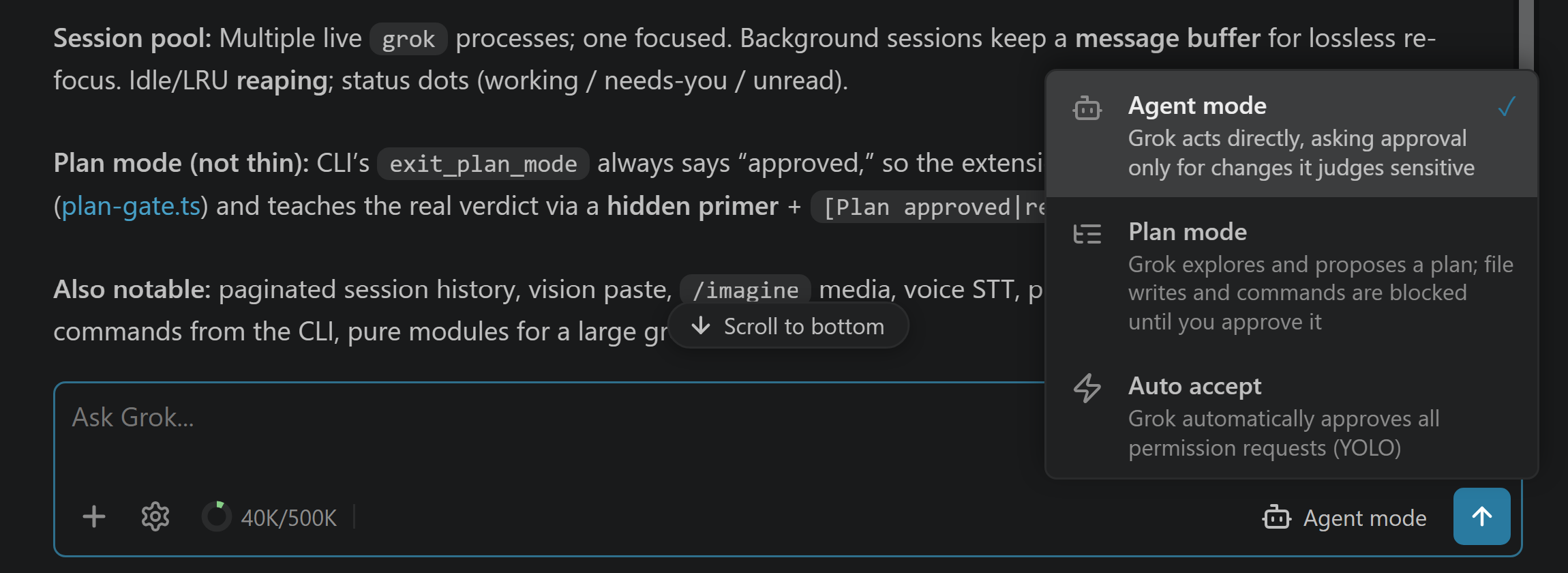
Modes — Agent, Plan & Auto acceptSwitch from the bottom toolbar — even mid-turn, so you can flip to Auto accept to stop approving cards without stopping Grok. Grok Plan combines the CLI's own edit refusal with the extension's gate on delegated writes and non-read-only commands until you approve the plan (see How it works). Codex and Claude enforce planning in their adapter/CLI. Muse offers its native approval modes: Allow all, Prompt unmatched, and On request (desktop only), with no Plan. Cloud machines use the isolated VM instead of Muse's shell sandbox and omit On request. Auto accept approves actions automatically; approving a plan returns you to whichever mode you were in before planning.
Image & video generation —
|






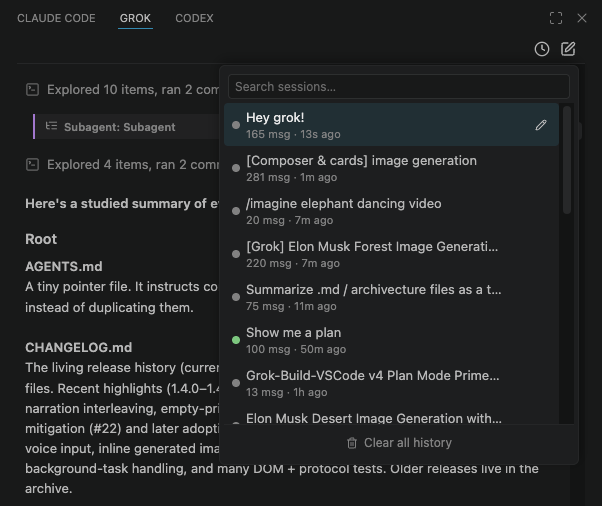
| Dot | Meaning |
|---|---|
| 🔵 Blue | Working |
| 🟡 Yellow | Needs you — a permission, question, or plan is waiting |
| 🟢 Green | Finished, with results you haven't opened yet |
| 🔴 Red | Finished with an error you haven't opened |
| ⚪ Gray | At rest |
The green/red dot is an unread badge — it survives a VS Code restart and clears when you open the session, so after firing off a few agents the green dots are exactly the results waiting for you.
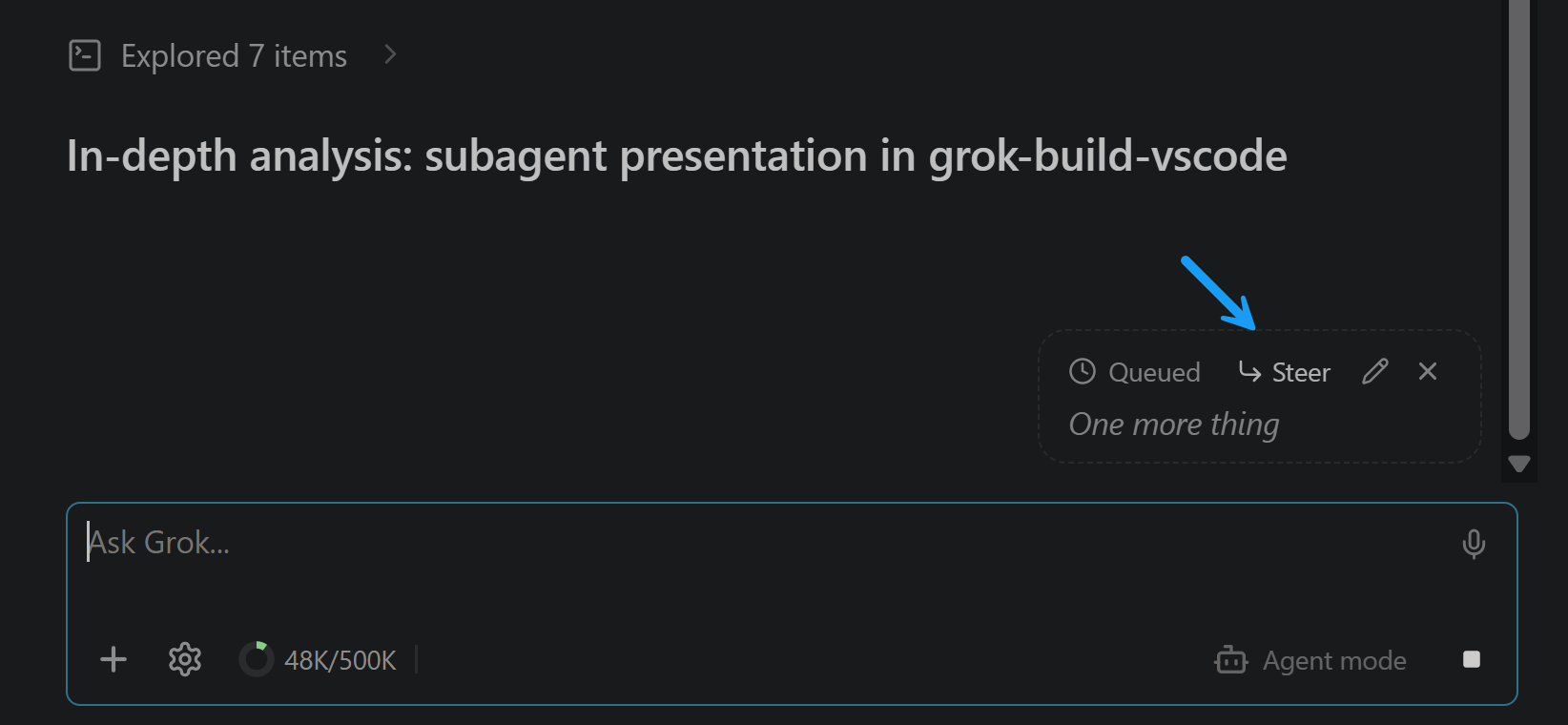
Queue or steer — type while the agent works, without ever interrupting it
A message you send mid-turn never cancels anything. By default it queues — a pending block at the end of the chat (Edit / Remove), sent the moment the turn ends; type more and it merges into the same message. Hit Steer on it to redirect the agent now instead: the text goes straight into the running turn without losing the tool work in flight. Prefer that always? Turn on Steer by default (Settings).
Grok and OpenAI Codex both take a mid-turn correction; Claude Code and Muse Code do not, so there the Steer button never appears and anything you send while it works simply queues. A steer carries your text and the files you attached to that message — images included, where that agent accepts them; where it doesn't, the whole message is queued rather than sent without its pixels, and the chat tells you so. What it leaves out is the ambient editor selection: the running turn already has the version it started with.
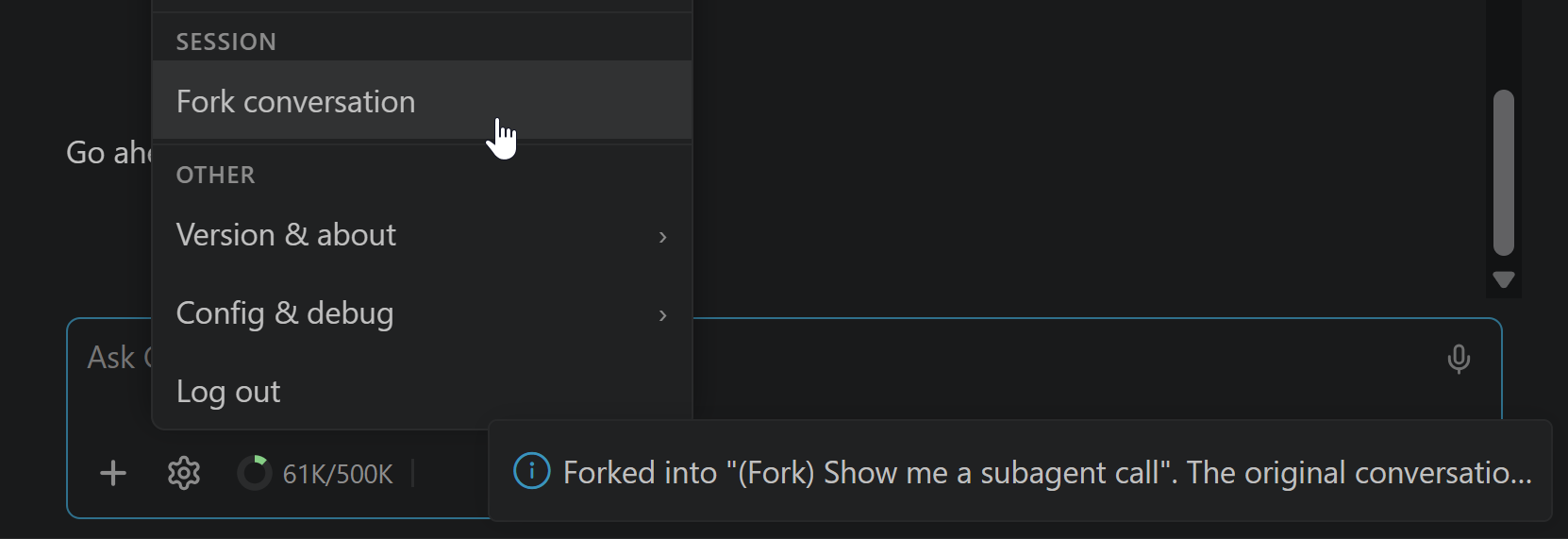
Fork conversation — branch a thread without touching the original
The conversation's ⋯ menu → Continue in a new chat → Use this workspace copies the conversation into a new session named (Fork) <the original's name> and opens it — try a tangent or a different approach while the original stays byte-for-byte unchanged in your history. It branches the conversation, not your code: files on disk are untouched.
Worktree session — isolate code edits in a git worktree
Grok: New Worktree Session (the conversation's ⋯ menu → Continue in a new chat → Use a new worktree, or the Command Palette) creates an isolated git worktree under ~/.grok/worktrees/ and opens a fresh session whose cwd is that checkout — so agent edits don't touch your main tree until you Apply worktree. Remove worktree deletes the isolated checkout. History rows for worktree sessions show a WT <label> badge and reopen with the correct cwd.
Changes — is my work safe to walk away from, answered in the panel
The project panel's branch button carries a badge of uncommitted files and opens a Changes view. One sentence answers the question you actually have — conflicts, then uncommitted work, then unpushed commits, then clean — and one button carries the whole promise (Commit and push, Push 3 commits), so nothing repeats it back at you in a dialog. Commit sits beside it for work you want recorded but not published yet. A refused push says what to do next — connect GitHub, or ask the agent to pull — and Ask agent to pull on the branch line drops that request into the message box for you. It is every changed file or none — to leave something out, discard it, and the view says so under the buttons rather than leaving you to find out. A very large tree lists the first 200 rows and says how many more there are; the count above them and the commit itself still cover every one. The turn's Changed N files card carries an Open Changes link, so the answer to "and what is uncommitted now?" is one tap from the answer to "what did this turn touch?". Files open into the same diff the chat renders under a tool call; discarding one is reachable only from inside its diff, because an irreversible action should require having looked. Unpushed commits are listed only when nothing is uncommitted — two lists of unfinished work at once is the noise this view exists to remove. It never runs git fetch, so behind is reported as of your last one and the line says so. Coding purpose only, and it reads and works the same from a phone — where it also refreshes itself while you are looking at it, and stops when you switch away.
Rewind — roll the conversation (and files) back to an earlier point
Hover a message you sent → Rewind (or Grok: Rewind Conversation), confirm, and Grok rolls back to that point — truncating the chat and, optionally, restoring the files it changed since then from its own snapshots. A safety prompt shows first, because rewinding can revert code on disk. Both work from a browser as well as at the desk.
Deep Research / Workflow progress — a card that pins above the composer while it runs
When an agent runs a workflow — Grok's Deep Research and Workflow tools, Claude Code's workflows, Muse Code's workflows — the chat shows a workflow card with its reported progress. Grok's Goal tasks keep a progress card of their own. Named Grok workflows offer Pause, Resume and Stop while the run's state allows them.
Every workflow card has one quiet header: an icon, "Workflow", the run's name, a dot per step (per agent on Muse; past four, three dots around where the run is), the status and the elapsed time. The dots, the steps and the agent rows share one colour code: green done, blue in progress, grey next, red failed. A running workflow that reports its progress pins its card just above the composer, so it cannot scroll out of reach, and the place where it started keeps a one-line trace. The pin button at the end of the opened card puts the card back where it started instead, and the choice is remembered (grok.pinLiveWorkflows; a phone keeps its own). Grok's Pause, Resume and Stop are on whichever copy is live. Cards start closed. Open one for the steps, drawn as rings on a track, with each agent grouped under its step and its tokens where the agent reports them, and the result, which reads like a reply and has a copy button. While a running workflow is live in this view, two minutes without an update shows as "no update for 2 min". When the run finishes the pin goes and the card lands where the run started, with the outcome. A Grok finish missed while nobody was watching is reconciled from the CLI's saved workflow state, and reopening older turns keeps the card where the run happened. How each agent's workflows and subagents differ: docs/subagents-and-workflows.md.
Context & cost — what's in the window, and what the turns actually bill
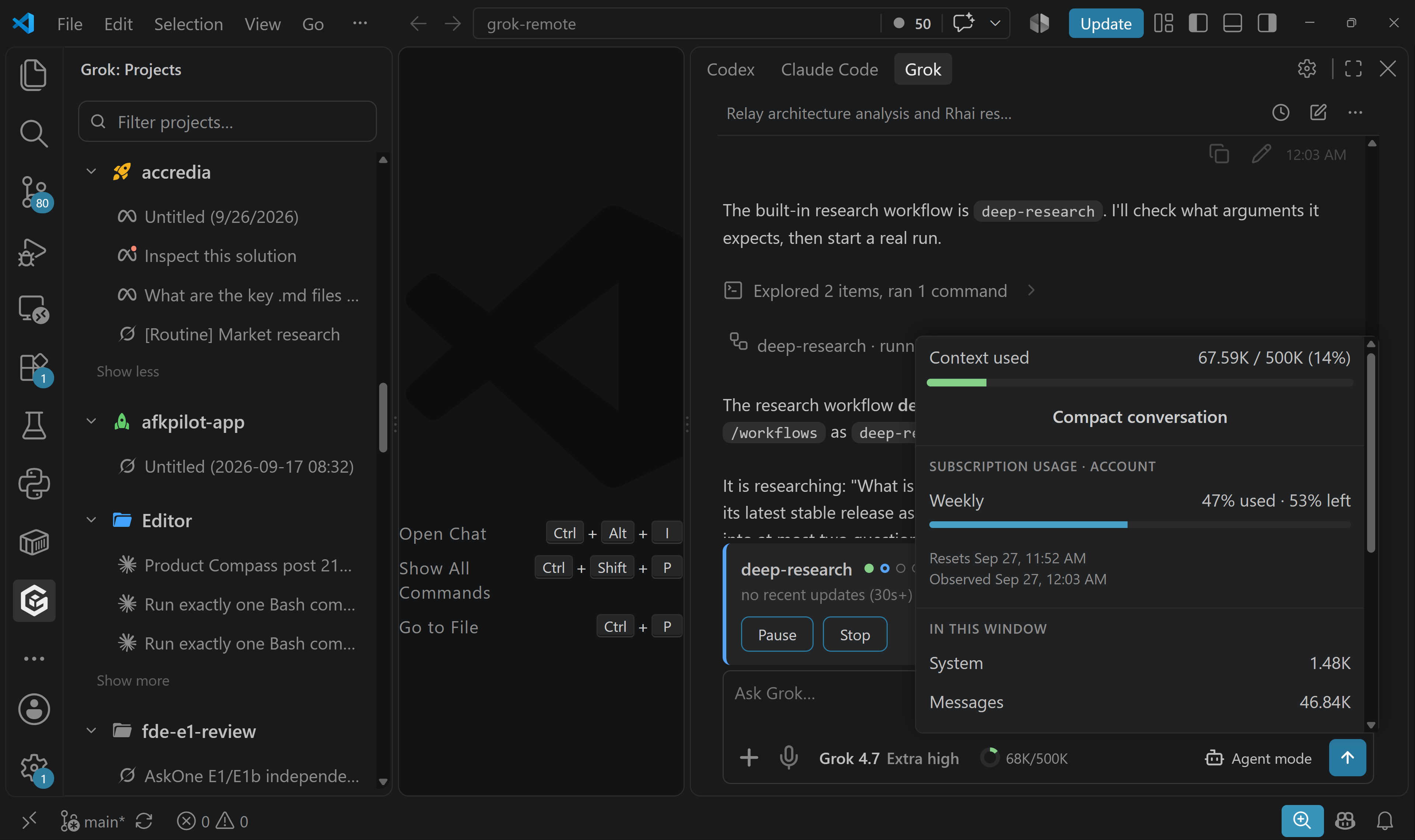
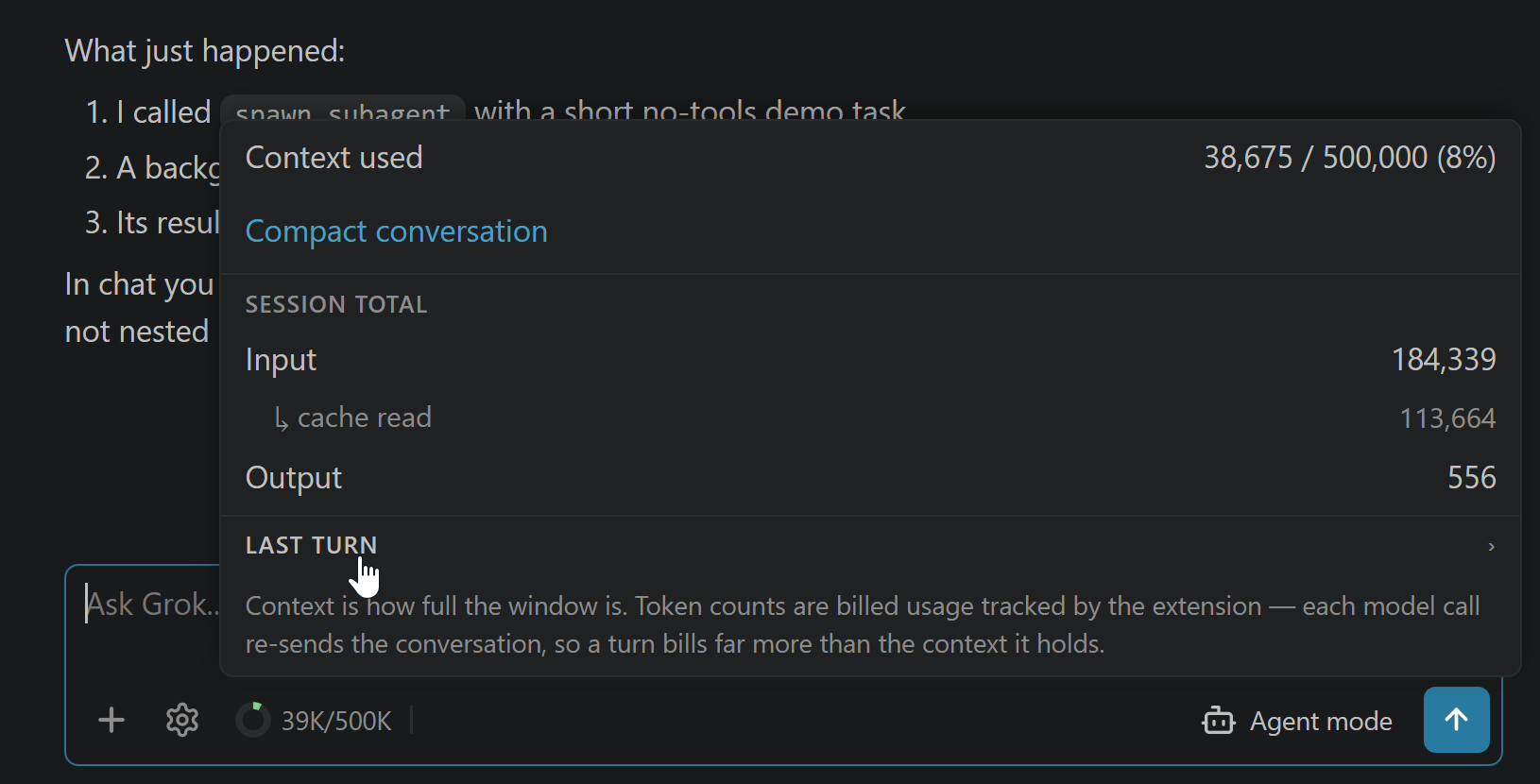
Click the context donut for used / window (%) — said in thousands, with the exact count still on the donut's own tooltip — plus what the conversation has billed — input, cache read, output, and the CLI-reported USD cost — as a session total and a per-turn split with its model calls. Compact conversation lives here too, right next to the number that tells you when you need it. The same popover answers the other usage question — how much of your plan's window is left, as labelled windows with a meter, a reset time, and when the reading was taken. Grok asks the account, Codex reads what Codex itself records, and Claude's arrives with your next reply.
Subagents — delegated tasks render as cards with their result
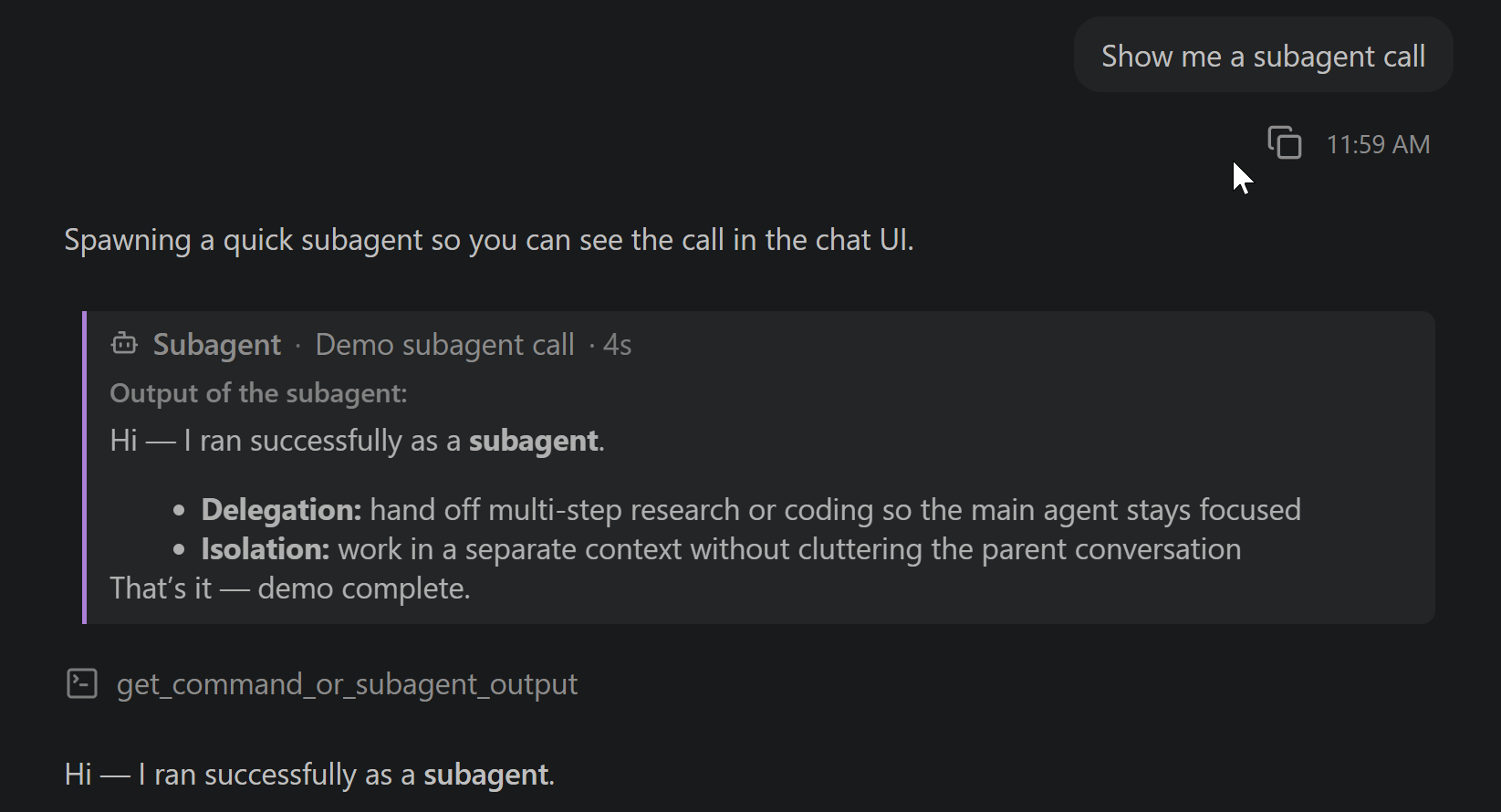
When Grok, Claude Code or Codex delegates work to a subagent, the chat shows a card with the same quiet header as a workflow: an icon, "Subagent", the task, its status and a timer. Open it for the subagent's activity where the agent streams it (Grok, Codex), its result — which reads like a reply and has a copy button — and the tokens it used where the agent reports them. Background subagents included: their result folds back into the card when it lands. Muse Code delegates through workflows instead.
Tool calls — every read, edit & command inline; expand for full details
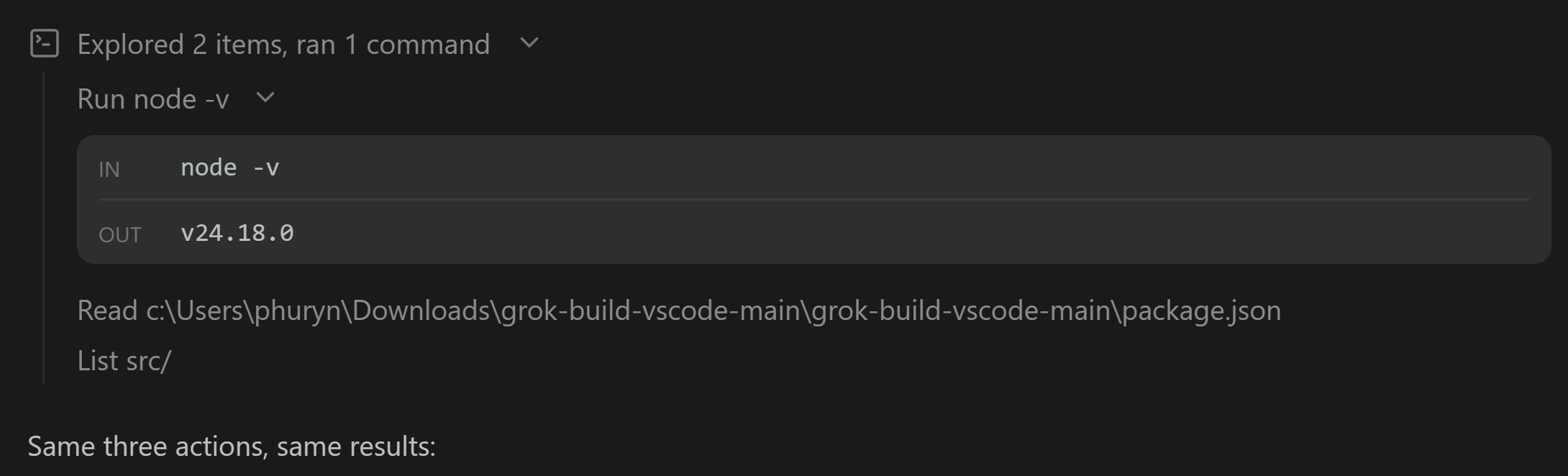
Every action appears as a category-iconed row, batched and summarized ("Explored 5 items", "Edited 2 files"); a failed tool turns red with the reason. Edits show a +N −M change count and expand to an inline diff at the file's real line numbers; shell commands expand to an IN/OUT block with the full command and its complete output — exactly what Grok received, exit code included. In Coding purpose, a turn that changed files ends with a Changed N files card rolling up every path and its +N −M; tap a row for one diff covering everything the turn did to that file — taken against what the file looked like before the agent touched it, not before its last edit — and on a desk open diff puts that in its own editor tab. Where a diff cannot be taken honestly (a folder that is not a git repository, a repository busy with another command, a project you switched away from between sending and tapping) the row falls back to the tool call that made the edit; a turn from a conversation you have reloaded says so at the foot of the card instead, because the before-state is kept only while the session stays open. The card starts collapsed; click its header to reveal the file list and, where available, the Open Changes button. Expand diff card (grok.expandDiffCard) sets its own default independently of tool details, and applies live to existing cards. On a phone or browser the choice is stored on that device. To audit an Auto-accept run, pre-expand everything with grok.expandCommandOutputs, or Grok: Expand All Tool Details from the Command Palette.
Math & LaTeX rendering — equations render as math, not raw TeX
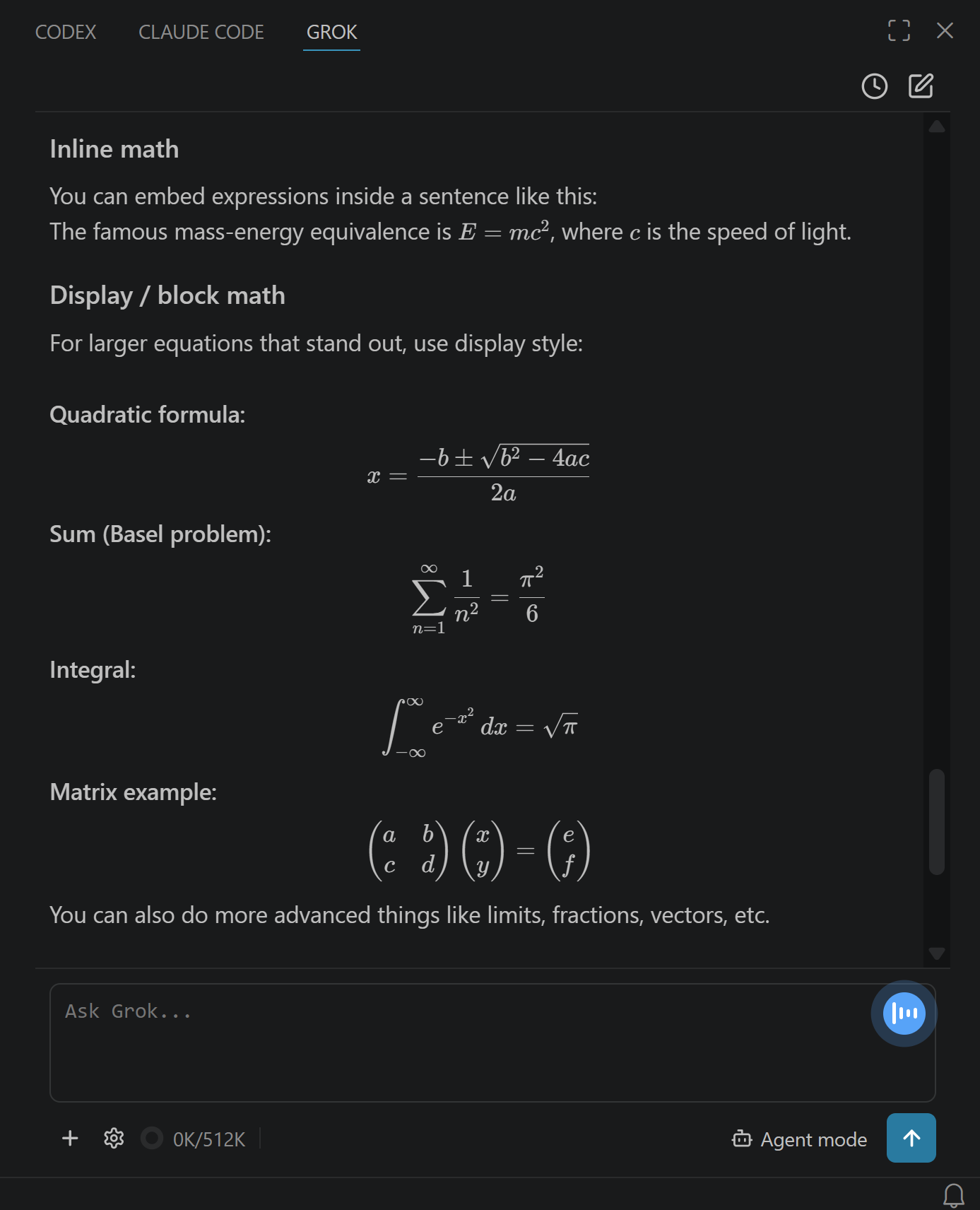
LaTeX in answers — inline \(…\), display \[…\], matrices, integrals, Greek — renders as real typeset math via MathJax, bundled so it works offline. Hover a display equation to copy its source or export it as PNG or SVG. (Bare $…$ is deliberately not a delimiter — it would mangle "it costs $5".)
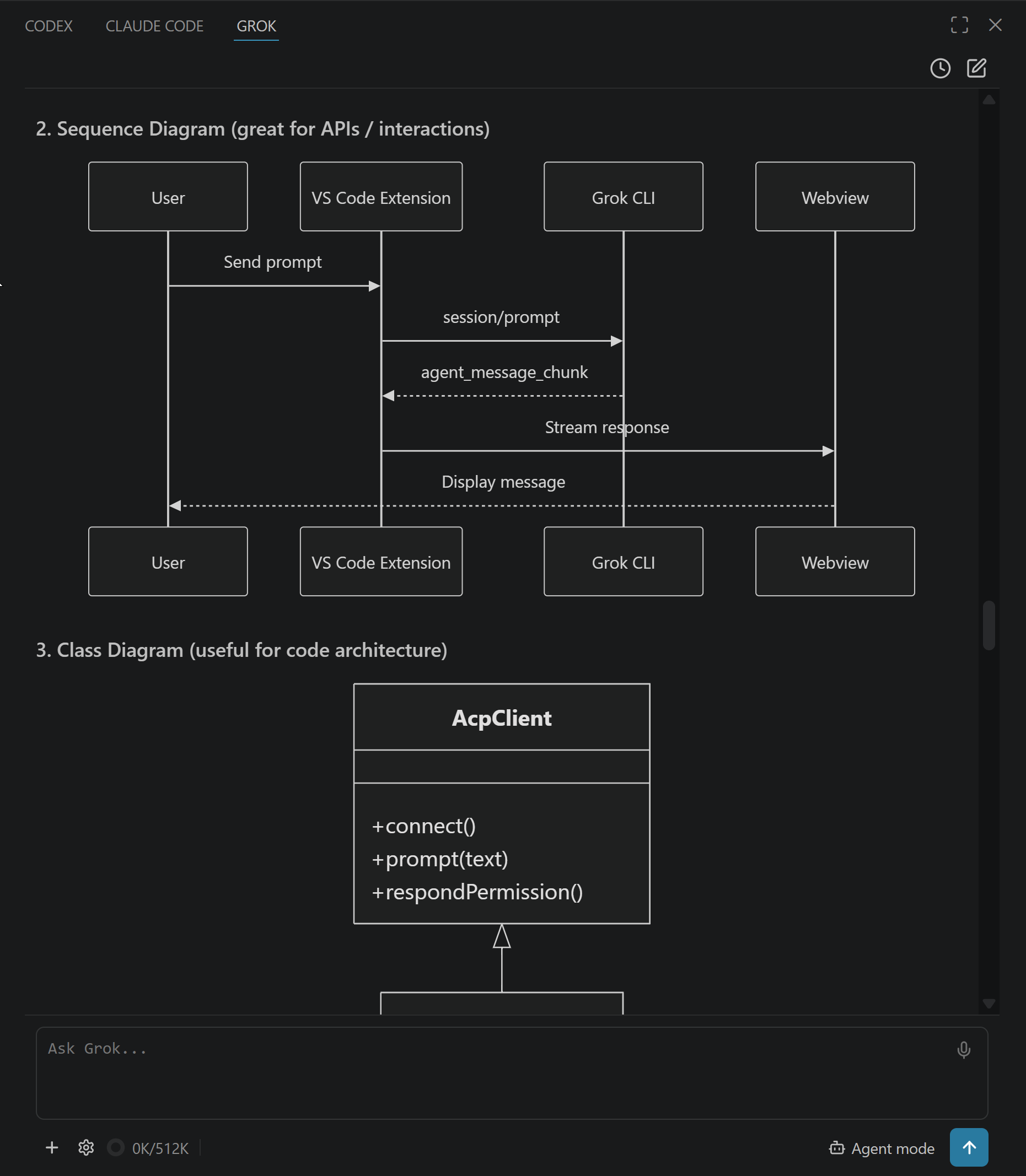
Mermaid diagrams — flowcharts and sequence diagrams render as diagrams
A ```mermaid block renders as a real diagram via Mermaid — bundled, offline, themed to your light/dark mode. Hover to copy the source or export it as PNG or SVG; while it's still streaming, or if it's malformed, the readable source is shown instead.
Model picker — switch models live, no restart
Click the model chip in the composer to open the model picker. The list comes from your CLI; switching is live in most cases. (A few models belong to a different agent and need a quick restart — the extension detects that and carries your context forward.)
Multi-provider — built for Grok Build, works with Codex, Claude Code and Muse Code
The host talks ACP (JSON-RPC over stdio), not a Grok-specific protocol, with packaged adapters for OpenAI Codex and Claude Code. Muse Code speaks Meta's own protocol instead, and reaches the same UI through a small adapter this extension ships. Connect them in Settings → Providers; each signs in through its own CLI. Grok Build is the default and the one everything is tuned against, but every connected agent shares one model picker, and each conversation keeps its agent once it has history, so all four can run side by side with shared chat, tool and permission cards, and history. Muse's picker uses its own names: Allow all (no prompts), Prompt unmatched (prompt when no rule matches), and On request (sandboxed tools, prompts only for explicit permission requests). Allow all starts with the shell sandbox off and the workspace trusted. On desktop, the other modes use the sandbox/network/trust settings under Providers, with On request always forcing the sandbox on at process start. On request is disabled with an explanation in an already running desktop process without a sandbox. On cloud machines, the isolated VM is the sandbox: Muse's shell sandbox is off for every available mode, Prompt unmatched retains its approval rules, and On request is omitted. Existing On request conversations cannot open on cloud; new cloud conversations use Prompt unmatched if On request was the remembered default. Approval switches apply from the next action; sandbox and trust change on reopen or a new conversation. Muse remembers its last selected mode separately from the other providers; reopening follows Muse's replayed mode. Deny unmatched is temporarily hidden because it delays every turn in Muse; saved conversations and remembered defaults in that mode use Prompt unmatched. Older hosts retain their two-entry picker. Steering, compaction, history deletion and host-managed connectors are unavailable for it. Providers also offers to update the Grok, Codex and Claude CLIs in place when yours is older than the version this app is built against — installed the way you installed it (npm, Homebrew, or the vendor's own installer), never switching you to a different one — and the conversations you had open reopen when it finishes.
Settings → Connectors has three sections: apps you connect here (Connect / Disconnect — available to Grok, Codex, and Claude), grok.com connectors that follow your Grok account, and local Grok connectors declared in this machine's config files. Connecting an app is not desk-only: it works from a phone, and on a cloud machine where there is no desk at all. Project-file servers stay off this page. grok.com connectors are edited at grok.com/connectors.
Settings → Providers → Provider config files opens the file each CLI actually reads — ~/.grok/config.toml, ~/.codex/config.toml, ~/.claude/settings.json — and edits it in place, from a phone as readily as at the desk. Those three are the whole list: the credentials that live beside them are not reachable from here. A CLI reads its config once at startup, so the panel offers to restart the conversation you have open after you save, and states the limit rather than hiding it — other sessions already running keep the settings they started with.
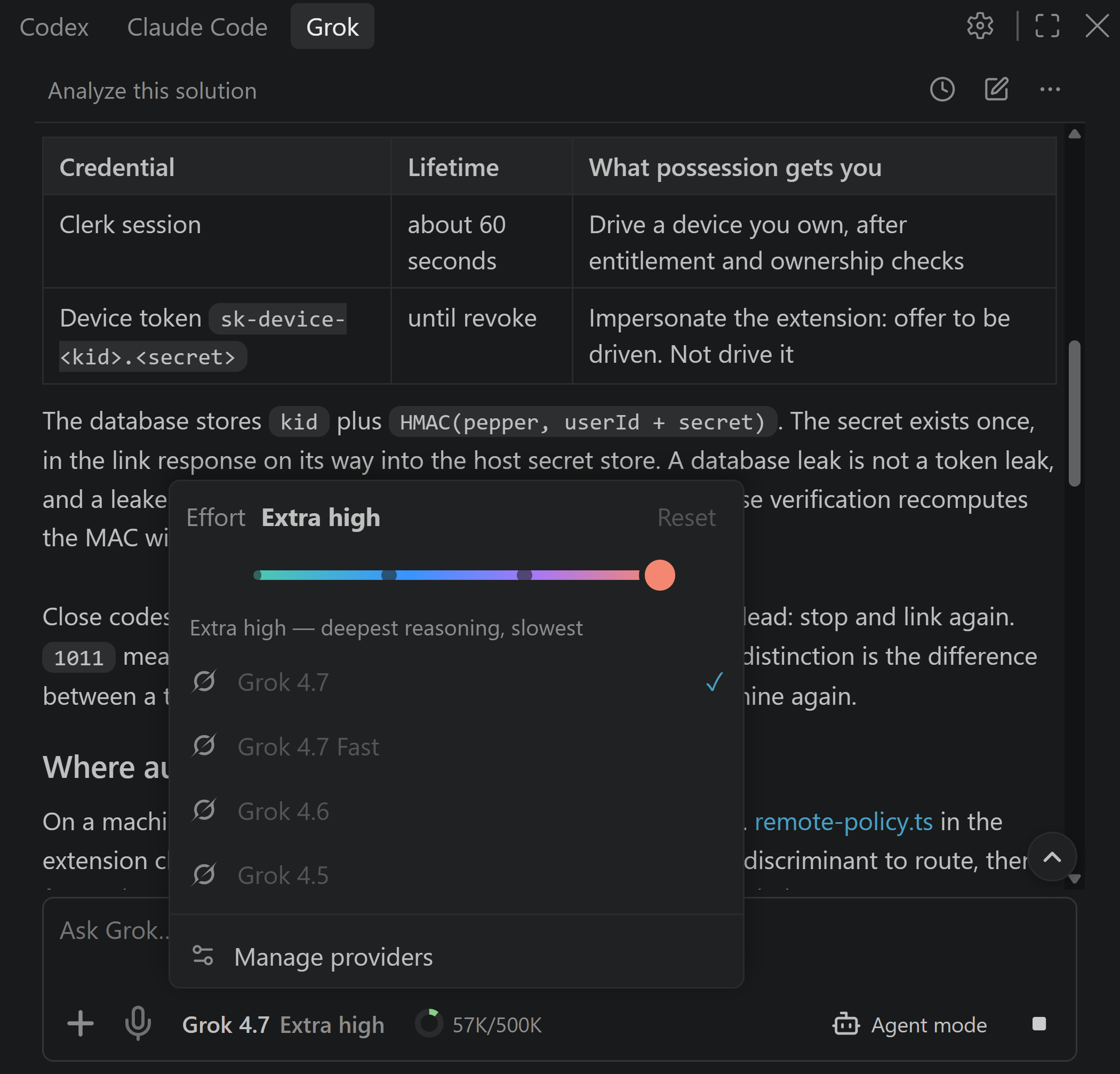
Reasoning effort — trade tokens for depth
Click the composer model chip, then choose a stop on the effort strip. The available levels follow the selected model. On recent CLIs it applies live to the running session; older ones restart, with an optional Summarize & Restart that carries context forward.
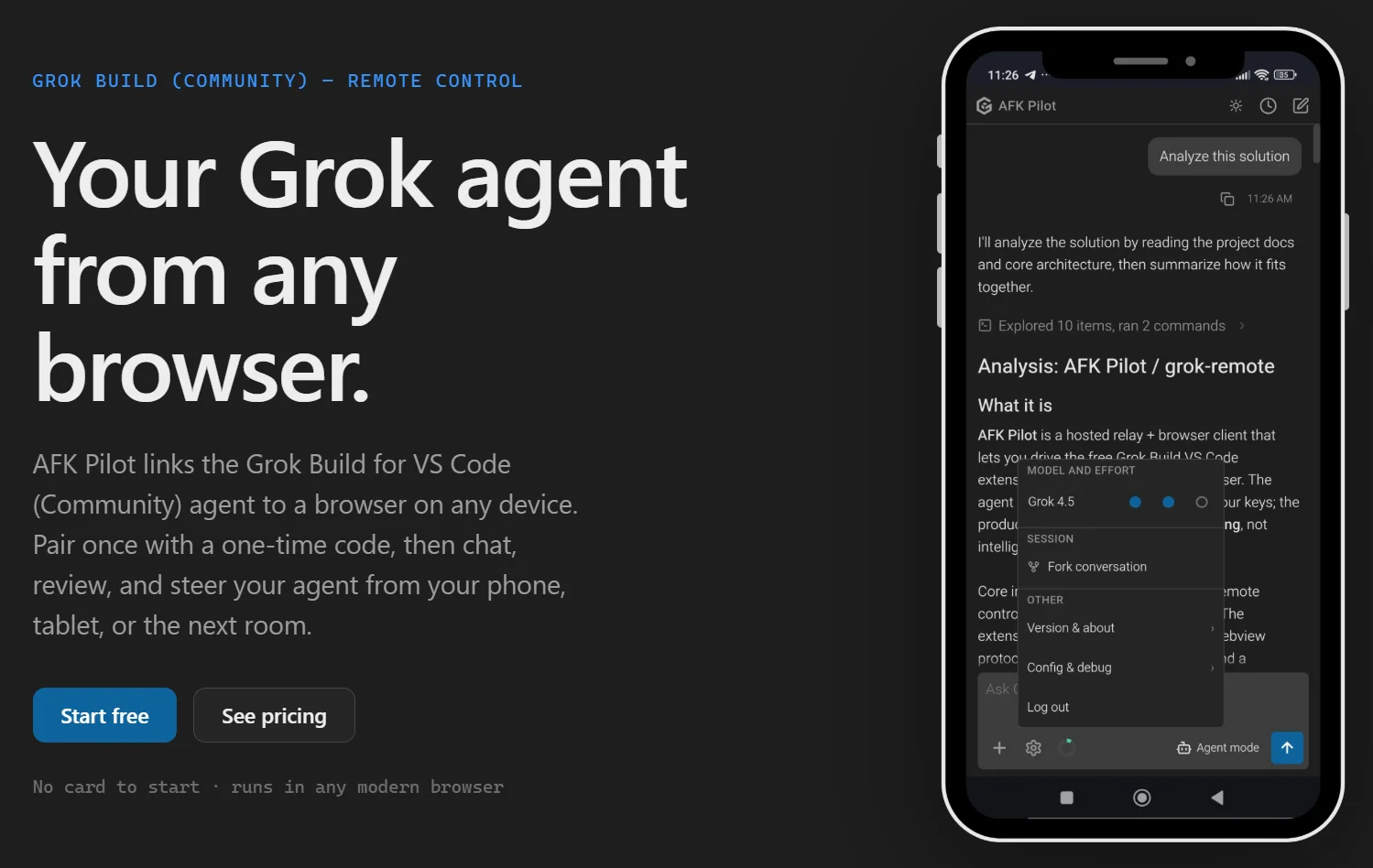
Remote Control (AFK Pilot) — watch and steer your sessions from a phone or any browser
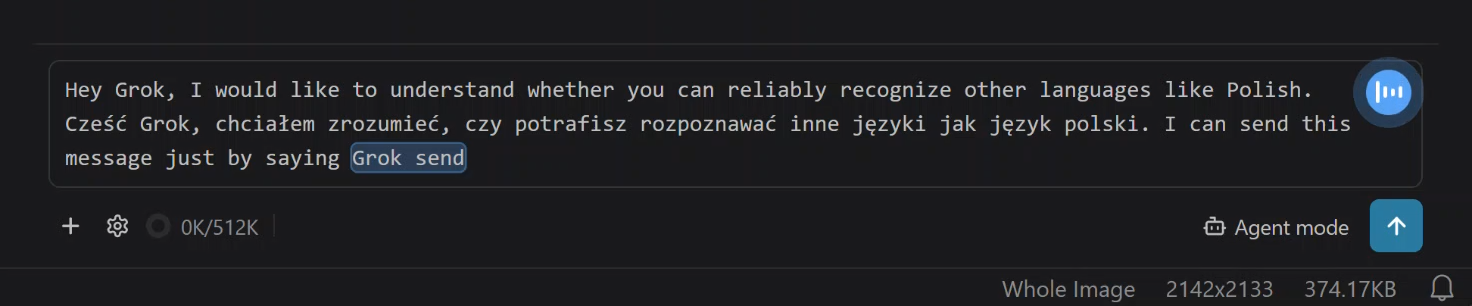
The Remote control phone button in the chat’s top bar is always available on the desk. Choose Sign in and link this machine to pair it with AFK Pilot, a companion web client that mirrors this chat in the browser: follow a running turn, approve permissions, answer questions, and send or steer messages from your phone while away from your desk. Connecting an agent works from there too — the CLI's headless sign-in runs on the linked computer and the page shows you the link (and, for Grok, Codex and Muse, the short code) to confirm, from the onboarding card or from Settings → Providers. So does connecting an app under Settings → Connectors: its sign-in runs on the linked computer too, and the browser lands back on the page instead of a localhost address you would have to copy across. Grok, OpenAI Codex, Claude Code, and Muse Code all sign in this way. Codex needs device-code login enabled on your OpenAI account first, and the flow walks you through it. Claude Code is paste-code: you open the link, sign in, and paste the code Anthropic shows you back into the page. The extension dials out to the service — no inbound port, no port forwarding — and Unlink this device in desktop Settings (with confirmation), or AFK Pilot: Unlink this device in the VS Code Command Palette, unlinks it again. The mobile view renders the retained chat window in full fidelity (diffs, images, equations, diagrams) with touch-sized controls; on reconnect, the remote snapshot is capped at the last 10 user messages while the VS Code view keeps the complete buffer. Its own + picker attaches a photo or a document (.md/.txt/.pdf/.csv/.xlsx/.docx) straight from your phone. You can dictate there too — say "grok send" to submit hands-free — rewind or edit a message you already sent, connect GitHub — from Settings or while cloning — and pick a private repository from a list rather than typing its URL, give each browser tab its own conversation and repository, and pick up the very conversation VS Code has open, live in both. A conversation follows the tab you are using: asking for it from a second tab moves it there and tells the first, which can take it back with one tap.
Once linked, click Remote control and scan the QR code to continue this conversation on your phone. Copy link and Open in browser use the same conversation link, including its project and worktree directory. The code is generated on this machine; session coordinates stay in the URL fragment. A green dot means a phone or browser is connected. Keep this app open while you are away; it stays awake, and AFK Pilot never stores prompts or code. Until the relay has supplied this machine's identity, the popover shows "Generating QR code…"; Open in browser then opens AFK Pilot itself (one linked machine goes straight to its chat, more than one stops on the device picker). If another window of the app holds the link, the popover says so.
Continue on phone… in a desktop or VS Code Projects session menu opens the code for that row, even when another chat is focused. Settings → Remote control shows This machine live and Continue on phone → Show code for the focused conversation; the Command Palette also has Grok: Continue on Phone. Account management and the existing sign-in explainer remain available there. Remotes do not offer the desk’s handoff button.
A projects rail lists every repository with Grok history and its newest conversations, with pinned conversations lifted above them across all projects and a search over both. You can start a session in any project without switching to it first, and rename, delete or clear history from the row — from the ⋯ button or by right-clicking it. Give a project a colour and an icon and it carries them everywhere it is named — its row in the rail, the chip above the message box, the project switcher, the file panel — on VS Code, desktop, cloud, or your phone. Projects you put away — and any left untouched for 30 days — fold into Archived, and come back on their own the moment you work in one again. Expand Archive to open a conversation or move a project back to Projects on VS Code, desktop, cloud, or your phone. Archiving keeps every project reachable. On a phone the rail is a drawer behind the handle in the header.
While a device is linked or a local agent turn is in flight, the extension also keeps the machine awake (caffeinate on macOS, SetThreadExecutionState on Windows, systemd-inhibit on Linux) so a turn you kicked off from your phone isn't cut short by idle sleep. The display still sleeps — only system sleep is blocked — and the lock is released when neither a linked device nor an active local turn needs it. Turn it off with grok.remote.keepAwake. A closed laptop lid can still suspend the machine; these wake locks do not change the operating system's lid-close policy.
Requirements
- VS Code 1.106+ (or a compatible editor on the same base — Cursor 3.x qualifies; Antigravity is still on base 1.104 and keeps the last compatible extension version).
- A supported provider CLI on macOS, Linux, or Windows: Grok Build (
grok), Codex, Claude Code or Muse Code. Grok and Muse ship native Windows installers, so the extension runs natively on all three — no WSL required (WSL2 + Remote-WSL still works if you prefer it). - A login: either a SuperGrok or X Premium+ subscription (
grok login) or an xAI API key. Either subscription unlocks Grok Build; with an API key you also get the grok-4.x models and grok-imagine. (Grok's free tier does not include the CLI agent.) - Voice control is optional and uses Grok sign-in or an OpenAI API key (Codex sign-in alone does not include transcription) — it just needs
ffmpegto record. Setup + advanced options: docs/voice-setup.md.
Install
1. Install the extension. In VS Code or Cursor, open Extensions (Ctrl/Cmd+Shift+X) and search "GUI for Grok Build & Muse Code".
2. Open Grok and sign in. Press Ctrl/Cmd+;. The sidebar walks you through installing the grok CLI and signing in — one click per step, with your SuperGrok / X Premium+ subscription or an xAI API key. That's the whole setup.
Grok defaults to the Secondary Side Bar (right side, next to other AI tools). Cursor refuses that container, so a first installation moves the view to the Primary Side Bar. Use the editor's own Move View controls to relocate it; where the secondary container is unavailable, Settings → Advanced → Move view… opens that picker.
Prefer the terminal, building from source, or installing into several IDEs at once? See the project INSTALL docs.
Quick start
- Open the Grok view (
Ctrl/Cmd+;, or Grok: Open from the command palette) — it lives in the Secondary Side Bar by default. - Type a prompt and press Enter. Grok streams its answer, showing a Thinking… line while it reasons. Want the full reasoning inline? Turn on Show thinking traces in Settings.
- Approve actions. When Grok wants to write a file or run a command it may raise a permission card — preview an edit in the native diff editor, with full-file context focused on the first changed line, then Allow once / always / Reject.
- Pick your mode (Agent / Plan / Auto accept), model, and reasoning effort from the bottom toolbar and model chip.
- Resume anytime — the clock icon lists past sessions for this project.
Configuration
All grok.* settings (VS Code Settings → search "grok")
| Setting | Default | Notes |
|---|---|---|
grok.cliPath |
"" |
Path to the grok binary. Empty = auto-discover (~/.grok/bin/grok → PATH). |
grok.defaultModel |
"" |
Model ID for new sessions. Empty = CLI default. |
grok.defaultEffort |
"" |
Reasoning effort forwarded as --reasoning-effort (none / minimal / low / medium / high / xhigh). Empty = CLI default. Applies live on recent CLIs; older CLIs (and resetting to the model default) restart the session. |
grok.defaultMode |
"" |
Mode for new sessions, remembered automatically from your last Agent / Auto accept switch (Plan is never remembered). Empty = Agent. |
grok.includeActiveFileByDefault |
true |
Auto-add the active editor as a context chip. Sends the file path (not its contents) unless you have text selected, in which case the selected lines are included. Click the chip to toggle it off — that choice is remembered across file switches and restarts. |
grok.mentionIndexLimit |
5000 |
How many workspace files the composer's @ autocomplete indexes. Raise it (no upper limit) if files are missing from the @ list in a large repo; applies on the next @. Files you have open as tabs are always mentionable regardless of this cap. |
grok.acp.promptIdleTimeoutMs |
1800000 |
Silence before a live turn is treated as hung (ACP request timed out: session/prompt). Any ACP traffic resets the idle clock. 0 disables. Applies to new sessions. |
grok.acp.promptAbsoluteTimeoutMs |
86400000 |
Hard wall-clock cap for one turn, even while it is still streaming. 0 disables. Applies to new sessions. |
grok.acp.requestTimeoutMs |
120000 |
Timeout for ACP methods other than session/prompt (initialize, session/new, …). |
grok.useCtrlEnterToSend |
false |
When true, Enter inserts a newline and Ctrl/Cmd+Enter sends. |
grok.showThinking |
false |
Show Grok's reasoning (thinking) traces in chat. Off shows a Thinking… stand-in. Also toggleable live from Settings. |
grok.expandCommandOutputs |
false |
Expand tool details by default — each shell command's IN/OUT block and each edit's inline diff (useful for auditing Auto-accept sessions). With this setting on, groups containing command or edit details open too; read/explore-only groups stay collapsed, and a lone command outside a group opens its details. Edit rows always show a +N −M change count, even when their diff is closed. Toggle live from Settings → Expand tool details. (Setting key kept for compatibility.) |
grok.expandDiffCard |
false |
Open each coding turn's Changed-files card by default. Click a header to toggle that card; changing this preference updates all existing cards. Independent of Expand tool details and Expand/Collapse All. Host-backed on desktop and IDEs; stored per device on a phone or browser. |
grok.steerByDefault |
false |
Send straight into the running turn instead of queueing. Off: a message sent mid-turn waits and flushes when the turn ends (steer it on demand with the Steer button). On: it skips the queue and redirects the agent immediately. Applies wherever that agent takes a mid-turn correction — Grok and OpenAI Codex do, Claude Code and Muse Code do not and keep queueing. Never cancels the turn or discards work in progress; carries your text and its attachments, not the ambient editor selection. Toggle live from Settings → Steer by default. |
grok.soundNotifications |
false |
Play a short tone when Grok finishes a turn or errors — a rising chime for done, a lower tone for errors — but only when the Grok panel isn't focused, so it notifies you when you've stepped away. Toggle live from Settings → Sound notifications. |
grok.thumbsFeedback |
false |
Show thumbs on a finished Grok turn so you can send a rating to SpaceXAI. Off by default. On, thumbs appear only when this Grok session supports feedback — never on Codex, Claude or Muse. Toggle from Settings → General → Thumbs feedback to SpaceXAI. |
grok.telemetry.enabled |
true |
Send anonymous, privacy-first usage telemetry (see Privacy). Also honors VS Code's global telemetry.telemetryLevel. |
grok.chatFontScale |
100 |
Zoom for the chat panel only, as a percent (150, 200, …). Scales the whole chat UI without rescaling the rest of VS Code (unlike Ctrl/Cmd+Shift+=). Applies live; supports User (global) and Workspace (local) scope. |
grok.voiceBackend |
"auto" |
Prefer the agent vendor when its credential is available, otherwise use the other. Explicit xai / openai choices require that credential. |
grok.voiceOpenAiApiKey |
"" |
OpenAI API-platform key override; empty uses OPENAI_API_KEY. Codex / ChatGPT sign-in does not include transcription API access. |
grok.voiceOpenAiModel |
"gpt-live-transcribe" |
OpenAI Realtime transcription model. |
grok.voiceApiKey |
"" |
Optional xAI key override. Empty = GROK_VOICE_API_KEY / XAI_API_KEY from .env or the host environment, then your cached grok login token. See docs/voice-setup.md. |
grok.ffmpegPath |
"" |
Path to ffmpeg for microphone recording. Empty = use ffmpeg from PATH. |
grok.voiceInputDevice |
"" |
Microphone device override. Empty = system default (Windows auto-detects the first DirectShow audio device). |
grok.voiceSendPhrase |
"grok send" |
Spoken phrase that auto-submits when it ends a transcription. Empty = disable hands-free sending. |
grok.voiceKeyterms |
[] |
Words or phrases that bias streaming recognition toward code and project vocabulary. Sent to the selected backend with each streaming connection; up to 100 terms of 50 characters, including the send phrase and Grok. |
grok.voiceLanguage |
"" |
Optional language code (for example en, fr, de, or ja). Controls xAI text formatting and supplies an OpenAI transcription language hint. |
grok.voiceStreaming |
true |
Stream transcription live as you speak. false = one-shot batch mode. Costs depend on backend and model; OpenAI API usage is billed separately. |
Commands & keybindings
VS Code commands & keys (Ctrl/Cmd+Shift+P → "Grok")
VS Code commands (not Grok slash commands):
| Command | What it does |
|---|---|
Grok: Open |
Open the Grok sidebar |
Grok: New Session |
Start a fresh session |
Grok: Compact Conversation |
Compact the current session to reclaim context |
Grok: Pick Model |
Open the model picker |
Grok: Toggle Plan / Agent Mode |
Open the mode picker (Agent / Plan / Auto accept) |
Add to Grok chat |
Add files to the composer (the Explorer selection, the active editor, or a file picker) |
Add Selection to Grok |
Attach the selected lines as a snippet chip in the composer |
Grok: Insert @-Mention |
Insert an @-mention for the active file into the composer |
Grok: Expand All Tool Details (This Session) |
Open every tool group, command IN/OUT box, and edit inline diff, and keep new ones open — this session only |
Grok: Collapse All Tool Details (This Session) |
Collapse them all, and keep new ones collapsed — this session only |
Grok: Show Logs |
Open the Grok output channel (ACP messages, errors) |
Grok: Log Out |
Sign out of the Grok CLI (grok logout) and return to the sign-in screen |
| Key | Action |
|---|---|
Ctrl+; / Cmd+; |
Open Grok sidebar |
Alt+G |
Insert @-mention for the active file (when the editor is focused) |
Grok's own slash commands (/imagine, /compact, …) autocomplete in the composer when you type /, sourced live from your installed CLI version. Reference snapshot: docs/SLASH-COMMANDS.md.
How it works
The extension is intentionally thin: it speaks JSON-RPC over grok agent stdio and renders the results. Grok owns sessions, memory, MCP, models, and tool execution; the extension mediates file reads/writes, terminal requests, diff previews, the webview UI — and Plan Mode.
Plan Mode is the one place the extension adds defense-in-depth. The CLI owns the plan review and receives native JSON-RPC success outcomes (approved, cancelled for Keep planning, or abandoned for Cancel), so approval or revision continues inside the original turn. An Approve/Keep-planning comment is interjected before that verdict releases the turn; a Cancel comment queues as the next ordinary prompt because abandonment has no continuation step. The extension's gate still blocks workspace writes and non-read-only commands while planning because the CLI's own terminal path remains porous. No hidden primer, bracket marker, follow-up verdict prompt, or verdict-time turn cancellation is sent. Plan is disabled fail-closed when the CLI is older than the required version or its version cannot be verified.
Full diagram, message flow, module map, and design notes: docs/architecture.md.
Known limits
- Diff preview semantics. The native editor reconstructs both full-file sides from Grok's replaced-region metadata and the current file on disk, then opens on the first changed line. If the file is unreadable, oversized, or has moved on so the region cannot be located, it safely falls back to the region-only diff. The write happens only after approval.
- View placement. The view defaults to the Secondary Side Bar (requires VS Code 1.106+, the extension's engine floor). Use the editor's Move View controls to relocate it. Where the secondary container is unavailable, including Cursor, Settings → Advanced → Move view… opens the editor's picker; a first installation there defaults to the Primary Side Bar.
Companion apps
This extension is complete on its own. Two optional companions share the same chat UI and the same Grok Build CLI:
- AFK Pilot — watch, approve, and steer this extension's agent from your phone or any browser. Pair once from Remote control in the + menu.
- Grok Build Desktop (Community) — the same agent as a standalone app for Windows, macOS and Linux, for machines where you would rather not install an editor. Free.
Neither is required, and nothing here depends on them.
Privacy
Privacy by design — no message content, code, or file paths leave your machine automatically. Automatic reports are anonymous, opt-out session_start, remote_portal_opened, remote_handoff_shown, remote_link_started, remote_link_completed and session_remote_started events (turn it off with grok.telemetry.enabled: false or VS Code's global telemetry.telemetryLevel). The session-start event carries an install id plus a low-cardinality settings snapshot, including mode / model / effort, host kind, UI preferences, whether voice input is available, and which agents are connected — never message content, code, paths, or free-text settings. The remote handoff events carry only the anonymous install id and hostKind, plus source (topbar, rail, projects, settings, or palette) on portal-open, handoff-shown and link-start events, withHint on portal-open, and linked on handoff-shown; link-completed has only install id and hostKind. Remote-session-start adds clientDevice, sessionOrigin, and provider. No URL, device id, conversation id, title, project path, or working directory is reported. The full field list is in docs/privacy.md. Data leaves only through features you explicitly enable or invoke: Voice input sends audio to the selected xAI or OpenAI backend for transcription; the optional Read simplified summaries switch in VS Code or AFK Pilot sends the cleaned spoken reply to SpaceXAI for a brief version; optional Thumbs feedback to SpaceXAI (off by default) sends a rating on a finished Grok turn; Remote Control relays the chat to your linked devices. Each is disclosed separately from telemetry.
More: docs/privacy.md.
License & attribution
Licensed under the Functional Source License, Version 1.1, MIT Future License (FSL-1.1-MIT) — see LICENSE. In short: use, modify, and redistribute freely for any purpose except offering a competing commercial product or service. Versions up to and including 1.8.1 were published under MIT and remain MIT. The copyright notice and license text must travel with all copies, including compiled builds — if you're reusing this project, see docs/attribution.md for how to credit it properly.