🌐 BYTEFORGE FIGLET SUITE — VS CODE EXTENSION
██████╗ ██╗   ██╗████████╗███████╗███████╗ ██████╗ ██████╗  ██████╗ ███████╗
██╔══██╗╚██╗ ██╔╝╚══██╔══╝██╔════╝██╔════╝██╔═══██╗██╔══██╗██╔════╝ ██╔════╝
██████╔╝ ╚████╔╝    ██║   █████╗  █████╗  ██║   ██║██████╔╝██║  ███╗█████╗
██╔══██╗  ╚██╔╝     ██║   ██╔══╝  ██╔══╝  ██║   ██║██╔══██╗██║   ██║██╔══╝
██████╔╝   ██║      ██║   ███████╗██║     ╚██████╔╝██║  ██║╚██████╔╝███████╗
╚═════╝    ╚═╝      ╚═╝   ╚══════╝╚═╝      ╚═════╝ ╚═╝  ╚═╝ ╚═════╝ ╚══════╝
                 ███████╗██╗ ██████╗ ██╗     ███████╗████████╗    ███████╗██╗   ██╗██╗████████╗███████╗
                 ██╔════╝██║██╔════╝ ██║     ██╔════╝╚══██╔══╝    ██╔════╝██║   ██║██║╚══██╔══╝██╔════╝
                 █████╗  ██║██║  ███╗██║     █████╗     ██║       ███████╗██║   ██║██║   ██║   █████╗
                 ██╔══╝  ██║██║   ██║██║     ██╔══╝     ██║       ╚════██║██║   ██║██║   ██║   ██╔══╝
                 ██║     ██║╚██████╔╝███████╗███████╗   ██║       ███████║╚██████╔╝██║   ██║   ███████╗
                 ╚═╝     ╚═╝ ╚═════╝ ╚══════╝╚══════╝   ╚═╝       ╚══════╝ ╚═════╝ ╚═╝   ╚═╝   ╚══════╝
FIGLet Comment Generator for VS Code
Generate ASCII art banners directly inside your editor.
📘 Overview
The FIGLet Comment Generator extension brings the power of FIGLet ASCII art directly into Visual Studio Code.
Create eye‑catching section headers, file banners, and comment blocks with just a few keystrokes — all rendered using the ByteForge FIGLet Suite engine.
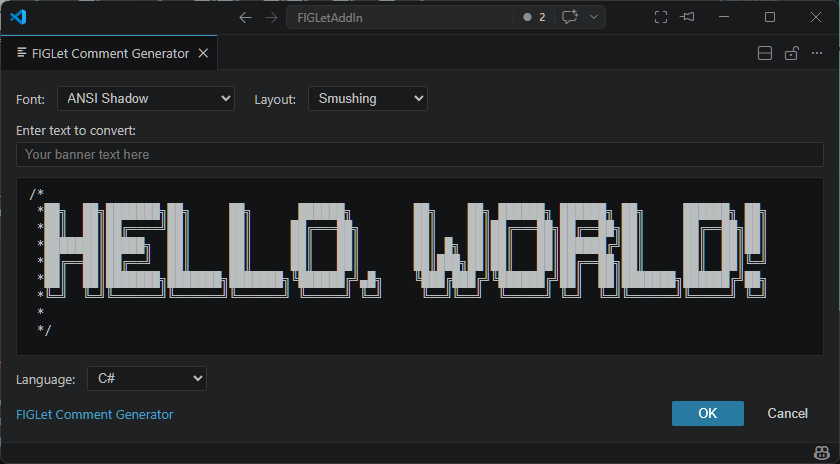
This extension is powered by our own FIGLet TypeScript Library and integrates seamlessly with any programming language supported by VS Code.
✨ Features
- 🎨 Generate ASCII art banners using FIGLet fonts
- 🔤 Choose from multiple FIGLet fonts
- 🧠 Automatically wraps banners in the correct comment syntax
- ⚙️ Supports multiple layout modes (Full Size, Kerning, Smushing)
- 🧩 Context‑aware insertion based on cursor position
- ⌨️ Customizable keyboard shortcuts
- 🖥️ Retro‑terminal aesthetic with clean, modern UI
🛠 Installation
- Open VS Code
- Press
Shift+Ctrl+X (Windows/Linux) or Shift+Cmd+X (macOS)
- Search for
FIGLet Comment Generator
- Click Install
🚀 Usage
Generate a FIGLet banner
- Place your cursor at the line where you want the banner
- Press
Ctrl+Alt+B (Windows/Linux/macOS)
- Type your text
- Select a font (optional)
- Press Enter
Example
Input:
Hello, World!
Output (using the “small” font):
#   _  _     _ _          __      __       _    _ _
#  | || |___| | |___      \ \    / /__ _ _| |__| | |
#  | __ / -_) | / _ \_     \ \/\/ / _ \ '_| / _` |_|
#  |_||_\___|_|_\___( )     \_/\_/\___/_| |_\__,_(_)
#                   |/
⚙️ Configuration
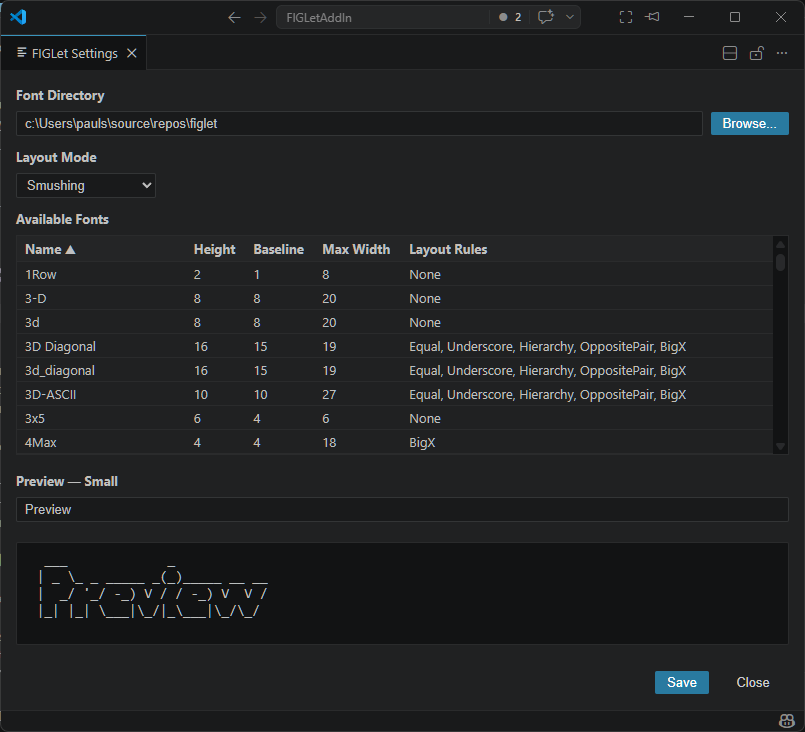
Open Settings, you have three methods:
- Press
Shift+Ctrl+P and search for FIGLet Settings
- Right-click any text editor and select
FIGLet Comments > FIGLet Settings
- Press
Ctrl+, (or go to File > Preferences > Settings) and search for FIGlet
You can configure:
- Default font
- Default layout mode
- Font folder location
🧩 Supported Languages
The extension automatically detects the file type and uses the correct comment syntax:
- C‑style languages:
// or /* */
- Python:
#
- HTML/XML:
<!-- -->
- SQL:
--
- PowerShell:
#
- Many more
🔧 Powered By
This extension uses our own FIGLet TypeScript Library — part of the ByteForge FIGLet Suite — for rendering FIGLet text with full support for:
- FLF font parsing
- Layout modes (FullSize, Kerning, Smushing)
- Smushing rules (Equal, Underscore, Hierarchy, Opposite Pair, Big X, Hardblank)
🤝 Contributing
Contributions are welcome!
If you’d like to improve the extension:
- Fork the repository
- Create a feature branch
- Commit your changes
- Open a Pull Request
📜 License
This extension is licensed under the MIT License.
💡 Credits
- Original FIGLet concept by Frank, Ian & Glenn
- Implementations by Paulo Santos (ByteForge)
- FIGLet specifications: figlet.org
Support
If you encounter any issues or have feature requests, please:
- Search existing issues
- Create a new issue if needed
Made with ❤️ by Paulo Santos

