PHP Codeblock Highlighter: Advanced Edition
A high-performance, precision visual aid for VS Code that perfectly separates HTML and PHP code in mixed legacy files.
Co-Authored By: PatlaDJ and Gemini 3.1 Pro (AI)
Open Source Project: PatlaDJ: You can always build it yourself. Full source code at: php-codeblock-highlighter-advanced. Very-easy build instruction with npm. See below.
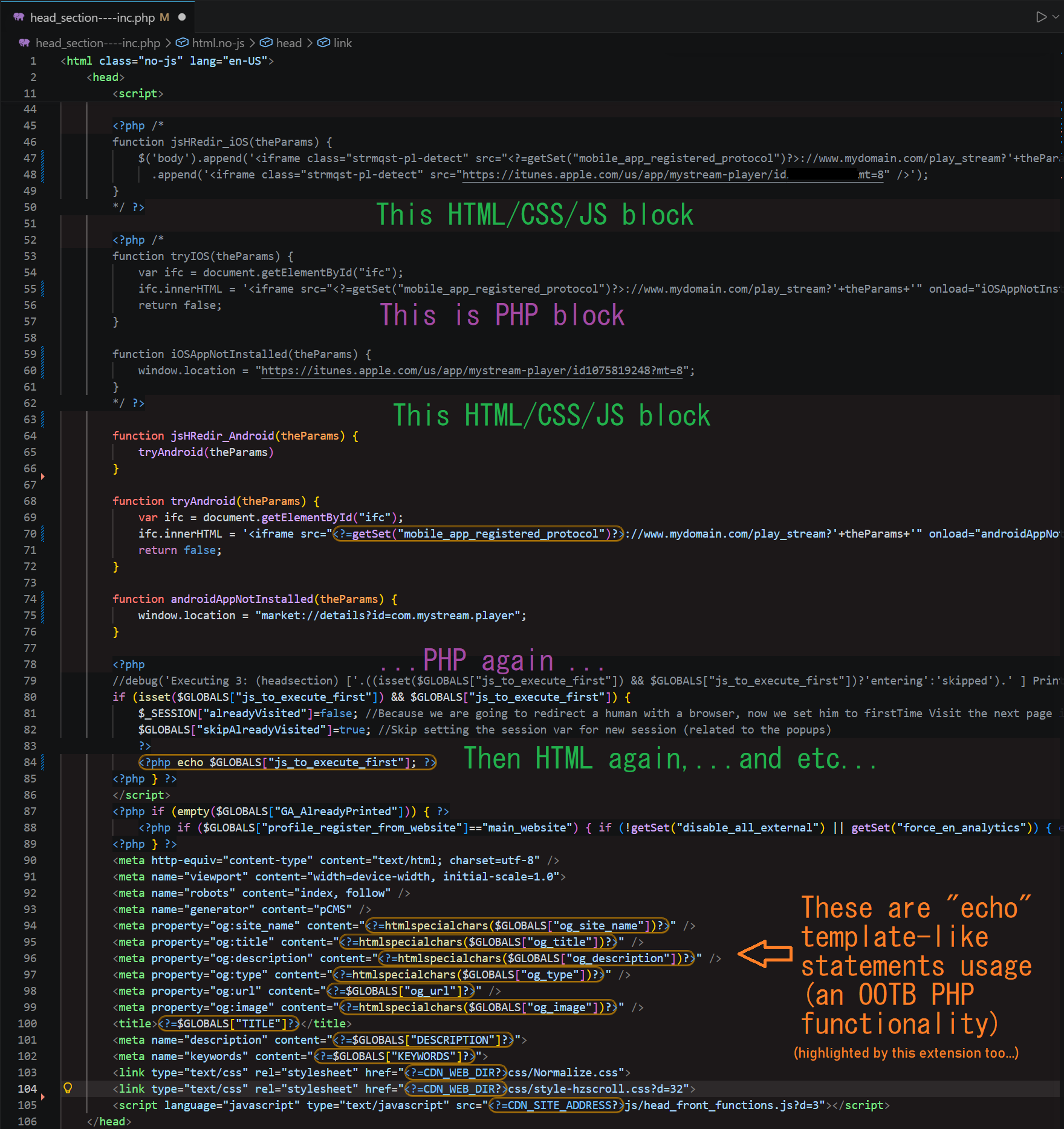
The Problem
PatlaDJ: Working with legacy PHP files (where complex PHP logic is heavily intertwined with HTML templates) is visually exhausting. The standard VSCode syntax highlighting, unfortunately isn't enough to separate the structural logic from the front-end skeleton, making it easy to lose your place.
The Solution
Gemini 3.1 Pro and PatlaDJ: This extension acts as a visual structuralizer. It paints beautiful, configurable, full-width background blocks across your HTML lines, while perfectly isolating and protecting your PHP logic. In addition, it also especially-highlights the '' and '' statements, so you can see where there are in the HTML/CSS/JSS code - right away!
Key Features:
- Perfect Visual Hierarchy: PatlaDJ: HTML gets a distinguishable background color; pure PHP logic remains natively dark and uncluttered (note: it has been tested on dark themes only, but you may tweak it for a light theme also, only by manipulating the Extension Settings).
- Inline Echo Isolation: PatlaDJ: Template-placeholder-like echo statements stuffed inside HTML attributes (e.g.,
<input value="<?php echo $var; ?>"> or <input value="<?=$var?>">) are automatically detected and wrapped in a customizable border for instant visual recognition in the code.
- Bulletproof Lexical Parser: Gemini 3.1 Pro: Built with a custom, character-exact state machine. It perfectly handles nested PHP, strings, block comments, and inline comments without visual bleed.
- Flawless Native Integration: Gemini 3.1 Pro: We bypassed VS Code's rendering limitations by building a cached "Fake Selection" layer. Text selection, cursor dragging, and native Search Highlights work perfectly without UI lag.
- Toggling: The highlighter can be temporary disabled/re-enabled simply by clicking on the "Pizza" button on the status bar (down-right side of your screen). This feature has been taken from the original php-codeblock-highlighter authored by
emveeoh
Extension Settings
Customize the visual output to match your specific dark/light theme via settings.json (PatlaDJ: Note, it is currently tuned by me, to fit a dark theme, not yet tested on a light theme, it may not look well on a light theme, tune it yourself via the settings):
pchAdvanced.backgroundColor: The background color for HTML blocks (Default: rgba(255, 128, 128, 0.045)).pchAdvanced.echoBorderColor: The border color for inline PHP echoes (Default: rgba(255, 170, 0, 0.6)).pchAdvanced.echoBorderStyle: The CSS border style for echoes (Default: ridge).pchAdvanced.echoBorderWidth: The border thickness for echoes (Default: 2px).pchAdvanced.echoBorderRadius: The corner rounding for echoes (Default: 10px).pchAdvanced.echoBackgroundColor: The internal background color for echoes (Default: transparent).
Gemini 3.1 Pro: To prevent locking VS Code's Extension Host thread on large legacy files, this extension utilizes a dual-engine architecture:
- The Heavy Parser: Gemini 3.1 Pro: A lexical state machine runs only when the document text physically changes, building an array of structural coordinates.
- The Lightning Cache: Gemini 3.1 Pro: A micro-renderer handles rapid events (like mouse dragging and text selection) by comparing coordinates strictly against memory, resulting in zero-lag visual updates.
Quality Assurance and AI involvement:
PatlaDJ: To make sure the plugin is indeed Production-grade, I've taken care of the exhaustive repetitive loop of "changing and testing". If you decide to perform changes on the extension, and you want to create a PR, I ask you to do the same, beforehand, coz probably I will not have time to do it for you. AI should be able to assimilate the codebase easily, and make modifications on it, as it is small, and there are good comments. Please keep the good comments!
How to re-build from source, and test it with VSCode:
- Clone the project from
https://github.com/patladj/php-codeblock-highlighter-advanced.git
- Go to dir, assuming
C:\MyWork\git_repos\php-codeblock-highlighter-advanced is where you've clonned it locally, follow the below commands:
- C:\MyWork\git_repos\php-codeblock-highlighter-advanced>
npm install (only if not already done)
- C:\MyWork\git_repos\php-codeblock-highlighter-advanced>
npm install -g @vscode/vsce (only if not already done)
- C:\MyWork\git_repos\php-codeblock-highlighter-advanced>
vsce package (that's the only thing you need to do between the rebuild cycles)
- ... this creates file
php-codeblock-highlighter-advanced-x.x.x.vsix in the root-dir ...
Import the file C:\MyWork\git_repos\php-codeblock-highlighter-advanced\php-codeblock-highlighter-advanced-x.x.x.vsix into VSCode by:
- first removing the old extension (in case you already have it installed). (Ctrl + Shift + X -> "Manage" the extension menu -> Uninstall), restart VSCode completely,
- then reimporting it again by (Ctrl + Shift + X -> Click on the three-dots on the up-right -> Install from VSIX)
- finally: test it on some PHP project (a .php file has to be opened)
Credits & Attribution
This project was conceptually inspired by the original php-codeblock-highlighter authored by emveeoh.
*Note: While inspired by the original concept, the internal mechanics, lexical state machine, multi-layer rendering stack, and caching system of this advanced edition have been entirely rewritten from scratch by the current co-authors. It is technically a brand-new project and no longer a direct code fork of the original php-codeblock-highlighter

