Token Saver & Counter
   
Stop burning your AI quota and subscription budget on bloated prompts, lockfiles, and noisy comments. Token Saver gives you a live multi-model Status Bar token counter, 1-click Slim / Skeleton / Git Diff prompt packing with automatic Problems capture, a workspace token-waster auditor, and a 1-click AI Ignore Shield.
- Calibrated AI Model Profiles:
Claude (Opus / Sonnet / Haiku) · Gemini (Pro / Flash) · GPT / Codex · DeepSeek (R1 / V3) · Qwen · Grok · Local LLMs (32K)
- Supported IDEs:
VS Code · Cursor · Antigravity · Devin (formerly Windsurf) · Trae · Kiro · VSCodium · Positron · GitHub Codespaces · Firebase Studio
When You Need This
| Your Situation |
What You Get |
| Sending multiple files & errors to ChatGPT Pro, Claude, or Gemini in the browser |
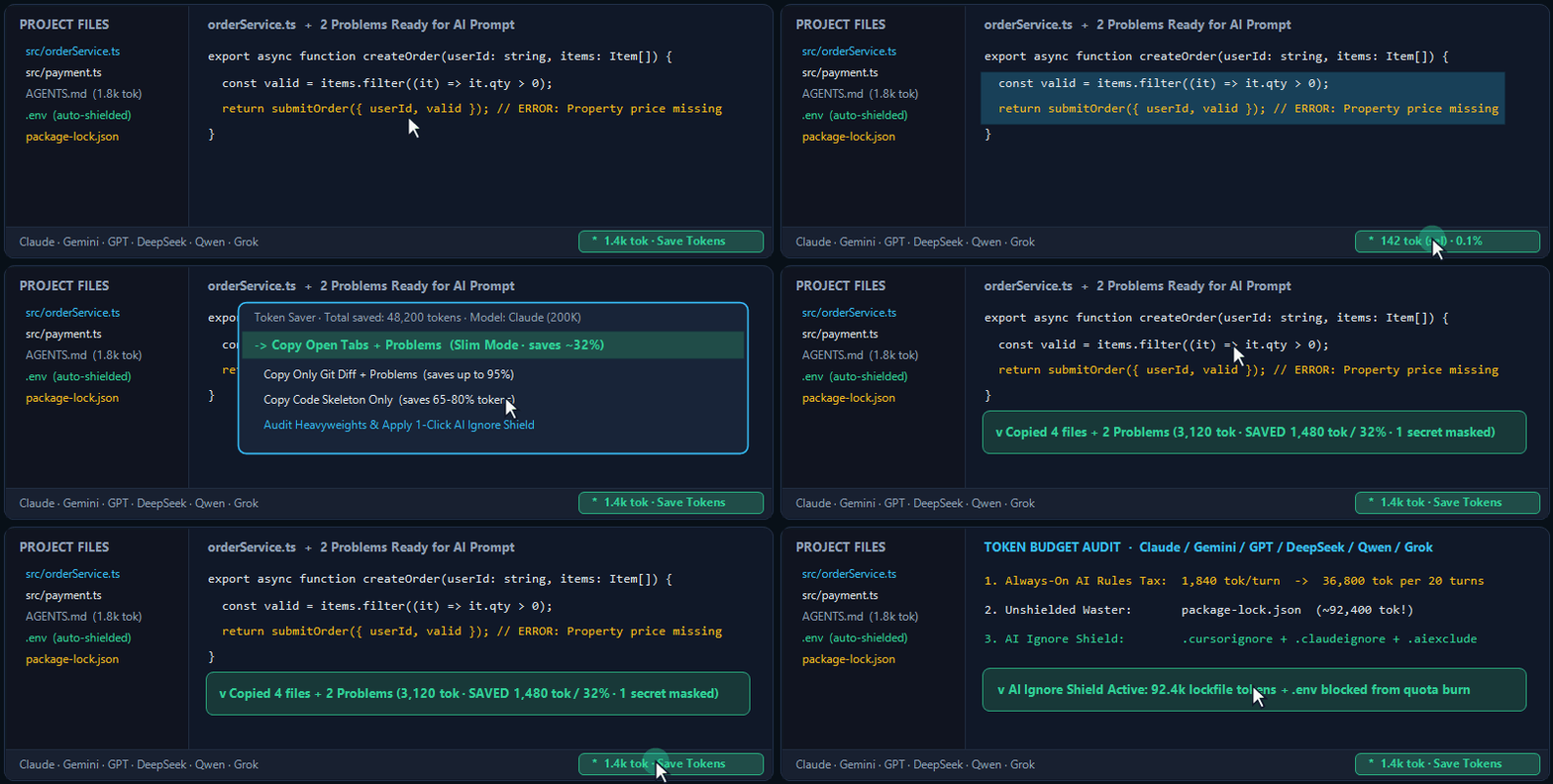
Click ✦ 1.4k tok → Copy Open Tabs + Problems (Slim Mode) — packs your folder tree, open files, and live Problems errors into your clipboard while stripping blank lines, license headers, and noisy comments (saves ~25–35% tokens automatically). |
| Fixing a fresh bug without pasting 15,000 tokens of whole files |
Choose Copy Only Uncommitted Git Diff + Problems — sends just your recent edits and exact compiler/linter diagnostics (saves up to 95% tokens). |
| Showing an AI architect your project structure without blowing your quota |
Choose Copy Code Skeleton Only — extracts imports, class definitions, and function signatures while collapsing bulky method bodies (saves 65–80% tokens). |
| Wondering why an IDE coding agent burns your daily limit in 20 minutes |
Run Audit Project Heavyweights & AI Rules Tax — reveals the Top 15 heaviest files in your workspace plus the per-turn & 20-turn overhead of always-on rule files (AGENTS.md, CLAUDE.md, GEMINI.md, .cursorrules). |
Preventing AI agents from silently reading package-lock.json or dist/ |
Click Apply 1-Click AI Ignore Shield — safely creates or updates .cursorignore, .claudeignore, and .aiexclude without overwriting your existing custom rules. |
| Checking the exact token weight of a paragraph or function before sending |
Highlight any text in the editor — the bottom-right Status Bar counter immediately switches to sel mode and shows the exact token count and context window percentage for your chosen model family. |
What this extension does not do (by design):
- 100% local & offline — never sends your source code to external servers and never requires Node.js, Python, or third-party CLI tools.
- No private account scraping — never reads browser cookies or internal billing endpoints; calculates token weights locally with script-aware calibration (Latin, Cyrillic, CJK, and code punctuation).
- Built-in secret safety —
.env files are skipped automatically and inline API keys (sk-..., AIza..., ghp_...) are redacted before anything touches your clipboard.
⚡ 15-Second Quick Start
- Check the bottom-right corner of the Status Bar to see live token counts for your active file or highlighted selection (hover to see context window
% and your Total Tokens Saved).
- Click the Status Bar counter to copy Slim Open Tabs + Problems, Git Diff + Problems, or Code Skeleton in one click — then press
Ctrl+V / Cmd+V in any AI chat.
- Run Apply 1-Click AI Ignore Shield once per project to protect your agent quota from lockfiles and build folders.
Commands
Token Saver: Open MenuToken Saver: Copy Open Tabs + Problems (Slim -30%)Token Saver: Copy Only Git Changes + Problems (Save up to 95%)Token Saver: Copy Code Skeleton Only (Save up to 75%)Token Saver: Pick Files to Copy for AI PromptToken Saver: Scan Project Token Heavyweights & AI Rules TaxToken Saver: Generate AI Ignore Shield (.cursorignore / .claudeignore / .aiexclude)Token Saver: Switch Target AI Model Profile
Credits
Developed and maintained as a free community tool by PRYSKY Studio.
Licensed under the MIT License.
| |

