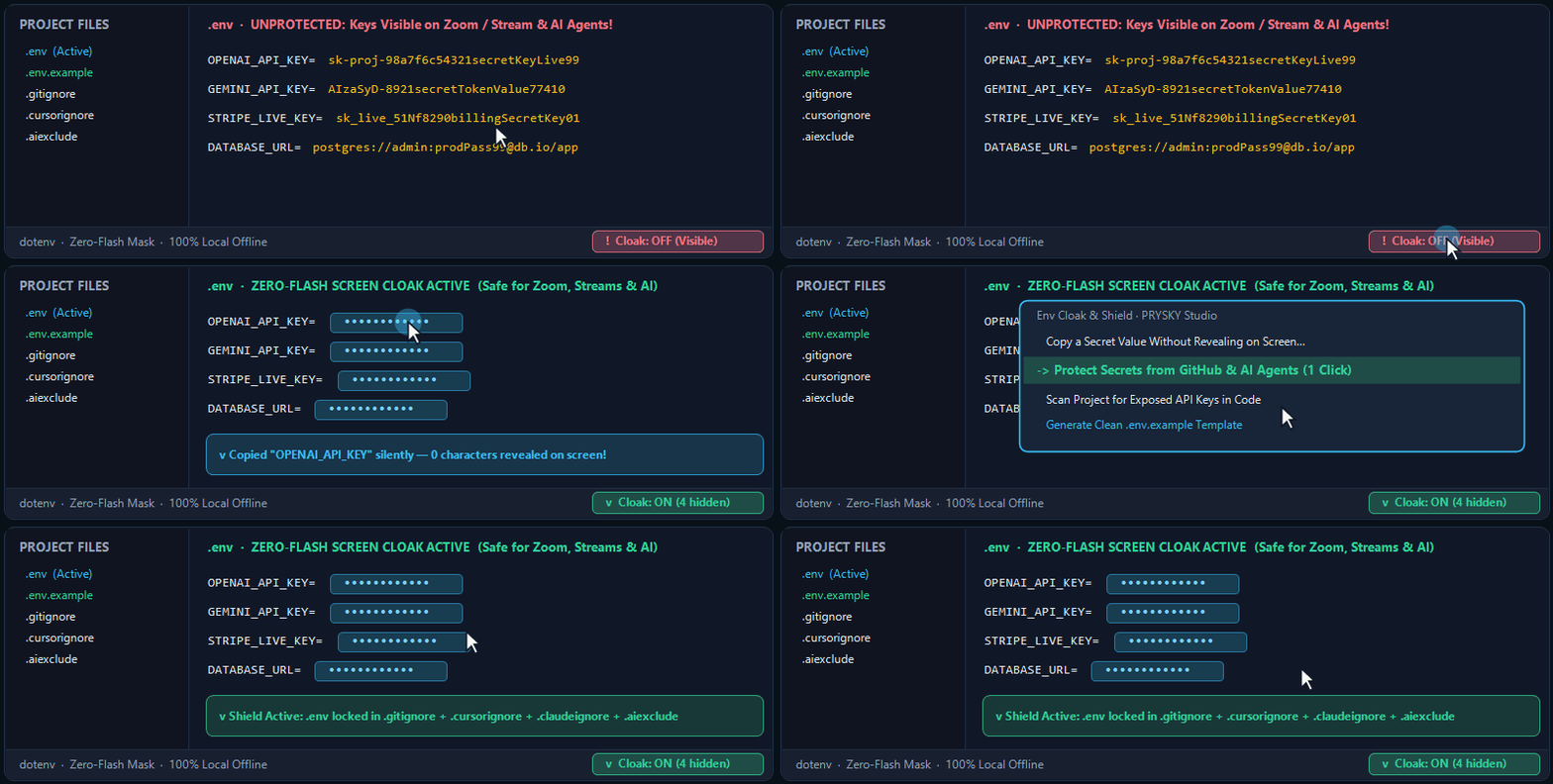
Keep your .env credentials, database passwords, and paid API keys (OpenAI, Claude, Gemini, Stripe, GitHub, AWS) safe from screen recordings, Zoom calls, AI coding agents, and accidental public GitHub uploads — in one click right from the Status Bar.
Sharing your screen on Zoom, recording a video, or taking a screenshot
.env values and inline API keys (sk-..., AIza..., ghp_..., AKIA..., database URLs) are masked immediately with uniform •••••••••••• badges — with zero split-second flash when switching tabs and without leaking password length.
Copying an API key into a browser or terminal during a live call
Click 🛡️ Cloak: ON → Copy a Secret Value Without Revealing on Screen… — pick the variable by name (OPENAI_API_KEY) and its value copies straight to your clipboard while staying hidden on screen.
Editing one variable in .env without exposing the rest of the file
Toggle Peek Active Cursor Line — reveals only the single line under your cursor for clean editing instead of blocking your editor with an unusable black box.
Preventing AI coding agents or git push from leaking your .env file
Click Protect Secrets from GitHub & AI Agents — adds .env and private key rules into .gitignore, .cursorignore, .claudeignore, and .aiexclude in one click while preserving your existing rules.
Checking if you or an AI agent left a real API key hardcoded in code
Run Scan Project for Exposed API Keys — checks your workspace in under a second and opens a partially-redacted audit report with exact file:line locations.
Sharing environment setup with a teammate or an AI assistant safely
Click Generate Clean .env.example Template — creates .env.example keeping comments and safe ports (PORT=3000) while stripping every secret value.
What this extension does not do (by design):
100% local, zero cloud accounts — never uploads, syncs, or transmits your .env files or keys anywhere; no account sign-up or external vault required.
Never modifies your .env file on disk during cloaking — screen masking uses pure visual editor decorations, so your real .env file stays untouched for local servers and scripts.
Never masks .env.example or .env.sample — template files stay readable as intended.
⚡ 15-Second Quick Start
Right after installing, 🛡️ Cloak: ON is active in the bottom-right corner of your Status Bar — open any .env file and all secret values are already masked.
Click 🛡️ Cloak: ON on the Status Bar to copy a variable silently, peek the active cursor line, or generate .env.example.
Run Protect Secrets from GitHub & AI Agents once per project to lock .gitignore and AI agent ignore files in one click.
Commands
Env Cloak & Shield: Open Security Menu
Env Cloak & Shield: Toggle Screen Cloak (ON / OFF)
Env Cloak & Shield: Toggle Peek Active Cursor Line
Env Cloak & Shield: Copy Secret Value Without Revealing on Screen
Env Cloak & Shield: Protect Secrets from Git & AI Agents (.gitignore / .cursorignore / .aiexclude)
Env Cloak & Shield: Scan Project for Exposed API Keys & Secrets
Env Cloak & Shield: Generate Safe .env.example Without Secrets
Credits
Developed and maintained as a free community tool by PRYSKY Studio.
Licensed under the MIT License.