Claude IDE Bridge



MCP bridge between Claude Code and your IDE. 177 tools — diagnostics, LSP, debugger, terminal, git. Works in VS Code, Cursor, Windsurf, and Google Antigravity.
Give Claude Code real-time visibility into your editor. Claude sees your open files, diagnostics, terminal output, and editor state — and can act on all of it.
Fix a bug from your phone. Let Claude run your tests and commit the result. Ask Claude what lint errors are in your workspace without copy-pasting anything. This extension makes all of that work.
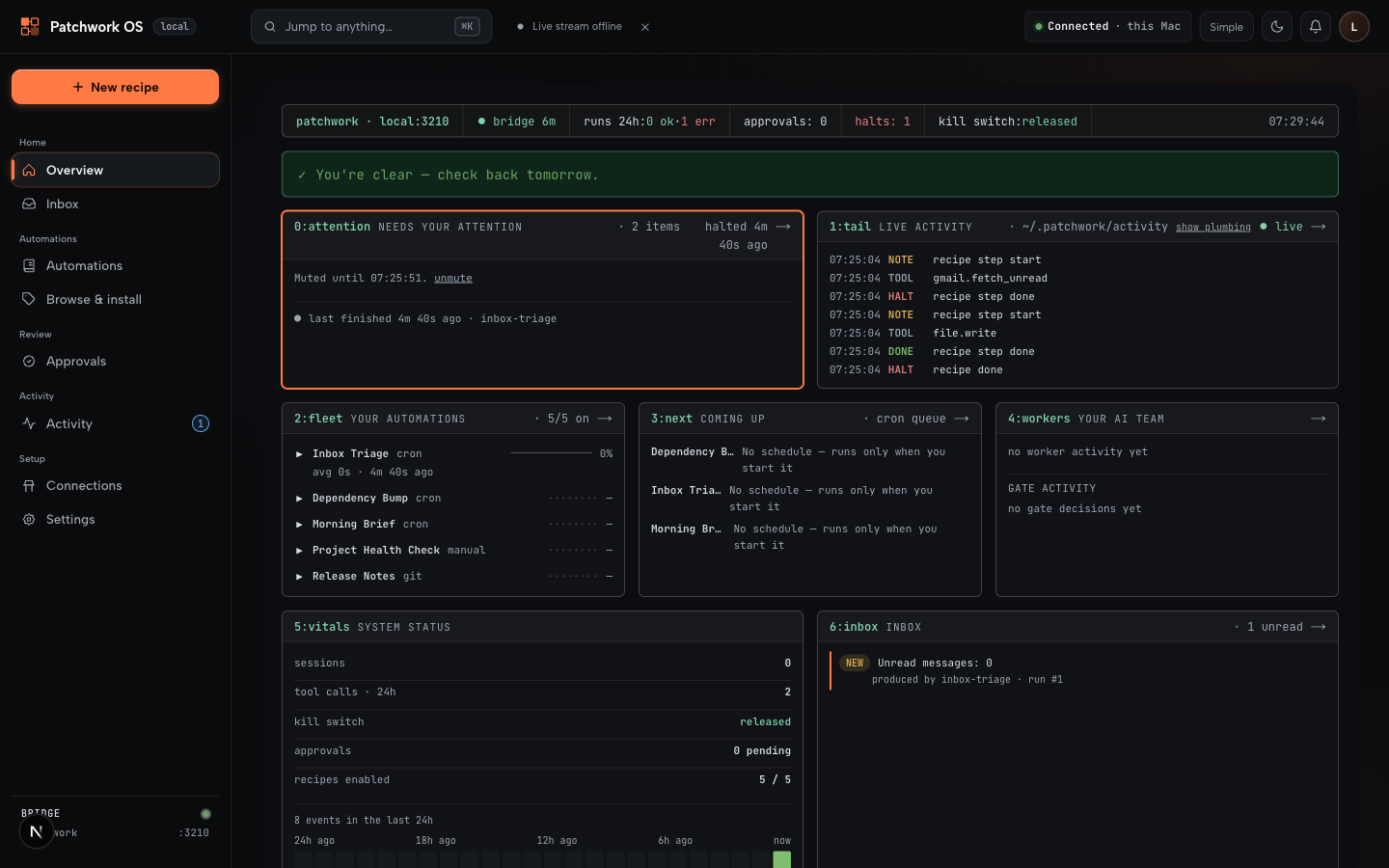
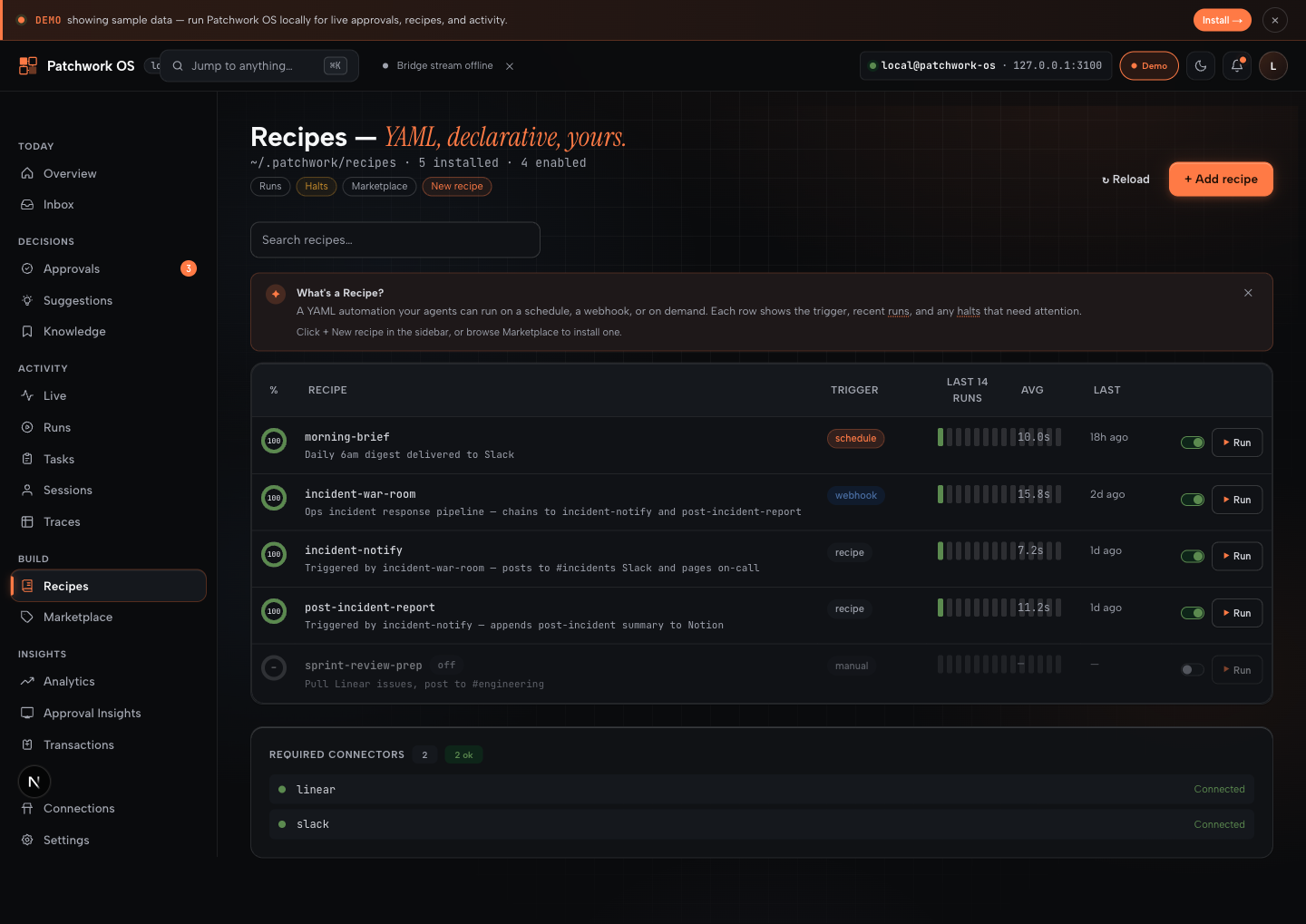

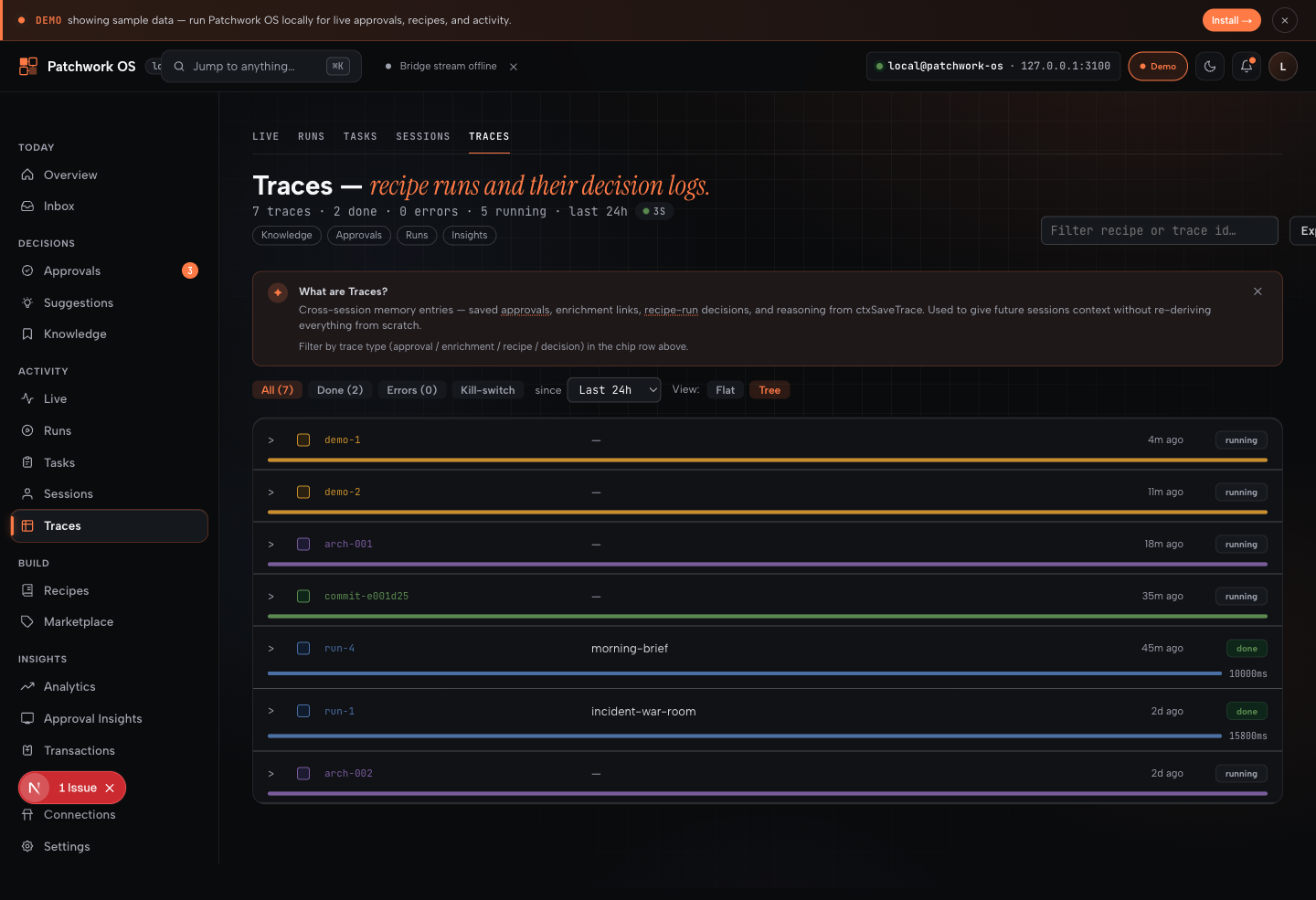
Walkthrough
A guided walkthrough ships with the extension. It opens automatically on first install; re-open any time via Command Palette → "Welcome: Open Walkthrough" → "Get Started with Claude IDE Bridge".
Two ways to use this
| Mode |
What you get |
Who it's for |
| Bridge only (default) |
177 MCP tools: LSP, diagnostics, debugger, terminal, git, GitHub, file ops |
Anyone who wants Claude Code to see and act on their IDE |
| Patchwork OS layer (opt-in) |
All bridge tools + recipes, approval queue, oversight dashboard, mobile push approvals, multi-model |
Power users running automation, agent workflows, or background tasks |
The bridge runs without any flags. Add --automation --driver subprocess to enable the Patchwork OS layer when you want it.
Quick Start (bridge only)
Step 1 — Install this extension.
The extension detects whether claude-ide-bridge is installed globally, installs or upgrades it if needed, then starts it in the background for your workspace.
Step 2 — Connect Claude Code.
Add the connection flag to your shell profile once (~/.zshrc or ~/.bashrc):
export CLAUDE_CODE_IDE_SKIP_VALID_CHECK=true
Then, in any project directory, claude --ide is all you need:
claude --ide
Why the env var? Claude Code normally validates that --ide is launched from within a recognized IDE (VS Code, Cursor, etc.). The bridge manages this connection itself, so the check is skipped. Prefer a one-off? Run CLAUDE_CODE_IDE_SKIP_VALID_CHECK=true claude --ide inline instead.
Step 3 — Confirm the connection.
Type /ide in Claude Code to see your open files, diagnostics, and editor state. The status bar item in VS Code shows the connection state.
To check bridge logs at any point: run Claude IDE Bridge: Show Logs from the command palette.
Manual setup (optional)
If auto-start is disabled, manage the bridge yourself:
npm install -g patchwork-os
claude-ide-bridge --workspace /your/project
The npm package is named patchwork-os and ships three CLI binaries: claude-ide-bridge, patchwork, and patchwork-os. Bridge-only users typically run claude-ide-bridge; Patchwork OS users run patchwork. Same code, different defaults.
What Claude Can Do With This Extension
Once connected, Claude has full IDE context and can act on it without you describing your setup:
- Read your diagnostics — "Fix all TypeScript errors in this file" works because Claude can call
getDiagnostics directly.
- Navigate code — go to definition, find references, search workspace symbols, get call hierarchies.
- Run and read terminal output — create terminals, run commands, wait for output, report results back.
- Edit and save files — open files in your editor, apply changes, save documents.
- Run tests and check coverage — run your test suite, read failures, fix them, re-run.
- Set breakpoints and inspect debug state — start a debug session, evaluate expressions, stop when done.
- Commit, push, and open PRs — full Git workflow via structured tools, not raw shell commands.
- Format, lint, and organize imports — code quality tools wired to your IDE's language servers.
- Capture a screenshot — Claude can see what your editor looks like.
- Watch files for changes — register file watchers and react to saves.
- Refactor safely —
refactorAnalyze → refactorPreview → renameSymbol workflow with risk scoring.
- Spawn background Claude tasks —
runClaudeTask, getClaudeTaskStatus, cancelClaudeTask, listClaudeTasks for headless orchestration.
- Quick-task presets —
launchQuickTask with presets: fixErrors, refactorFile, addTests, explainCode, optimizePerf, runTests, resumeLastCancelled.
- Edit transactions —
beginTransaction, stageEdit, commitTransaction, rollbackTransaction for atomic multi-file edits.
- Coverage tracing —
getCodeCoverage + lcov/json-summary parsing.
- Environment health —
bridgeDoctor verifies extension, git, linter, test runner, lock file, and GitHub CLI with actionable suggestions.
The bridge starts in full mode by default (177 tools). Pass --slim to restrict to the IDE-only surface (~60 tools). Tools that require the extension are automatically hidden when the extension is disconnected and reappear on reconnect.
Requirements
- VS Code 1.93+ (or a compatible fork: Cursor, Windsurf, Google Antigravity)
- Node.js 22+ on
PATH (for auto-install)
Commands
| Command |
Description |
Claude IDE Bridge: Reconnect |
Manually reconnect to the bridge |
Claude IDE Bridge: Show Logs |
Open the output channel |
Claude IDE Bridge: Copy Connection Info |
Copy bridge URL and token to clipboard |
Claude IDE Bridge: Start Bridge |
Manually start the bridge for this workspace |
Claude IDE Bridge: Install / Upgrade Bridge |
Install or upgrade the bridge via npm |
Claude IDE Bridge: Refresh Analytics |
Refresh the analytics sidebar panel |
Claude IDE Bridge: Open Panel |
Reveal the Claude Bridge analytics view |
Analytics Panel
The extension contributes a Claude Bridge panel in the VS Code activity bar. It shows:
- Live active tasks with output overlay and Resume/Cancel controls
- Quick-task preset buttons (Fix Errors, Add Tests, Explain Code, etc.)
- Health score (0–100), p95 tool latency, and connection quality
- Recent task history with handoff note preview
- Continue from last handoff
Configuration
| Setting |
Default |
Description |
claudeIdeBridge.autoConnect |
true |
Connect automatically on startup |
claudeIdeBridge.autoStartBridge |
true |
Auto-start the bridge process on extension activation |
claudeIdeBridge.autoInstallBridge |
true |
Auto-install/upgrade the bridge via npm if not found or outdated |
claudeIdeBridge.logLevel |
info |
Log verbosity: info, debug, or warn |
claudeIdeBridge.lockFileDir |
(empty) |
Override lock file directory (default: ~/.claude/ide/). Useful for multi-bridge setups. |
claudeIdeBridge.port |
0 |
Port for the bridge to listen on. 0 = auto-select. Set a fixed port ≥ 1024 (e.g. 55000) when running multiple IDEs simultaneously. |
After Restarting or Updating the Bridge
| Scenario |
What to do |
| Bridge restarted |
The extension reconnects automatically — no action needed |
| Bridge updated |
Reload the VS Code window (Developer: Reload Window) |
| Claude Code session |
Start a new Claude Code conversation — old sessions don't survive a bridge restart |
| Claude Desktop |
The stdio shim reconnects automatically — only restart if the shim process died |
Troubleshooting
When the extension loses its connection to the bridge, tools requiring extension access (terminal, LSP, debug, editor state) are automatically hidden from Claude. Open the Output panel and select Claude IDE Bridge to check connection status. Run Claude IDE Bridge: Reconnect from the command palette, or reload the window.
For a full environment health check, ask Claude to call bridgeDoctor. It verifies the extension connection, git, linters, test runner, lock file, node_modules, and GitHub CLI — and reports actionable suggestions for anything that's wrong.
Bridge and extension version mismatch
The extension auto-manages the npm package. If you also installed the bridge manually, versions may diverge. To sync:
- Run Claude IDE Bridge: Install / Upgrade Bridge from the command palette.
- Reload the VS Code window after the upgrade completes.
Extension keeps reconnecting
Repeated disconnects usually mean multiple old versions are installed across VS Code forks (e.g. both VS Code and Cursor). Install the latest extension in every editor and reload each window.
Untrusted workspaces
In untrusted workspaces, bridge auto-install and auto-start are disabled. The extension will watch for a manually-started bridge via lock file, but will not spawn one itself.
Level up to Patchwork OS
Everything below is opt-in. The bridge works fine without any of it. Enable when you want a background agent that watches your workspace, runs YAML recipes on events, and routes risky actions through an approval queue.
claude-ide-bridge --automation --automation-policy automation-policy.json --driver subprocess
# or use the patchwork CLI which sets these defaults
patchwork start-all
Automation Hooks
Event-driven hooks fire Claude tasks in response to IDE events. Activate with --automation --automation-policy <path.json>.
| Trigger |
When it fires |
onDiagnosticsStateChange |
Errors/warnings appear (state: "error") or clear (state: "cleared") |
onFileSave |
A matching file is explicitly saved |
onFileChanged |
Any buffer edit on a matching file |
onRecipeSave |
A .yaml / .yml file is saved (runs preflight by default) |
onTestRun |
runTests completes (filter: "failure" / "pass-after-fail" / "any") |
onGitCommit |
gitCommit tool succeeds |
onGitPush |
gitPush tool succeeds |
onGitPull |
gitPull tool succeeds |
onBranchCheckout |
Git branch is created or switched |
onPullRequest |
githubCreatePR succeeds |
onCompaction |
Claude compacts its context (phase: "pre" / "post") |
onInstructionsLoaded |
Claude loads CLAUDE.md at session start |
onTaskCreated / onTaskSuccess |
Orchestrator task lifecycle events |
onPermissionDenied |
Claude Code denies a tool call |
onCwdChanged |
Claude Code's working directory changes |
onDebugSession |
VS Code debug session starts/ends (phase: "start" / "end") |
All hooks support inline prompt strings or promptName references, with a minimum 5s cooldown.
See Patchwork OS docs for full policy syntax, placeholder reference, and prompt-injection defenses.
Recipes
Recipes are plain YAML files that declare a trigger and an action. Share them like dotfiles. Examples:
daily-status — morning brief from yesterday's commits (cron 08:00)watch-failing-tests — drops triage note to inbox on test failurelint-on-save — surfaces new TS/JS diagnostics on file savemorning-brief — commits + Linear + Calendar → inboxsentry-to-linear — Sentry issue → Linear ticket (one-shot)google-meet-debrief — meeting notes → Linear + Slack
Recipes run via patchwork recipe run <name> or fire automatically from automation hooks.
Claude Orchestration
When started with --driver subprocess, the bridge can spawn Claude Code subprocesses as background tasks. Tools: runClaudeTask, getClaudeTaskStatus, cancelClaudeTask, listClaudeTasks, resumeClaudeTask. Output streams to the Claude IDE Bridge output channel in real time.
The headless CLI also exposes start-task "<description>", quick-task <preset>, and continue-handoff as subcommands, sharing the same dispatch path as MCP clients and the sidebar.
Mobile Oversight (alpha)
Approve or reject risky Claude actions from your phone. Install the Patchwork OS dashboard as a PWA (iOS/Android), subscribe to push notifications in Settings → Mobile notifications, and inline Approve/Reject actions appear directly in your notification tray. Requires a push-relay service deployment.
JetBrains companion
A companion IntelliJ plugin (v1.0.0) is available on the JetBrains Marketplace. It registers 66 handlers (49 fully implemented + 17 stubs): core tools, PSI-based LSP (goto, references, hover, rename, symbols, format), XDebugger integration, and code style tools. Use the same bridge from VS Code, IntelliJ IDEA, PyCharm, GoLand, and other JetBrains IDEs simultaneously.
Links
Version & Compatibility
|
|
| Extension version |
shown in the Marketplace header above |
| Bridge version |
latest on npm · GitHub releases |
| npm package |
patchwork-os (binaries: claude-ide-bridge, patchwork, patchwork-os) |
| VS Code requirement |
1.93+ |
| Compatible editors |
VS Code, Cursor, Windsurf, Google Antigravity |
| Node.js requirement |
22+ (for bridge auto-install) |
| Test suite |
1000+ tests across bridge + extension |

