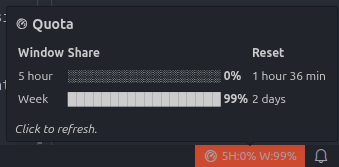
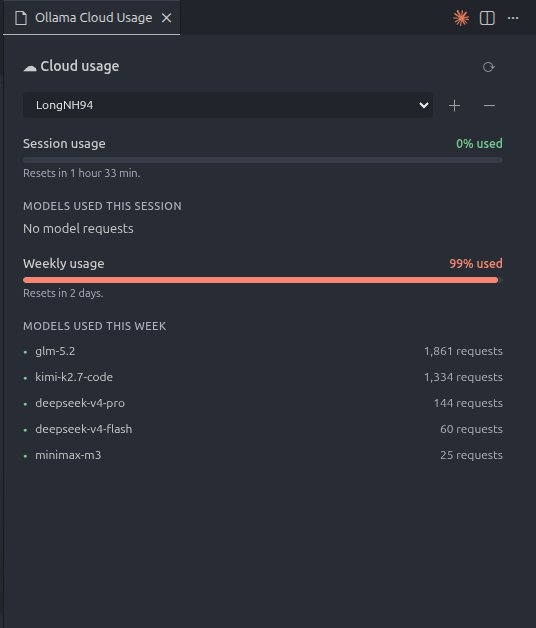
View Ollama Cloud usage and limits in VS Code — a compact status bar indicator plus a detailed usage panel.
Features
Status bar indicator — legacy plans show session (5h) and weekly usage; credit plans show the remaining USD balance. Hover for a quota tooltip with per-model share bars and reset countdowns.
Usage panel — click the status bar item to open a detailed panel with:
Session and weekly usage bars (legacy plans) or an included-credit bar (credit plans), split into per-model segments (blue shades by model)
Live reset countdown taken from the API's resets_at / period.until
Models used this session / week / period with request counts (hover a bar segment for model name + count)
Request summary for the long range (USD spend shown when the plan reports usage_usd)
Multi-account support: switch, add, remove accounts via dropdown
Auto-refresh — usage reloads every 60 seconds.
Server-provided reset windows — countdowns use the reset timestamps returned by Ollama instead of a local UTC heuristic.
Secure storage — API keys stored in VS Code Secret Storage (or OLLAMA_API_KEY env var).
Plans
Ollama returns two different account shapes from GET /api/balance:
Legacy plan
Credit plan
Status bar
5H:56% W:25%
$72.5/$100
Quota rows
Session (5h) + Weekly
Included credits
Reset source
included.session/weekly.resets_at
included.period.until
Model breakdown
24h (current session window) + 7d (week)
24h + 30d (included period)
Extra
Long-range requests
Long-range spend/requests + purchased credits
Used percentages are derived from the API's remaining_percent (used = 100 - remaining). For credit plans, used = 1 - balance_usd / allowance_usd.
How it gets data
GET https://ollama.com/api/balance — quota windows. Legacy plans return session/weekly with remaining_percent and resets_at; credit plans return balance_usd, allowance_usd and a period.
GET https://ollama.com/api/usage?range=24h|7d|30d&group_by=model — request counts and per-model breakdowns, used for the model lists, session-window counts and long-range summary. Legacy plans use 24h + 7d; credit plans use 24h + 30d.
Both calls use Authorization: Bearer <API key>. Ollama rate-limits these endpoints at 10 requests/minute per user; this extension makes three requests per 60-second refresh.
Since 2026-10-07/api/usage no longer returns activity / limits (it is a time series with totals and buckets); quota data moved to /api/balance. The parser still accepts the old shape for compatibility.
Screenshots
Usage Panel
Status Bar
Use
Install the extension (Marketplace or code --install-extension <file>.vsix).
Click the Ollama Cloud status bar item (bottom-right) to open the panel.
Click + and paste your Ollama API key. Or start VS Code with OLLAMA_API_KEY set.
Usage auto-refreshes every 60s; click ⟳ in the panel to refresh manually.
Commands
Ollama Cloud: Refresh Usage
Ollama Cloud: Open Usage Panel
Ollama Cloud: Add Account
Ollama Cloud: Remove Account
Ollama Cloud: Switch Account
Development
npm install
npm run compile
npm test                  # compiles, then runs out/api.test.js
npx @vscode/vsce package  # produces ollama-cloud-usage-<version>.vsix
See CLAUDE.md for architecture, API contracts and implementation notes.
License
Copyright 2026 Nguyễn Hoàng Long
Licensed under the Apache License, Version 2.0.
See the LICENSE file for details.