SERP — VS Code Extension
Developer tooling for SERP — architecture explorer, live deployment control, runtime inspector, and AI sessions scoped to every part of your system.
What is SERP?
SERP (Service · Event · Runtime · Platform) is a C++ framework for building distributed multiprocess systems on embedded and automotive platforms.
serpcore provides the runtime — typed service interfaces, properties, notifications, calls, a threading model, and IPC transports (in-process, D-Bus, gRPC, POSIX Unix Domain Sockets).
serpgen takes a declarative spec (serp.sidl) and generates the C++ interfaces, transport wiring, process skeletons, and build system. You fill in the business logic; the framework handles the rest.
This extension is the IDE companion for SERP projects.
Getting Started
Install the SERP dev package first — it provides serpgen and the runtime libraries the extension depends on.
No project yet? The Explorer panel shows a Create from Template button — one click scaffolds a complete working project.
Explorer
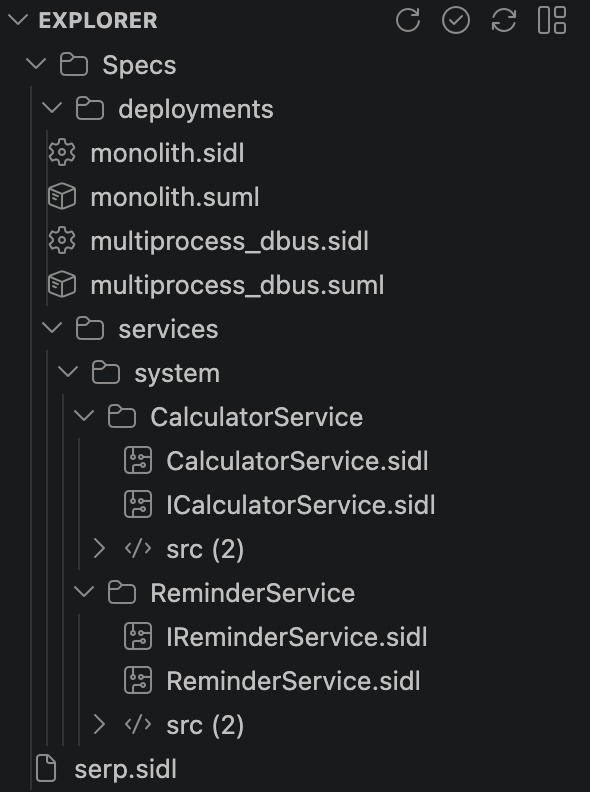 |
Browse the full workspace: deployments, services, spec files, and source files — all in one tree.
Toolbar: Refresh · Validate · Generate · Open Dashboard
Right-click a spec node to validate or regenerate individual files.
Keyboard Shortcuts
| Action |
Windows / Linux |
macOS |
| Validate specs |
Ctrl+Alt+V |
Ctrl+Option+V |
| Generate |
Ctrl+Alt+G |
Ctrl+Option+G |
| Open Architecture Dashboard |
Ctrl+Alt+D |
Ctrl+Option+D |
| Build |
Ctrl+Alt+B |
Ctrl+Option+B |
| Run |
Ctrl+Alt+R |
Ctrl+Option+R |
| Stop |
Ctrl+Alt+S |
Ctrl+Option+S |
|
Active Deployment
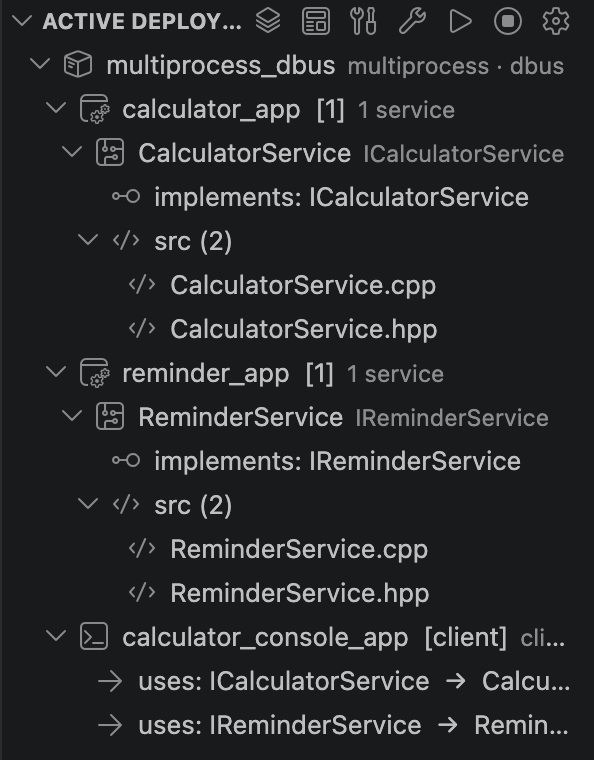 |
Build, run, and stop the active deployment. Shows processes, the services they host, interfaces each service implements or uses, and direct links to impl and generated files.
Toolbar: Select Deployment · Open Diagram · Build · Clean Build · Run · Stop · Select Build Profile (dev-grpc / dev-dbus / release)
Right-click the deployment: Clean Build · Restart · Show Status · Open Diagram
Right-click a service: Open Implementation · Open Generated Files
|
Architecture Dashboard
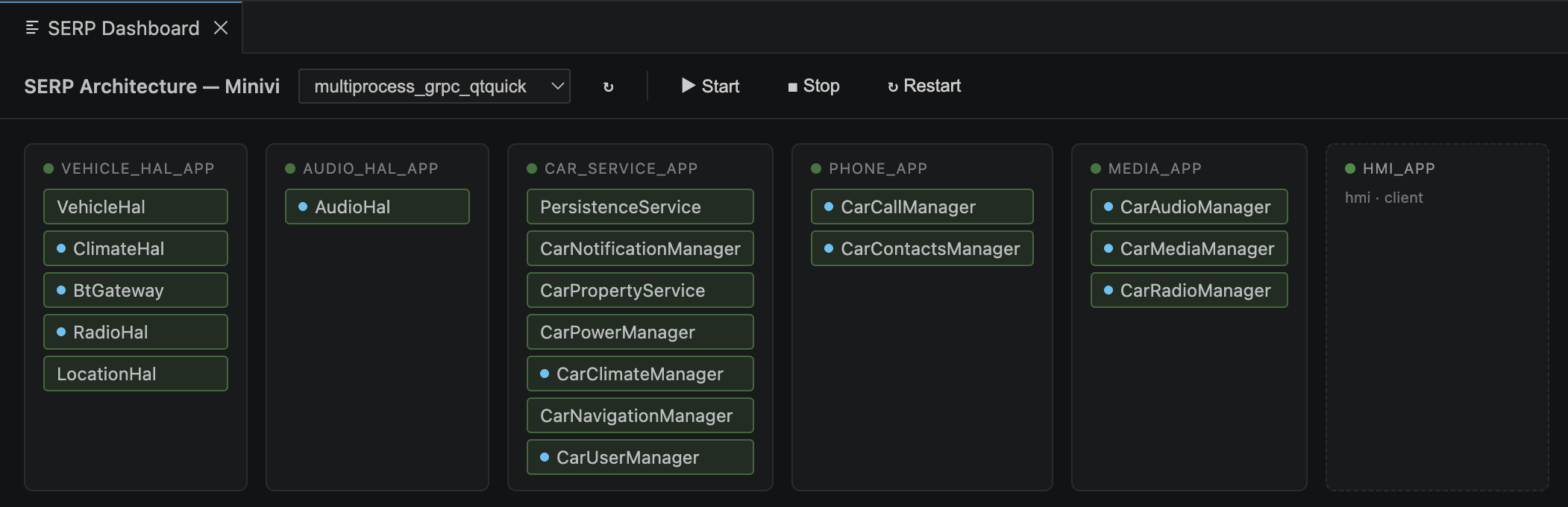
An interactive live view of the deployment — process cards with their services, live CPU/MEM stats, and one-click access to sessions and impl files.
Open with Ctrl+Alt+D or the Dashboard button in the Explorer toolbar.
- Green dot on a card — process running; red — stopped
- Blue dot on a service chip — an AI session is linked
- Click a service chip — detail panel with impl file, interfaces, Open Impl / Open Session
- Click a process card — Start / Stop / Restart / Logs controls
Runtime Inspector
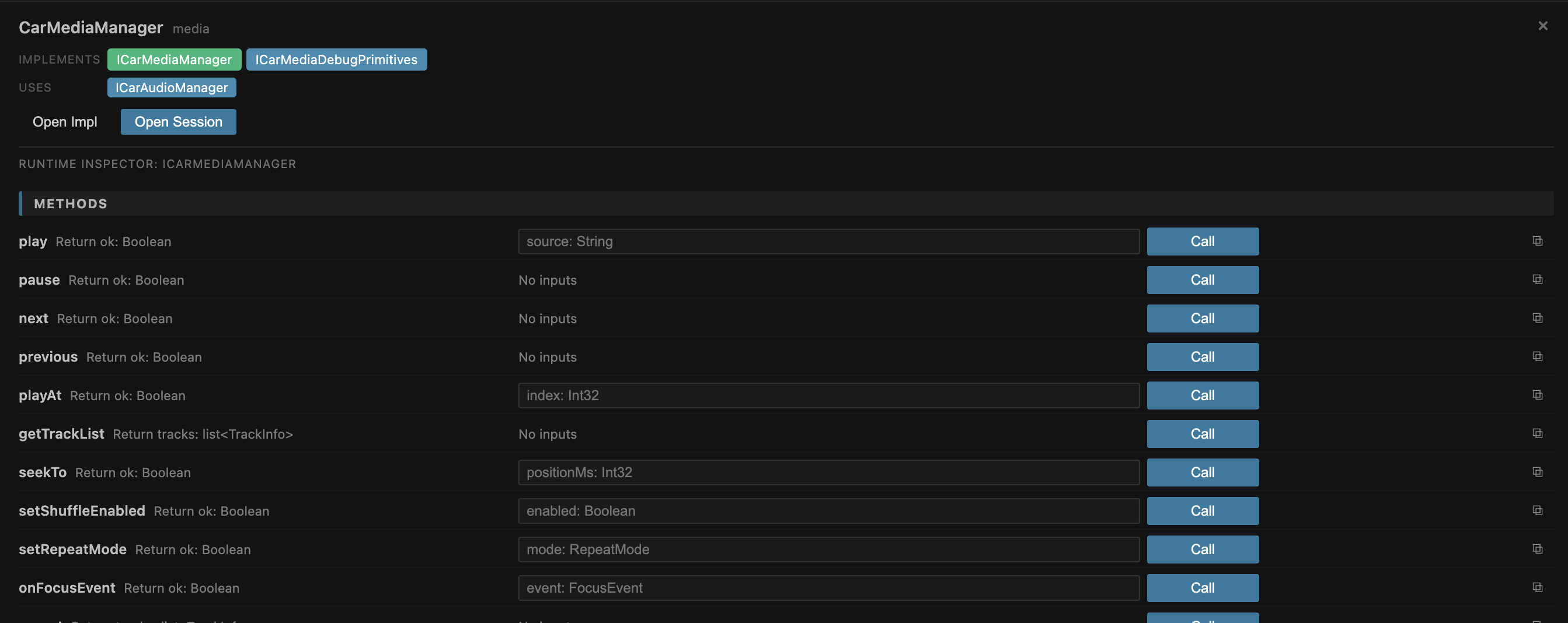
Click any service chip on the Dashboard to open the detail panel. The Runtime Inspector exposes the full interface of the service — call methods with typed input fields, read and watch properties, and subscribe to notifications. All directly on the running process, no client code needed.
Works over gRPC (dev-grpc profile, macOS) or D-Bus (dev-dbus, Linux).
SERP AI
Work on a SERP project is decomposed into focused AI sessions — each with its own role, context, restrictions, and workflow. This keeps every session small and purposeful: the selected agent knows exactly what it owns, what it can touch, and what the goal is. Claude Code is the default backend; Codex can be selected per project from SERP AI Configuration → Overview → Project agent.
When a session opens, it calls the SERP MCP server (serp.session.getContext) to load its role definition — responsibility, allowed writes, forbidden writes, and the knowledge documents relevant to that role. The MCP server also manages session state, summaries, validation, and cross-session context inheritance.
Architecture — designs service decomposition and deployment topology. Can write to specs/ only. Cannot touch src/ or gen/.
Services — scoped to src/services/<group>/<service>/ and its tests. Cannot change specs or other services. Expand to add Sequence sub-sessions for individual interaction flows.
HMI — scoped to one HMI component.
Full Context — freeform, no assigned role and no write restrictions beyond the universal gen/ block. For work that doesn't fit neatly into one of the scopes above.
Every scope above is a folder holding a list of sessions, not a single link — open several sessions against the same service at once (e.g. implement in one, debug in another). Folders are always expandable, even empty; hover for an inline + to start a new session and a history icon for past archived ones.
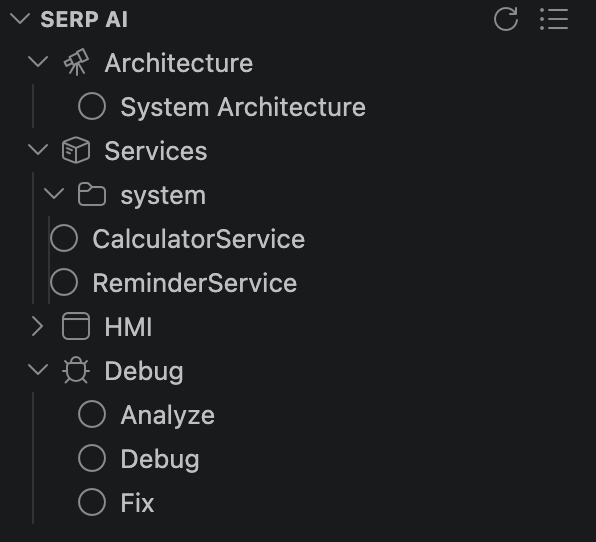 |
Debug — Analyze/Debug are tied to the active deployment; Fix is project-wide and picks its own deployment(s) to build/run/validate against:
| Session |
Role |
Can write |
| Analyze |
Runtime Investigator |
nothing — read-only |
| Debug |
Runtime Investigator |
nothing — probes live runtime only |
| Fix |
Implementation Fixer |
src/**, tests/** |
|
Click a session → opens it. New sessions are selected in the tree automatically; Codex sessions open in the native Codex editor when available, with terminal resume as a fallback. Right-click a session for Rename · Reset Status · Archive; right-click a folder for New Session · Archived Sessions….
Each session shows its live status: spinner while it's actually working, a red question mark when it's asked you something and is waiting for your reply, green once linked and idle, yellow if the underlying backend session is gone. This is reported by the session itself (serp.session.setState); Claude Code also has a lifecycle hook that reports working/idle deterministically as a backstop, while Codex relies on MCP state plus the tracked headless process while it is starting.
A context guard hook keeps Claude Code sessions current between messages — before each prompt it diffs watched files against a snapshot taken at last getContext call and injects only what changed. A scope guard hook enforces write restrictions on every Claude Code file edit — gen/ is always blocked, and writes outside the session's allowed paths are rejected before the agent can act on them, correctly even when several sessions are writing at once. Other backends still get the same MCP context and role instructions, but do not run Claude's hook system.
A session can also spawn another one itself (serp.session.spawn) — hand off a task to a session for a different scope and keep going without waiting for it. The new session shows up in the panel immediately, running in the background; useful for e.g. an Architecture session that updates a few service specs and kicks off a session per affected service to adapt the implementation.
Design Contracts (specs/**/*.design.yaml) are the durable, user-approved counterpart to session summaries — architecture/service/interface/HMI/deployment decisions with an explicit approval lifecycle (draft → proposed → approved/rejected/needs_update) and implementation lifecycle (not_started → generated → implemented → validated/stale/blocked). AI may propose blocks; only you approve them; AI may implement only what's approved. Right-click a service/HMI/Architecture node for Open Design Contract, Show Pending Design Blocks, Approve/Reject/Request Changes Design Block…, and Show Design Diff. A N stale / design drift: N badge appears on that node when there's something worth a look — pending-approval counts are tracked too (they gate the same right-click actions) but aren't shown as tree text, since every Sync Design run proposes blocks and a pending count alone isn't urgent.
Greenfield projects go design → specs → code. An existing project adopting Design Contracts after the fact goes the other way — Sync Design (right-click, or the inline sync icon on hover) scans existing specs/code and proposes design blocks from them, always as proposed, never auto-approved. Run it on a service/HMI/sequence node to sync just that one; run it on Architecture for a global sync of every component at once. It also detects drift (a spec changed after its design was approved, an implementation file went missing, etc.) — shown as a design drift: N badge, with Show Design Drift for the details. Right after a sync applies, a headless AI session spawns automatically per synced service to read the real spec/code and decide the rest itself — a human-readable description for each block, and the actual implementation status (it calls the real mark-implemented tool on its own judgment, not a mechanical guess) — it's never a regular session you open — while it runs, it shows up under a Temp branch at the top level of the SERP AI tree (and a "Drafting design text (N)" status bar item), and disappears from both the moment it finishes. Disable the whole thing via the serp.ai.design.autoDraftText setting if you'd rather review structural-only blocks yourself first.
Session commands (type in any message to trigger the corresponding MCP tool):
| Command |
Action |
serp.status |
Show current session role, workflow stage, and scope |
serp.sync |
Sync session state with the MCP server |
serp.update |
Pull in updated context from parent sessions |
serp.refresh |
Reload scope context and reset file snapshot |
serp.summarize |
Write a summary of completed work |
serp.validate |
Run serpgen validate against current specs |
Documentation
PlantUML Diagrams
Generate an architecture or sequence diagram for any deployment straight from the spec — rendered in a VS Code webview, no external server needed.
Active Deployment toolbar → Open Diagram or right-click deployment → Open Diagram

