React State Map
Know where every prop comes from — right in your editor.
Hover any prop to see the state that owns it and every component it travels through. Fix prop drilling with one quick fix. See what a change affects before you make it. Catch Next.js Server Component mistakes as you type. Zero config, fully local.
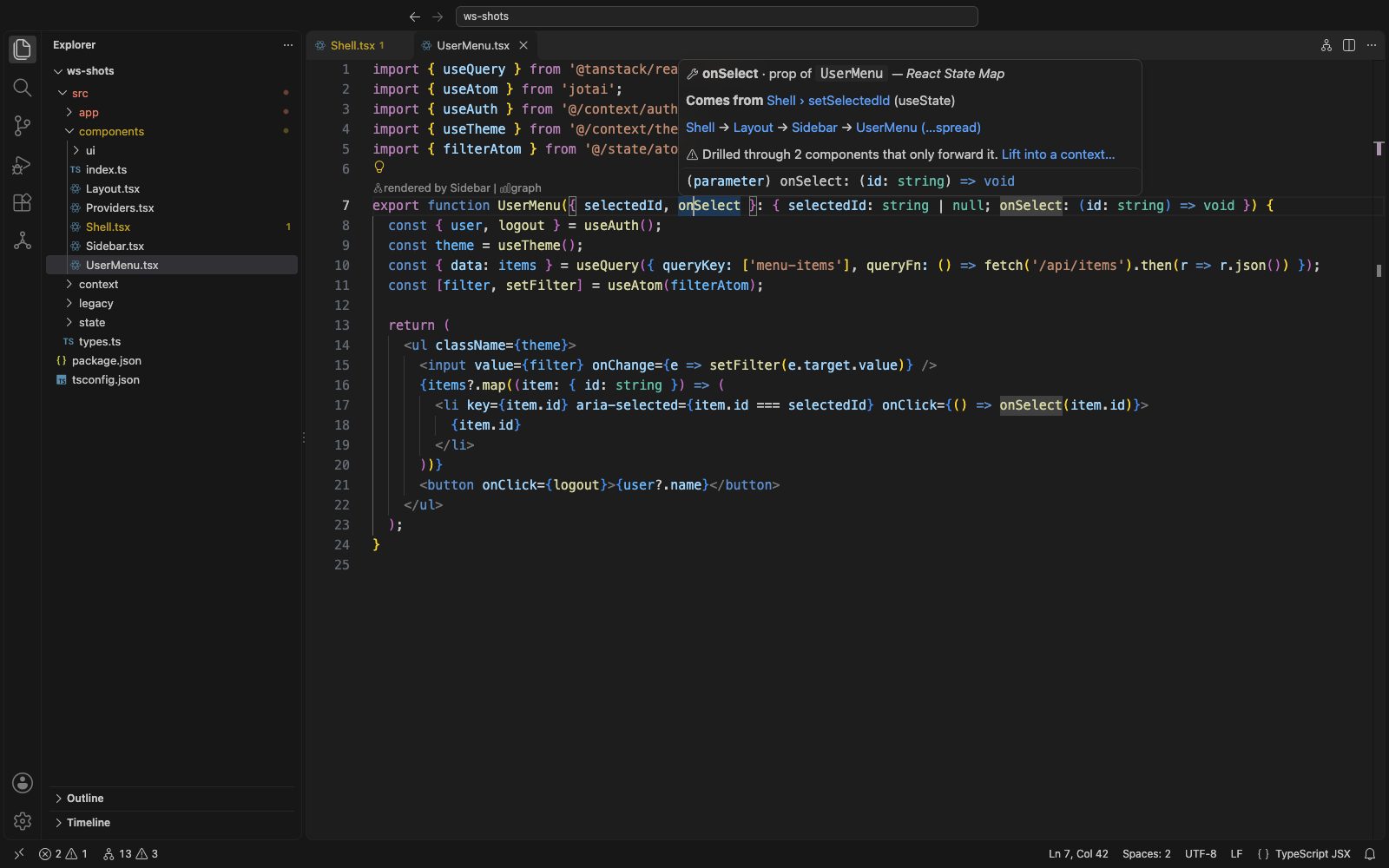
Hover a prop. See where it really comes from.
"Go to Definition" stops at the prop. React State Map keeps going: through every parent, every rename, every {...props} spread, barrel file and @/ path alias — back to the useState, store, query or context that owns the value. Every hop is a link.
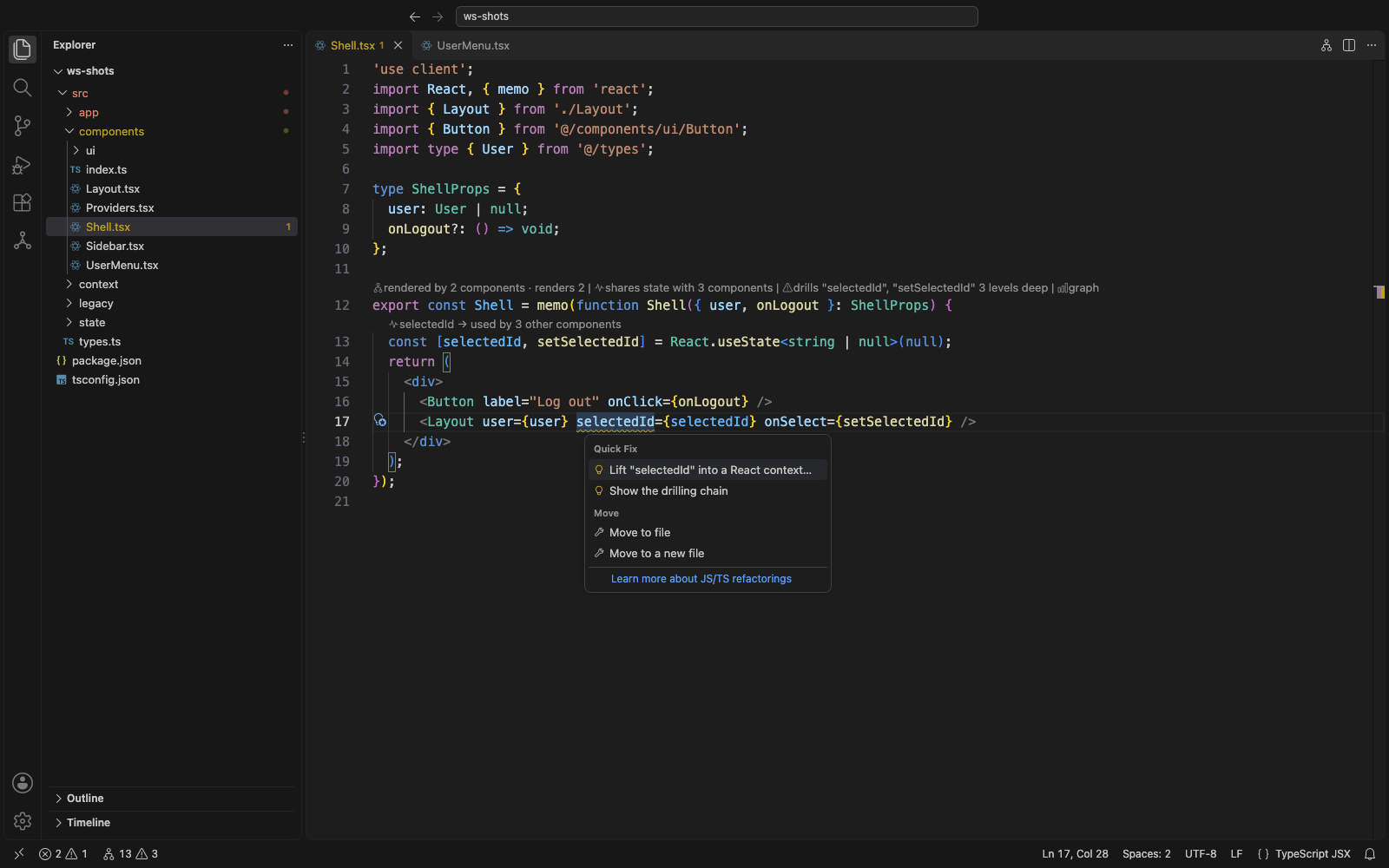
Prop drilling, fixed in one click
When a value is passed through components that only forward it, you get a warning on the exact JSX attribute — and a quick fix that does the whole refactor across every file:
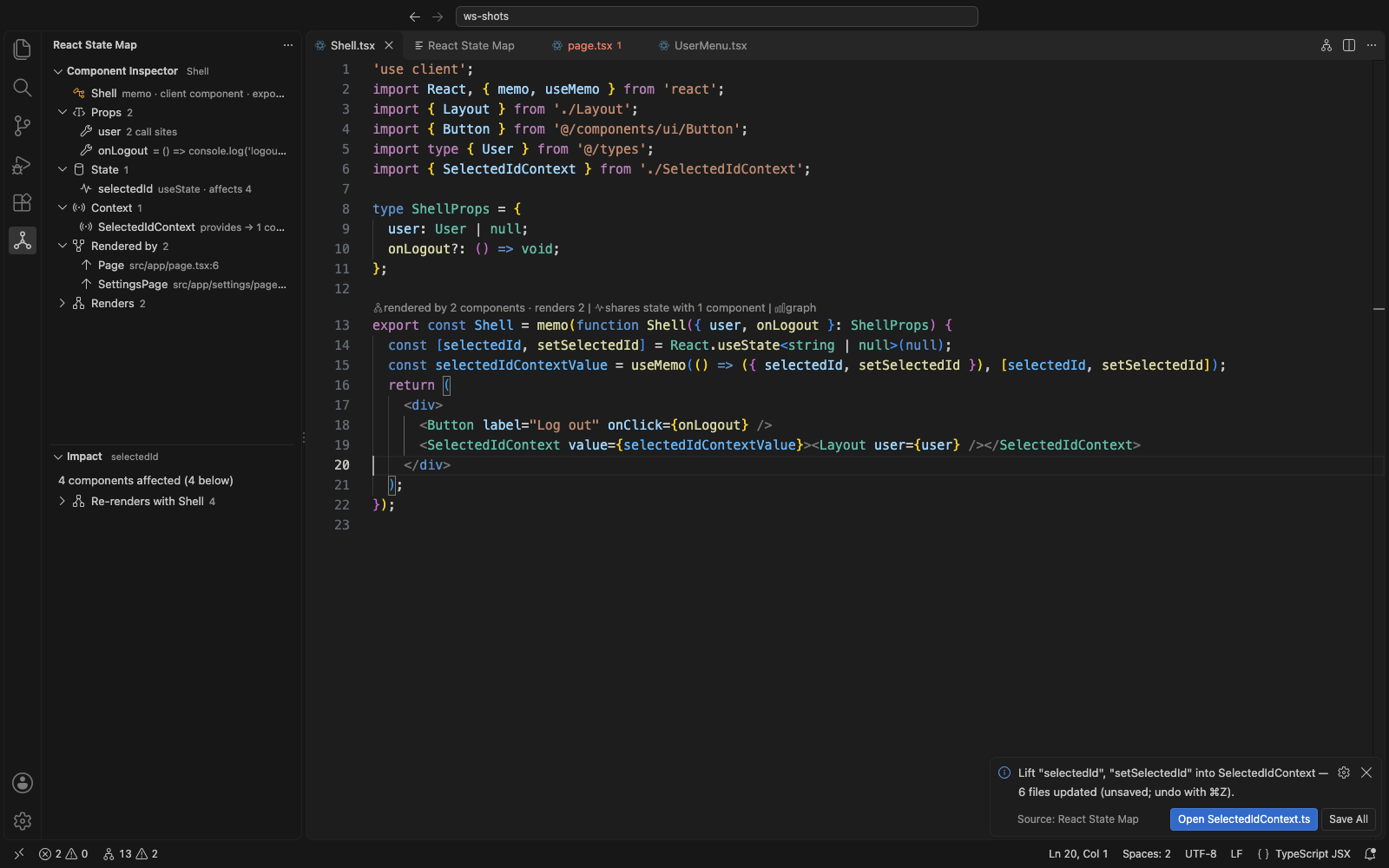
- creates a typed
SelectedIdContext with a useSelectedId() hook,
- provides it where the state lives (memoized, React 19
<Ctx value> syntax when you're on React 19),
- removes the prop from every component in between — signatures, types and JSX,
- reads it with the hook where it's actually used.
It only runs when it's provably safe (for example, it refuses if a component in the chain is also rendered somewhere else that would lose the value) and it's a single undoable edit.
CodeLens that answers the obvious questions
Above every component: who renders it, how many components share its state, and whether it drills or only forwards something. Above every piece of state: how many other components depend on it. Click any lens to dig in.
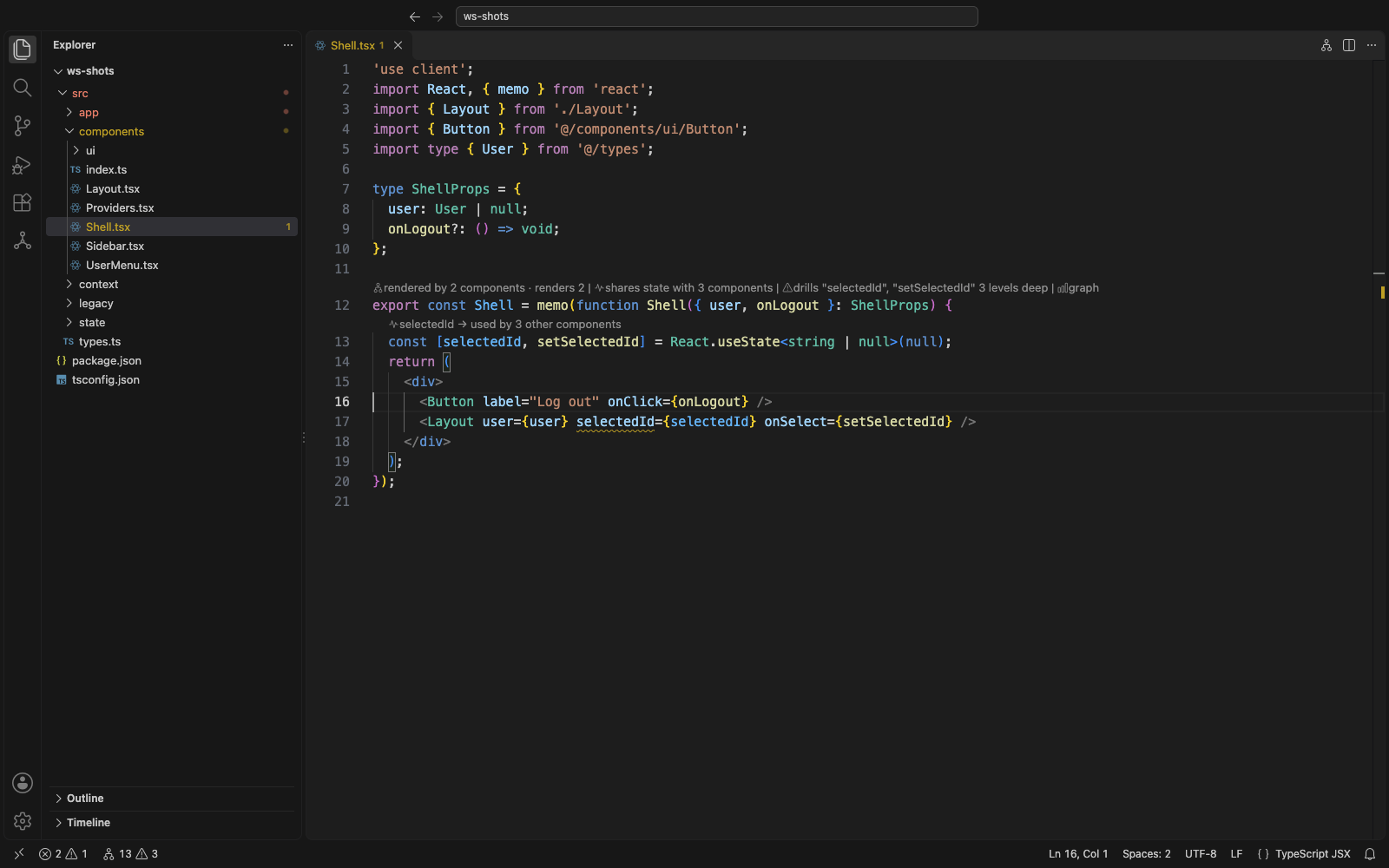
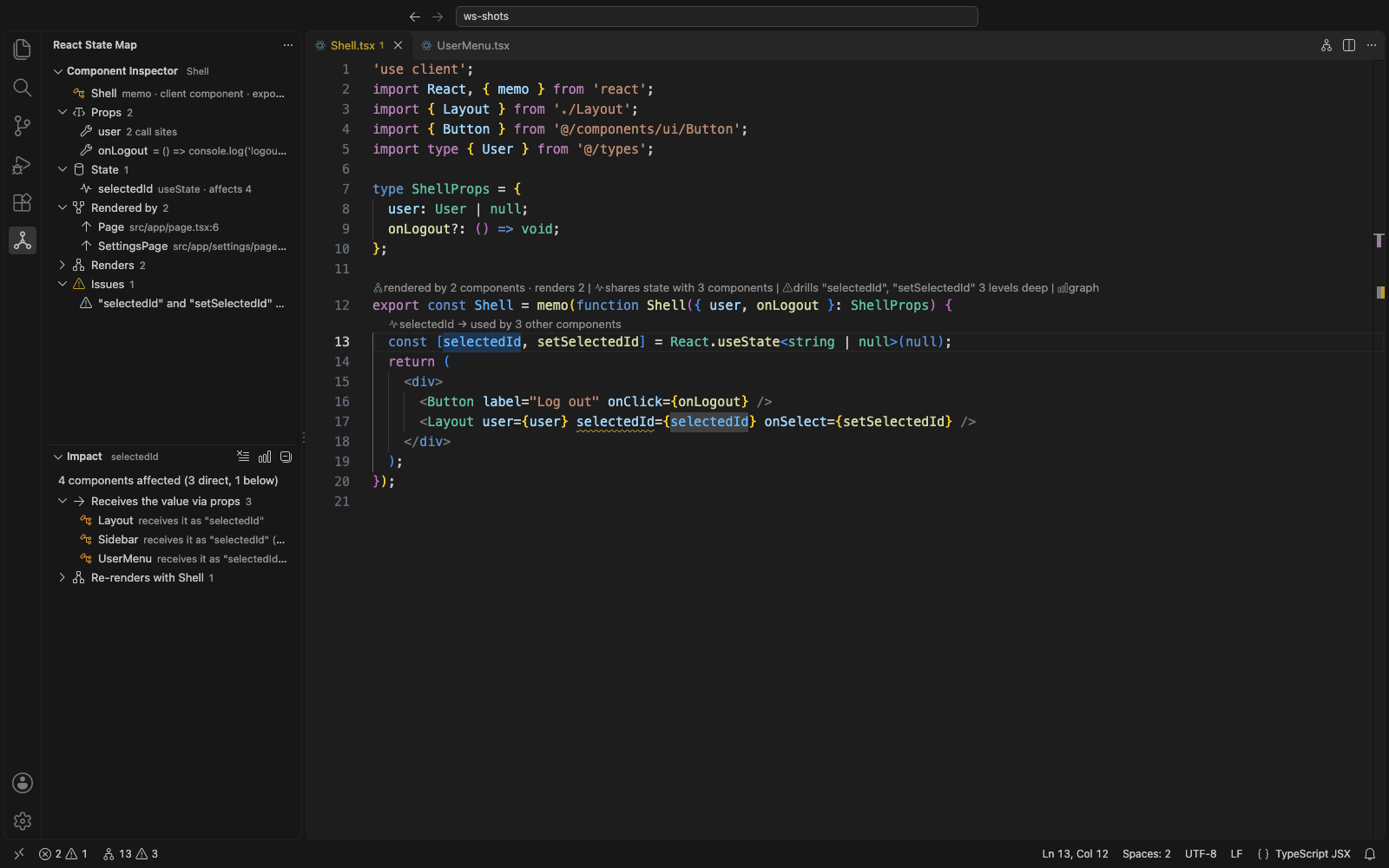
Know the blast radius before you change something
Show Impact (⌘⌥I / Ctrl+Alt+I) on a piece of state, a component or a context lists everyone affected — grouped by why: receives it via props, subscribes to the same store/atom/query, consumes the context, re-renders with it, renders it. The Component Inspector in the sidebar follows your cursor and shows props (with their origins), state, contexts, parents, children and issues for the component you're in.
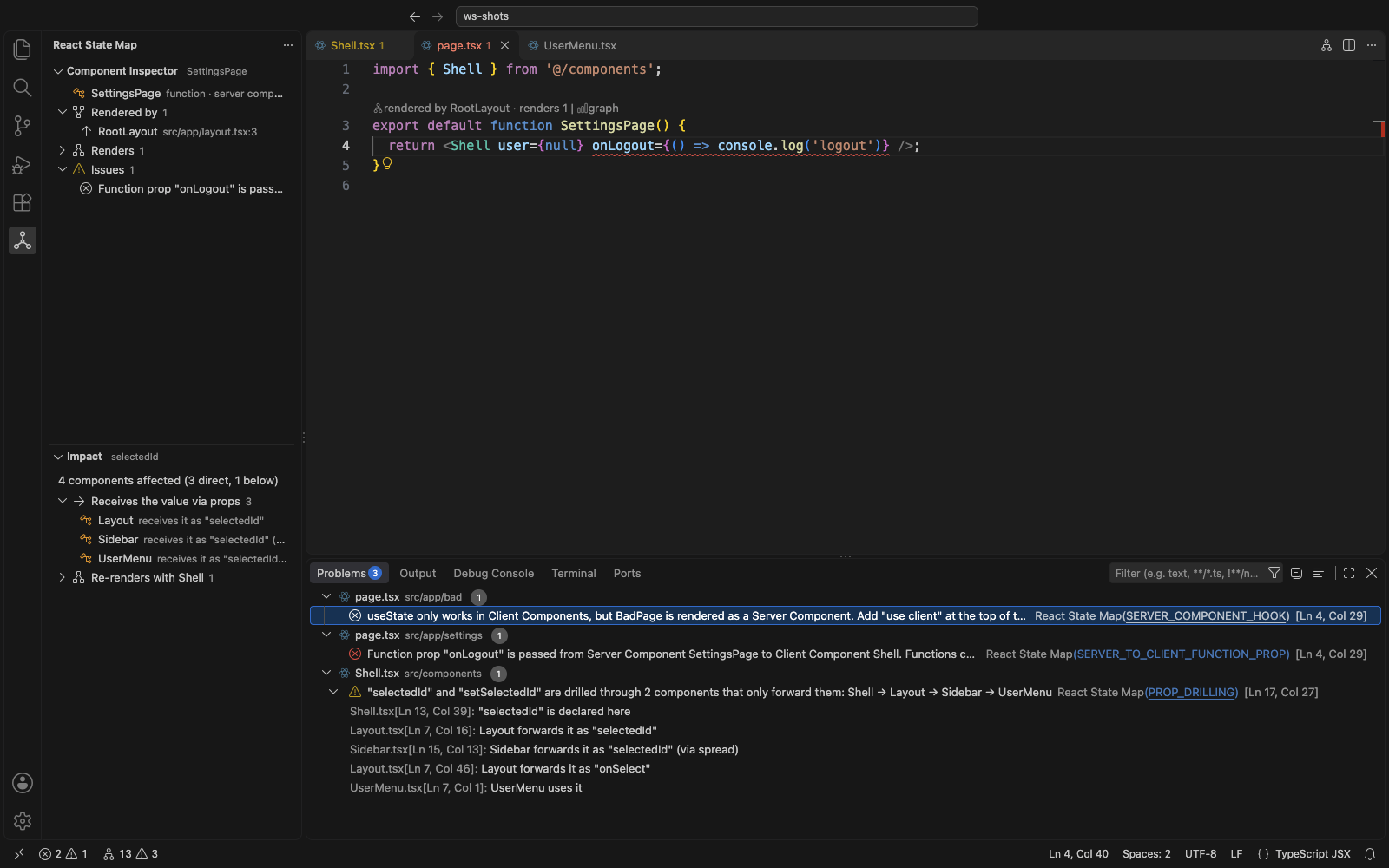
Next.js Server & Client Components, checked as you type
React State Map knows which components render on the server in the App Router (including layout → page wiring) and flags real errors before you run the app:
- a client-only hook (
useState, useEffect, a custom hook that uses them, a store hook…) in a Server Component,
- a function passed from a Server Component to a Client Component that isn't a Server Action.
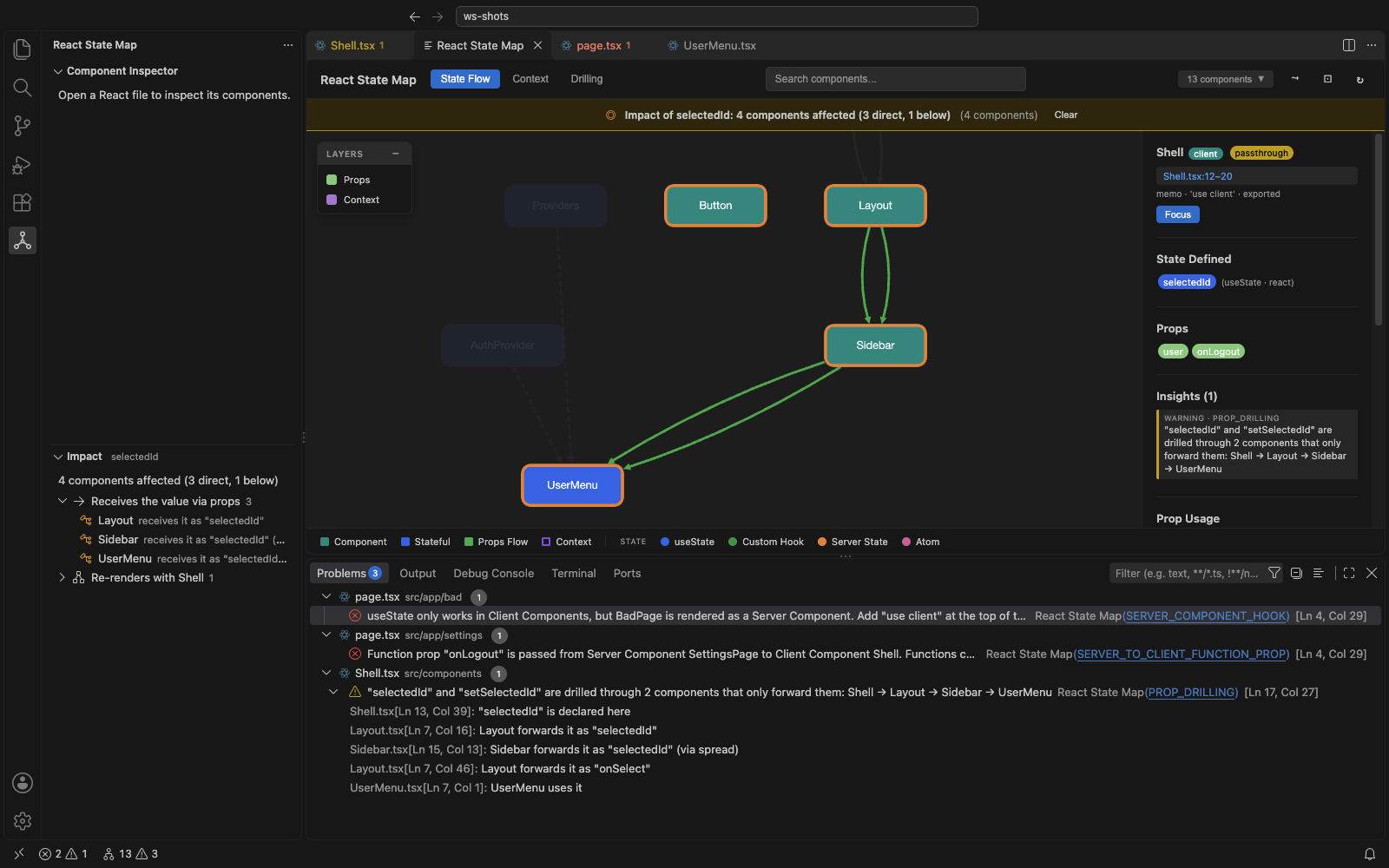
The whole map, when you need it
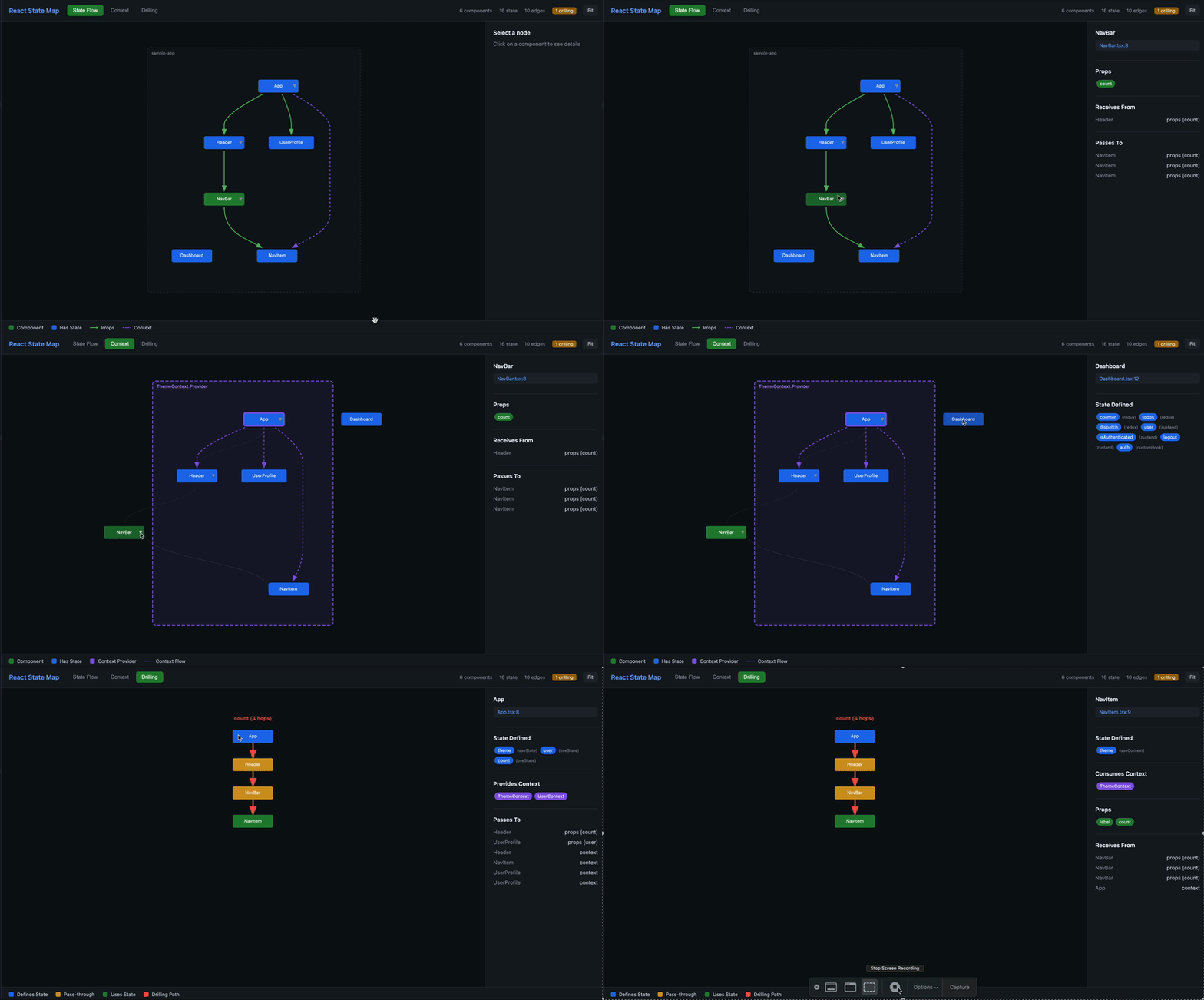
Open State Map shows an interactive graph of your app: render tree, prop flows, contexts and drilling chains, with search, path-finding, semantic zoom and impact highlighting. Click a node to jump to the code.
Built for Copilot agent mode
The extension registers its analysis as tools for GitHub Copilot's agent mode — Copilot picks them up automatically, or reference one with #stateMapTraceProp and friends — so Copilot can ask "where does this prop come from?", "what breaks if I change this state?" or "give me the lift-to-context refactor as a diff" and get an exact answer instead of grepping. Using Claude Code or Cursor? The same tools are available through the MCP server in @react-state-map/cli.
| Tool |
Answers |
#stateMapOverview |
Frameworks, counts, top issues, drilling chains, contexts |
#stateMapFind / #stateMapComponent |
Find a component; everything about it |
#stateMapTraceProp |
Where a prop's value comes from, hop by hop, plus every call site |
#stateMapImpact |
What's affected by changing a component, state or context |
#stateMapRenderPath |
How one component ends up rendering another |
#stateMapIssues / #stateMapPlanFix |
Issues with ids; the automatic fix as a unified diff |
What it understands
- React —
useState, useReducer, useContext, React 19 use(), useActionState, useOptimistic, useSyncExternalStore, useFormStatus, memo, forwardRef, class components, default exports under any name
- State libraries — Redux / Redux Toolkit (incl. RTK Query and typed
useAppSelector hooks), Zustand, Jotai, Recoil, Valtio, XState, TanStack Query, SWR, Apollo, React Hook Form, React Router / Next.js / TanStack Router hooks
- Context —
createContext, .Provider and React 19 providers, custom hooks that wrap useContext (so useAuth() is linked to its AuthProvider)
- Your project layout — tsconfig/jsconfig
paths, extends, Vite-style project references, barrel files, aliased and namespace imports, monorepos and multi-root workspaces
Issues it reports
| Code |
Severity |
Quick fix |
SERVER_COMPONENT_HOOK — client-only hook in a Server Component |
Error |
|
SERVER_TO_CLIENT_FUNCTION_PROP — function passed from a Server to a Client Component |
Error |
|
PROP_DRILLING — value passed through components that only forward it |
Warning |
Lift into a context |
CONTEXT_LEAK — context read and re-passed as props |
Info |
|
PROP_BUNDLE — large object passed as a single prop |
Info |
|
UNUSED_PROP — prop destructured but never used (faded out) |
Hint |
Remove it |
PROP_PASSTHROUGH — one forwarding step of a drilling chain |
Hint |
Lift into a context |
Hide any of them with reactStateMap.diagnostics.disabledCodes.
Commands
| Command |
Shortcut |
| React State Map: Show Impact (state, component or context under the cursor) |
⌘⌥I / Ctrl+Alt+I |
| React State Map: Show in State Map |
⌘⌥M / Ctrl+Alt+M |
| React State Map: Open State Map |
|
| React State Map: Lift Drilled State into Context… |
|
| React State Map: Go to Component… |
|
| React State Map: Show Parents & Children |
|
| React State Map: Re-analyze Workspace |
|
The status bar shows component and issue counts; click it to open the graph.
Settings
| Setting |
Default |
|
reactStateMap.codeLens.enabled |
true |
CodeLens above components and state |
reactStateMap.hover.enabled |
true |
Prop origin / state impact on hover |
reactStateMap.diagnostics.enabled |
true |
Report issues in the Problems panel |
reactStateMap.diagnostics.disabledCodes |
[] |
Issue codes to hide |
reactStateMap.analyzeOnType |
true |
Re-analyze unsaved changes as you type (otherwise on save) |
reactStateMap.drillingThreshold |
3 |
Hops before passing a value down counts as drilling |
reactStateMap.fixes.providerSyntax |
auto |
react19 (<Ctx value>), legacy (<Ctx.Provider>) or detect |
reactStateMap.fixes.preview |
false |
Open multi-file fixes in the Refactor Preview instead of applying them directly |
reactStateMap.include / exclude |
sensible defaults |
Glob patterns relative to the workspace folder |
reactStateMap.editorTitleButton |
true |
Graph button in the editor title bar |
Analysis runs in a background worker thread, so it never blocks the editor. Results are cached per file: after the first scan, an edit re-analyzes just that file and re-links the graph in milliseconds. Everything happens locally — no network requests, no telemetry.
Also available
- @react-state-map/cli — MCP server for Claude Code & Cursor, a
check command and GitHub Action for CI, fix for refactors from the terminal, and the standalone HTML graph.
- @react-state-map/core — the analysis engine as a library.
Feedback
Found a pattern it doesn't understand, or a false positive? Open an issue — a minimal code sample makes it easy to fix.
License: MIT

