Studio in your editor: every endpoint and how its calls went, above each call and in views of their own; Studio in a tab beside your code; from a call to its endpoint and back; requests and mocks live; new endpoints written for you; recorded calls as tests; @courier in the chat; Courier's own file i
Installation
Launch VS Code Quick Open (Ctrl+P), paste the following command, and press enter.
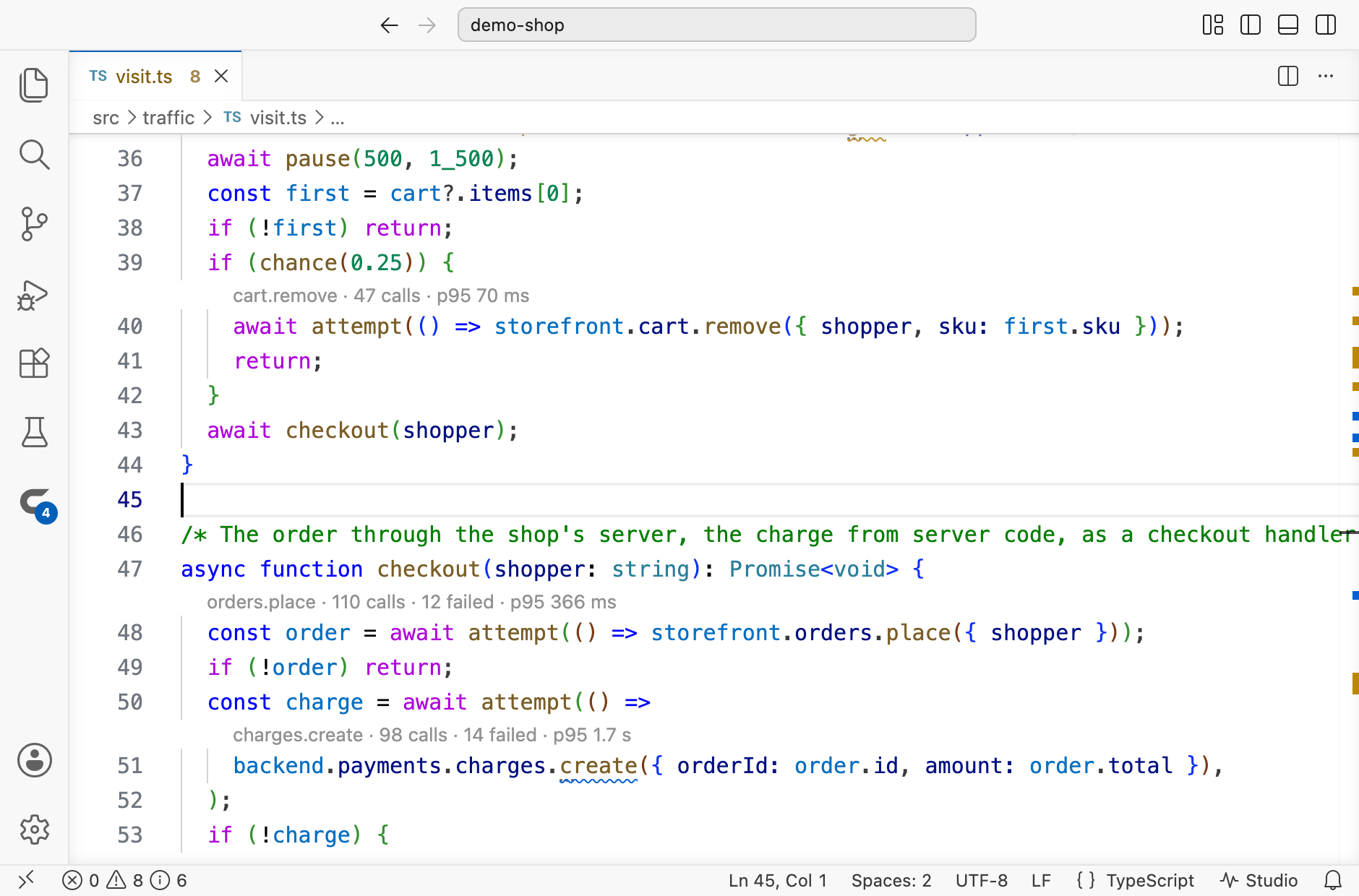
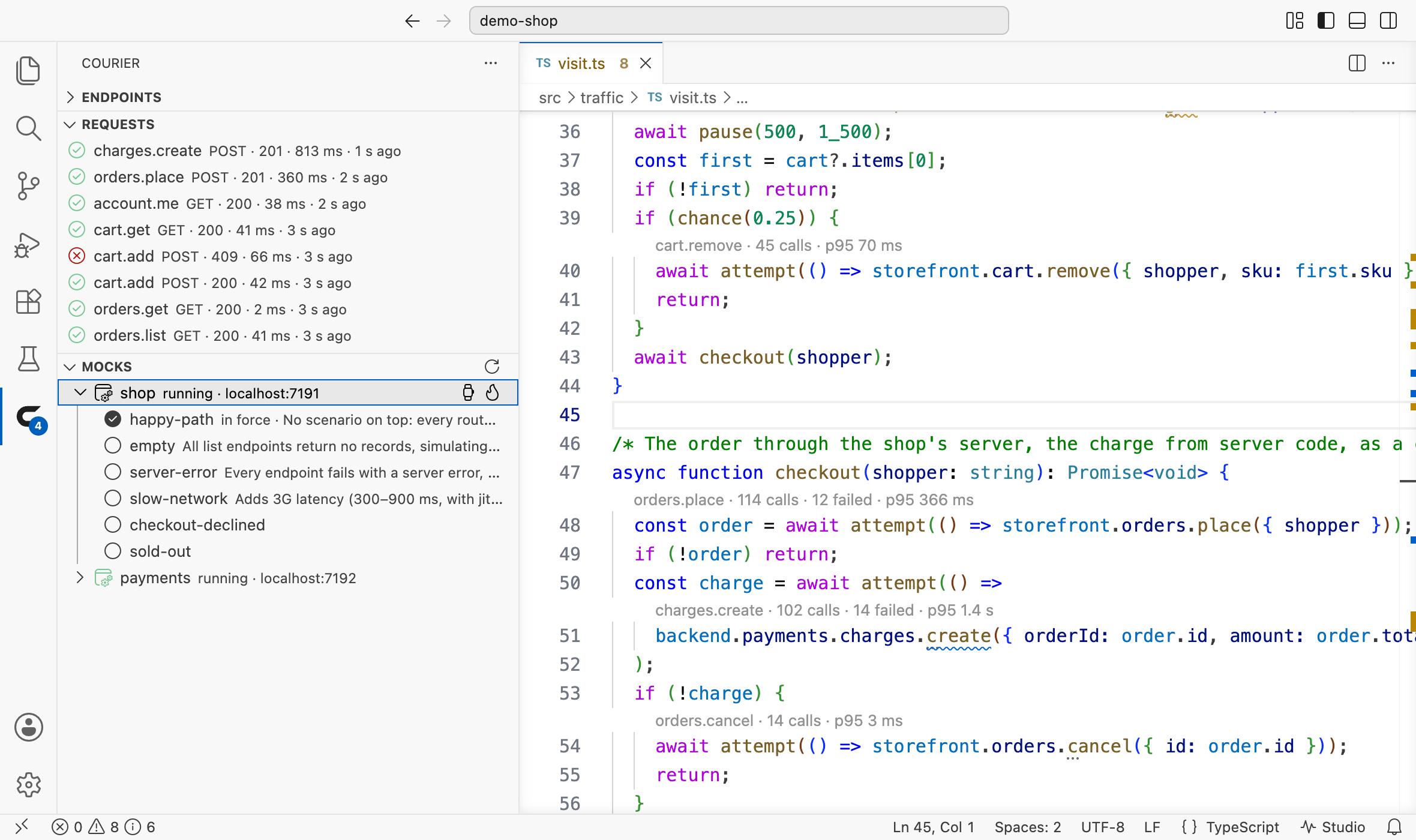
Above each call to an endpoint, how its calls went in the Studio running for your project — how many, how many failed, how many are still in flight, and how long nineteen in twenty took. Studio in a tab beside your code; from a call to its endpoint and back; the requests Studio records and the mocks it runs, in views of their own; new endpoints written the way your files write them; recorded calls in the Test Explorer; @courier in the chat; the audit's findings where the code calls; and your API offered to VS Code's agent.
You find out an endpoint is slow, or failing, where you are already looking: in the code that calls it. The extension reads the figures from Courier Studio, which watches every call your app makes, and writes them above each call to an endpoint as you work.
Figures where you work
Calls, failures, calls in flight and the 95th percentile, above every call to an endpoint or at the end of its line, kept up to date while the window has focus.
Studio in your editor
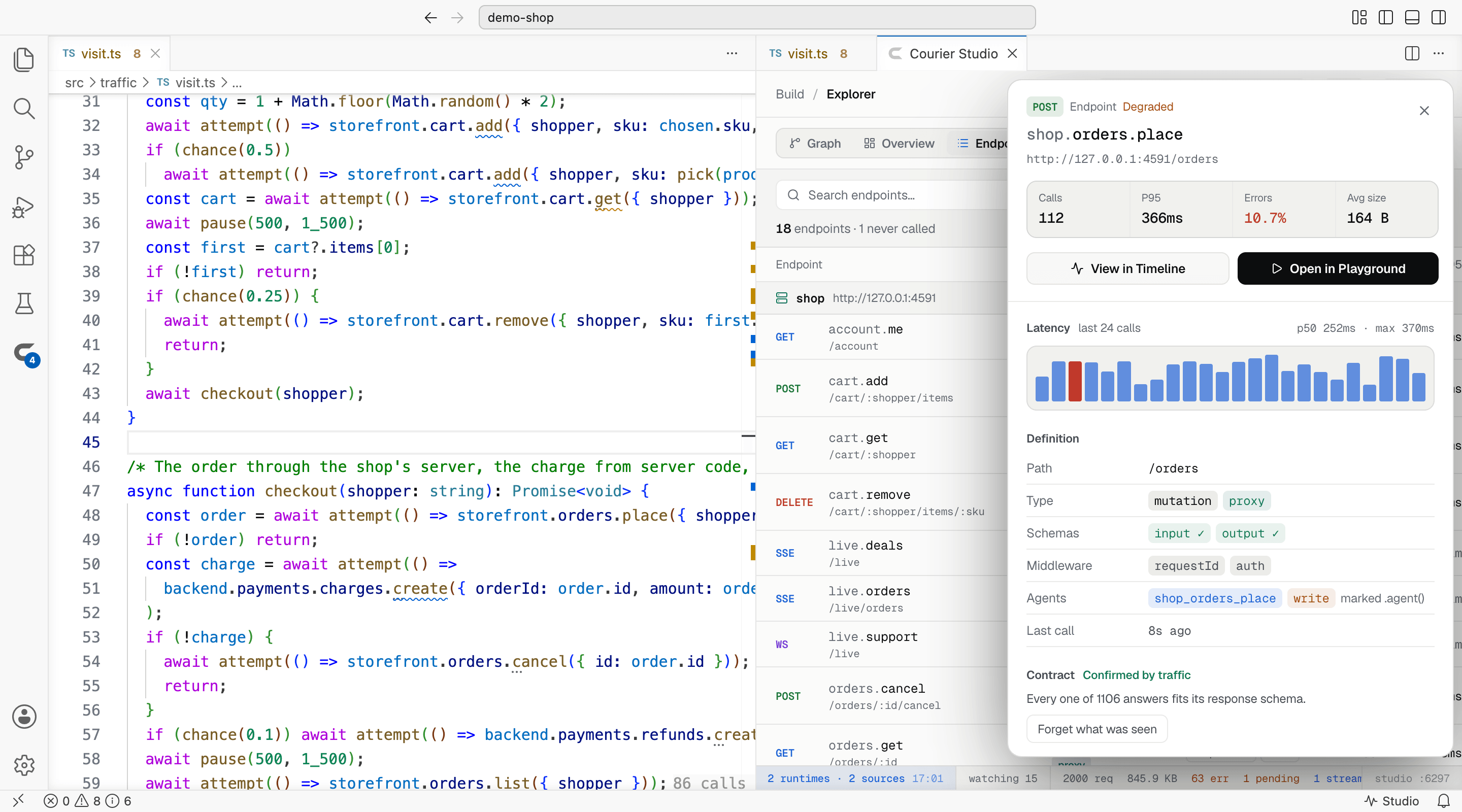
Every page of Studio's in a tab beside your code, in the editor's theme, with your project's token — or in your browser, as you choose.
From a call to its endpoint
Go to Definition from a call to its declaration, Find All References to every call, the figures over each declaration, every endpoint in Go to Symbol.
Every endpoint in one view
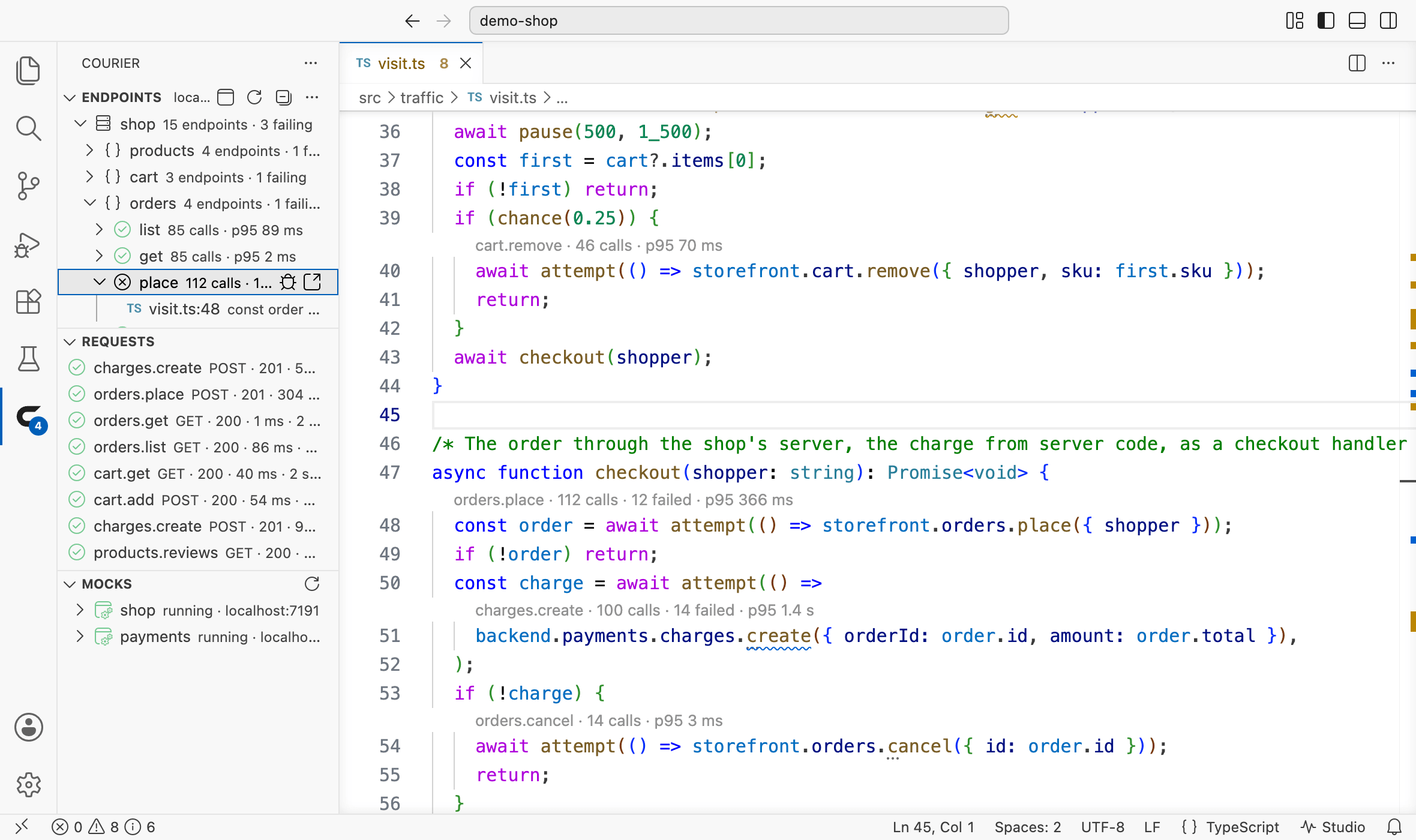
Sources, groups and endpoints with how their calls went, a badge counting the failing ones, and each place your code calls them.
Requests and mocks, live
The latest requests Studio recorded, failed ones first when you ask; each mock with its scenarios, a click switching them, its delays and faults a click away.
New endpoints, written for you
New Endpoint… types one into its group the way that file writes them; import an API, open its OpenAPI document, check what a change breaks.
Recorded calls as tests
The calls Studio recorded show in the Test Explorer and run against the API as declared now; Courier's commands run as tasks.
Ask @courier
/status, /failures, /audit, /endpoint answered from Studio, and any question by the chat's model from Studio's figures.
The audit at your calls
An N+1 pattern, a timeout risk, a write retried without an idempotency key — marked where the code makes the call.
Your API for the agent
VS Code's agent gets each project's MCP servers — its API and its Studio — with no mcp.json to write.
Courier's file icons
Its own icons for courier.config.ts, courier.mocks.ts and .courier in Material Icon Theme and vscode-icons, through Courier File Icons, which comes with it — in remote windows too.
Stays on your machine
It talks only to Studio on localhost — a question to @courier in words goes to the model you picked in the chat — keeps no telemetry, and stays off in Restricted Mode.
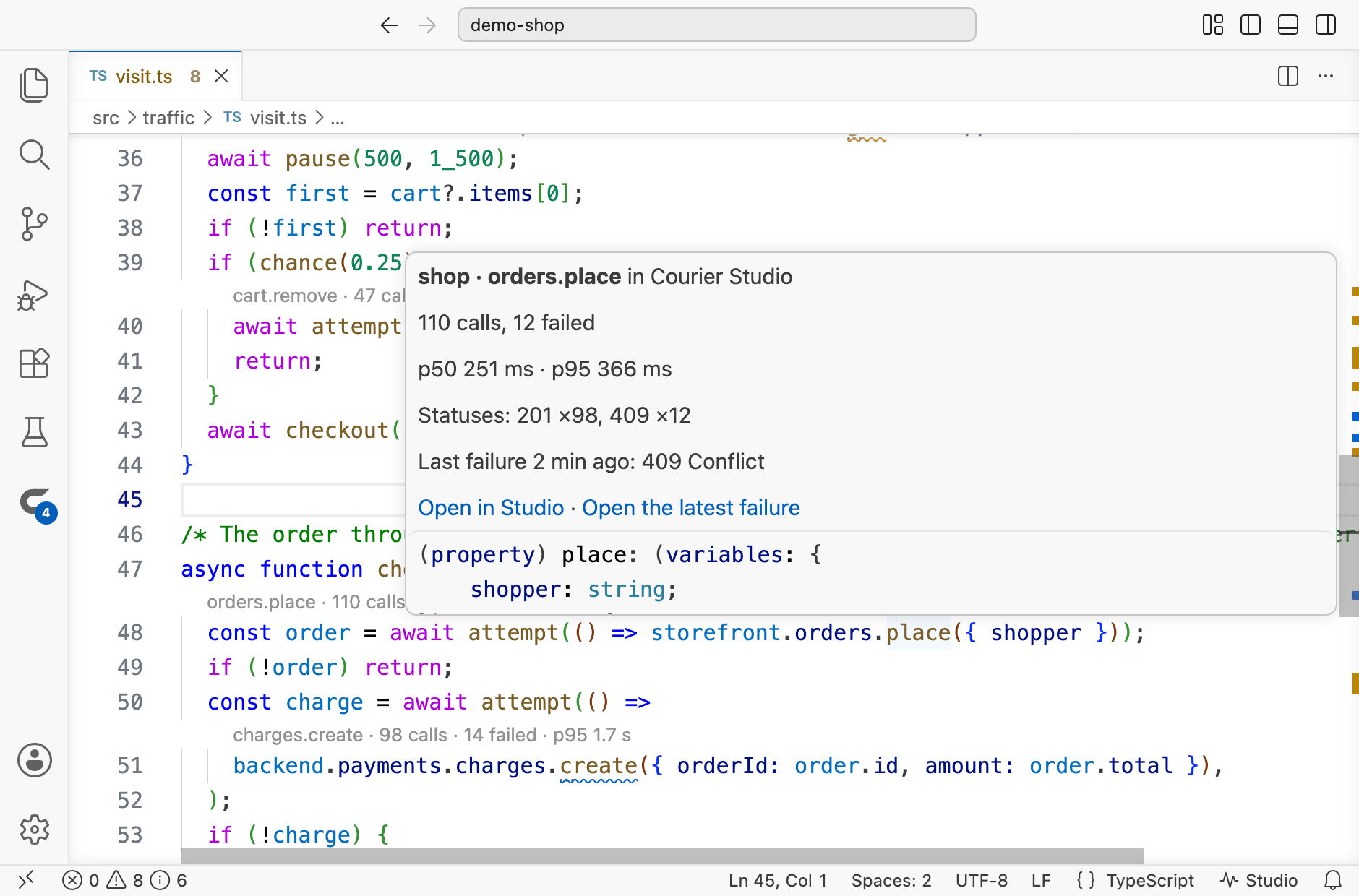
Hover over the call for the rest: the median and the 95th percentile, the statuses the calls ended with, and the latest failure with its reason — Open the latest failure opens that request in Studio's inspector. A stream or a channel shows how many were opened, and how many are open. With courier.hints.style set to inlay, the figures sit at the end of the call's own line instead of a line above it.
Studio in your editor
Every page of Studio's the extension opens — an endpoint, a request, the audit — opens in a tab of the editor's own, beside your code, in the editor's theme and with your project's token, so what changes things in Studio works there too. Called from opens the file beside it. courier.studio.openIn set to browser sends the pages to your browser instead.
Go to Definition on a call opens the endpoint's declaration in its group's file; Find All References on a call or a declaration lists every call to it; above each declaration, its figures and how many places call it; and Go to Symbol in Workspace finds every endpoint by its full name.
The Courier view
The Courier icon in the Activity Bar opens every endpoint of your project — each source, the groups its calls name, each endpoint with its figures, failed, answered or not called yet — and under an endpoint, each place your code calls it. Its actions open the endpoint in Studio, its failed calls in the Timeline, or the latest failure in the inspector.
Below it, Requests lists the latest requests Studio recorded — a click opens one in Studio's inspector — and Mocks each mock Studio runs: open one for its scenarios and click another to switch to it, or set one of Studio's delays or fault presets on it, and stop them again.
With no Studio running, the view starts one — your project's own studio script through its package manager, or npx @noverax/courier-studio — in a terminal of its own. In a workspace without Courier, Set Up Courier runs Create Courier, which shows its plan and changes nothing until you agree.
Adding to your API, and testing it
New Endpoint… — from the palette, the view, or the editor's context menu — asks for the group, the name, the method and the path, and types the endpoint in after the group's last one, the way that file writes its endpoints, its variables and response left for you to fill in. Import an API…, Show OpenAPI Document… and Check API Changes… run Studio's own commands for the project.
The calls Studio recorded as tests, under tests/recorded/, show in the Test Explorer and run against the API as your code declares it now. Terminal › Run Task… › courier runs Studio, the recorded calls' check, the OpenAPI documents, the change report and the agents' list for each project.
Ask @courier
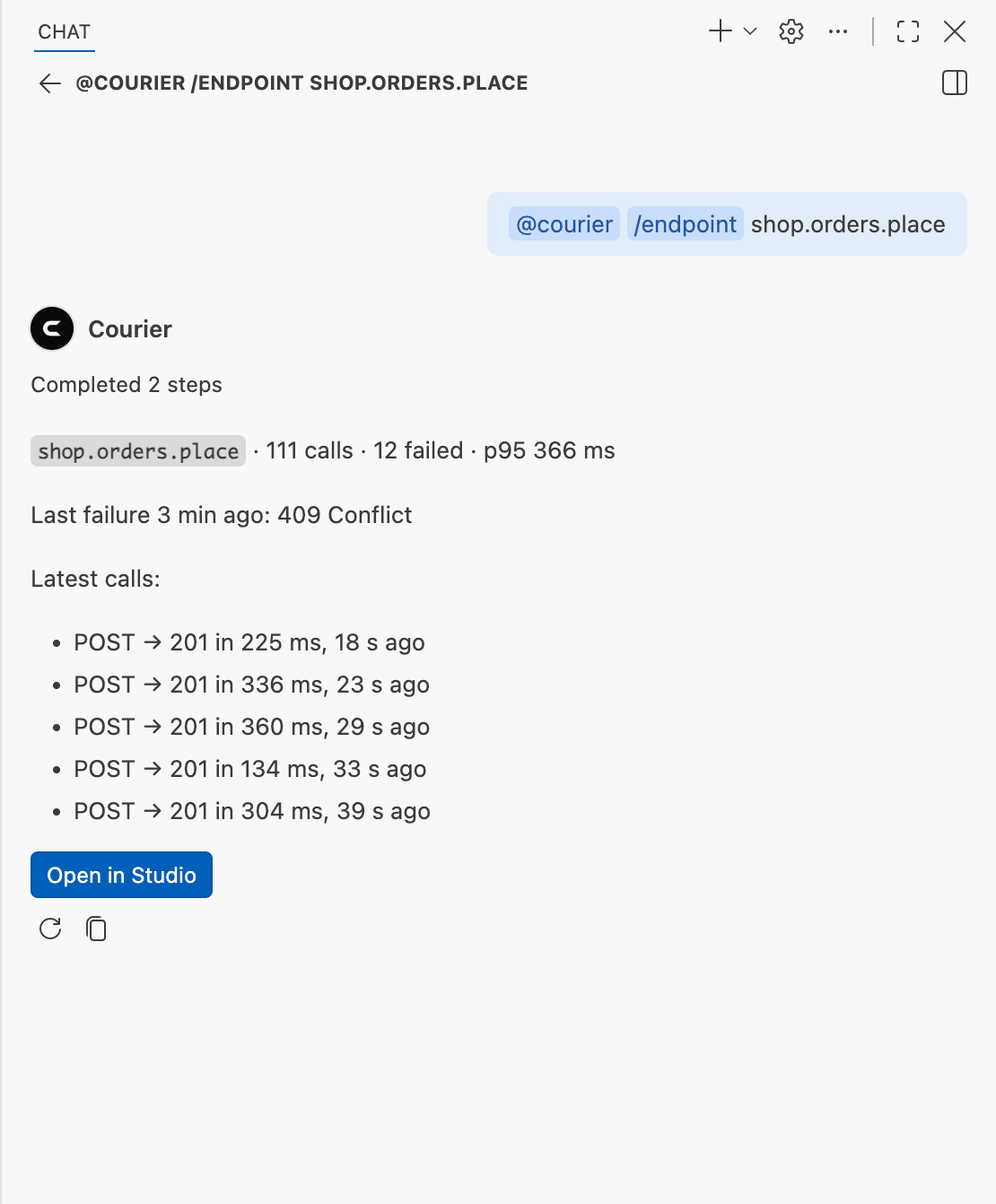
@courier /endpoint orders.place
/status says how every endpoint is doing, /failures lists the latest failed requests, /audit what the audit found, and /endpoint one endpoint — named, or the one under the cursor — with its latest calls, its declaration and the code that calls it. Any other question goes to the model you picked in the chat, with Studio's figures for this session.
The audit at your calls
Studio's audit reads the requests it recorded; the extension marks its findings at the calls they concern, and in the Problems panel under Courier audit, each linking to Studio's Audit page. An audit error is a warning in the editor: the code compiles, its traffic needs a look.
Courier's file icons
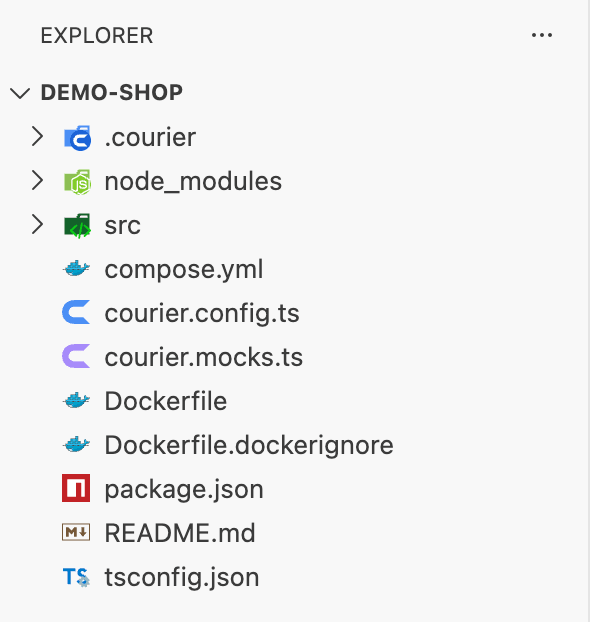
With Material Icon Theme or vscode-icons in use in a Courier project, Courier File Icons offers once to show Courier's own icons for courier.config.ts, courier.mocks.ts and the .courier folder, through the settings those themes read — one click, no reload. The folder is drawn in each theme's own style. From then on they follow you: into the other theme when you pick it, onto your other machines through Settings Sync, into remote windows, across updates, each profile as its own settings say, and out again everywhere with Courier: Remove Courier's Icons from the File Icon Theme.
This extension installs Courier File Icons with it. Icon themes run where the editor's window runs, and so does Courier File Icons, beside them — on this computer in a remote window too, while this extension runs where your code is.
Your API, for VS Code's agent
Server
Offered when the project has
What the agent gets
Courier API
@noverax/courier-mcp
The endpoints marked .agent(), and those the agents policy in courier.config offers
Courier Studio
@noverax/courier-studio
The requests Studio recorded, its audit, its mocks and their scenarios
Each runs from the project's folder, the API's handed the project's .env files, and starts only when the agent first needs it. VS Code 1.101 or later.
How it works
Studio writes where it runs to .courier/studio.json in your project, and the extension reads it — for a monorepo, each project's own Studio, the one nearest the file you are in. Studio finds the calls in the file as it stands in the editor, saved or not, the same way it finds them for Called from in its inspector: a member chain that ends with an endpoint's name, api.orders.place(), and a query hook that names one, q.orders.useQuery("list"), in TypeScript, JavaScript, and the scripts of Vue, Svelte and Astro components.
The extension sends Studio the text of the files you open, so it talks only to a Studio on this machine: an address naming another host, in a project's file or in the settings, is ignored. It reads Studio's token from the project's .courier/studio-token for what reads your code or changes something — where an endpoint is called and declared and the groups a new endpoint can go in, which Studio shows only to a caller with the token; a mock's scenario or conditions; and Studio's own tab — and a question to @courier in words goes to the model you picked in the chat with Studio's figures for this session. It sends nothing anywhere else.
Commands
Courier: Open in Courier Studio — open Studio for the project of the file in front
Courier: Open Studio in Editor / Open Studio in Browser — open Studio in a tab of the editor's own, or in your browser
Courier: Start Studio — start Studio for the project of the file in front, or the one you pick
Courier: Set Up Courier — run Create Courier in a terminal, in the workspace folder you pick
Courier: New Endpoint… — add an endpoint to a group, as its file writes them
Courier: Import an API…, Show OpenAPI Document…, Check API Changes… — Studio's own commands, for the project you pick
Courier: Show Courier's Icons in the File Icon Theme / Remove Courier's Icons from the File Icon Theme — from Courier File Icons
Courier: Refresh Endpoint Hints — find the calls again and bring the figures up to date
Courier: Show Log — Courier's log in the Output panel: each Studio starting and stopping, and why a question to one found no answer
From Studio the other way round: each call site in Called from opens in your editor; choose which in Studio's Settings → Editor.
Settings
Setting
What it does
courier.hints.enabled
Show the figures over endpoint calls (default: on)
courier.hints.style
codeLens: a line above each call (default); inlay: at the end of the call's line
courier.hints.refreshSeconds
How often the figures are brought up to date while the window has focus (default: 5)
courier.studio.openIn
Where Studio's pages open: a tab of the editor's own (default), or the browser
courier.audit.diagnostics
Mark the audit's findings at the calls they concern (default: on)
courier.notifications.failures
Tell with a notification when a call fails while you work, at most once a minute per endpoint (default: off)
courier.agents.mcpServers
Offer VS Code's agent each project's MCP servers (default: on)
courier.fileIcons.offer
Offer once to put Courier's icons into the icon theme in use (default: on) — a setting of Courier File Icons
courier.studio.url
Studio's address, when it runs for a project outside this workspace — on this machine, in your user settings
Snippets
courier-endpoint, courier-group and courier-api define an API, and courier-routes writes by hand the routes a page takes where Courier writes none; courier-query, courier-mutation, courier-subscription, courier-channel and courier-call call it.
Part of Courier
Courier is type-safe HTTP for any framework: define your API once in plain TypeScript and call it from server code, the browser and AI agents, every call visible in Studio. See courier.noverax.cloud.